Customer Ratings & Reviews
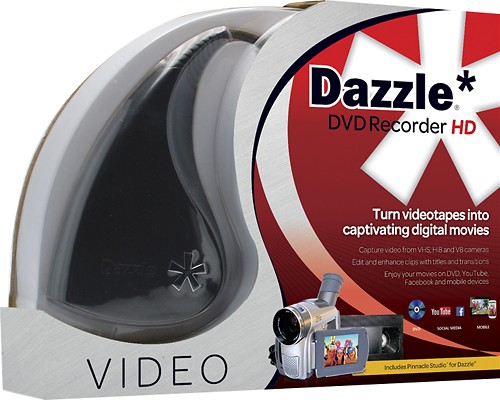
- Model:
- 8112150
- |
- SKU:
- 1593161
Customer reviews
Rating 4 out of 5 stars with 173 reviews
(173 customer reviews)to a friend
Customers are saying
Customers often highlight the Dazzle DVD Recorder HD's user-friendly interface, praising its simplicity and ease of use. Many users also appreciate its video capture capabilities, finding it particularly useful for editing videos. Additionally, several customers mention its ability to convert VHS tapes to DVDs, making it a great choice for preserving old recordings. However, some users have expressed concerns about its compatibility, specifically with Apple devices.
This summary was generated by AI based on customer reviews.
- Pros mentioned:Ease of use
Rated 5 out of 5 stars
Dazzle: Great for all skill levels
||Posted .This reviewer received promo considerations or sweepstakes entry for writing a review.I only need my Dazzle for digitizing stuff from my DVR, which has only a wee capacity. Being able to store movies, concerts, and shows to watch at my leisure is a great convenience. This basic use is easy to learn, even if you have no experience editing video. I'm now starting to teach myself about more of the associated software (Pinnacle)'s bells and whistles, in order to edit home video and my friends' musical performances into something resembling a professional video production. In fact, I like my Dazzle so much, the prompt for me to offer this review came after I bought a second one, for a friend. One tip before I go: After capturing your video, and dragging your file(s) into the timeline, let the entire audio track turn from amber to green and disappear before you start trimming out commercials or bumpers. Otherwise, you run the risk of the final export having its audio out of sync. That bit was NOT in the user manual.
I would recommend this to a friend - Pros mentioned:Video captureCons mentioned:Software
Rated 4 out of 5 stars
Nice Price.
||Posted .This reviewer received promo considerations or sweepstakes entry for writing a review.Software not perfect but does the job I can capture a 4:3 vcr home movie and by setting the capture to 16:9 it gives you a good full screen on a HD style set with no black bars on the sides or top and bottom of my screen. I used power director to multi-trim and edit down to single frames and omit other unwanted scenes then burn to Blu-Ray or DVD. I was going to buy a usb adapter for $20 but discovered this was the better deal my decision was made when other capture device would have failed using power director I know this because when I tried using Dazzle alone(with Power Director) it didn't perform no where close to that of the HD DAZZLE using their software. When trying any other adapter I would have had those annoying black bar's on sides and video - sound problems I'm not un-happy I spent the extra! Had I went the less expensive route I would have failed.
I would recommend this to a friend - Pros mentioned:Ease of use
Rated 4 out of 5 stars
Fairly easy way to digitize your old videos
||Posted .This reviewer received promo considerations or sweepstakes entry for writing a review.Product was relatively easy to install on my laptop. Setup between the VCR was simple. Transferred 4 home videos during the bitter winter months then lost interest. It is time consuming because you have to let the video play in order to capture it onto your PC. I then burned one DVD of the captured videos to give to a family member. That part I fumbled through because I didn't read any directions. Probably easier had I read!
I would recommend this to a friend - Pros mentioned:Ease of useCons mentioned:Software
Rated 4 out of 5 stars
A must-have for anyone who records video
||Posted .This reviewer received promo considerations or sweepstakes entry for writing a review.I bought the Dazzle DVD Recorder to convert tapes from an older video camera into digital format. The device is great! It's easy to use if you have some grasp on what you're doing and is durable and simple in structure. What really struck me was that the Dazzle uses a simple AV input/output cable, so it can be used with a super wide-range of devices. I hate it when things are manufacture specific for a variety of reasons, both financial and on principal. Anyway, it was great for my purposes, (i.e. converting to digital format). I haven't actually burned a DVD yet, so I can't really review that portion. The only issue I have with the Dazzle isn't even the device itself--it's the Pinnacle software that comes with it. I had to download numerous patches on my computer because it's a Windows 8 and apparently the Pinnacle Software that comes with the Dazzle was made for an older operating system. Having to begin with a new software by downloading a patch is annoying enough, but what really got me was that I had to hunt for and find it. The software didn't have any prompts, update notifications...nothing. Just a general error message. It took me at least an hour to figure everything out and download what I needed before I could even start uploading the new software. To summarize: The Dazzle itself is great. It's pretty easy to use and install. It does what it needs to do without any bells and whistles. You can use it for all sorts of recorders. It's incredibly worth the cost. The Pinnacle Software it comes with, however, stinks. I'm probably going to end up editing the videos in another program, too. Still, totally worth buying for the Dazzle itself!
I would recommend this to a friend - Pros mentioned:Ease of use
Rated 5 out of 5 stars
I can NOT believe it works so well
||Posted .This reviewer received promo considerations or sweepstakes entry for writing a review.I was SO skeptical that this alien looking contraption could possibly just plug and play. I am not techy in the least and struggle with computers but I am now about 50 hours into digitizing my kids cam corder tapes and could not be happier. I don't understand it, I just plugged it in, downloaded the dazzle studio and hit import. It saw my camera and I was off. After import, I move the files (which go to "my computer-my videos" ) onto an external hard drive so I don't lose them. My next challenge will be to edit but for now they are at least protected. Wow!!
I would recommend this to a friend - Pros mentioned:Ease of use, Video capture
Rated 5 out of 5 stars
Great Product
||Posted .This reviewer received promo considerations or sweepstakes entry for writing a review.Very Easy to edit videos. Quick to learn software program, edit and add music to videos. My primary goal was to transfer old VHS tapes to DVD. Was easy to add captions and edit old VHS videos. Was able to combine multiple VHS tapes to one DVD. I researched many video editing products, and found this to be the best value for dollars spent.
I would recommend this to a friend - Pros mentioned:Ease of use
Rated 5 out of 5 stars
Amazingly easy to use... PLUS...
||Posted .This reviewer received promo considerations or sweepstakes entry for writing a review.For such a small package this item packs a big punch! Am very happy with the ease of hookup and ease of use... I am especially happy about how professional the end quality is... Can't beat the price!
I would recommend this to a friend - Pros mentioned:Ease of useCons mentioned:Software
Rated 4 out of 5 stars
Great device to transfer VCR tapes to Computer
||Posted .This reviewer received promo considerations or sweepstakes entry for writing a review.It was really easy and amazing to move my tapes to my computer. We now have the videos we took of our kids on our hard drive and did it ourselves for much less than hiring this out. And we have the soft ware to edit this to a new video for use at family events. The software set-up was a little tricky. It was only showing black and white until my son helped me change the setting. Then it worked perfectly and easily!
I would recommend this to a friend Rated 4 out of 5 stars
It does the job!
||Posted .This reviewer received promo considerations or sweepstakes entry for writing a review.Very handy for what I needed it to do, which was converting all of my old vhs home videos to digital. It handles all of my vhs stuff as well as my HDV video camera digital tapes, which was a nice surprise! The software takes a minute to get used to, and I can tell it has a lot of functionality that I haven't even begun to explore yet. I can see myself using the product for some time to come!
I would recommend this to a friend- Pros mentioned:Ease of use
Rated 4 out of 5 stars
Product provided the expected results
||Posted .This reviewer received promo considerations or sweepstakes entry for writing a review.Easy to use, easy to connect. Very good user quid. Product provided the expected results.
I would recommend this to a friend - Pros mentioned:Ease of use
Rated 4 out of 5 stars
Easy to use
||Posted .This reviewer received promo considerations or sweepstakes entry for writing a review.Was looking for easy to use photo converter for family pictures.
I would recommend this to a friend - Cons mentioned:Software
Rated 4 out of 5 stars
Dazzle
||Posted .This reviewer received promo considerations or sweepstakes entry for writing a review.Had to find this product online as the locations were sold out. Would be nice 8f an updated version for Windows 10 was available.
I would recommend this to a friend Rated 4 out of 5 stars
Don't know I bought it for Chrismass
||Posted .This reviewer received promo considerations or sweepstakes entry for writing a review.My boyfriend has been looking and reading about DVD recorders and he likes two. This one turned out to be lower in price.
I would recommend this to a friend- Pros mentioned:Ease of use
Rated 4 out of 5 stars
Great gift
||Posted .This reviewer received promo considerations or sweepstakes entry for writing a review.Bought this for a relative to convert old VHS to digital. Simple to use and gets the job done.
I would recommend this to a friend - Pros mentioned:Ease of use
Rated 4 out of 5 stars
Dazzle DVD Recorder review
||Posted .This reviewer received promo considerations or sweepstakes entry for writing a review.It is a good-working devise. It does pretty much everything its advertised to do.
I would recommend this to a friend - Cons mentioned:Software
Rated 5 out of 5 stars
Fantastic product
||Posted .This reviewer received promo considerations or sweepstakes entry for writing a review.Works like a champ. I've been able to transfer hours of video from an old camcorder that used tapes. The software that's provided is fairly basic but it gets the job done.
I would recommend this to a friend - Pros mentioned:Ease of use
Rated 5 out of 5 stars
Right tool for the job!!!
||Posted .This reviewer received promo considerations or sweepstakes entry for writing a review.This is exactly what I needed to transfer my movies from my Sony Handycam to my MacBook. Worked perfectly and simply dropped them into iMovie and made an awesome graduation video for my daughter's graduation.
I would recommend this to a friend - Cons mentioned:Software
Rated 4 out of 5 stars
Very Good
||Posted .This reviewer received promo considerations or sweepstakes entry for writing a review.Not a lot of options in this category, and this one does the job. Software is not the most intuitive out there, but once you get used to it, shouldn't have too many problems. Overall, the quality-price ratio is very good.
I would recommend this to a friend - Pros mentioned:Ease of use
Rated 4 out of 5 stars
Excellent Product
||Posted .This reviewer received promo considerations or sweepstakes entry for writing a review.Good features, decent value. Easy to use, good documentation.
I would recommend this to a friend - Cons mentioned:Compatibility
Rated 4 out of 5 stars
It's come a long way since the original dongle!
||Posted .This reviewer received promo considerations or sweepstakes entry for writing a review.I've used Dazzle for a long time. Primarily because it was inexpensive and could be found at my local Best Buy stores. I wasn't too impressed with their external dongles in the past due to compatibility, speed, proprietary features. For example, you would need to use their specific video editor to capture video. The problem was that I hated using anything other than the video editor of my choice. Well, this external dongle breaks those barriers. I can use any capture software and works great with live streams. Not too bad on lag-time. It works every time (Unlike their previous capture devices).
I would recommend this to a friend