Customer Ratings & Reviews
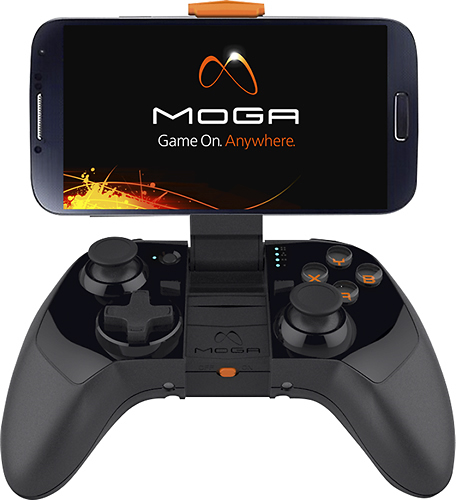
- Model:
- CPFA123252
- |
- SKU:
- 1883271
Customer reviews
Rating 4.3 out of 5 stars with 84 reviews
(84 customer reviews)to a friend
Customers are saying
Customers frequently mention the excellent battery life and compatibility with Android phones and tablets. Many appreciate its ease of use and the included tablet stand. The controller's size and wireless functionality are also frequently praised. However, some customers find the price to be a drawback.
This summary was generated by AI based on customer reviews.
- Pros mentioned:Compatibility
Rated 5 out of 5 stars
Great product.
||Posted .This reviewer received promo considerations or sweepstakes entry for writing a review.Great product. Works with android tablet. Great for gaming on the go.
I would recommend this to a friend Rated 5 out of 5 stars
Fun wireless control
||Posted .This reviewer received promo considerations or sweepstakes entry for writing a review.Super cool control wireless and makes it easier to play on my phone
I would recommend this to a friend- Pros mentioned:Ease of use
Rated 5 out of 5 stars
It's a great control because you play games easier
||Posted .This reviewer received promo considerations or sweepstakes entry for writing a review.I liked this control and I'm having fun with it in my free time
I would recommend this to a friend Rated 5 out of 5 stars
best product I ever bought
||Posted .This reviewer received promo considerations or sweepstakes entry for writing a review.Moga made me nostalgic. I get to play every single game from my childhood just like old times. The only downside is that with my new Samsung 5 case, the phone doesnt fit as well as my samsung 3 did in the holster. Nonetheless I absolutely LOVE it.
I would recommend this to a friendRated 4 out of 5 stars
Worth it
||Posted .This reviewer received promo considerations or sweepstakes entry for writing a review.Got it on sale. Worth a purchase but limited on games it works with so don't expect all games to work. Also, the pivot app you need to download messes with my wifi on my s5
I would recommend this to a friendRated 4 out of 5 stars
reasonable quailty
||Posted .This reviewer received promo considerations or sweepstakes entry for writing a review.for the price a good piece of hardware with specific devise compatibility only. after researching we found it a good match and bought. It has been durable.
I would recommend this to a friendRated 5 out of 5 stars
great controller
||Posted .This reviewer received promo considerations or sweepstakes entry for writing a review.Awesome controller. Syncs to my phone easily and I can play various games on it. I am playing my games with more skill now.
I would recommend this to a friendRated 4 out of 5 stars
exelent divice but...
||Posted .This reviewer received promo considerations or sweepstakes entry for writing a review.It's a great huy. Exelent performance Exelent conectó Just some time my cel drop off front the control
I would recommend this to a friendRated 4 out of 5 stars
Good product
||Posted .This reviewer received promo considerations or sweepstakes entry for writing a review.Well.made product that my son continues to use since we purchased it.
I would recommend this to a friendRated 5 out of 5 stars
Works great
||Posted .This reviewer received promo considerations or sweepstakes entry for writing a review.Maneuvering to use with tablet is great! I'll recommend to everyone!!!
I would recommend this to a friendRated 1 out of 5 stars
Waste of money
||Posted .This reviewer received promo considerations or sweepstakes entry for writing a review.You can only use the product if you purchase comes from their company. You can't play game that is already on your phone.
No, I would not recommend this to a friendRated 2 out of 5 stars
Didn't work on Note 10.1 2014
||Posted .This reviewer received promo considerations or sweepstakes entry for writing a review.I was really hoping that this controller would work to be able to play games with my Note 10.1 tablet (2014 ed), but it would only pair and connect in the B mode, not the A mode. I called Moga Tech support, no dice. Best buy customer service, no dice. Even tried a different controller, no dice. Bummed it didn't work out for me.
No, I would not recommend this to a friendRated 3 out of 5 stars
It was ok.
||Posted .This reviewer received promo considerations or sweepstakes entry for writing a review.I liked this device, however I wish you could use playstation controls.
I would recommend this to a friend- Pros mentioned:Compatibility, Tablet stand
Rated 4 out of 5 stars
Great for the Nexus Player
Posted .This reviewer received promo considerations or sweepstakes entry for writing a review.Snagged this on deep discount from Verizon to use with my Nexus Player. Pairing took a little time, as I had to switch it over to mode B for it to pair. After that it synced perfectly with my Nexus Player. Works great to play games on Android TV. Bonus that it also works with your phone and tablets (version I got even included a nice tablet stand).
I would recommend this to a friend - Pros mentioned:Battery lifeCons mentioned:Price
Rated 5 out of 5 stars
The one to beat...with a caveat.
Posted .This reviewer received promo considerations or sweepstakes entry for writing a review.Short part of the review: if you run emulators on your phone, stop reading, buy this controller, and you're welcome. If you don't run emulators, read on. I bought the controller earlier this afternoon and set it up simply enough. There's a different app in Google Play store called Universal Moga Application - it's not 32mb, it's 568k. Instead of going through Moga's Pivot app (which has had some issues with emulators, from what I've read), the Universal app runs everything. Set your phone in the locking arm (for reference, I have a Galaxy Note 3: yes, it fits well), set the controller to the B setting, pair it up via Bluetooth (like any other Bluetooth device), and off you go. The whole setup literally took 2-3 minutes, including installing the Universal app. Why would I use this, you ask? Aside from the above mentioned emulators, if you play console type games on your phone (Eternity Warriors series, for example), the controller is found with no extra input on your part; start the game and play. The one problem that I have (personal) with the controller is it's a bit pricey. It does come with an internal battery to charge the phone while you play (the controller battery must be above 25% to charge your phone), and if you're near a laptop, you can charge the controller battery off the laptop while you charge the phone battery off the controller, allowing multiple hours of play. There's also not a lot of competition in this area (yet), which is another part of the cost. There's also the consideration that this (right now) is the top controller available. Build quality is console level, so the controller is comfortable to hold for hours. If you're the type that has been sitting waiting for a serious Bluetooth controller for gaming on your device, you can stop waiting...this is it. It's a bit expensive, but worth it for the users it's aimed at.
I would recommend this to a friend - Pros mentioned:Battery life
Rated 4 out of 5 stars
Great Bluetooth Wireless Game Controller
Posted .This reviewer received promo considerations or sweepstakes entry for writing a review.I have an HTC Sensation which can be difficult to pair with non-HID devices; however, I can pair with the Moga controller in either one of two pairing methods (A or B mode). There are a host of Android and iOS games that support Moga controller natively--just visit Moga's website to find a growing catalog of games to use with the Moga controller. I really like Modern Combat 4, Shadowgun, and Dead Trigger games. I also like the additional power from the controller that charges the phone for longer gaming time.
I would recommend this to a friend Rated 5 out of 5 stars
Awesome product
Posted .This reviewer received promo considerations or sweepstakes entry for writing a review.I have been using my MOGA controller for over a year now and it's been fantastic. I've connected it to multiple android devices and even a windows desktop to use as a wireless gaming controller. One issue I did have was the spring in the holder snapped and would no longer hold the phone in place. Luckily it was within 15 days and I got a replacement. The issue has not happened since, but just beware not to yank on it too hard. I suspect mine was a factory issue. Works great for emulating games on Android too.
I would recommend this to a friend- Pros mentioned:Battery life
Rated 5 out of 5 stars
fantastic product for mobile gamers
Posted .This reviewer received promo considerations or sweepstakes entry for writing a review.Ive had these controllers for about a week and there a joy to use. I use to plug in my xbox 360 or PS3 controllers to play my games but not all were supported and it just goes to show how far the Android platform has come. Pros: wirwireless, works with most games you want a controller, charges your phone while you play and the battery is built in and rechargeable.
I would recommend this to a friend - Pros mentioned:Ease of use
Rated 4 out of 5 stars
Works well with Google nexus tablet
Posted .This reviewer received promo considerations or sweepstakes entry for writing a review.I use this to play games on the Google nexus tablet and it works perfectly. Downloading the app is a bit annoying but its worth it.
I would recommend this to a friend - Pros mentioned:Battery life
Rated 5 out of 5 stars
Love the extra battery
Posted .This reviewer received promo considerations or sweepstakes entry for writing a review.This is a great controller! It feels good and I love how I have an extra battery in it to charge my phone as I play. It only works with select games, but that list is quickly growing. Overall great device and I would recommend it.
I would recommend this to a friend