Winter SaleEnds 1/19. Limited quantities. No rainchecks.Shop now

Main Content

Customer Ratings & Reviews

Your price for this item is $44.99
Clearance
The comparable value price is $79.99

Customer reviews

Rating 4.5 out of 5 stars with 162 reviews

Rating Filter

Pros mentioned filter

Cons mentioned filter

94%
would recommend
to a friend

Customers are saying

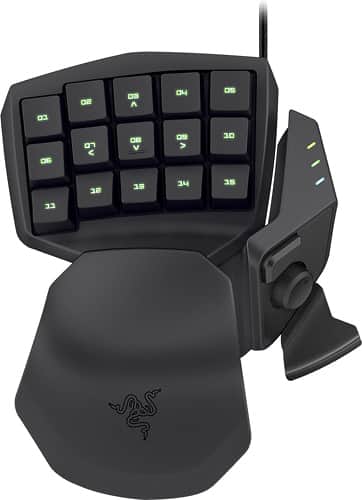
Customers are positive about the Tartarus Gaming Keypad's ease of use, keyboard quality, and extensive customization options, praising its comfortable design and ability to create macros. However, some customers express concerns regarding the software's reliability and the product's price point.

This summary was generated by AI based on customer reviews.

The vast majority of our reviews come from verified purchases. Reviews from customers may include My Best Buy members, employees, and Tech Insider Network members (as tagged). Select reviewers may receive discounted products, promotional considerations or entries into drawings for honest, helpful reviews.
Page 1 Showing 1-20 of 162 reviews
  • Rated 5 out of 5 stars

    More than just games

    |
    |
    Posted .
    This reviewer received promo considerations or sweepstakes entry for writing a review.

    I originally bought the Razer Tartarus for gaming purposes; but since my purchase I've used it for navigating my way around Windows, the Internet, videos and more. It's a great gaming peripheral and all-round good keypad for general use. With multiple profiles that, each of which can be fully customized and linked to a specific program, you'll never worry about pushing the wrong button again.

    I would recommend this to a friend
  • Pros mentioned:
    Keyboard quality

    Rated 5 out of 5 stars

    Smaller than a full sized keyboard

    |
    |
    Posted .
    This reviewer received promo considerations or sweepstakes entry for writing a review.

    A keyboard that fits in the palm of your hand. Takes only a day or two before your mind/hand coordination adapts to Tartarus. Programmable keys, not even sure how many, I have not found a need to program all of them yet. Very comfortable to use. Can sit on the desk, or for a more relaxing gaming experience, I sometimes just use it from the arm of the couch/chair, and or lap. Can be programmed for any computer use, excel, photo editing.....etc...etc. I love it. Using only a keyboard in the past tends to make my shoulders and neck sore. With this device, you may work/game in any posture. Key programming is very simple, after a few times of experimenting. I thoroughly enjoy the Tartarus experience. Highly recommend Tartarus if you tend to think with a minimalist mind.

    I would recommend this to a friend
  • Pros mentioned:
    Customization, Ease of use

    Rated 5 out of 5 stars

    AMAZING

    |
    |
    Posted .
    This reviewer received promo considerations or sweepstakes entry for writing a review.

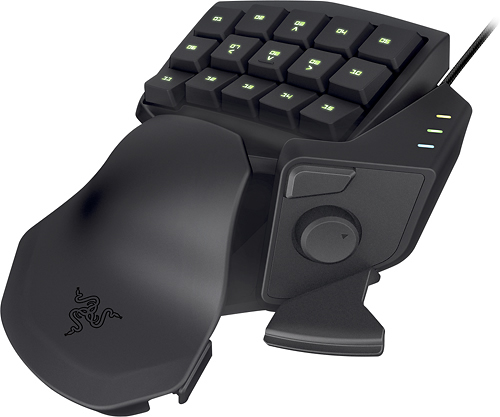
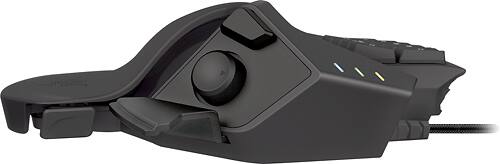
    I am an avid gamer and I have always used binds. This makes it much more easier and don't have to reach across. Buttons are positioned perfectly and use the top button above the stick to get a total of 30 binds.

    I would recommend this to a friend
  • Pros mentioned:
    Ease of use, Keyboard quality

    Rated 5 out of 5 stars

    Pretty Cool Gadget

    |
    |
    Posted .
    This reviewer received promo considerations or sweepstakes entry for writing a review.

    Seems to be of good quality. Easy to use, and comfortable over a long period of gaming. Wish I had found stuff like this years ago.

    I would recommend this to a friend
  • Rated 4 out of 5 stars

    Nice addition to gaming

    |
    |
    Posted .
    This reviewer received promo considerations or sweepstakes entry for writing a review.

    I had never used a keypad before, and wasn't sure if it was really needed. This keypad is actually very nice. You do need to take the time and set it up to how you want it. I have an iMac that dual boots between Mac OS/X and Windows 8.1. It works seamlessly between them. I do recommend this keypad.

    I would recommend this to a friend
  • Pros mentioned:
    Ease of use, Keyboard quality

    Rated 5 out of 5 stars

    perfect gaming keypad for my needs

    |
    |
    Posted .
    This reviewer received promo considerations or sweepstakes entry for writing a review.

    This Razar gaming keypad is comfortable for the hand, easy to use and was easy to set up with my computer.

    I would recommend this to a friend
  • Pros mentioned:
    Ease of use

    Rated 5 out of 5 stars

    My second one

    |
    |
    Posted .
    This reviewer received promo considerations or sweepstakes entry for writing a review.

    This is the second generation of the Razer gamepad I've purchased. My first was a nostromo, and it still works. I got the new one because the paint on the keys of my nostromo has worn off from too much use. I like the new thumb buttons a lot better, and it's still just as comfortable to use and easy to customize. Great purchase for any gamer.

    I would recommend this to a friend
  • Pros mentioned:
    Key customization

    Rated 5 out of 5 stars

    All my jr. gamer hoped it would be

    |
    |
    Posted .
    This reviewer received promo considerations or sweepstakes entry for writing a review.

    This is the only thing our son asked us to get him for his 14th birthday, and he was very happy with it indeed. Apart from assigning typical gaming keys, he was particularly impressed with how many tasks could be assigned to the thumb. He got the enhancements he was hoping for, and now he's saving up for the Razer mouse.

    I would recommend this to a friend
  • Rated 5 out of 5 stars

    Takes a little getting use to...

    |
    |
    Posted .
    This reviewer received promo considerations or sweepstakes entry for writing a review.

    This keypad is great if you are a serious gamer and love to attach macros, quick keys, etc... My husband originally bought it for himself but couldn't get the hang of mouse and keypad like he planned so he gave it to our 13 year old who thinks it is the greatest thing since sliced bread. the 13 year old couldn't imaging playing without it now because everything is quickly at his finger tips.

    I would recommend this to a friend
  • Pros mentioned:
    Key customization

    Rated 5 out of 5 stars

    great for your mmo gamers

    |
    |
    Posted .
    This reviewer received promo considerations or sweepstakes entry for writing a review.

    the on the fly change up of programed key set by what program is open is good even works with none gaming programs to help make word easier to use , only draw back was if you have more the one program open that's is keyed to it can load the keys for the program your not currently using just have open in the backround (like on one mmo doing repetive crafting while playing on another mmo)

    I would recommend this to a friend
  • Pros mentioned:
    Keyboard quality

    Rated 5 out of 5 stars

    Excellent device for comfortable gaming

    |
    |
    Posted .
    This reviewer received promo considerations or sweepstakes entry for writing a review.

    I purchased this in hopes of a more ergonomic gaming experience. With this device I was able to achieve that by rebinding keys that are needed for a game over to the game pad. Adjustable and to get the comfort I was looking for. Make sure to check out in store before buying as people with larger hand spans have found some of these devices to not be as comfortable.

    I would recommend this to a friend
  • Pros mentioned:
    Ease of use

    Rated 4 out of 5 stars

    Gaming pad

    |
    |
    Posted .
    This reviewer received promo considerations or sweepstakes entry for writing a review.

    This is great for people who don't want to be all over the keyboard for their keybinds. And for those who want to match their keybinds in location to their custom ui spell bars. I cluster mine low center screen in rows 4-5 so this pairs up great with them. The additional buttons near the thumb are great for quick changes during pvp.

    I would recommend this to a friend
  • Pros mentioned:
    Keyboard quality
    Cons mentioned:
    Price

    Rated 3 out of 5 stars

    A section of a keyboard for space purposes

    |
    |
    Posted .
    This reviewer received promo considerations or sweepstakes entry for writing a review.

    Tartarus is basically just half of a regular keyboard for $70, but works just fine. I use it to save space on my small desk when I am using my Wacom Cintiq tablet and need keyboard shortcuts. There are newer, mechanically keyed, probably more flexible versions now.

    No, I would not recommend this to a friend
  • Pros mentioned:
    Ease of use

    Rated 4 out of 5 stars

    good keypad

    |
    |
    Posted .
    This reviewer received promo considerations or sweepstakes entry for writing a review.

    you need to push the key all way down, and has more travel than deathstalker, and the feedback is slower than a mechanical keyboard but is really comfortable, and if you dont like the play with keyboard or you are new in pc gaming this is easier, because you can place all the keys you need in the position you want

    I would recommend this to a friend
  • Pros mentioned:
    Ease of use

    Rated 5 out of 5 stars

    Good For RSI

    |
    |
    Posted .
    This reviewer received promo considerations or sweepstakes entry for writing a review.

    I have been searching for a good device to relieve my RSI for almost 6 YEARS! This device is the answer for my issues. By being able to program mouse clicks with my left hand it has increased my work efficiency and taken the pain away. Get this is you have any RSI problems!

    I would recommend this to a friend
  • Pros mentioned:
    Customization

    Rated 4 out of 5 stars

    Works well for intended use, not so much for FPS

    |
    |
    Posted .
    This reviewer received promo considerations or sweepstakes entry for writing a review.

    If you are an MMO player this will be a good alternative for a full keyboard. For FPS players the remapping you have to do is alittle hard to get used to. As always it's Razer so there is good build quality and plenty of customization.

    I would recommend this to a friend
  • Pros mentioned:
    Customization

    Rated 4 out of 5 stars

    I see what they mean about small hands

    |
    |
    Posted .
    This reviewer received promo considerations or sweepstakes entry for writing a review.

    I finally caved and got this item after I really got into some steam games with friends. I played regularly enough to justify the cost and it has really helped me group common buttons and be much more comfortable than my keyboard. I love the customization. I love the support I've gotten from Razer so far. I can see this being a very well used tool for my future. That being said, I know understand some of the comments made about the smaller hand people. I have average hands, I'd say. Long fingers but slightly crooked which makes reaching sometimes difficult with my pinky and ring finger in specific. The little nub is great because it helps me come back to my home keys after I have to move my hand to reach a particular key. They are never out of reach, let me clarify, they just aren't comfortably just there. They take a conscious effort for that extra little bit of stretch so there is that little bit of delay. When I'm in the thick of it, I find my palm riding up to reach those keys faster, but then it takes a farther reach for my thumb to hit the paddle. For those with normal hands, I think you're going to love this. For those with smaller hands, don't give up on it. I have a feeling the more I use this thing, the more I'm going to either get accustomed to the small reaches so they become natural, or I'll adapt some button mappings to help me out. Still has done more good than bad for me.

    I would recommend this to a friend
  • Pros mentioned:
    Ease of use

    Rated 5 out of 5 stars

    love it

    |
    |
    Posted .
    This reviewer received promo considerations or sweepstakes entry for writing a review.

    Awesome product. I have small hands so some of the far keys can be a stretch while using the thumbstick but not by much. Takes a vwry short time to get used to. Just remap a few keys here and there and save on mulyiple profiles.

    I would recommend this to a friend
  • Pros mentioned:
    Ease of use

    Rated 4 out of 5 stars

    Great product, east set up

    |
    |
    Posted .
    This reviewer received promo considerations or sweepstakes entry for writing a review.

    Setting up the keys was easy. Mainly use for Elder Scrolls online. No issues with the interface with ESO.

    I would recommend this to a friend
  • Pros mentioned:
    Ease of use

    Rated 5 out of 5 stars

    Superb mid level gaming accessory

    |
    |
    Posted .
    This reviewer received promo considerations or sweepstakes entry for writing a review.

    I own multiple razor products and they all have a high level of functionality. The razor synapse 2.0 program that comes standard with all razor products is very intuitive and easy to use.

    I would recommend this to a friend
Sponsored