Customer Ratings & Reviews

- Model:
- 5AT1S3-WEN0
- SKU:
- 6430962
Rating by feature
- Value
Rating 4.4 out of 5 stars
- Quality
Rating 4.7 out of 5 stars
- Ease of Use
Rating 4.5 out of 5 stars
Customers are saying
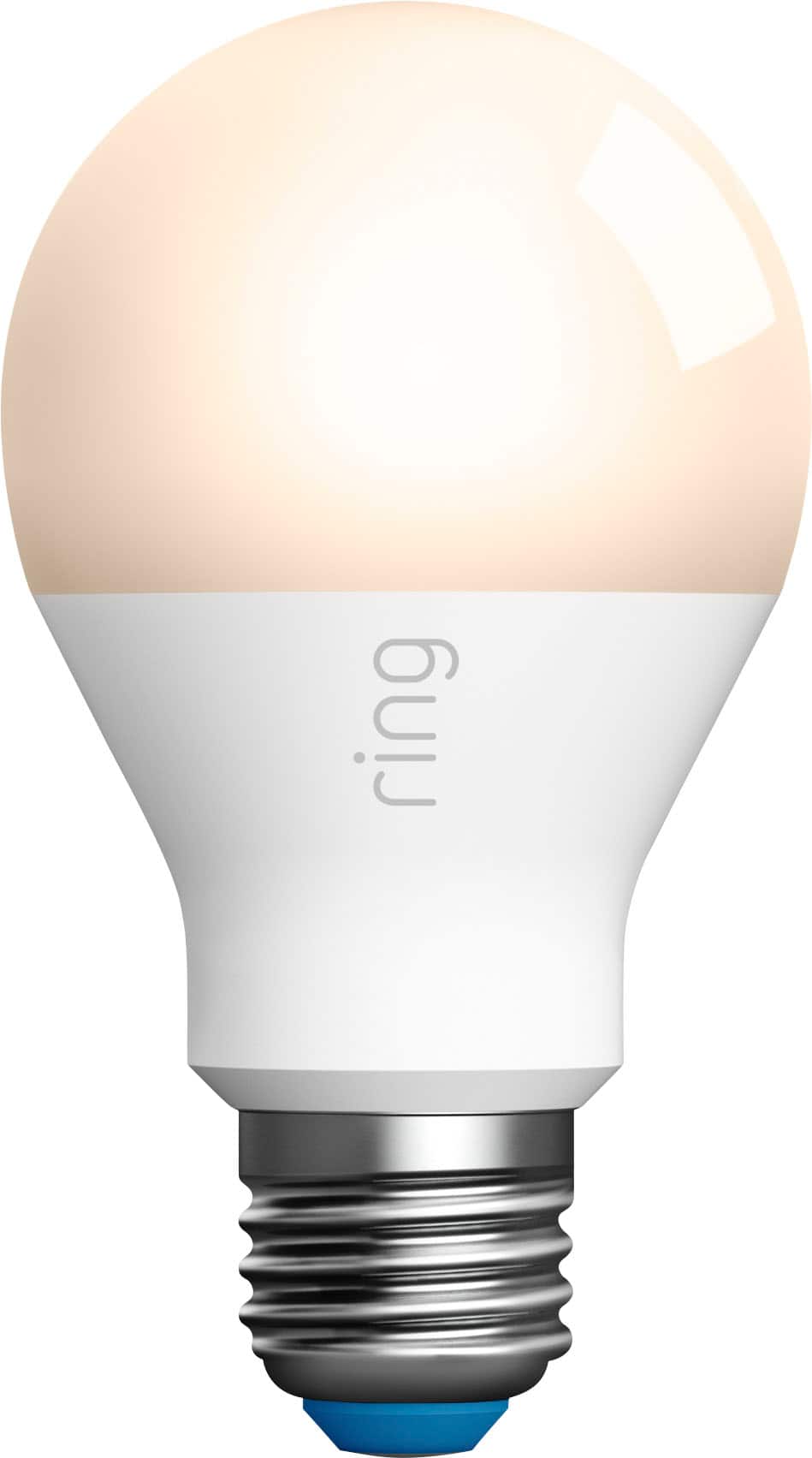
Customers express satisfaction with the A19 Wi-Fi Smart LED Bulb's ease of use and brightness control. Many appreciate its compatibility with systems like Ring and its overall performance. However, some customers have noted the lack of a motion sensor and the requirement of a Smart Lighting Bridge.
This summary was generated by AI based on customer reviews.
Excellent Product
||Posted . Owned for 7 months when reviewed.This reviewer received promo considerations or sweepstakes entry for writing a review.Excellent description of the product, definitely buy again.
I would recommend this to a friendSolid deal
||Posted . Owned for 1 week when reviewed.This reviewer received promo considerations or sweepstakes entry for writing a review.Pretty cool for the price only complaint is it doesn't reach all white color spectrum
I would recommend this to a friendlight
||Posted . Owned for 1 month when reviewed.This reviewer received promo considerations or sweepstakes entry for writing a review.works well-- no issues came with the echo that we purchased
I would recommend this to a friendRing does it again!!
||Posted . Owned for 1 month when reviewed.This reviewer received promo considerations or sweepstakes entry for writing a review.Ring products are just the best. Works perfect with my app
I would recommend this to a friendDisappointed with comparability not product
||Posted . Owned for 1 week when reviewed.This reviewer received promo considerations or sweepstakes entry for writing a review.My disappointment was, not comparable with Ringbpro alarm system
I would recommend this to a friendBrand response from Ring
Posted .Hi Ahmad.
Thank you for taking the time to share your feedback with us. We are always looking for ways to improve our neighbor's experience, and your feedback is an invaluable part of this process. That is why we are dedicated to offering devices that help you safeguard what is most important at home, while also allowing you to connect with your neighbors from anywhere. We’re glad to read that you are finding the provided features useful.
Ring Community was launched to help deliver the most current news and educational information to our neighbors. This online forum is divided into four categories: Product Boards, Ring Updates, Tips and Tricks, and a Moderators’ Corner. The Product Boards are where you can begin new topics with your questions or feedback; there is also a search option that helps you find topics that have already been posted by other neighbors.
All the Best,
Matthew from Ring.
WiFi smart bulb
||Posted . Owned for 1 month when reviewed.This reviewer received promo considerations or sweepstakes entry for writing a review.I received the Item, and they works fine. Thank you
I would recommend this to a friendWorks Great!
||Posted . Owned for 1 week when reviewed.This reviewer received promo considerations or sweepstakes entry for writing a review.Great LED light bulb but requires the Ring bridge.
I would recommend this to a friendBrand response from Ring
Posted .Hi Tony.
Thank you for taking the time to share your experience with us. We understand the importance of a seamless setup process so that you can begin using your Ring A19 Smart LED Bulb right away. The features and technology provided by the Ring A19 Smart LED Bulb are incredibly valuable and help provide you with peace of mind about your home security. We can definitely provide you with more information regarding the concern mentioned in your review.
It sounds like to the device is not functioning as expected. The Ring A19 Smart LED Bulb is designed to work with the Ring Bridge to be keep your home secure. The Ring Bridge lets Ring Smart Lights, Ring doorbells and cameras, and select Alexa-enabled devices talk to each other and work better together. If one Ring Bridge-enabled device detects motion, it can turn on your Ring Smart Lights, Ring doorbells and cameras, giving your Ring of Security endless combinations.
If any additional information is needed regarding your Ring A19 Smart LED Bulb, please reach out to our community. Ring Community is our first peer-to-peer community forum, giving our customers the ability to help one another and share their feedback and experiences directly with Ring. Join the Ring Community today!
Thank you,
Miyuki from Ring.
You need a bridge
||Posted . Owned for 1 week when reviewed.This reviewer received promo considerations or sweepstakes entry for writing a review.I havent had the chance to actually use these yet. I didnt know when I purchased them that a Ring bridge is needed to set them up on the app and wifi.
I would recommend this to a friendBrand response from Ring
Posted .Hi Robert, I know it can take some time to get used to new smart home devices. A Ring Bridge is required to set up the A19 Bulb in the Ring app and access smart controls. You can learn more about what features the Smart Lighting Bridge provides here https://support.ring.com/hc/en-us/articles/360025181851-Ring-Smart-Lighting-Bridge-Information. If you have any other questions, check out the Ring Community https://community.ring.com/ to find answers from other neighbors. All the best, Ashley from Ring.
Love it
||Posted . Owned for 3 weeks when reviewed.This reviewer received promo considerations or sweepstakes entry for writing a review.Love that I can control the light on and off. Going to buy another one.
I would recommend this to a friendsmart
||Posted . Owned for 3 weeks when reviewed.This reviewer received promo considerations or sweepstakes entry for writing a review.Did not fit my system. I have dimmers that I like using, plus most of our lights are spots and higher wattage.
I would recommend this to a friendBrand response from Ring
Posted .Hello driveneeded
Thank you for sharing your experience. We have this Help Center page with information on our Smart LED Lightbulbs: https://support.ring.com/hc/en-us/articles/360038463211-Smart-LED-Lightbulbs-Information. We have other Smart Lights as well that are worth looking into to see if they work for you on here or on Ring.com.
Best wishes
Ivan from Ring
- Cons mentioned:Bridge
Loser!
||Posted . Owned for 10 months when reviewed.This reviewer received promo considerations or sweepstakes entry for writing a review.This lamp is needed a Smart Lighting Bridge. But I don't have. Lol.
No, I would not recommend this to a friendBrand response from Ring
Posted .Hi LoveSalePrice. Ensuring you have all of the components you need in order to get your A19 Smart Bulb up and running is definitely an important concern. The Ring Smart Lighting Bridge is required in order to set up the A19 Smart Bulb in the Ring app and control it. Some Amazon Echo devices can also be used as a Bridge, which you can read more about here: https://support.ring.com/hc/en-us/articles/360059329551-Using-your-Echo-devices-as-a-Smart-Lighting-Bridge. I hope this information helps. All the best, Ashley from Ring.
Paula
||Posted . Owned for less than 1 week when reviewed.This reviewer received promo considerations or sweepstakes entry for writing a review.Should be told on box you need accessories to make it work. Im an elderly woman and wanted the security of a camera to see who is at my door but no need to spend more money for peace of mind. Returning the product will find something new
No, I would not recommend this to a friendBrand response from Ring
Posted .Hi PaulaBBlover. Having the ability to see who is at your door is a key feature of our Video Doorbells, and I'd be happy to point you in the right direction. The Ring Smart Lighting A19 LED Smart Bulb doesn't have a camera and is meant to replace a regular light bulb. If you're looking for a doorbell with a camera so you can see who is at your door, one of our Video Doorbells may be the right fit for you. For more information, check out the Ring Doorbell Buyer's Guide here: https://support.ring.com/hc/en-us/articles/360035250032-The-Ring-Doorbell-Buyer-s-Guide. That article will help you see what features and requirements each Doorbell has so you can choose the right one for you. If you have any further questions, feel free to ask them on the Ring Community at https://community.ring.com/. The Ring Community is our peer-to-peer forum where neighbors can answer each other's questions. Best wishes, Ashley from Ring.
- Pros mentioned:Brightness
Steer clear of
||Posted . Owned for less than 1 week when reviewed.This reviewer received promo considerations or sweepstakes entry for writing a review.Sucks that you need a ring bridge with this item and it doesnt tell you that til its delivered.lights up great for a normal bulb use but your better off with the alexa bulbs.
No, I would not recommend this to a friendBrand response from Ring
Posted .Hello Infamoussyn,
Thank you for leaving your review. Our top priority at Ring is to ensure that our customers have the best possible experience with our products. It is important to us that you have all the necessary information to ensure that you are able to utilize all of the features of the Ring Smart A19 LED Bulb.
The Ring Bridge is the central point for connecting all Ring Smart Lighting products. It enables smart lighting control from anywhere using the Ring app and lets Ring Smart Lighting products interact with other Ring products for enhanced security. Rest assured, we’re here to provide you with some additional information regarding your concern.
Based on your review, it seems like you did not know the Ring Bridge was needed for the Ring A19 Smart LED Bulb. This indoor/outdoor bulb is weather-resistant and offers a neutral white light that is the equivalent of a 60-watt incandescent bulb and includes adjustable brightness and custom light schedules. We would like to note that the Ring Bridge is only needed if you would like to use the smart control feature of the Ring A19 LED Bulb. Please see our help center article for more information: https://support.ring.com/hc/en-us/articles/360038463211-Smart-LED-Lightbulbs-Information.
If you still have concerns regarding this, we would love to hear from you directly on our Ring Community forum. This is a platform intended for Ring users, just like yourself, to create open discussions regarding their Ring experiences, provide suggestions or feedback, and more: https://community.ring.com/.
Thank you, Jamila with Ring.
What went Wrong?
||Posted . Owned for 3 weeks when reviewed.This reviewer received promo considerations or sweepstakes entry for writing a review.Haven't been able to have Alexa find the bulb once I installed it.
No, I would not recommend this to a friendBrand response from Ring
Posted .Hi there, I understand wanting to have all of your smart home devices working together seamlessly. I'd recommend following the steps here https://support.ring.com/hc/en-us/articles/360048169011-Helping-Your-Ring-Devices-Work-With-Alexa. That article should help guide you through the process of getting your A19 Bulb discovered and working in the Alexa app. Ensure you have the correct Amazon account linked with your Ring account as well https://support.ring.com/hc/en-us/articles/360034187232-Amazon-Account-Linking-in-Control-Center. If you still have questions after reviewing those articles, you can check out the Ring Community https://community.ring.com/ to find answers from other neighbors. Best, Ashley from Ring.
Smart light
||Posted . Owned for 3 weeks when reviewed.This reviewer received promo considerations or sweepstakes entry for writing a review.Couldn’t use it does not work with my Amazon echo 3
No, I would not recommend this to a friendBrand response from Ring
Posted .Hi JosephE.
Thank you for taking the time to share your experience with us. We understand the importance of having all relevant product information prior to purchasing. Having the ability to integrate your Ring Smart Lighting A19 Bulb with your Alexa-Enabled device adds incredible value to your home security system. We can definitely provide you with more information regarding the concern mentioned in your review.
It sounds like the device is not funtioning as expected. The A19 Smart Bulb produces a maximum of 800 lumens (60W incandescent equivalent) and it's brightness is adjustable through the Ring app and select Alexa enabled devices (Ring Bridge required). The Ring Smart Lighting Bridge connects to the Ring app using your home wifi network. It lets you control whole groups of Smart Lights and other Ring products, and be notified via the Ring app when any light or motion sensor detects movement. Amazon Echo (4th Gen) or an Echo Show 10 (3rd Gen) have a built-in Ring Smart Lighting Bridge that will help you control and coordinate your Ring Smart Lighting. Follow the steps here to integrate your Ring and Echo devices:
Make sure your Ring app is up to date.
Link your Ring account to your Amazon account using your smartphone or tablet.
Open the menu (≡).
Tap Set up a Device.
Tap Smart Lighting.
Select your Location.
Use your mobile device to scan the QR code on the Smart Lighting device you wish to install.
The code can also be found on the product packaging your your Ring Smart Lighting device.
If your mobile device is not scanning the QR code, you can select Set up without scanning and enter the five digit PIN code underneath your device’s QR code.
The Ring app will let you know if you have a compatible Echo or Echo Show 10.
Make sure your Echo or Echo Show 10 is up to date by saying “Alexa, is your software up-to-date?” When prompted, say “Yes” to install the update.
Tap Use Echo.
The Ring app will search for your Ring Smart Light and download the latest software for your device. Once the process is complete, your app will automatically bring you to the next step.
Set up your Light Group:
Your app will now connect your device to your Echo or Echo Show 10 and the device will be ready to use.
Amazon Echo (4th Gen) or an Echo Show 10 (3rd Gen) have a built-in Ring Smart Lighting Bridge that will help you control and coordinate your Ring Smart Lighting.
We invite you to reach out to our Community if any additional information is needed regarding your Ring Smart Lighting A19 Smart Bulb. The Ring Community is our first peer-to-peer community forum, giving our customers the ability to help one another by sharing their feedback and experiences with each other.
Thank you,
Melissa from Ring.
EH
||Posted . Owned for 2 weeks when reviewed.This reviewer received promo considerations or sweepstakes entry for writing a review.You need the ring bridge for this to be compatitable.
I would recommend this to a friendBrand response from Ring
Posted .Hello YEPPERS,
Thank you for sharing your feedback with us regarding the Ring A19 Smart LED Bulb. It is important to us that you have all the necessary information to ensure that your setup experience is seamless. We truly value your feedback, simply because it helps us improve the product from a consumer standpoint.
Based on your review, it seems that you did not know that the Ring Bridge was needed for the Ring Smart Lights. We would like to note that the Ring Bridge is only needed if you would like to use the smart controls feature of the LED bulbs. Please see our help center article for more information: https://support.ring.com/hc/en-us/articles/360038463211-Smart-LED-Lightbulbs-Information.
If you still have concerns regarding this, we would love to hear from you directly on our Ring Community forum. This is a platform intended for Ring users, just like yourself, to create open discussions regarding their Ring experiences, provide suggestions or feedback, and more: https://community.ring.com/.
Thank you, Jamila with Ring.
Required Ring Bridge does not work properly
Posted .This reviewer received promo considerations or sweepstakes entry for writing a review.To use this product you need to connect to wi-fi via a Ring "Bridge". The Ring Bridge is garbage that doesn't work properly, so the bulbs become useless. I had an extended absence from home over the summer so I purchased several ring smart bulbs and outlets along with the required ring "bridge". Everything worked great for a week and I could turn the lights on and off with my phone from several thousand miles away from home. Then, the internet service in my home cut out temporarily as it is prone to do in my area (my service provider has intermittent internet outages). The service restored itself after about an hour and my modem/router reset. After the outage, my ring cameras and hard wired doorbell all came back online but my smart bulbs and outlets all stayed "offline" and the Ring Bridge would not automatically reconnect to my wi-fi. It showed "updating" in the Device Health page of the app and "no signal", "no network", "not connected". Apparently this piece of garbage was not designed to reset and reconnect after an outage (which could occur during a temporary power outage - for example). It is a very common feature on almost ALL electronic devices that use wi-fi that they automatically reconnect to the network after a disconnection. Somehow, the GENIUSES that designed this cheap crap "bridge" didn't think to include this feature in their product. I called Ring customer service and I was told that I needed to do a hard reset of the device (turn off/turn on). I explained that I was not at home and asked how it could be done remotely (this hard reset information is available on their website and I didn't need to wait 15 minutes on hold to be given info I already had). They suggested that I have a family member or neighbor do it for me. I explained that I installed these devices because I had no one to watch my house while I was gone and that the primary purpose of using smart bulbs was a security measure precisely for when someone was NOT at home. So calling their Mumbay or New Dehli customer service was a waste of time. They should have included on their website the information regarding no remote reset. So now I have wasted a tone of money for some crap that doesn't work. I feel like I have been deceived and cheated.
No, I would not recommend this to a friendBrand response from Ring
Posted .Hi lmito. Having a Ring Bridge that automatically reconnects to WiFi is a valid concern. Typically, these devices should reconnect with no problem. If it doesn't reconnect, it could be due to environmental factors. Be sure that your Ring Bridge is out in the open and has a strong RSSI. Alternatively, you can use select Amazon Echo or Alexa devices as a Ring Bridge, as described in this Help Center article here: https://support.ring.com/hc/en-us/articles/360059329551-Using-your-Echo-devices-as-a-Smart-Lighting-Bridge. This Help Center article here has information on troubleshooting your Ring Bridge: https://support.ring.com/hc/en-us/articles/360026018531-Troubleshooting-Guide-for-Ring-Smart-Lights-Bridge. If you have any further questions or concerns, try browsing the Ring Community at https://community.ring.com/. As our first peer-to-peer forum, the Ring Community allows you to ask questions and interact with other neighbors to discuss your Ring devices. Best wishes, David with Ring.