Customer Ratings & Reviews
- Model:
- ET-WV530B
- SKU:
- 5872506
to a friend
Customers are saying
Customers consistently note the Connect Home Pro AC2600 Mesh Wi-Fi System's ease of use and compact size. Many appreciate its strong signal and wide range, allowing for reliable Wi-Fi coverage throughout their homes. However, some users point out limitations in the number of Ethernet ports and find the accompanying app to be less than ideal. The system's performance and design also receive positive feedback.
This summary was generated by AI based on customer reviews.

Expected more
|Posted .This reviewer received promo considerations or sweepstakes entry for writing a review.Thought this would be a great addition to my home since I have a great deal of home automation and this unit works with Z-Wave devices. It also supports ZigBee, WiFi and Bluetooth 4.1. First, there are few instructions included with this device other than download the app, I use iOS, and follow the instructions. Here is the problem I encountered, I do not want to remove my existing router as this is connected to Google fiber. Not to mention I have a large number of wired (2, 24 port switches) and wireless devices and honestly will not give up the functionality I have with the current setup. The in-app instructions do not give a lot of details so you will have to dig for help. That being said the fact that I could not get the device to function may be due in part to it not being the primary router. If I could use just the automation features without it having to control my entire network I would probably love it's ability to control my home automation with the Bluetooth and WiFi options but the trade off is too steep for me.
No, I would not recommend this to a friendLacking basic routing capability
Posted .This reviewer received promo considerations or sweepstakes entry for writing a review.I purchased two connect home pros to replace two Google wifi devices that were setup in a mesh network, primarily because I wanted to take advantage of the built in SmartThings hub. Overall the performance works fine, however the Samsung Connect currently does not have the ability to do DHCP reservations if you want to assign specific static IP addresses to the devices on your network. What's even stranger is that you can do port forwarding, however I don't know how this works since you typically combine static IPs with port forwarding. I'm hoping that the feature set is not fully developed yet. I cannot see why they released this product without even the most basic of routing capabilities, especially for a "Pro" device.
No, I would not recommend this to a friend- Pros mentioned:Speed
Nice device but doesn't run at specified speeds
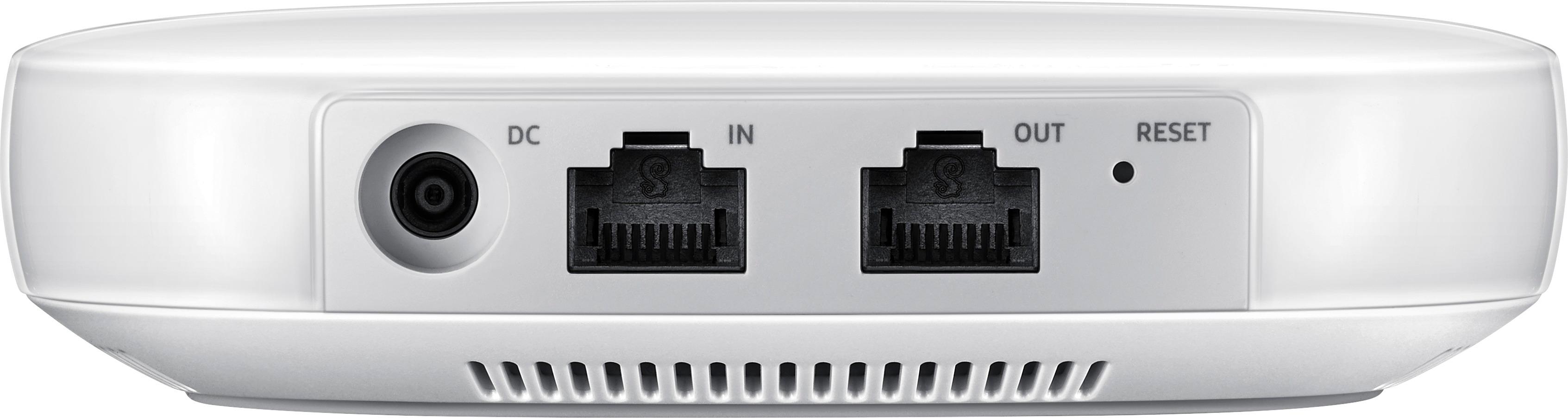
Posted .This reviewer received promo considerations or sweepstakes entry for writing a review.As a SmartThings user and because I have fiber to my house I was excited to see the features and specifications for the Samsung Connect Home Pro AC2600. I bought it as soon as it was available at my local BestBuy. Because I have fiber to my home I regularly see Internet speeds greater than 1000 Mbps down and up. The installation of the Connect Home Pro took a couple of attempts but ended up completing successfully and the latest firmware installed automatically. When I tested the WiFi speed while close to the device it was running at about 240 Mbps down and 370 Mbps up. I connected my device directly to the second Ethernet port on the Connect Home and measured over 700 Mbps up and down over the direct connection. I called into the Samsung support line and the representative said they are hearing about issues hitting rated speeds and my experience (running at less than 300Mbps) appears to be in line with what they are hearing. He agreed the most appropriate course was to return the devices and monitor reviews, etc. to see if the issue is resolved at some time in the future. CAUTION: In the current state there doesn't appear to be any reason to buy the Pro version of this device. It will not perform even to the rated specifications of the non-Pro version. The representative also confirmed they are still working on a solution to transfer from an existing SmartThings hub to a Connect Home device. This is an inexcusable omission in my opinion. Summary: Nice looking device. Acceptable installation process. Performs fine but not at rated speed which is the whole reason to buy the Pro version. Lack of migration tool for existing SmartThings installation is inexcusable.
No, I would not recommend this to a friend Does what it says
|Posted .This reviewer received promo considerations or sweepstakes entry for writing a review.This is a cool router if you own other samsung connected products. Works great with app and it stays connected no issues.
I would recommend this to a friendgreat
|Posted .This reviewer received promo considerations or sweepstakes entry for writing a review.the connect is great, connected so many of my at home products to use with one app!!
I would recommend this to a friend- Pros mentioned:Ease of use
Disappointing, will be returning
Posted .This reviewer received promo considerations or sweepstakes entry for writing a review.I just got off the phone with Samsung and I am incredibly disappointed. Setup was easy -- too easy. It defaults to a 192.168.1.1 IP address with no way to change it, so if you already have a network set up, too bad. Samsung support indicated this was a 'consumer level' device. Apparently Samsung doesn't realize that wireless routers have been installed by millions of 'consumers' over the last 20 years, mostly without trouble. It's one thing to provide a quickstart for easy out-of-the-box setup, but it's another thing not to provide any support for advanced configuration. You can't even change the IP address? The only hope for this device is that they rushed it to market with a basic configuration and will provide advanced configuration capabilities later. In the meantime, my pre-order is going back to Best Buy for a refund.
No, I would not recommend this to a friend - Cons mentioned:App
Save your Money...
Posted .This reviewer received promo considerations or sweepstakes entry for writing a review.This is a good idea in theory... Unfortunately, the Samsung Connect App is extremely lacking. As a result, this product just doesn't function well as a "Smart Hub" to replace either Smartthings or Wink. As a router, it was OK, but I couldn't get any Apple products to connect to it. So, I have returned this item and am sticking with my Wink Hub 2, but upgrading my Wifi to the Linksys Velop.
No, I would not recommend this to a friend - Pros mentioned:Ease of use
Love this product!
Posted .This reviewer received promo considerations or sweepstakes entry for writing a review.Very easy to install! I particularly like the simple design and its UX.
I would recommend this to a friend Doesn't work outside US as a smartThings hub
Posted .This reviewer received promo considerations or sweepstakes entry for writing a review.When I installed the connect pro version, only the wifi feature got enabled. The smarthings hub feature is disabled in my country. This limitation was not clear in documentation, only some non official forums reffer to it. I was surprised because the standalone hub v2 has perfect support outside US, I only expected this newer version to be better and it turns out to be the other way around. Looking fwd for a solution from customer support, else I need to figure out how to return this item.
No, I would not recommend this to a friendNot cooperative and no way to prefer 5G
Posted .This reviewer received promo considerations or sweepstakes entry for writing a review.It is cool that these let you do a SmartThings Hub as well. Just note that this will reduce 2.4GHz performance. This really hurts since you can't set a separate SSID for the 5GHz radios and it relies solely on device configuration to use 5GHz band. I care most about it as I have Gigabit ATT Fiber and with the client devices preferring 2.4GHz N networking I was only getting around 30-40mbps. I swapped this in for a competing product that by nature encouraged clients to use 5GHz by default. Now I can also setup a separate SSIDs for 2.4GHz and 5GHz network bands. This allows me to hard set which devices I want at 5GHz for more performance and which ones at 2.4GHz for less importance. On 5GHz I can now get 200+mbps and on 2.4G I get around the 60mbps. I do not feel Samsung is ready for prime time yet for power users or anyone with decent internet connection. Stick to other products from Linksys/Netgear/Eero that have triband 2x2 and get better performance for less money even when buying the SmartThings Hub separately.
No, I would not recommend this to a friend