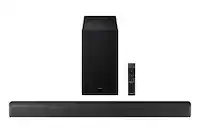
Customer Ratings & Reviews










- Model:
- HW-B650/ZA
- SKU:
- 12378060
Rating by feature
- Value
Rating 4.7 out of 5 stars
- Quality
Rating 4.6 out of 5 stars
- Ease of Use
Rating 4.7 out of 5 stars
Great Sound
||Posted . Owned for 1 month when reviewed.This reviewer received promo considerations or sweepstakes entry for writing a review.Great sound and for the price it was perfect for our upgraded system
I would recommend this to a friendTV sounds better with that
||Posted . Owned for 3 weeks when reviewed.This reviewer received promo considerations or sweepstakes entry for writing a review.A great deal I like it it's awesome the best sound bar I've ever had
I would recommend this to a friendupgrade
||Posted . Owned for 1 month when reviewed.This reviewer received promo considerations or sweepstakes entry for writing a review.This was easy to setup. There were no issues and only took a few minutes.
I would recommend this to a friendGreat soundbar!!!
||Posted . Owned for 3 weeks when reviewed.This reviewer received promo considerations or sweepstakes entry for writing a review.Item as described. Real good quality sound. Perfect for what I need.
I would recommend this to a friendSound
||Posted . Owned for 2 months when reviewed.This reviewer received promo considerations or sweepstakes entry for writing a review.Doesnt work well with Apple TV. The spund is muffled eved with a new 8G HDMI cable
I would recommend this to a friendBrand response from Samsung
Posted .Evilwoman001,
Thank you for taking some time to review the HW-B650 Soundbar.
First, please check that you have positioned the soundbar correctly. It has come to our attention that customers may be positioning the soundbar incorrectly, resulting in poor sound quality. The soundbar should be placed with the SAMSUNG logo facing up towards the ceiling. If you position the soundbar with the logo facing up, you will see the display/status panel and the speakers will be facing outward. (Refer to product photos on Samsung.com and zoom in on the photos) If you have incorrectly placed the soundbar with the SAMSUNG logo perpendicular to the floor (facing you when you sit), you will experience muffled or low-quality sound because the unit will be resting on the speakers.
Updating the firmware on your soundbar gives you all the benefits of the latest improvements and resolve issues. When an update is available, you can update the Soundbar by connecting the USB drive that contains the update firmware to the SERVICE port of the Soundbar.
1.Go to the Samsung Electronics website (www.samsung.com) → click on the “Support” option in the upper right corner.
2.Click on “Manuals & Software” from the pop-up list > TVs & Home Theater > Home Theater > Select your model
2. Download the firmware file (USB type).
3. Unzip the file to create a folder with the file name.
4. Store the created folder in a USB and then connect it to the Soundbar.
5. A sequence of “UPDATE” > “BYE” > “ON” will appear on the display 3 times. This will take around 6 minutes.
- During update, do not turn it off or remove the USB.
- If “UPDATE” does not appear on the display window, remove the power cord from the Soundbar and then reconnect it.
- When the latest Version is installed, no update is performed.
- Depending on the USB type, update may not be supported.
6. After the 3 cycles are complete, the Soundbar will restart and last source used will appear on the display for about 20 seconds and then it will go off (“UPDATE” > “BYE” > “ON”) 3 times “D.IN” > off
If you need more help, Samsung is here for you. Please call us at 1-800-SAMSUNG, 8AM - 12AM EST (Ask for Soundbars), 7 days a week. Our Live Chat agents are also available by clicking on the ‘Support’ link on our website.
~ Samsung Solutions
Best sound
||Posted . Owned for 1 month when reviewed.This reviewer received promo considerations or sweepstakes entry for writing a review.Love the sound it sound like you in a theater..bring on the popcorn
I would recommend this to a friendgreat sound
||Posted .This reviewer received promo considerations or sweepstakes entry for writing a review.what a nice sound bar .... immpresed how this works. like it a lot
I would recommend this to a friendWow!!
||Posted . Owned for 1 week when reviewed.This reviewer received promo considerations or sweepstakes entry for writing a review.Amazing sound... takes watching movies at home to another level!!!
I would recommend this to a friendGreat Soundbar
||Posted . Owned for 2 weeks when reviewed.This reviewer received promo considerations or sweepstakes entry for writing a review.The sound on this is great. It makes for an immersive experience.
I would recommend this to a friendGreat sound for 12x12 room
||Posted . Owned for 2 weeks when reviewed.This reviewer received promo considerations or sweepstakes entry for writing a review.Frequency response is good for the speakers and subwoofer. In a small room. Use for gaming and watching movies
I would recommend this to a friendGood System!
||Posted . Owned for 3 weeks when reviewed.This reviewer received promo considerations or sweepstakes entry for writing a review.Very good sound quality. Easy setup. Fills the room with sound!
I would recommend this to a friendGreat sound for price and product
||Posted . Owned for 3 weeks when reviewed.This reviewer received promo considerations or sweepstakes entry for writing a review.Great sound from sound bar and is able to put sound in full room
I would recommend this to a friendNot bad. More Cons than Pros.
||Posted . Owned for 1 month when reviewed.This reviewer received promo considerations or sweepstakes entry for writing a review.Decent enough sound system but the instructions are woefully incomplete. The Soundbar has many different settings, but none are even mentioned in the instructions.
No, I would not recommend this to a friendBrand response from Samsung
Posted .Hi There Mpuzzo,
For thank you taking the time to leave a review on the new HW-B650 Soundbar!
To find the full manual which has all of the sound modes, instructions on improving your audio quality, and how to mount the soundbar, please follow this link, https://downloadcenter.samsung.com/content/UM/202206/20220614191128528/HW-B650_ZA_FullManual_01_ENG_220422.0.pdf
Here are a few tips to get you started before you look at the manual.
By pressing the CH LEVEL button, you can adjust the volume of the each speaker.
• Press the button to select CENTER LEVEL and then adjust the volume between -6~+6 by using the Up/Down buttons.
• If the Rear Speakers (sold separately) are connected, the setting REAR LEVEL is supported. To adjust the volume of the REAR LEVEL between -6 to +6 by using the Up/Down buttons.
By pressing the SOUND CONTROL button (which looks like a gear), you can set the audio function. The desired settings can be adjusted using the Up/Down buttons.
AUDIO SYNC - NIGHT MODE ON/OFF - VOICE ENHANCE ON/OFF
– AUDIO SYNC
If the video on the TV and audio from the Soundbar are not synchronized, press the (Sound Control) button to select AUDIO SYNC and then set the audio delay between 0~300 milliseconds by using the Up/Down buttons. (Not available in “USB” or “BT” mode.)
– NIGHT MODE ON/OFF
This mode is optimized for nighttime viewing with the settings adjusted to bring the volume down but keep the dialog clear.
– VOICE ENHANCE ON/OFF
This mode makes it easier to hear spoken dialog in movies and TV.
• The NIGHT MODE, and VOICE ENHANCE audio function can be turned ON/OFF by using the Up/Down buttons.
• Press and hold the (Sound Control) button for about 5 seconds to adjust the sound for each frequency band. 150Hz, 300Hz, 600Hz, 1.2kHz, 2.5kHz, 5kHz, and 10kHz are selectable using the Left/Right buttons and each can be adjusted to a setting between -6 to +6 using the Up/Down buttons. (Make sure the Sound mode is set to “STANDARD”.)
By pressing the SOUND MODE button, you can select the desired sound mode.
SURROUND SOUND - BASS BOOST - GAME - ADAPTIVE - DTS VIRTUAL:X - STANDARD
– SURROUND SOUND
Provides a wider sound field than standard.
– BASS BOOST
Sound field mode with emphasis on bass sound.
– GAME
Provides stereoscopic sound to immerse you in the action while gaming.
– ADAPTIVE
Analyzes the content in real-time and automatically provides an optimal sound field
based on the characteristics of the content.
– DTS VIRTUAL:X
Immersive 3D sound from any content.
– STANDARD
Outputs the original sound.
• DRC (Dynamic Range Control)
Lets you apply dynamic range control to Dolby Digital tracks. Press and hold the sound MODE button for more than 5 seconds while the Soundbar is powered off. To turn DRC (Dynamic Range Control) on or off. With the DRC turned on, loud sounds are reduced. (The sound may be distorted.)
• Bluetooth Power
This feature automatically turns the Soundbar on when it receives a connection request from a previously connected TV or Bluetooth device. The setting is On by default.
– Press and hold the SOUND MODE button for more than 5 seconds to turn off the Bluetooth Power function.
Meh
||Posted . Owned for 1 month when reviewed.This reviewer received promo considerations or sweepstakes entry for writing a review.1 month and it turns off and on intermittent while watching tv. May have to return it.
No, I would not recommend this to a friendBrand response from Samsung
Posted .Hi MarkaB,
We’re sorry to hear that your experience with the HW-B650 soundbar was not up to standards. We want to make this right for you So that we can better troubleshoot this issue and provide steps towards a solution, please contact Samsung Soundbar Support at 1-800-SAMSUNG (Ask for Soundbars), 8 AM – 12 AM EST, 7 days a week. Or visit us on the Samsung website and click on the ‘Support’ link for:
• LiveChat with an agent
• Manuals, Software, & Warranty Info
~ Samsung Solutions
Sound bar
||Posted . Owned for 2 weeks when reviewed.This reviewer received promo considerations or sweepstakes entry for writing a review.Great sound! Fills the basement as is very clear. Great purchase
I would recommend this to a friendInconsistent E-Arc Functionality
||Posted . Owned for 2 months when reviewed.This reviewer received promo considerations or sweepstakes entry for writing a review.Audio is great but will drop out when connected via E-Arc. Very annoying. A firmware update did not fix the problem. You must use optical audio to maintain a consistent audio. The sound quality is good but I've wasted so much time trying to solve this problem.
No, I would not recommend this to a friendBrand response from Samsung
Posted .RobertM,
I'm sorry to hear of the eARC drop-outs you're noticing. Please give us the opportunity to gather additional information from you so we can isolate this issue and provide steps towards a resolution. You can reach us at 1-800-SAMSUNG, 8AM - 12AM EST, 7 days a week. Our LiveChat agents are also available by clicking on the ‘Support’ link on our website.
~ Samsung Specialist
Sound bar
||Posted . Owned for 3 weeks when reviewed.This reviewer received promo considerations or sweepstakes entry for writing a review.Great sound bar. You can really hear the sound. Sounds amazing.
I would recommend this to a friendOk, not great
||Posted . Owned for 1 year when reviewed.This reviewer received promo considerations or sweepstakes entry for writing a review.Usually works but often will not connect via Bluetooth.
No, I would not recommend this to a friendBrand response from Samsung
Posted .Pdxbob,
I'm sorry to hear of the Bluetooth issues you're having. Please try the following which may help resolve this:
1. Set the soundbar to Bluetooth pairing mode.
Repeatedly press Source on the remote or soundbar until the soundbar's display reads BT > WAIT > BT PAIRING. If the soundbar displays BT READY, press and hold Source on the soundbar until BT PAIRING displays.
2. Verify the device you are connecting is in pairing mode.
The method for putting a device in pairing mode is different with every device. Check the user manual for your device if you aren't sure how to put it into pairing mode.
If you are pairing to a Samsung TV, and the soundbar's name is not shown on the Bluetooth speaker list, select Cancel and try again. You may need to do this one or two times until the soundbar's name appears.
3. Check for a firmware update on your soundbar.
4. Perform a hard reset on the device you're connecting.
The best way to do a hard reset is to remove the battery and reinsert it, if possible. Some devices that do not have access to the battery may have a way to simulate a battery pull in order to perform the hard reset.
If the device does not have a method to do a hard reset, perform a soft reset instead (simply turn it off and back on again).
5. Try pairing other devices.
Try pairing other devices with your soundbar. Also, try pairing other devices with the device you were trying to connect to your soundbar. This can help identify where the issue may be.
If both your soundbar and your device will pair with other devices, but not with each other, then your device may need to be updated, or it may not be compatible with your soundbar.
If you've tried the above and your issue persists, please contact Samsung Support for further troubleshooting. You can reach us at 1-800-SAMSUNG (Ask for Soundbars), 8 AM – 12 AM EST, 7 days a week. Or visit us on the Samsung website and click on the ‘Support’ link for:
• LiveChat
• Manuals, Software, & Warranty Info
~ Samsung Specialist
Great addition
||Posted . Owned for 1 month when reviewed.This reviewer received promo considerations or sweepstakes entry for writing a review.This make the sound on our television better. It automatically turns the sound on when the tv is turned on.
I would recommend this to a friendSubwoofer white noise
||Posted . Owned for 2 weeks when reviewed.This reviewer received promo considerations or sweepstakes entry for writing a review.Item has a flaw that exists in both of the 2 I bought, and you can see an example by searching for the model # and "Subwoofer White Noise". Any time the bar is receiving a signal, even when it is a 'quiet' scene, the subwoofer emits a rumble'y white noise. I tried everything I could to fix it.. optical out from TV eArc out from TV, direct to bar from PS5.. different power outlets. PCM vs. bitstream.. nothing fixed it. Tried 2, both returned
No, I would not recommend this to a friendBrand response from Samsung
Posted .Hello Computerfly,
Thank you for your review of the Samsung HW-B650 Soundbar and for sharing your experiences that have caused you to return your unit. Your experience is very important to us and will be shared with our product team.
Should you ever decide to give Samsung Soundbars another try and have questions or need assistance with settings, setup, or features, please know we are always here to help.
Call us at 1-800-SAMSUNG (ask for Soundbars), available 8 AM – 12 AM EST, 7 days a week.
~ Samsung Solutions