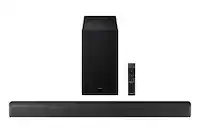
Customer Ratings & Reviews










- Model:
- HW-B650/ZA
- SKU:
- 12378060
Rating by feature
- Value
Rating 4.7 out of 5 stars
- Quality
Rating 4.6 out of 5 stars
- Ease of Use
Rating 4.7 out of 5 stars
Great sound
Posted .This reviewer received promo considerations or sweepstakes entry for writing a review.This is my second purchase in as many months. Soundbar sounds amazing and is very easy to connect to TV as well as other devices. A bargain when on sale!
I would recommend this to a friendSounds horrible
||Posted . Owned for 1 month when reviewed.This reviewer received promo considerations or sweepstakes entry for writing a review.Poor sound quality waiting for Geek Squad to come back and check it out.
No, I would not recommend this to a friendBrand response from Samsung
Posted .Hello TracyJ,
Thank you for sharing your review of the HW-B650 Soundbar. I am sorry to see that it not lived up to your expectations.
If Geek Squad is unable to assist with improving your overall audio experience. Use this tips below to help optimize your soundbar.
When you press the SOUND MODE button on the provided soundbar remote, you are able to select the pre-equalized sound modes by choosing SURROUND SOUND, BASS BOOST, GAME, ADAPTIVE, DTS VIRTUAL:X, STANDARD.
By pressing the TONE CONTROL button, you can adjust the volume of the treble or bass sound. Press the button to select TREBLE or BASS and then adjust the volume between -6~+6 by using the Up/Down buttons.
Press and hold the (Sound Control) button for about 5 seconds to adjust the sound for each frequency band. 150Hz, 300Hz, 600Hz, 1.2kHz, 2.5kHz, 5kHz, and 10kHz are selectable using the Left/Right buttons and each can be adjusted to a setting between -6 to +6 using the Up/Down buttons. (Make sure the Sound mode is set to “STANDARD”.
Lastly, using the WOOFER button on the remote, you can adjust the subwoofer’s volume between -6 to +6 by toggling the button up or down. To set the subwoofer volume level to 0, press the button down.
I hope these tips help you enjoy your new product.
You can always contact us for further help at 1-800-SAMSUNG (Ask for Soundbars), 8 AM – 12 AM EST, 7 days a week. Our LiveChat agents are also available by clicking on the ‘Support’ link on our website.
~ Samsung Solutions
Nice piece.
Posted .This reviewer received promo considerations or sweepstakes entry for writing a review.Sounds awesome, super easy hookup, samsung tv so 1 remote works nicely. Awesome value for sure. Seriously took 5 minutes to hook up and run.
I would recommend this to a friendExcellent soundbar for the price!
Posted .This reviewer received promo considerations or sweepstakes entry for writing a review.I am really glad that I did some research based on my budget. Can’t believe that this setup is so clear, clean and crisp with a deep base. I highly recommend this product especially if you have a Samsung TV with Bluetooth capability
I would recommend this to a friendSoundbar
Posted .This reviewer received promo considerations or sweepstakes entry for writing a review.Its a great model,love the sounds and bass especially when watching movies, and listening to music
I would recommend this to a friendSamsung sound bar
Posted .This reviewer received promo considerations or sweepstakes entry for writing a review.I am extremely satisfied with the sound bar. It was extremely easy to set up and it has fantastic sound!
I would recommend this to a friendI’d buy agin
Posted .This reviewer received promo considerations or sweepstakes entry for writing a review.Easy to use and works great! I’d definitely buy this product again and definitely recommend it to anyone look for a nice affordable surround sounds with good bass!
I would recommend this to a friendAn Excellent Choice
Posted .This reviewer received promo considerations or sweepstakes entry for writing a review.Sound quality is great, and the bass has been solid. Setup was straightforward and only had a small hiccup getting the bass synced.
I would recommend this to a friendGreat sound and value - if you can stand the LED
Posted .This reviewer received promo considerations or sweepstakes entry for writing a review.Great sound, easy to install, compact rear speakers are available. 5-stars all the way, EXCEPT the LED light on the bar comes on by itself every few hours and it is extremely bright in a dark bedroom.
I would recommend this to a friendSoundbar
Posted .This reviewer received promo considerations or sweepstakes entry for writing a review.Easy to install, great sound quality. Ordered online, picked up in store. Great customer service
I would recommend this to a friendEars ain’t as good as they used to be bummahh
Posted .This reviewer received promo considerations or sweepstakes entry for writing a review.Very good product for the price range! I recommend getting the Geek Squad (hundred bucks) for setting up your systems and coverage for any issues you may have over the next year. Guys were great, helpful, knowledgeable and will go out of their way to hook you up with systems that are best for your needs. If you are comfortable with setting up your own sound systems you will not need help with this device. This product works without WiFi but will connect with your other devices with WiFi. My tv speakers suck and this product makes a huge improvement! Well worth the money.
I would recommend this to a friendGreat Soundbar
Posted .This reviewer received promo considerations or sweepstakes entry for writing a review.Very easy to set up. Sounds great!!! If you want a soundbar that works. This is the soundbar for you!!
I would recommend this to a friendSamsung HW-B650 Soundbar
Posted .This reviewer received promo considerations or sweepstakes entry for writing a review.Sound bar sounds great and was delivered very quickly! The different audio profiles that come programmed into the sound bar ensure I have the best audio experience depending on what I'm watching.
I would recommend this to a friendSound bar
Posted .This reviewer received promo considerations or sweepstakes entry for writing a review.Excellent sound great product easy to setup easy instructions to read
I would recommend this to a friendNot very good sound bar
||Posted . Owned for 1 month when reviewed.This reviewer received promo considerations or sweepstakes entry for writing a review.Not that great selling on offer up get the Vizio way breed
No, I would not recommend this to a friendBrand response from Samsung
Posted .Hello,
You can optimize your audio performance to your liking by pressing the SOUND MODE button on your soundbar remote, and then selecting the desired sound effect by choosing SURROUND SOUND, BASS BOOST, GAME, ADAPTIVE, DTS VIRTUAL:X, STANDARD.
By pressing the TONE CONTROL button, you can adjust the volume of the treble or bass sound. Press the button to select TREBLE or BASS and then adjust the volume between -6~+6 by using the Up/Down buttons.
Press and hold the (Sound Control) button for about 5 seconds to adjust the sound for each frequency band. 150Hz, 300Hz, 600Hz, 1.2kHz, 2.5kHz, 5kHz, and 10kHz are selectable using the Left/Right buttons and each can be adjusted to a setting between -6 to +6 using the Up/Down buttons. (Make sure the Sound mode is set to “STANDARD”.
Additionally, using the WOOFER button on the remote, you can adjust the subwoofer’s volume between -6 to +6 by toggling the button up or down. To set the subwoofer volume level to 0, press the button down.
I hope these tips help you enjoy your new product.
You can always contact us for further help at 1-800-SAMSUNG (Ask for Soundbars), 8 AM – 12 AM EST, 7 days a week. Our LiveChat agents are also available by clicking on the ‘Support’ link on our website.
~ Samsung Solutions
Not good sound
||Posted . Owned for 1 month when reviewed.This reviewer received promo considerations or sweepstakes entry for writing a review.It didnt sounds as well as at the store uts too low
No, I would not recommend this to a friendBrand response from Samsung
Posted .Hello Miguel,
Thank you for sharing your review regarding the HW-B650 Soundbar. I am sorry to see that you are not fully satisfied with your purchase.
You can optimize your audio performance to your liking by pressing the SOUND MODE button on your soundbar remote, and then selecting the desired sound effect by choosing SURROUND SOUND, BASS BOOST, GAME, ADAPTIVE, DTS VIRTUAL:X, STANDARD.
By pressing the TONE CONTROL button, you can adjust the volume of the treble or bass sound. Press the button to select TREBLE or BASS and then adjust the volume between -6~+6 by using the Up/Down buttons.
Press and hold the (Sound Control) button for about 5 seconds to adjust the sound for each frequency band. 150Hz, 300Hz, 600Hz, 1.2kHz, 2.5kHz, 5kHz, and 10kHz are selectable using the Left/Right buttons and each can be adjusted to a setting between -6 to +6 using the Up/Down buttons. (Make sure the Sound mode is set to “STANDARD”.
Additionally, using the WOOFER button on the remote, you can adjust the subwoofer’s volume between -6 to +6 by toggling the button up or down. To set the subwoofer volume level to 0, press the button down.
If we can help with anything else, please call us at 1-800-SAMSUNG (Ask for Soundbars), 8 AM – 12 AM EST, 7 days a week. LiveChat with an agent as well as manuals, software, and warranty info can be found at the ‘Support’ link on our Samsung website.
~ Samsung Solutions
theDan
Posted .This reviewer received promo considerations or sweepstakes entry for writing a review.Decent sound for the price point, Easy set-up. Massive upgrade for almost any flat panel tv sound.
I would recommend this to a friendSoundbar.
Posted .This reviewer received promo considerations or sweepstakes entry for writing a review.Wonderful sound. Easy installation. Low profile. Nice remote control.
I would recommend this to a friendPerfect
Posted .This reviewer received promo considerations or sweepstakes entry for writing a review.Excellent sound very strong and easy set up overall worth it fit great with my Samsung tv
I would recommend this to a friendSoundbar
Posted .This reviewer received promo considerations or sweepstakes entry for writing a review.Very easy to set up and it has great sound and clarity
I would recommend this to a friend