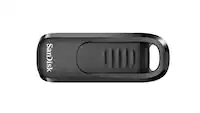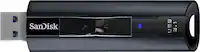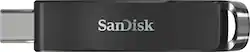
SanDisk - Ultra 128GB USB 3.0 Type-C Flash Drive - Sleek Black
- Key Specs
- Storage Capacity: 128 gigabytes (Measured in megabytes (MB), gigabytes (GB) and terabytes (TB), this is the amount available for storing files, music, movies, photos and more. The total includes the capacity of the hard disk drive and solid state drive if both are included on the computer.)
- Connector Type(s): USB-C (Type of interface connection found on the device.)
- USB Generation: USB 3.0 (The specification (generation) of the USB standard. Generations are backwards compatible with previous specifications (provided that those devices have the necessary adapter to accommodate the connection type).)
- Maximum Read Speed: 150 megabytes per second (The greatest speed at which the device can read information; for example, opening files.)
- Password Protection: true
- General
- Brand: SanDisk
- Model Number: SDCZ460-128G-A46
- Product Name: Ultra 128GB USB 3.0 Type-C Flash Drive
- Color: Sleek Black
- Capacity
- Storage Capacity: 128 gigabytes (Measured in megabytes (MB), gigabytes (GB) and terabytes (TB), this is the amount available for storing files, music, movies, photos and more. The total includes the capacity of the hard disk drive and solid state drive if both are included on the computer.)
- Connectivity
- Connector Type(s): USB-C (Type of interface connection found on the device.)
- USB Generation: USB 3.0 (The specification (generation) of the USB standard. Generations are backwards compatible with previous specifications (provided that those devices have the necessary adapter to accommodate the connection type).)
- Speed
- Maximum Read Speed: 150 megabytes per second (The greatest speed at which the device can read information; for example, opening files.)
- Features
- Password Protection: true
- Retractable: true
- Dimensions
- Product Height: 0.4 inches (The out of box height of the item. Height is measured as the vertical distance from the bottom of the item to the top as it would be primarily used or placed.)
- Product Width: 2.2 inches (The out of box width of the item. Width is measured as the horizontal distance from one side of the item to the other as it would be primarily used or placed.)
- Product Depth: 0.8 inches (The out of box depth of the item. Depth is measured as the distance from the front of the item to the back as it would be primarily used or placed.)
- Compatibility
- Lanyard Attachment: true
- Other
- UPC: 619659167165
Fast data transfer speeds reduce the time used to copy large files, while the 128GB provides ample storage space for your favorite data. This SanDisk Ultra Type-C USB flash drive has SanDisk SecureAccess software, which helps you encrypt sensitive files easily.
- 128GB storage capacity: Offers ample space for photos, videos and more.
- USB 3.0 interface: For a fast connection. Backward compatible with USB 2.0.
- Fast read speed: Read speed up to 100MB/s for fast data transfer.
- SanDisk SecureAccess software: Helps keep your files protected.
- 1-year subscription for RescuePro file recovery software: For simple recovery.
- Hot swappable: Allows easy connection without having to reboot.
- iPhone 15/Pro Compatibility: Works with iPhone 15/Pro via Apple Files App, does not support direct video recording
- 128GB storage capacity: Offers ample space for photos, videos and more.
- USB 3.0 interface: For a fast connection. Backward compatible with USB 2.0.
- Fast read speed: Read speed up to 100MB/s for fast data transfer.
- SanDisk SecureAccess software: Helps keep your files protected.
- 1-year subscription for RescuePro file recovery software: For simple recovery.
- Hot swappable: Allows easy connection without having to reboot.
- iPhone 15/Pro Compatibility: Works with iPhone 15/Pro via Apple Files App, does not support direct video recording
Whats Included
- SanDisk Ultra 128GB USB 3.0 Type-C Flash Drive
- SanDisk Ultra 128GB USB 3.0 Type-C Flash Drive
A: It is probably formatted with the wrong file system. Mostly like it is formatted with Fat32 or Fat16. Change to NTFS. Open file explorer, right click on the flash drive, choose format, change file system to NTFS then click format. After you should be good to go.
A: Hi, please be informed that this USB Drive has a USB Type-C connector which can only be connected to a computer/ device/ mobile phone that has a USB Type-C port. Since, iPhones have a lightning port and not a USB Type-C port, you cannot connect this USB Drive in an iPhone. In this case, you can try our SanDisk® iXpand Flash Drive which is specifically designed to be connected directly to the iPhone's lightning port.
Q: does this flash drive help to reset regular computers
A: Please allow us to inform you that the SanDisk® Ultra USB 3.1 Type C Drive works as a regular plug and play drive when connected to a computer.
Q: Will this work witj Motorola edge 5g?
A: Yes, the SanDisk® Ultra USB 128GB Type C flash drive is compatible with the Motorola Moto Edge as it come with Type C port and support OTG (On-The-Go).
Q: Is this good for getting photos from my Motorola which is type c Android?
A: Yes, the SanDisk® Ultra USB 3.0 Type C is compatible with Android device which come with Type C port and support OTG (On-The-Go).
Q: This is my first time purchasing a Flash Drive, does this work with MacBook Air (2020)? :)
A: It will work okay out of the box, but you can improve performance by reformatting it using the Mac.
Q: Will this fit my Samsung galaxy android phone
A: Yes, if your phone is type c
Q: Will this work with an iPad Air Gen 4?
A: Please allow us to inform you that our Dual Drives with USB Type-C connectors can be connected to computers/ devices with USB Type-C ports including your iPad Air (2020). However, in order to know how to access this Dual Drive using the "Apple Files Application" on your iPad Air, we suggest you to contact Apple Support.