
Sony Interactive Entertainment - PlayStation Portal Remote Player - White
Color
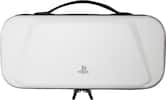
White- PowerA - Protection Case for PlayStation Portal Remote Player - White$29.99The price was $34.99
More Buying Options
Specifications
- WirelessYesBattery SizeBattery packCompatible Platform(s)PlayStation 5
- Key Specs
- Wireless: true
- Battery Size: Battery pack (The battery size required for operation.)
- Compatible Platform(s): PlayStation 5
- General
- Brand: Sony Interactive Entertainment
- Model Number: 1000041319
- Product Name: PlayStation Portal Remote Player
- Color: White
- Features
- Product Type: Controller
- Headset Jack: true
- Rumble Vibration: true
- Analog Joysticks: true
- Connectivity
- Wireless: true
- Power
- Battery Size: Battery pack (The battery size required for operation.)
- Dimensions
- Product Height: 6 inches (The out of box height of the item. Height is measured as the vertical distance from the bottom of the item to the top as it would be primarily used or placed.)
- Product Width: 3.88 inches (The out of box width of the item. Width is measured as the horizontal distance from one side of the item to the other as it would be primarily used or placed.)
- Product Length: 14 inches (The out of box length of the item. Length is measured as the longest dimension of the item.)
- Product Weight: 2.6 pounds (The out of box weight of the item.)
- Compatibility
- Compatible Platform(s): PlayStation 5
- Warranty
- Warranty - Parts: 1 year
- Warranty - Labor: 1 year
- Other
- UPC: 711719579779
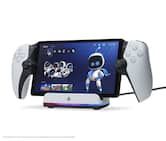
PlayStation Portal Remote Player. Play your PS5 console over your home Wi-Fi with console quality controls using PlayStation Portal Remote Player. Experience the incredible immersion of DualSense wireless controller features like haptic feedback and adaptive triggers in supported games. Put your game collection on PS5 in the palm of your hand— PlayStation Portal Remote Player can play compatible games you have installed on your console without needing to play on a TV. PlayStation Portal Remote Player can stream compatible games installed on your PS5 console. PlayStation Portal Remote Player requires broadband internet Wi-Fi with at least 5Mbps for use. For a better play experience, a high-speed connection of at least 15Mbps is recommended. The quality and connectivity of your play experience may vary depending on your network environment. A PS5 console and account for PlayStation Network is required. The PS5 console must be connected to a broadband internet connection, powered on fully or in Rest Mode, and it must be paired with your PlayStation Portal Remote Player. Games that require a VR headset (PlayStation VR or PlayStation VR2) or additional peripherals (other than a DUALSHOCK 4, DualSense, or DualSense Edge wireless controller) are not compatible. Games that must be streamed on PS5 using a PS Plus Premium membership are not compatible. Haptic feedback and adaptive trigger features available when supported by game. Individual game performance will vary based on the specific game being played, and the quality of connectivity in your network environment. Haptic feedback and adaptive trigger features are only available when those features are supported by the game being played.
- Put Your PS5 in the Palm of Your Hand: PlayStation Portal™ Remote Player gives you access to the games on your PS5 over a WiFi network, letting you jump right into gaming without needing to play on a TV.
- Play Your Game Collection with Remote Play: PlayStation Portal Remote Player can play compatible games you have installed on your PS5 console, including your favorite games for PS5 and PS4.
- Cloud Streaming from the Game Catalog and Classics Catalog: Discover an awesome library of PS5® games on the PlayStation Portal™ Remote Player with PlayStation®Plus Premium. Access hundreds of games from the Game Catalog6 and Classics Catalog, streamed directly to your PlayStation Portal™ Remote Player with new games added every month.
- Cloud Streaming for PS5® Games in Your Library: With PlayStation®Plus Premium, stream select digital PS5® games in Your Library from PlayStation™Store directly to your PlayStation Portal™ Remote Player, with no downloads required. Enjoy instant access to some of the latest and greatest PS5® games in the palm of your hand.
- Experience Breathtaking Immersion with DualSense® Wireless Controller Features: Feel the immersive power of haptic feedback and adaptive triggers in supported games. Responsive vibrations react to your in‑game choices and simulate environmental factors. Dynamic resistance mimics the tension of interactions with in‑game gear and objects in select PS5® games.
- 60fps Capable at 1080p Resolution: Remote Player can deliver silky smooth gameplay at up to 60fps with high image clarity on its 1080p resolution screen.3
- Get Gaming Fast: PlayStation Portal Remote Player is a purpose-built device dedicated to delivering an incredible remote play experience. That means you can turn it on, press a button to connect to your PS5 console and get right to playing with remarkable speed.
- Put Your PS5 in the Palm of Your Hand: PlayStation Portal™ Remote Player gives you access to the games on your PS5 over a WiFi network, letting you jump right into gaming without needing to play on a TV.
- Play Your Game Collection with Remote Play: PlayStation Portal Remote Player can play compatible games you have installed on your PS5 console, including your favorite games for PS5 and PS4.
- Cloud Streaming from the Game Catalog and Classics Catalog: Discover an awesome library of PS5® games on the PlayStation Portal™ Remote Player with PlayStation®Plus Premium. Access hundreds of games from the Game Catalog6 and Classics Catalog, streamed directly to your PlayStation Portal™ Remote Player with new games added every month.
- Cloud Streaming for PS5® Games in Your Library: With PlayStation®Plus Premium, stream select digital PS5® games in Your Library from PlayStation™Store directly to your PlayStation Portal™ Remote Player, with no downloads required. Enjoy instant access to some of the latest and greatest PS5® games in the palm of your hand.
- Experience Breathtaking Immersion with DualSense® Wireless Controller Features: Feel the immersive power of haptic feedback and adaptive triggers in supported games. Responsive vibrations react to your in‑game choices and simulate environmental factors. Dynamic resistance mimics the tension of interactions with in‑game gear and objects in select PS5® games.
- 60fps Capable at 1080p Resolution: Remote Player can deliver silky smooth gameplay at up to 60fps with high image clarity on its 1080p resolution screen.3
- Get Gaming Fast: PlayStation Portal Remote Player is a purpose-built device dedicated to delivering an incredible remote play experience. That means you can turn it on, press a button to connect to your PS5 console and get right to playing with remarkable speed.
Disclaimers
- Requires a PS Plus Premium Membership and only available to adult accounts. PS Plus is an ongoing subscription with a recurring subscription fee which is charged automatically (at the then current PS Store price) at the frequency you choose at purchase until cancelled. Terms apply: playstation.com/legal.
- Requires a PS Plus Premium Membership and only available to adult accounts. PS Plus is an ongoing subscription with a recurring subscription fee which is charged automatically (at the then current PS Store price) at the frequency you choose at purchase until cancelled. Terms apply: playstation.com/legal.
Q: Can I stream games from the Game Catalog?
A: Yes, you can stream games from the Game Catalog with PlayStation Plus Premium.
Q: What is the refresh rate capable on this device?
A: This device is capable of 60fps.
Q: Does this device have haptic feedback?
A: Yes, this device has haptic feedback in supported games.
Q: Is it possible to play my PS4 games on this device?
A: Yes, you can play your PS4 games on this device.
Q: Does the device have adaptive triggers?
A: Yes, the device has adaptive triggers in supported games.
Q: Does this player require downloads for PS5 games?
A: No, this player does not require downloads for select digital PS5 games with PlayStation Plus Premium.
Q: What is the resolution of the screen?
A: The screen has a 1080p resolution.
Q: Does this remote player have rumble vibration?
A: Yes, this remote player has rumble vibration.
Compare similar products

PlayStation Portal Remote Player. Play your PS5 console over your home Wi-Fi with console quality controls using PlayStation Portal Remote Player. Experience the incredible immersion of DualSense wireless controller features like haptic feedback and adaptive triggers in supported games. Put your game collection on PS5 in the palm of your hand— PlayStation Portal Remote Player can play compatible games you have installed on your console without needing to play on a TV. PlayStation Portal Remote Player can stream compatible games installed on your PS5 console. PlayStation Portal Remote Player requires broadband internet Wi-Fi with at least 5Mbps for use. For a better play experience, a high-speed connection of at least 15Mbps is recommended. The quality and connectivity of your play experience may vary depending on your network environment. A PS5 console and account for PlayStation Network is required. The PS5 console must be connected to a broadband internet connection, powered on fully or in Rest Mode, and it must be paired with your PlayStation Portal Remote Player. Games that require a VR headset (PlayStation VR or PlayStation VR2) or additional peripherals (other than a DUALSHOCK 4, DualSense, or DualSense Edge wireless controller) are not compatible. Games that must be streamed on PS5 using a PS Plus Premium membership are not compatible. Haptic feedback and adaptive trigger features available when supported by game. Individual game performance will vary based on the specific game being played, and the quality of connectivity in your network environment. Haptic feedback and adaptive trigger features are only available when those features are supported by the game being played.
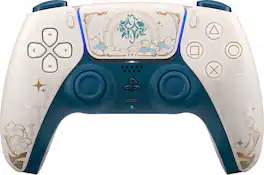
Master elemental energy in the world of Teyvat on PlayStation 5 with the DualSense Wireless Controller – Genshin Impact Limited Edition. Showcasing emblems of twin travellers Aether and Lumine, and featuring their trusted companion guide Paimon, this ethereal white, gold, and green palette is adorned with arcane glyphs of a fantasy realm. Discover a deeper, highly immersive gaming experience that brings the action to life in the palms of your hands. The DualSense wireless controller offers immersive haptic feedback, dynamic adaptive triggers and a built-in microphone, all integrated into an iconic comfortable design.

Experience mobile gaming on the greatest scale with a full-sized mobile controller to rule them all. Made for full-sized tablets, get the ergonomics and performance of a pro-grade console controller, combined with device compatibility that sets a new standard for the entire industry.

Inspired by the look and feel of the PS DualSense wireless controller, the Backbone One PlayStation Edition transforms your iPhone device into the ultimate gaming console. Snap in your iPhone and play any game or service that supports controllers, including App Store, GeForce NOW or even stream from PlayStation with PS Remote Play or PC. Our Second Generation device features two sets of magnetic adapters that allow for even better phone fit along with a reshaped D-pad which enhances responsiveness, resulting in superior feel and control across multiple genres of gameplay. The Backbone app organizes your content library and game streaming services into an integrated user experience. Uncover a new world of premium gaming in seconds.
| Pros for Sony Interactive Entertainment - PlayStation Portal Remote Player - White | |||
|---|---|---|---|
| Overall Performance, Portability, Screen Quality, Battery Life, Comfort | There were no pros for this product— | There were no pros for this product— | Overall Performance, Portability, Button Responsiveness |
| Cons for Sony Interactive Entertainment - PlayStation Portal Remote Player - White | |||
| Connectivity, Input Lag | There were no cons for this product— | There were no cons for this product— | Connectivity, Compatibility |
Specs
Reviews
Customers are saying
Customers often highlight the PlayStation Portal Remote Player's overall performance, screen quality, and portability as significant advantages. Many find the device comfortable to hold and appreciate its lightweight design. However, some customers have expressed concerns about connectivity issues, occasional lag, and frame rate variations depending on internet connection stability. Despite these drawbacks, the device's battery life is generally considered satisfactory.
- Overall Performance (2483)
- Portability (1405)
- Screen Quality (734)
- Connectivity (851)
- Input Lag (59)
Customer Images
The vast majority of our reviews come from verified purchases. Reviews from customers may include My Best Buy members, employees, and Tech Insider Network members (as tagged). Select reviewers may receive discounted products, promotional considerations or entries into drawings for honest, helpful reviews.
- Rated 5 out of 5 stars
Great Companion for PS5, With the Right Setup
I’ve been using the PlayStation Portal for a while now, and overall it’s a solid device if you understand what it’s designed for. The screen is excellent — the 8-inch display is bright, sharp, and makes PS5 games look great. The built-in DualSense controls feel just like a real PS5 controller, including adaptive triggers and haptic feedback, which really helps immersion. Games like action, RPGs, and sports titles play smoothly when the connection is strong. That said, this device depends heavily on your internet connection. A stable Wi-Fi signal (or a strong mobile hotspot) is crucial. When the connection is good, gameplay feels responsive with minimal lag. When it’s not, you’ll notice input delay or drops. This isn’t a flaw of the hardware so much as the nature of cloud/remote play. Battery life is decent — typically around 4–5 hours depending on usage — and the device is lightweight and comfortable for longer sessions. I especially like being able to play my PS5 without tying up the TV or while relaxing in another room. Pros: • Beautiful, large screen • Real DualSense controls built in • Easy setup with PS5 • Great for at-home or travel play Cons: • Requires strong, stable internet • No native/offline gaming • Limited use outside Remote Play Final Thoughts: The PlayStation Portal isn’t meant to replace a console or a handheld gaming PC — it’s a remote-play companion, and it does that job well. If you already own a PS5 and want flexibility to play anywhere with good Wi-Fi, it’s worth it. Just don’t expect standalone gaming.
This review is from Sony Interactive Entertainment - PlayStation Portal Remote Player - Midnight Black
RashonF Posted
- Rated 5 out of 5 stars
LOVING IT !!
I find this device to be a very solid performer overall, offering a high-quality display that looks sharp and vibrant in everyday use. The design is comfortable and thoughtfully made, making it easy to hold and use for extended periods without discomfort. It stands out for its ease of use, with intuitive controls and a user-friendly layout that requires little to no learning curve. The build quality feels well-made and reliable, while still maintaining a lightweight feel that makes it convenient to carry and handle. Overall, it delivers a great balance of performance, comfort, and portability, making it a dependable choice for regular use.
This review is from Sony Interactive Entertainment - PlayStation Portal Remote Player - Midnight Black
Wrench Posted
- Rated 5 out of 5 stars
⭐️⭐️⭐️⭐️⭐️
I purchased the PlayStation Portal Remote Player from Best Buy and my experience with it has been very positive. The 8-inch screen is bright and clear, and games run smoothly at 1080p/60fps when connected to a strong WiFi network. I really like that it keeps the full DualSense features, including haptic feedback and adaptive triggers, because it feels just like playing directly on my PS5. Setup was quick and straightforward. Once connected, I was able to play in different rooms without needing the TV, which has been very convenient. Battery life has also been solid for extended gaming sessions. The only downside is that performance depends heavily on internet stability. With a weaker connection, you may notice some lag. Overall, it has been a great addition to my gaming setup and delivers exactly what it promises.
This review is from Sony Interactive Entertainment - PlayStation Portal Remote Player - Midnight Black
Harveykazibwe Posted