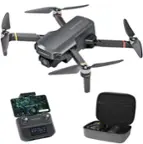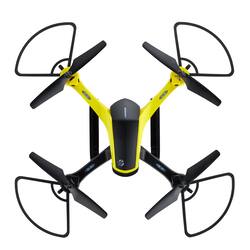
Vivitar - VTI Skytracker GPS Drone - Black
- Key Specs
- Maximum Flight Time: 16 minutes
- Control Type: Remote control
- General
- Product Name: VTI Skytracker GPS Drone
- Brand: Vivitar
- Assembly Required: No
- Recommended Minimum Age: 18 years
- Model Number: DRC445-NOC-STK-2
- Color: Black
- Color Category: Black
- Flight
- Autonomous Flight Modes: Hover, Landing
- Obstacle Avoidance Technology: None
- Directional Controls: All
- Maximum Flight Time: 16 minutes
- Maximum Flight Distance: 0.1894 miles
- Maximum Speed (Horizontal): 8.95 miles per hour
- Number of Rotors: 4
- Camera
- Integrated Camera: true
- Maximum Video Frame Rate: 720p (HD) @ 30 FPS (The maximum frequency at which consecutive images can be captured by a video recording device.)
- Photo Resolution: 1280 x 720 (Refers to the number of pixels, both horizontally and vertically, used to capture an image. The higher the resolution the finer the image details.)
- First Person View (FPV): false
- Camera Gimbal: Built-in (A support that pivots and stabilizes the camera.)
- Autofocus: true (Allows the camera to automatically focus through the lens, rather than by adjusting the lens manually.)
- Environmental
- Indoor Or Outdoor Use: Outdoor (Indicates the appropriate environment product was designed to be used in.)
- Compatibility
- Mobile Device Holder: false
- Features
- Control Type: Remote control
- Integrated GPS: Yes
- Wireless Connectivity: Wi-Fi (The manner in which a device sends data to another device over a short distance without the use of wires or cables.)
- Frequency Band: 2.4 GHz (Bands may be grouped into categories such as low- and high-band VHF (Very High Frequency), low- and high-band UHF (Ultra High Frequency), or certain frequency channels (measured in MHz or GHz). Generally, higher frequencies transmit information faster but have shorter range than lower frequencies.)
- Landing Gear/Legs Included: Landing Legs
- Dimensions
- Product Weight with Battery: 725.75 grams
- Storage
- Memory Card Compatibility: miniSD (The type of memory card(s) recommended for use with the product.)
- Memory Card Included: false (Indicates whether a memory card is included.)
- Built-in Storage: false
- Power
- Rechargeable Battery: true
- Removable Battery: true
- Warranty
- Manufacturer's Warranty - Parts: 1 Year Limited
- Manufacturer's Warranty - Labor: 1 Year Limited
- Other
- UPC: 681066172216
Record impressive aerial video using the Vivitar VTI Skytracker Camera GPS Drone (DRC-445) with Wi-Fi. With one-button takeoffs and landings, this drone is easy to fly, even for beginners. Its Follow Me technology ensures the recording GPS drone continuously tracks your position or the position of another object in motion.
- GPS Drone's one-button takeoffs and landings: GPS drone's one-button takeoffs and landings offer simplicity for new and experienced flyers
- Approximately 16 inutes of flight time: Approximately 16 minutes of flight time support extended shots for 720p full HD video and 16 MP still images
- Follow me function: Follow me function locks the drone onto its subject's position for uninterrupted image capture
- Built-in GPS: Built-in GPS enables automatic return after flight
- 3 Speed modes: 3 speed modes allow fast and slow video flyovers to match your subjects' pace or affect the drama of your shot
A: Hi Richie, thank you for reaching out. We are sorry to hear the drone is not working as expected. Please ensure a full charge and calibration outdoors to check if the issue is fixed. If the issue is not fixed, please reach out to us at 18005929541 or [email protected], quoting ticket number 43047, we will try help fix this. Thank you.
Q: How do I make my drones fly using just my Android phone
A: undefined
A: kingsdrone.com has the batterys for these.
A: Hi there, thank you for reaching out and thank you also bring the error to our notice. We will work on this and get it fixed. If you have any more question, please reach out to us at 18005929541 or [email protected], quoting ticket number 42877, we will try help fix this. Thank you.
Q: How do I get parts and a controller
A: By contacting the manufacturer on the app.
A: Same. I used to have the app but now i cant find it anywhere
Q: How do I control my drone with my smart phone
A: Hi there, thank you for reaching out to us. To control drone through a smartphone, please download and install the VTI Sky tracker app from Playstore or Appstore. Charge and calibrate your drone outdoors and connect your phone to the drone's hotspot. Open the app and follow on screen instructions. Please reach out to us at 18005929541 or [email protected], quoting ticket number, 42612 if you have any issues and we will assist you. Thank you.