
Wacom - Intuos Pro Small Bluetooth Professional Graphic Drawing Tablet (2025) - Black
Wacom - Intuos Pro Small Bluetooth Professional Graphic Drawing Tablet (2025) - Black
More Buying Options

Specifications
- Screen Size0 inchesActive Area7.4 x 4.1 inTotal Storage Capacity0 gigabytesWireless ConnectivityBluetoothBattery ChemistryLithium-ionPressure Levels8192
- Key Specs
- Screen Size: 0 inches (Size of the screen, measured diagonally from corner to corner.)
- Active Area: 7.4 x 4.1 in (The size of the screen area that a user interacts with, either by stylus and/or touch (if supported).)
- Total Storage Capacity: 0 gigabytes
- Wireless Connectivity: Bluetooth (The manner in which a device sends data to another device over a short distance without the use of wires or cables.)
- Battery Chemistry: Lithium-ion
- Pressure Levels: 8192 (Allows the device to recognize different pressures from a compatible pen or stylus, which may control line thickness, opacity, or color. The more pressure levels, the more responsive the pen will feel.)
- General
- Brand: Wacom
- Model Number: PTK470K0A
- Product Name: Intuos Pro Small Bluetooth Professional Graphic Drawing Tablet (2025)
- Color: Black
- Year of Release: 2025
- Display
- Screen Size: 0 inches (Size of the screen, measured diagonally from corner to corner.)
- Stylus Input: Active (Electromagnetic Resonance) (An active stylus/pen is able to communicate directly with a compatible device; active electromagnetic resonance (EMR) pens are powered via a device's screen and active electrostatic (AES) pens require an additional power source. A passive stylus does not have electronic features and is compatible with most capacitative touch screens.)
- Active Area: 7.4 x 4.1 in (The size of the screen area that a user interacts with, either by stylus and/or touch (if supported).)
- Aspect Ratio: 16:9 (The measurement of the width of a screen compared to the height of a screen, expressed as a ratio.)
- Storage
- Total Storage Capacity: 0 gigabytes
- Compatibility
- Operating System Compatibility: Windows, Mac OS
- System Requirements: USB-A port, Windows 10 or later/Mac OS 13 or later, Bluetooth for wireless connection to computer/s Marketing Description (The software that a product must have for it to be able to integrate with another product.)
- Connectivity
- Wireless Connectivity: Bluetooth (The manner in which a device sends data to another device over a short distance without the use of wires or cables.)
- Bluetooth Version: 5.3 (The Bluetooth specification formalized by the Bluetooth Special Interest Group. All versions of the Bluetooth standard are backwards compatible with previous versions.)
- Interface(s): USB-C, USB-A (Refers to the types of connections that devices use to interact and communicate with each other.)
- Power
- Charging Interface(s): USB-C (The connection for transmitting power to charge the device.)
- Battery Life (up to): 16 hours (Battery life will vary depending on the product configuration, product model, applications loaded on the product, power management setting of the product and the product features used by the customer. As with all batteries, the maximum capacity of this battery will decrease with time and usage.)
- Battery Capacity: 1200 milliampere hours (The amount of energy stored in the battery.)
- Battery Chemistry: Lithium-ion
- Features
- Pressure Levels: 8192 (Allows the device to recognize different pressures from a compatible pen or stylus, which may control line thickness, opacity, or color. The more pressure levels, the more responsive the pen will feel.)
- Number Of Switches: 1
- Number of Shortcut Keys: 5 (Allows for convenient access to frequently used software shortcuts.)
- Tilt Angle (Maximum): 60 degrees (Greatest angle of tilt between the pen and active screen area that the device can recognize. Allows for intuitive functions when using the pen, such as more natural brush strokes or shading.)
- Dimensions
- Product Height: 0.28 inches (The out of box height of the item. Height is measured as the vertical distance from the bottom of the item to the top as it would be primarily used or placed.)
- Product Width: 6.4 inches (The out of box width of the item. Width is measured as the horizontal distance from one side of the item to the other as it would be primarily used or placed.)
- Product Depth: 8.5 inches (The out of box depth of the item. Depth is measured as the distance from the front of the item to the back as it would be primarily used or placed.)
- Product Weight: 8.47 ounces (The out of box weight of the item.)
- Included
- Stylus Included: true
- Stylus Model Included: Wacom Pro Pen 3
- Stylus Stand Included: true
- Warranty
- Warranty - Parts: 2-year in USA, Canada, and Latin America
- Warranty - Labor: 2-year in USA, Canada, and Latin America
- Other
- UPC: 753218984067
The Intuos Pro drawing tablet, Wacom’s flagship tablet, combines cutting-edge pen technology with unmatched precision, comfort, and versatility to help creators achieve the perfect harmony between work and flow. Designed with professional needs in mind, it’s the only Wacom graphic tablet featuring the customizable Pro Pen 3, which allows you to adjust the grip, weight, and button configuration for a personalized experience with Wacom’s most sensitive and accurate pen technology. This art tablet’s ergonomic layout includes intuitive Dials and ExpressKeys, located at the top of the tablet and easily accessible for both left- and right-handed users. At its thinnest, Intuos Pro is only 4mm, and is built with durable magnesium, it’s portable yet rugged, ideal for studio or on-the-go use. With three sizes to suit any style—whether for detailed editing or expressive art forms - Intuos Pro integrates seamlessly with creative software and supports Bluetooth connectivity. It’s also compatible with previous generation Wacom Pro Pens and EMR styluses from brands like LAMY and STAEDTLER
- Wacom's Best Pen Technology: Pro Pen 3 offers amazing precision, 8192 pressure levels, tilt support & lag-free tracking for smooth, precise strokes; choose slim, straight or flared grip, adjust balance & button layout for precision and comfort.
- Dial Into Productivity: Speed up and stay in the creative flow with 5 customizable tablet ExpressKeys & a mechanical dial conveniently located at the top of the tablet and close to your keyboard for efficiency.
- Designed for Modern Monitors: With a versatile 16:9 format perfect for multiple monitors and wide displays; small size has a large active area with a small footprint 8.4” x 6.4” / 215 x 163 mm.
- Sleek and Sturdy: Measuring 4mm at its thinnest this professional-grade drawing tablet feels like pen-on-paper on your desk, combined with the robust durability of magnesium making it equally suited for your office or life on the go.
- Wireless Freedom: Use Intuos Pro with USB or connect wirelessly via Bluetooth to multiple computers with a simple switch.
- Included Software: Register your Intuos Pro and get access to software trials of Capture One, Clip Studio Paint EX and MASV file transfer service.
- Whats in the Box: Intuos Pro tablet, USB C-to-A cable, Wacom Pro Pen 3, Flare/Straight grips, balance weight, button covers, pen stand, replacement nibs (5 standard, 3 felt, 2 rubber), nib removal tool, quick start guide & regulation sheet and USB A-to-C adapter.
- System Requirements: USB-A port, Windows 10 or later/Mac OS 13 or later, Bluetooth for wireless connection to computer/s.
- Wacom's Best Pen Technology: Pro Pen 3 offers amazing precision, 8192 pressure levels, tilt support & lag-free tracking for smooth, precise strokes; choose slim, straight or flared grip, adjust balance & button layout for precision and comfort.
- Dial Into Productivity: Speed up and stay in the creative flow with 5 customizable tablet ExpressKeys & a mechanical dial conveniently located at the top of the tablet and close to your keyboard for efficiency.
- Designed for Modern Monitors: With a versatile 16:9 format perfect for multiple monitors and wide displays; small size has a large active area with a small footprint 8.4” x 6.4” / 215 x 163 mm.
- Sleek and Sturdy: Measuring 4mm at its thinnest this professional-grade drawing tablet feels like pen-on-paper on your desk, combined with the robust durability of magnesium making it equally suited for your office or life on the go.
- Wireless Freedom: Use Intuos Pro with USB or connect wirelessly via Bluetooth to multiple computers with a simple switch.
- Included Software: Register your Intuos Pro and get access to software trials of Capture One, Clip Studio Paint EX and MASV file transfer service.
- Whats in the Box: Intuos Pro tablet, USB C-to-A cable, Wacom Pro Pen 3, Flare/Straight grips, balance weight, button covers, pen stand, replacement nibs (5 standard, 3 felt, 2 rubber), nib removal tool, quick start guide & regulation sheet and USB A-to-C adapter.
- System Requirements: USB-A port, Windows 10 or later/Mac OS 13 or later, Bluetooth for wireless connection to computer/s.
Whats Included
- Intuos Pro Small
- USB Type C to A Cable (1.8m)
- Wacom Pro Pen 3
- Pen Stand
- Replacement Nib Set (5 Standard, 3 Felt, 2 Rubber)
- Nib Removal Tool
- Grips: Flare & Straight
- Balance Weight
- Button Covers: Tall 3 Button, Tall No Button, Thin 3 Button & Thin No Button
- Quick Start Guide & Regulation Sheet
- Intuos Pro Small
- USB Type C to A Cable (1.8m)
- Wacom Pro Pen 3
- Pen Stand
- Replacement Nib Set (5 Standard, 3 Felt, 2 Rubber)
- Nib Removal Tool
- Grips: Flare & Straight
- Balance Weight
- Button Covers: Tall 3 Button, Tall No Button, Thin 3 Button & Thin No Button
- Quick Start Guide & Regulation Sheet
Q: What is the battery life of the Intuos Pro Small?
A: The Intuos Pro Small has a battery life of up to 16 hours.
Q: Does this tablet have bluetooth capability?
A: Yes, the Intuos Pro Small can connect wirelessly via Bluetooth.
Q: What comes included with this drawing tablet?
A: The Intuos Pro Small comes with the tablet itself, a USB-C to USB-A cable, the Wacom Pro Pen 3, different grips for the pen, a balance weight, button covers, a pen stand, replacement nibs, a nib removal tool, a quick start guide, regulation sheet, and a USB-A to USB-C adapter.
Q: What is the active area size of the small Intuos Pro?
A: The active area of the Intuos Pro Small is 7.4 inches by 4.1 inches.
Q: What kind of connectivity does the Intuos Pro Small use?
A: The Intuos Pro Small uses USB-C for charging and connecting, or Bluetooth for wireless connection.
Q: How many levels of pressure sensitivity does the Wacom Pro Pen 3 have?
A: The Wacom Pro Pen 3 features 8,192 levels of pressure sensitivity.
Q: Is this compatible with Microsoft OneNote?
A: Hello, and thank you for the great question. Yes, the Wacom Intuos Pro Small PTK470 is compatible with Microsoft OneNote and Office365 applications. Regards
Q: Can you connect this to an ipad or samsung tablet?
A: Than you for the question. The Intous Pro Small does need a direct computer connection via USB to a computer that supports Macintosh OS, Windows OS as the Wacom Driver needs to be loaded to be use. Regards
Compare similar products
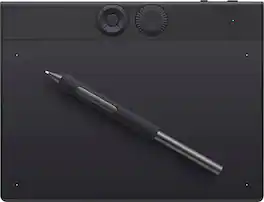
The Intuos Pro drawing tablet, Wacom’s flagship tablet, combines cutting-edge pen technology with unmatched precision, comfort, and versatility to help creators achieve the perfect harmony between work and flow. Designed with professional needs in mind, it’s the only Wacom graphic tablet featuring the customizable Pro Pen 3, which allows you to adjust the grip, weight, and button configuration for a personalized experience with Wacom’s most sensitive and accurate pen technology. This art tablet’s ergonomic layout includes intuitive Dials and ExpressKeys, located at the top of the tablet and easily accessible for both left- and right-handed users. At its thinnest, Intuos Pro is only 4mm, and is built with durable magnesium, it’s portable yet rugged, ideal for studio or on-the-go use. With three sizes to suit any style—whether for detailed editing or expressive art forms - Intuos Pro integrates seamlessly with creative software and supports Bluetooth connectivity. It’s also compatible with previous generation Wacom Pro Pens and EMR styluses from brands like LAMY and STAEDTLER
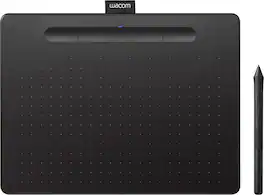
Step up to serious digital creation with the Wacom Intuos Medium Wireless drawing tablet. Featuring a spacious medium active area and Bluetooth connectivity to your computer, this graphics tablet gives aspiring artists and dedicated hobbyists the room and cord-free comfort to create with confidence. The pressure-sensitive battery-free pen delivers the reliable precision Wacom is known for - smooth, jitter-free lines with consistent pressure response. Work wirelessly or switch to wired mode for ultimate flexibility. Included downloadable software worth over $240 features 2 years of Clip Studio Paint Pro, 12 months of Boris FX Optics, and professional training resources. Four customizable ExpressKeys and a paper-like drawing surface streamline your workflow for illustration, photo editing, and digital painting. Certified Works with Chromebook and compatible with Windows, Mac, and all major creative apps. Backed by Wacom’s 40+ years of industry leadership - the reliable choice for creators ready to take their work seriously.

Ready to dive into digital art? The Wacom One drawing tablet is where your creative dreams begin. This graphics tablet with screen is the ideal pen display for creative beginners, casual artists, and visual thinkers looking to go digital or make the transition from traditional drawing. With a generous 14" anti-glare, anti-fingerprint screen and 98% sRGB color space coverage, you'll experience vibrant, true-to-life artwork with professional accuracy. The larger screen provides plenty of space to draw, sketch, annotate, or edit photos, while a smaller bezel means less real estate on your desk.

Transform your creative ideas into digital reality with the Wacom Intuos Small Wireless drawing tablet. Perfect for beginners and casual artists, this compact graphics tablet delivers reliable Wacom-quality precision at an accessible price. The battery-free pressure-sensitive pen provides natural, responsive drawing with no charging needed - just pickup and draw. Get started immediately with over $240 in included downloadable creative software and trials, including 2 years of Clip Studio Paint Pro and 12 months of Boris FX Optics. The paper-like surface texture and four customizable ExpressKeys make digital art, photo editing, and design feel natural and efficient. Cut the cord clutter with the Wacom Intuos Small Wireless drawing tablet. Featuring Bluetooth connectivity to your computer and wired mode, this graphics tablet eliminates cable management hassles while delivering reliable precision at your desk, dorm room, or home office. Certified to work with Chromebook and compatible with Windows and Mac, Wacom Intuos seamlessly integrates with Adobe, Corel, and all major creative applications. Backed by Wacom’s 40+ years of industry leadership, you’re choosing the same pen technology company trusted by professional studios worldwide - at a beginner-friendly price.
| Pros for Wacom - Intuos Pro Small Bluetooth Professional Graphic Drawing Tablet (2025) - Black | |||
|---|---|---|---|
| There were no pros for this product— | Ease of use, Size, Wireless, Quality, Drawing | There were no pros for this product— | Ease of use, Size, Wireless, Overall Performance, Price |
| Cons for Wacom - Intuos Pro Small Bluetooth Professional Graphic Drawing Tablet (2025) - Black | |||
| There were no cons for this product— | Lag, Setup, Software, Compatibility, Learning Curve | There were no cons for this product— | Lag, Setup, Surface |
Specs
Reviews
Customer Images
The vast majority of our reviews come from verified purchases. Reviews from customers may include My Best Buy members, employees, and Tech Insider Network members (as tagged). Select reviewers may receive discounted products, promotional considerations or entries into drawings for honest, helpful reviews.
- Rated 5 out of 5 stars
Best Tablet I Used
As someone who is trying to get into art but mostly plays one very specific game with this tablet i will say its game changer. The pen is nice and your able to change it to any way that suits you and you can remove the buttons if they are something that get in your way. Coming from a old 2013 Intuos I think this was a well worth it upgrade.
This review is from Wacom - Intuos Pro Small Bluetooth Professional Graphic Drawing Tablet (2025) - Black
Brady Posted
- Rated 5 out of 5 stars
Drawing pad
It worked great just needed a screen would have been nicer!!
This review is from Wacom - Intuos Pro Small Bluetooth Professional Graphic Drawing Tablet (2025) - Black
EddieN Posted