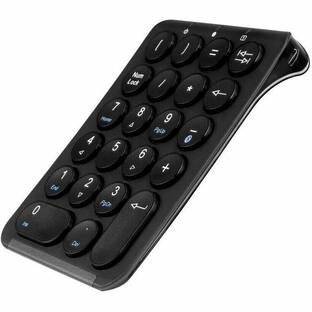
Adesso - Wireless Spill Resistant 18-Key Numeric Keypad - Wireless Connectivity - RF - 30 ft - 2.40 GHz - USB Interface - Black
Reviews coming soon
About this product
Adesso Wireless Spill Resistant 18-Key Numeric Keypad - Wireless Connectivity - RF - 30 ft - 2.40 GHz - USB Interface - 18 Key(s) - Windows 10, Windows 8, Windows 7 - English (US) - Computer - PC - Membrane Keyswitch - AAA Battery Size Supported - Black
Features
2.4 GHz RF Wireless Technology
This keypad works at any angle with a range of up to 30 ft. with no wires to get tangled.
Compact & Lightweight
The WKB-6010UB only weighs a quarter of a pound and is less than three and a half inches wide which makes it extremely portable and space saving.
Spill Resistant
The keypad's spill resistant design helps to prevent fluids from staying inside, which would otherwise cause damage to the keypad.
Quiet Membrane Key Switches
Membrane key switches provide a quieter typing experience with lifecycle lasting up to five million keystrokes.
Plug & Play
The WKB-6010UB requires no driver. Simply connect the device to your computer and begin enjoying your new peripheral companion. More from the Manufacturer
Specifications
- Form FactorCompact (60%)Connection TypeWireless
Reviews
This product doesn't have any reviews yet.

Compare similar products

Adesso Wireless Spill Resistant 18-Key Numeric Keypad - Wireless Connectivity - RF - 30 ft - 2.40 GHz - USB Interface - 18 Key(s) - Windows 10, Windows 8, Windows 7 - English (US) - Computer - PC - Membrane Keyswitch - AAA Battery Size Supported - Black
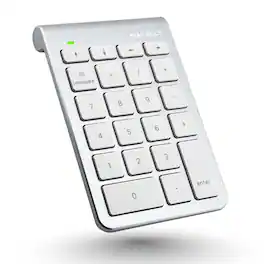
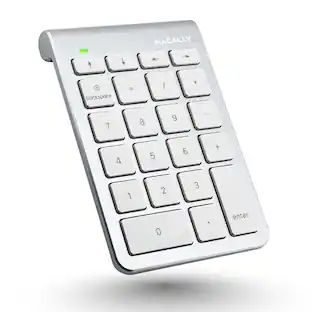
Enhance your productivity with the Macally BTNUMKEY22, a 22-key numeric keypad designed for professionals who require efficient number entry in spreadsheets, accounting software, calculators, and more. Whether you're working on a laptop, iPad, or Bluetooth notebook, this numpad keyboard offers seamless performance and compatibility. EASY TO USE: The Macally BTNUMKEY22 pairs effortlessly with your device—no software needed! Simply connect via Bluetooth, and you're ready to start entering numbers with precision and speed. ADDITIONAL KEYS FOR ENHANCED PRODUCTIVITY: Equipped with (4) Arrow Keys (up, down, left, and right) and (5) Function Keys (Add, Subtract, Multiply, Divide, Equals), along with (13) Standard Keys (Numbers 0-9, Decimal, Clear & Enter), this number keyboard is designed to meet all your number entry needs. Whether you need a 10 key USB keypad or a wireless 10 key for laptop, this device has you covered. LONG BATTERY LIFE: With a remarkable 400 hours of non-stop usage and no automatic sleep mode, you can rely on the Macally BTNUMKEY22 for long-lasting performance. UNIVERSAL COMPATIBILITY: The Macally BTNUMKEY22 is compatible with Mac OS X v10.6 or later and any Bluetooth-enabled Apple device, including iMac, Mac Pro, Mac Mini, MacBook laptops, iPad, and iPhone models. This makes it an ideal keypad for iPad and a versatile tool for all your Apple devices. COMPACT & ERGONOMIC DESIGN: Measuring just 132 (H) x 90 (W) x 17 (D) inches and weighing only 104 grams (0.2 pounds), this numpad is easy to carry and fits perfectly alongside your computer input devices. The slightly tilted and sloped design ensures a comfortable hand placement, reducing strain during long typing sessions.

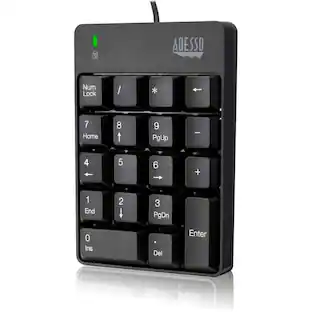
Adesso USB 18-Key Numeric Keypad - Cable Connectivity - USB Interface - 18 Key(s) - Windows 10, Windows 8, Windows 7 - English (US) - Computer - PC - Membrane Keyswitch - Black
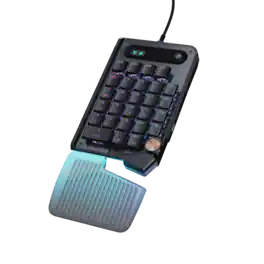
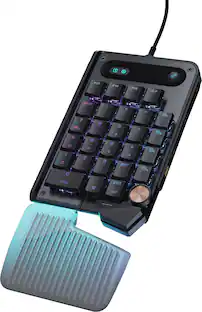
The Turtle Beach Command Series KP7 Modular Keypad is engineered for speed, precision, and adaptability across gaming, creation, and productivity workflows. Use it as a dedicated keypad, macro pad, or numpad, with seamless docking to the Turtle Beach Command Series KB7 Wired TKL Keyboard via dual modular rails, or as a standalone device. Titan low-profile Hall-Effect switches rated for 100 million clicks deliver fast, precise input with adjustable actuation and Rapid Trigger. True 8K wired performance ensures 0.125ms latency. A low‑profile chassis with kickstands, detachable wrist rest, programmable scroll wheel, extendable thumb bar when mounted to the right side of the Command Series KB7 or as a standalone, and per‑key RGB lighting completes a premium experience. The KP7 delivers a powerful, modular control solution for users who demand adaptability, performance, and workflow efficiency.
| Pros for Adesso - Wireless Spill Resistant 18-Key Numeric Keypad - Wireless Connectivity - RF - 30 ft - 2.40 GHz - USB Interface - Black | |||
|---|---|---|---|
| There were no pros for this product— | There were no pros for this product— | There were no pros for this product— | Build Quality, Ergonomics, Performance, Customization, Noise Level |
| Cons for Adesso - Wireless Spill Resistant 18-Key Numeric Keypad - Wireless Connectivity - RF - 30 ft - 2.40 GHz - USB Interface - Black | |||
| There were no cons for this product— | There were no cons for this product— | There were no cons for this product— | Button Layout |
Specs
Customers often buy these together
More to consider
Explore tech essentials Sponsored


Keep exploring
 $199.95The price was $209.95
 $37.99The price was $40.00
 $129.95The price was $159.95