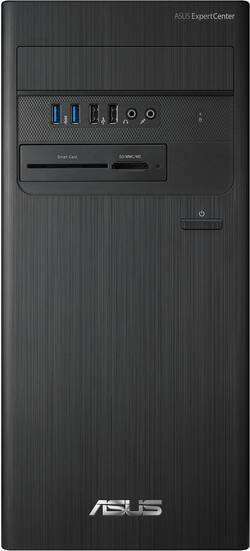
KEY SPECS AND FEATURES CPU: i5-13400 (10 Cores / 16 Threads) 8GB 3200MHz DDR4 RAM 512GB Gen 4 x 4 nVME SSD Smart Card Reader / SD / MCC Reader PS/2 Ports (Yes, for real) Intel AX201 Wi-Fi 6 Card with External Antennas NO USB-C Connections USB Keyboard and Mouse Included INITIAL SET-UP Unlike my other Asus computers, initial set-up and updates did not go smoothly. Initial start-up and configuration went without issue and the computer started up and was running in no time. Browsing through the list of installed apps was a pleasant surprise as there is very little bloatware. Thank you, Asus, that is a welcome addition. Unfortunately, after initial start-up things went downhill before they got better. Windows update had several pending updates, including an Asus firmware update. That’s when things started going south. The firmware update triggered an error in my SSD configuration noting that it needed to be installed in a RAID configuration in the Bios. It was. I rebooted. Same error. Changed to AHCI. Same error. After a couple of reboots … BSOD (Blue Screen of Death). The PC failed to start entirely and went into diagnostic mode. Luckily, whatever was hanging it up, fixed itself, but not after many tense moments and a bunch of troubleshooting. After this initial headache, the computer has not experienced similar issues since. USE This is computer meant to be set-up, installed in an office, and never thought about again. It is quiet and unobtrusive. Even using nearly 100% available CPU resources, the Asus never got overly loud or obnoxious. However, that 100% CPU utilization was only for a brief time. There are no chassis or exhaust fans in the case, so repeated heavy use would most likely generate enough heat to either make the machine overly loud or thermal throttle. UPGRADEABILITY I would rate the Asus a solid D- in upgradeability. For starters, as others have noted, it ships with an anemic 300W power supply. That severely limits the ability to add an aftermarket GPU to the PC. Those wanting a discrete GPU will likely need to pursue something like a low power Quadro card, or several generations old discrete graphics card. The case has a popout on the front for what appears the ability to add a CD-ROM or DVD-ROM drive. It even has the needed 5.25-inch opening in the chassis. However, there is no way to get that drive to fit without MAJOR surgery to front face plate. While it looks set up for a disc drive, the front cover will not accept one by default. To add insult to injury, not only will the front face not accept an optical disc drive, there are no available SATA headers on the motherboard to allow a data connection to said drive without buying an add-on card for a PCI-E slot. On a positive note, the buyer can easily swap to a larger nVME drive or even add a second nVME drive, as there are provisions on the motherboard for 2 drives. The machine will also accept up to 64GB of 3200 MHz DDR4 RAM. It ships with 8 and I upgraded it shortly after getting all the kinks ironed out to 16GB. The additional 8GB or RAM greatly reduced overall system resource utilization. CONCLUSION If you are looking for a well-built PC to serve as the starting point for a build and upgrade it, this is not the PC for you. You are severely limited in upgrade options unless those options can be hooked up via a USB connection. Oh, and those connections better support USB-A, as there are no USB-C connections and no Thunderbolt connections. USB-A in both 3.0 and 2.0. Ugh. For computing in an office environment or general home computing, this little Asus would be hard to beat. Even though short on RAM and SSD space, it is more than adequate for day-to-day tasks where it excels, asking for nothing in return. RECOMMENDED
Posted by NAMO
My mom runs her own business from home and has been using a 9 year-old HP Pavilion with a 4th generation Intel Core i3 processor. Needless to say, it was time for an upgrade. Of course, she would never do this upgrade herself -- that what "tech support sons" are for, right? When I saw this new ExpertCenter D5 model from ASUS, I knew it would fit the bill perfectly. For word processing, email, and other day-to-day productivity tasks, this tower will provide more than enough power for years to come. It's certainly not meant for hardcore video editing or similarly heavy workloads, but it is loaded with modern hardware and connectivity that will be a big upgrade for business users stuck on older machines. === PROS === - This is a sleek-looking tower. ASUS has three sizes of towers, with this being their largest. But it is still very light and compact, measuring less than 7 inches wide and about 16 inches tall. - Build quality and cable management are very good for this mid-level tower. As you can see in the attached photo, cables are neatly zip-tied and there is plenty of room inside the case for proper airflow. - This model is equipped with an Intel i5-13400 processor, which is an excellent mid-level processor with ample power for virtually any productivity task. - There are plenty of modern and legacy ports included. The front has 2x USB 2.0 Type-A ports, 2x USB 3.2 Type-A ports, a headphone jack, and a microphone-in jack. There is also an SD card reader and event a smart card reader for government and military personnel with Common Access Cards or similar. The rear has an ethernet port (1 Gigabit), 1x HDMI 1.4, 1x VGA, 1x DisplayPort 1.4, 2x PS/2 (old-school mouse and keyboard ports), 3x audio jacks (mic in, line in, and line out), 2x USB-2.0 Type-A, and 2x USB 3.2 Type-A. - I was amazed at how quick and easy it was to set up this machine. With most pre-builts, I have to spend at least an hour removing bloatware, declining software or anti-virus trials, and agreeing to countless "terms of service" pages. Not with this computer. ASUS has left out almost all the bloatware and trials -- the only potential exception being the "MyASUS" app which requires an ASUS account for product registration and driver updates. - The ExpertCenter D5 has a built-in Wi-Fi 6 card and includes an external antenna, allowing for maximum signal strength. I ran a few speed tests and saw results of over 750 Mbps download on my 1 Gbps internet plan. - The machine is whisper-quiet. Even under the relatively heavy loads of installing software and performing updates, the CPU fan and power supply fan are barely audible. - The motherboard has some flexibility for upgrades. There is a second M.2 slot for an additional SSD as well as a PCIe 4.0 x16 slot. There are also two PCIe 3.0 x1 slots for things like sound cards, networking cards, and USB port expansions. I also see at least two SATA 6 Gbps ports, but I'm not sure if there is anywhere inside the case to mount 2.5" SSDs. === CONS === - ASUS has included two sticks of relatively fast DDR4 RAM (3200 MHz), but only 8GB total (2x 4GB sticks). This is probably enough for most users, but I wish they would have future-proofed the machine by including a minimum of 16GB. Luckily, this is a pretty cheap upgrade. - Amazingly, there is not a single USB-C port anywhere on the system -- another hit towards future-proofing. Yes, USB-C adapters are cheap and readily available, but this is the first machine in several years that I've seen without a USB-C port. - The 300W power supply will limit the upgradability of the PC. You're probably not going to be able to add a high-end GPU. - There is contradictory information on the actual specs of this model (D500TEC-I5512). Originally, the Best Buy listing page said that this machine came with Windows 10 Pro. However, it actually includes Windows 11 Home (it looks like the listing has finally been corrected). Additionally, some product images on both the Best Buy listing and the ASUS website show that this model includes an optical drive, but it does not. As such, you'll want to pay close attention to the reviews and the product listing so you can make an informed decision. As of today, it appears that the specs and features on the Best Buy listing are correct. === OVERALL === I set up this PC for my mom about a week ago and she has been using it to run her business ever since. It is a massive upgrade over her old system and I'm confident that it will last at least another 5+ years based on her daily workflow of emails, web browsing, word processing, and Zoom calls. It is an excellent workstation for these types of business uses. There are a few questionable design choices, such as the measly 8GB of RAM and the lack of USB-C ports, but these are fairly minor issues. Power users who need a dedicated GPU and maximum upgradability will want to look elsewhere. But for anyone else in need of a day-to-day productivity/office PC, the ExpertCenter D5 is a great choice.
Posted by ryanmcv
People are always computing on-the-go, but a solid tower computer is indeed a beautiful thing to have! always great to have a tower at home or office and be able to use everything at once and easily upgrade. This ASUS Desktop is an excellent package for those wanting the option. The tower boasts an intel i7 processor, 16 GB fast memory and 2 TB SSD storage. So, I know there are lots of laptops with a similar configuration, but the desktop has three expansion slots, two USB 2, two USB 3, display port, HDMI and cat6 ethernet connection on the back. Also has old school keyboard and mouse connectors, and a vga !!! On the front you'll find a smartcard, sc/mmc/ms reader, two usb 2.0, two usb 3.0, mic and earphone jacks. Also a slot for dvd/cd player/writer on the front so you can still use and create on disc media. In other words, you are connected with this machine both current and past, which is helpful when you have data from a while back and want to read it! The box comes with the tower, plus basic wired mouse and wired keyboard. While I will probably use wireless connections, I like having wired versions around for those unfortunate times when batteries are unavailable.... So, basically, add your own monitor(s) and you are ready to go. the machine comes with basic intel graphic card, but as I mentioned before, it has three open slots so you can easily upgrade the video if you are a heavy gamer or doing a lot of intense graphic work. I watched some HD streaming shows, while having browser, spreadsheet and databases open and never a blip! I work from home, run a ranch and do some nonprofit work, so I often have dozens of things going on at one time. In the house, the machine is on the floor under the desk. Very quiet and has not really generated heat. Cannot hear a fan, so that is good. The chassis is lightweight which is another bonus.
Posted by Aggieof83
The vast majority of our reviews come from verified purchases. Reviews from customers may include My Best Buy members, employees, and Tech Insider Network members (as tagged). Select reviewers may receive discounted products, promotional considerations or entries into drawings for honest, helpful reviews.
Customers express satisfaction with the ExpertCenter D500's performance for basic office tasks and its quiet operation. Many appreciate the readily available USB ports and the ease of upgrading the RAM. However, some users point out limitations in the integrated graphics capabilities and the power supply's capacity for upgrades.