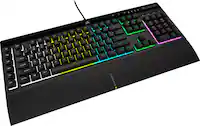
ASUS - ROG Gaming K1 Gaming Keyboard - Cable Connectivity - USB 2.0 Interface - RGB LED - Volume Control Hot Key(s) - Black
ASUS - ROG Gaming K1 Gaming Keyboard - Cable Connectivity - USB 2.0 Interface - RGB LED - Volume Control Hot Key(s) - Black
FREE shipping to
More Buying Options
Related Item

Specifications
- Form FactorErgonomic, Full-sizeConnection TypeWired
- Key Specs
- Form Factor: Ergonomic, Full-size (The size, arrangement, and physical configuration of the product.)
- Connection Type: Wired
- General
- Brand: ASUS
- Product Name: Asus ROG Gaming K1 Gaming Keyboard - Cable Connectivity - USB 2.0 Interface - RGB LED - Volume Control Hot Key(s)
- Color: Black
- Functions
- Form Factor: Ergonomic, Full-size (The size, arrangement, and physical configuration of the product.)
- Connectivity
- Connection Type: Wired
- Compatibility
- Operating System Compatibility: Windows
- Dimensions
- Product Height: 2.3 inches (The out of box height of the item. Height is measured as the vertical distance from the bottom of the item to the top as it would be primarily used or placed.)
- Product Width: 8 inches (The out of box width of the item. Width is measured as the horizontal distance from one side of the item to the other as it would be primarily used or placed.)
- Product Depth: 18.8 inches (The out of box depth of the item. Depth is measured as the distance from the front of the item to the back as it would be primarily used or placed.)
- Product Weight: 2.75 ounces (The out of box weight of the item.)
- Warranty
- Warranty - Parts: 1 year
- Warranty - Labor: 1 year
- Other
- UPC: 192876625323
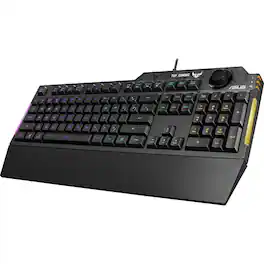
Asus ROG Gaming K1 Gaming Keyboard - Cable Connectivity - USB 2.0 Interface - RGB LED - Volume Control Hot Key(s) - Rugged - PC - Membrane Keyswitch
- ASUS TUF Gaming K1 RGB keyboard with dedicated volume kno...: Tactile TUF Gaming switches with 19-key rollover for responsive, reliable performance Dynamic RGB lighting effects and side-mounted light bar to illuminate your game Dedicated volume knob for fast and easy audio adjustment Durable, reinforced plastic frame with up to 300 ml spill-resistance for everyday stability and reliability Programmable keys with on-the-fly macro recording and onboard memory for personalized gameplay Armoury Crate
- Turn up the tough: ASUS TUF Gaming K1 is a gaming keyboard that delivers uncompromising performance and exceptional durability. It's equipped with switches that deliver silent tactility with every press. These are housed in a 300 ml spill-resistant frame that's fortified by a specialized coating and validated for tough duty. K1 also features customizable RGB illumination and side-mounted light bars for personalized style, a dedicated volume knob for fast
- GAMING GRADE PERFORMANCE: TUF Gaming K1's delivers a superb tactile response with a cushioned action that's both quiet and comfortable. It's also engineered with 19-key-rollover (NKRO) technology, ensuring remarkable precision and no missed key presses.
- DYNAMIC RGB AND LIGHTING BAR: TUF Gaming K1 features five individual lighting zones, and sports striking RGB bars on both sides. Each zone is individually customizable from the whole color spectrum, allowing you to illuminate your rig in your image. The ASUS Armoury Crate app provides next-generation RGB control that synchronizes lighting and game profiles with your content.
- DEDICATED VOLUME KNOB: With a dedicated volume knob at the top-right, TUF Gaming K1 makes it quick and easy to control your game audio on the fly. You can reach and twist intuitively, keeping your eyes firmly on the action.
Whats Included
- 48 programmable keys, 3 double keys, 3 extra single keys, keycap puller, 6' detachable USB cable with Type A plug, 3 programmable LEDs
Compare similar products
Asus ROG Gaming K1 Gaming Keyboard - Cable Connectivity - USB 2.0 Interface - RGB LED - Volume Control Hot Key(s) - Rugged - PC - Membrane Keyswitch

ROG StrixScope II X is an all-round battlestation featuring hot-swappable pre-lubed ROG NX Snow V2 mechanical switches with improved stability and reduced wobble, PBT doubleshot keycaps for great feel and shine resistance, multi-function quick controls, streaming hotkeys, and a detachable wrist rest.

The CORSAIR K70 CORE gaming keyboard empowers your best play and makes gaming and typing amazing. With silky smooth CORSAIR Red linear mechanical switches and two layers of sound dampening foam for a superior typing sound and feel, this is premier CORSAIR performance at its core. Take control effortlessly with a multi-function rotary dial and programmable media button, configurable in iCUE. Use iCUE to also customize the K70 CORE’s dazzling per-key RGB lighting and make your desktop your own dynamic work of art, and then save your RGB settings and macros on up to five onboard profiles to always have at the ready. Your ambition starts with the K70 CORE.

CORSAIR’s VANGUARD 96 pulls off the astonishing feat of shrinking a full keyboard with arrow keys, a tenkey pad, an LCD screen, rotary dial, and 6 programmable G-keys into a super-compact frame. Featuring wobble-free pre-lubricated CORSAIR MLX switches, it’s also hotswappable, supporting compatible 3-pin and 5-pin switches. The stunning LCD screen takes keyboard personalization to the next level with animations, stats, and game integration support. Quadlayer sound dampening provides satisfying keypress acoustics, and 8,000Hz hyper-polling delivers lightning-fast inputs. VANGUARD 96 also features Elgato Virtual Stream Deck integration, FlashTap SOCD handling, and easy customization via our web-based utility, CORSAIR Web Hub.
| Pros for ASUS - ROG Gaming K1 Gaming Keyboard - Cable Connectivity - USB 2.0 Interface - RGB LED - Volume Control Hot Key(s) - Black | |||
|---|---|---|---|
| There were no pros for this product— | Build Quality, Noise Level, RGB Lighting, Key Feel, Switch Performance | Key Feel, RGB Lighting, Keyboard Quality, Volume Control, Lighting | Build Quality, Noise Level, RGB Lighting, Feel, Size |
| Cons for ASUS - ROG Gaming K1 Gaming Keyboard - Cable Connectivity - USB 2.0 Interface - RGB LED - Volume Control Hot Key(s) - Black | |||
| There were no cons for this product— | Connectivity | Software, Connectivity, Wrist Rest | Software, Wrist Rest, Key Layout, Port Placement |
Specs

- Razer - Huntsman V3 Pro 8KHz Full Size Wired Analog Optical Linear Switch Gaming Keyboard with Snap Tap - Black$222.99The price was $249.99



Reviews
This product doesn't have any reviews yet.