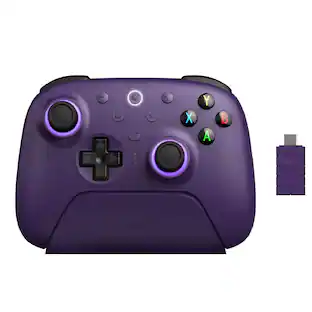
ASUS - ROG Raikiri Pro Wireless Controller for ROG Ally - Black
About this product
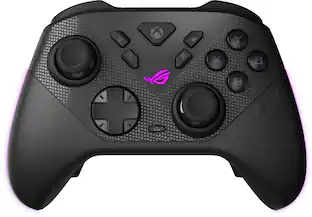
The ROG Raikiri Pro PC Controller features a built-in OLED display, tri-mode connectivity, four rear buttons, selectable step triggers, an ESS DAC, plus adjustable joystick sensitivity and response curves. Also, the ROG Raikiri Pro is ideal for PC gaming.
Built-in OLED display
Create a unique look with customizable animations, view status indicators, and switch profile on the fly.
Tri-mode connectivity
Versatile flexibility with wired USB-C, low-latency 2.4 GHz RF, plus a Bluetooth mode.
Intuitive rear controls
Four left and right buttons can be programmed for in-game commands or for on-the-fly joystick sensitivity shifts.
Selectable step triggers
Left and right triggers can be set to short or full-range modes, with dead zones customizable in Armoury Crate.
Extensive customization
Remap buttons, change joystick sensitivity, or make other adjustments via Armoury Crate.
- WirelessYesBattery SizeBattery packCompatible Platform(s)Windows
Reviews
Rating 3.9 out of 5 stars with 276 reviews
Top Mentions
- Controller Quality (30)
- Battery Life (16)
- OLED Display (15)
- Comfort (14)
- Customization (12)
- Build Quality (30)
- Wireless (25)
- Back Buttons (23)
- Size (8)
Customer Images
The vast majority of our reviews come from verified purchases. Reviews from customers may include My Best Buy members, employees, and Tech Insider Network members (as tagged). Select reviewers may receive discounted products, promotional considerations or entries into drawings for honest, helpful reviews.


Compare similar products
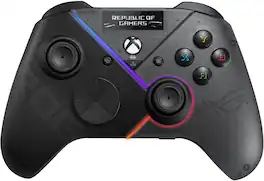
The ROG Raikiri Pro PC Controller features a built-in OLED display, tri-mode connectivity, four rear buttons, selectable step triggers, an ESS DAC, plus adjustable joystick sensitivity and response curves. Also, the ROG Raikiri Pro is ideal for PC gaming.
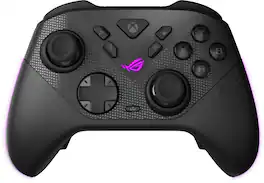
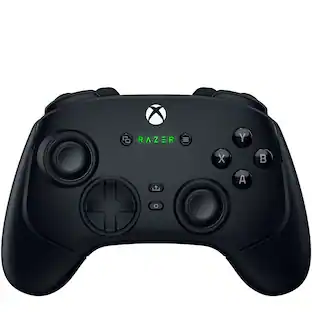
The ROG Raikiri II Xbox Wireless controller features TMR joysticks, 1KHz polling rate in PC mode, four rear buttons, dual-mode triggers, micro-switch buttons, and tri-mode connectivity.

The ROG Raikiri Pro PC Controller features a built-in OLED display, tri-mode connectivity, four rear buttons, selectable step triggers, an ESS DAC, plus adjustable joystick sensitivity and response curves. Also, the ROG Raikiri Pro is ideal for PC gaming.
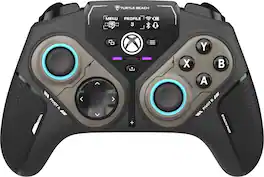
Rank up to Revolutionary Control. The Turtle Beach Stealth Pivot wireless smart controller is designed for revolutionary gameplay on Windows PCs. Stealth Pivot features rotating button modules to quickly switch between core button layouts designed for FPS, action & racing titles, or revolved layouts for fighter & retro games. Play wirelessly on PC with the 2.4 GHz wireless transmitter, or via Bluetooth on Android devices & Smart TVs, and even play on XBOX consoles using the wired connection. A 20-hour battery life keeps you locked in without disruptions, plus the wired cable supports play-and-charge capability. The Connected Command Display screen offers extensive customization, and hall-effect thumbsticks, adjustable triggers and mappable buttons provide smooth, long-lasting, and adjustable control for multi-genre dominance.
| Pros for ASUS - ROG Raikiri Pro Wireless Controller for ROG Ally - Black | |||
|---|---|---|---|
| Battery Life, Controller Quality, OLED Display, Comfort, Customization | Overall Performance, Battery Life, Button Quality, Ergonomics, Connectivity | There were no pros for this product— | Battery Life, Overall Performance, Modular Design |
| Cons for ASUS - ROG Raikiri Pro Wireless Controller for ROG Ally - Black | |||
| Build Quality, Wireless, Back Buttons, Size | Controller Size | There were no cons for this product— | Button Quality, Connectivity, Stick Drift |
Specs
Is there any way to get the display to show performance metrics like FPS, GPU/CPU usage percentage, etc.? I'm not able to find it anywhere but it seems like such an obvious use of the display and the only one that would make it worth this price.
Answered by ASUS AnswersThis specific product doesn't come with a utility program that shows performance metrics like FPS, GPU/CPU usage percentage, etc. You may get it from third-party.

As it says it is for the rog ally, can this Bluetooth to an xbox/pc? Or is it only for the ally at this moment?
Answered by ASUS AnswersYou can use this on PC as well.
Can I adjust the joystick sensitivity on this controller?
Yes, you can adjust the joystick sensitivity and response curves through the Armoury Crate software.
This question and answer was generated by AI based on customer and product data.How can I connect an external controller to the ROG Ally X?
You can connect an external controller to the ROG Ally X by plugging the USB wireless dongle into the dock's USB port and enabling the Embedded Controller option in the Command Center.
This question and answer was generated by AI based on customer and product data.What type of connectivity does the ROG Raikiri Pro offer?
The ROG Raikiri Pro offers tri-mode connectivity: wired USB-C, low-latency 2.4 GHz RF, and Bluetooth.
This question and answer was generated by AI based on customer and product data.
Customers often buy these together














More to consider
 $149.99The price was $189.99
 Top Deal$169.99The price was $189.99
 $169.99The price was $189.99
 Clearance$55.99The price was $109.99




Level up your game Sponsored
 $404.99The price was $465.99
Discover related products









Keep exploring
 $44.69The price was $51.48
 $219.99The price was $269.99