ASUS - ROG Strix 27" 4K OLED 240Hz 0.03ms Gaming Monitor with FreeSync Premium Pro and HDR (DisplayPort, HDMI) - Black
ASUS - ROG Strix 27" 4K OLED 240Hz 0.03ms Gaming Monitor with FreeSync Premium Pro and HDR (DisplayPort, HDMI) - Black
More Buying Options
Related Item

Highlights
- Key Specs
- Refresh Rate: 240Hz (The number of frames per second the device can produce natively without enhancement. Higher rates help produce smooth, seamless pictures.)
- Maximum Resolution: 3840 x 2160 (Maximum resolution refers to the highest number of pixels that a screen can process and display. Higher resolution signals produce more detailed images.)
- Response Time: 0.03 milliseconds (The speed at which pixels can change colors is called response time. It is measured in milliseconds (ms).)
- Panel Type: Not Applicable (Technology that affects response time and image quality.)
- Synchronization Technology: FreeSync Premium Pro (AMD Adaptive Sync), G-SYNC Compatible (NVIDIA Adaptive Sync) (Generally, these technologies allow syncing between a computer/console game's frame rate and the device's refresh rate for a smoother display without tearing.)
- Screen Size: 27 inches (Size of the screen, measured diagonally from corner to corner.)
- OLED Technology: QD-OLED
- Display Connector(s): 1 x DisplayPort 1.4, 2 x HDMI 2.1, Display connection via USB port (The number and type of connectors used to connect to an external display.)
- General
- Brand: ASUS
- Model Number: XG27UCDMG
- Product Name: ROG Strix 27" 4K OLED 240Hz 0.03ms Gaming Monitor with FreeSync Premium Pro and HDR (DisplayPort, HDMI)
- Color: Black
- Operating System Compatibility: Windows, Mac, Chrome, Linux
- Display
- Refresh Rate: 240Hz (The number of frames per second the device can produce natively without enhancement. Higher rates help produce smooth, seamless pictures.)
- Maximum Resolution: 3840 x 2160 (Maximum resolution refers to the highest number of pixels that a screen can process and display. Higher resolution signals produce more detailed images.)
- Native Resolution: 3840 x 2160 (Native resolution of a screen refers to its single, fixed resolution. Sometimes screens must scale an image up or down in order to fit the native resolution. This can cause a loss of resolution or detail.)
- Contrast Ratio: 1,500,000:1 (Measured difference between a displayed image's brightest whites and darkest blacks. The larger the first number, the more detail and color that can be displayed.)
- Response Time: 0.03 milliseconds (The speed at which pixels can change colors is called response time. It is measured in milliseconds (ms).)
- Display Type: OLED
- Panel Type: Not Applicable (Technology that affects response time and image quality.)
- Synchronization Technology: FreeSync Premium Pro (AMD Adaptive Sync), G-SYNC Compatible (NVIDIA Adaptive Sync) (Generally, these technologies allow syncing between a computer/console game's frame rate and the device's refresh rate for a smoother display without tearing.)
- Aspect Ratio: 16:9 (The measurement of the width of a screen compared to the height of a screen, expressed as a ratio.)
- Curved Screen: false
- Brightness: 250 candela per square meter (A measure of the total light output.)
- Screen Size: 27 inches (Size of the screen, measured diagonally from corner to corner.)
- High Dynamic Range (HDR): true (An HDR-compatible 4K TV or other HDR-compatible product displays HDR video content when it's available from sources like 4K Ultra HD Blu-ray Discs and 4K streaming services.)
- High Dynamic Range Format: HDR 10, VESA Certified DisplayHDR 400 True Black (There are a few HDR formats that tell the TV or other HDR-compatible product how to best utilize its capabilities to display HDR content. HDR technology can support one or multiple formats, each with various benefits to picture quality.)
- Horizontal Viewing Angle: 178 degrees (The maximum angle at which the display can be viewed with acceptable visual performance from either side.)
- Vertical Viewing Angle: 178 degrees (The maximum angle at which the display can be viewed with acceptable visual performance from above or below.)
- Touch Screen: false (Touch-screen devices make navigating more intuitive. Using a touch-screen display, you can do things such as tap to select, hold and drag to move items, swipe to scroll, and pinch to zoom.)
- On-Screen Display Languages: English (The available language options for displayed text.)
- Display Surface: Anti-reflective
- OLED Technology: QD-OLED
- Connectivity
- Number of DisplayPort Inputs (Total): 1
- Number of HDMI Inputs (Total): 2
- Display Connector(s): 1 x DisplayPort 1.4, 2 x HDMI 2.1, Display connection via USB port (The number and type of connectors used to connect to an external display.)
- DisplayPort Over USB-C: DisplayPort 1.4 (The version of DisplayPort that leverages the Alternate Mode Functional Extension of the USB-C interface. This connector allows for higher resolution, broader color space, multichannel audio support, and greater backwards compatibility with display adapters. Also known as DisplayPort Alt Mode.)
- Number of USB Ports (Total): 5
- USB Ports: 3 x USB-A 3.2, 1 x USB-C, 1 x USB-B (The number and type of USB ports the product has.)
- Number of USB-C Charging Ports: 1
- Number of USB-B Ports: 1
- Headphone Jack: true (The device features an interface that allows for the connection of headphones.)
- Compatibility
- Wall Mountable: true (The product is able to be secured to a wall. Some products are designed ready to mount, while others may require additional hardware/accessories for installation.)
- VESA Wall Mount Standard: 100mm x 100mm (VESA wall mount standards refer to the spacing of screw holes built into a TV in order to fit with standard TV wall mounts. These standards are implemented into most TVs and monitors.)
- Features
- Tiltable: true
- Adjustable Stand Height: true
- Eye Relief Features: Flicker free, Low blue light
- Built-In Webcam: false
- Integrated Speaker(s): false
- Smart Capable: false (Smart, or smart-capable devices are able to connect directly to your home network in order to stream content from the Internet, run Internet-based apps, or connect to other smart devices.)
- Dimensions
- Product Height With Stand: 20.06 inches
- Product Width: 24.13 inches (The out of box width of the item. Width is measured as the horizontal distance from one side of the item to the other as it would be primarily used or placed.)
- Product Depth (With Stand): 6.64 inches
- Product Weight: 16.4 pounds (The out of box weight of the item.)
- Stand Included: true
- Power
- Power Consumption: 80 watts
- Power Saving/Off Mode: 0.5 watts (This mode will turn the display and/or the device off, or into a standby mode, after a preset length of time with no activity to conserve power.)
- Certifications Listings & Approvals
- ENERGY STAR Certified: false (Devices carrying the ENERGY STAR service mark, such as computer products and peripherals, kitchen appliances, and other products, generally use 20% to 30% less energy than required by federal standards.)
- EPEAT Qualified: false (The Electronic Product Environmental Assessment Tool (EPEAT) was designed to provide an environmental assessment tool for purchasers. In order to qualify for EPEAT, a product must meet all 23 required criteria.)
- Warranty
- Warranty - Parts: 3 years
- Warranty - Labor: 3 years
- Other
- UPC: 197105815285
The ROG Strix OLED XG27UCDMG is a 27-inch, 240Hz 4K gaming monitor that boasts the latest fourth-generation QD-OLED technology to deliver supersharp visuals and crisp text. The cutting-edge QD-OLED panel offers greater longevity compared to previous OLED technologies and minimal flicker―even when frame rates fluctuate. With the addition of the Neo Proximity Sensor in the new ROG OLED Care Pro suite, the monitor transitions to a black screen when no user is detected, guarding against burn-in.
- 4K Resolution: 26.5-inch 4K (3840 x 2160) QD-OLED gaming monitor with 240Hz refresh rate and 0.03ms response time
- Latest 4th-gen QD-OLED Technology: Delivers sharper imagery and crystal-clear text, a longer lifespan over previous-gen OLEDs
- ASUS OLED Care+: New ASUS OLED Care Pro functions with Neo Proximity Sensor that precisely detects when the user is away, switching to a black screen to reduce the risk of burn-in
- OLED Anti-Flicker 2.0 Technology: Includes a new luminance compensation algorithm that reduces flicker by 20% compared to previous-gen panels, ensuring comfortable viewing
- VESA DisplayHDR: 400 True Black compliance, 99% DCI-P3 gamut, true 10-bit color, and Delta E < 2 color difference for astonishing HDR performance, making it perfect for photo and video editing
- Exclusive ASUS DisplayWidget Center: Application allows users to easily access OLED Care Pro functions and adjust monitor settings using a mouse
- Extensive Connectivity: Includes DisplayPort 1.4, HDMI 2.1, USB-C (DP Alt mode+ 90W PD), USB hub and earphone jack
Whats Included
- XG27UCDMG Monitor
- DisplayPort Cable
- HDMI Ultra High Speed Cable
- Power Cord
- USB 3.2 and USB-C Cables
- Microfiber Cloth
- VESA Mount Kit
- ROG Pouch and ROG Sticker
- Quick Start Guide
- Warranty Card
Q: Is this monitor G-SYNC compatible?
A: Yes, it is G-SYNC Compatible (NVIDIA Adaptive Sync).
Q: What is the response time of this monitor?
A: The response time is 0.03 milliseconds.
Q: What type of OLED technology does this monitor use?
A: This monitor uses QD-OLED technology.
Q: What is the refresh rate of this monitor?
A: The refresh rate is 240Hz.
Q: What connectivity options does this monitor offer?
A: It includes DisplayPort 1.4, HDMI 2.1, USB-C (with DisplayPort Alt Mode and 90W Power Delivery), a USB hub, and an earphone jack.
Q: Does this monitor have built-in speakers?
A: No, this monitor does not have built-in speakers.
Q: How does the ASUS OLED Care+ feature work?
A: ASUS OLED Care+ uses a Neo Proximity Sensor to detect when a user is away and switches the monitor to a black screen to reduce burn-in risk.
Q: Will this monitor do 4k at 240 Hz?
A: The ASUS XG27UCDMG does support 4K resolution at 240 Hz, making it ideal for gaming and incredible visuals.
Compare similar products

The ROG Strix OLED XG27UCDMG is a 27-inch, 240Hz 4K gaming monitor that boasts the latest fourth-generation QD-OLED technology to deliver supersharp visuals and crisp text. The cutting-edge QD-OLED panel offers greater longevity compared to previous OLED technologies and minimal flicker―even when frame rates fluctuate. With the addition of the Neo Proximity Sensor in the new ROG OLED Care Pro suite, the monitor transitions to a black screen when no user is detected, guarding against burn-in.

The ROG Swift OLED PG27UCDM is a 27-inch, 240Hz 4K gaming monitor that boasts the latest fourth-generation QD-OLED technology to deliver supersharp visuals and crisp text. The cutting-edge QD-OLED panel offers greater longevity compared to previous OLED technologies and minimal flicker―even when frame rates fluctuate. With the addition of the Neo Proximity Sensor in the new ROG OLED Care Pro suite, the monitor transitions to a black screen when no user is detected, guarding against burn-in. Built-in DisplayPort 2.1a UHBR20 provides a full 80Gbps bandwidth to support uncompressed 4K visuals at a stunning 240Hz to elevate viewing experiences to the next level.
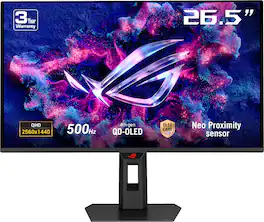
The ROG Strix OLED XG27AQDPG is a 27-inch, 500Hz QHD gaming monitor. The cutting-edge QD-OLED panel offers greater longevity compared to previous OLED technologies and minimal flicker―even when frame rates fluctuate. With the addition of the Neo Proximity Sensor in the new ROG OLED Care Pro suite, the monitor transitions to a black screen when no user is detected, guarding against burn-in
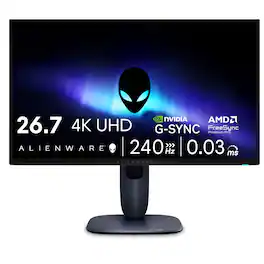
Meet our first 27" 4K QD-OLED Gaming Monitor. Experience ultimate visual fidelity and peak QD-OLED performance in a sleek 27" panel. Immerse yourself in new worlds with the world's highest pixel density in a QD-OLED monitor at 166 PPI* with 4K resolution, incredible color accuracy and Dolby Vision HDR.
| Pros for ASUS - ROG Strix 27" 4K OLED 240Hz 0.03ms Gaming Monitor with FreeSync Premium Pro and HDR (DisplayPort, HDMI) - Black | |||
|---|---|---|---|
| Color Quality, Refresh Rate, Resolution, Design | Color Quality, Refresh Rate, Resolution, Gaming Performance, Responsiveness | Color Quality, Refresh Rate, Connectivity, HDR Performance, Burn-in Prevention | Color Quality, Refresh Rate, Design, Connectivity |
| Cons for ASUS - ROG Strix 27" 4K OLED 240Hz 0.03ms Gaming Monitor with FreeSync Premium Pro and HDR (DisplayPort, HDMI) - Black | |||
| HDR Performance, Proximity Sensor, Speakers | There were no cons for this product— | There were no cons for this product— | HDR Performance |
Specs
Reviews
Customers are saying
Customers are positive about the ROG Strix 27" 4K OLED gaming monitor's color quality, with users describing the display as vivid and bright. The monitor's high refresh rate and sharp 4K resolution also received positive feedback. Some customers found the proximity sensor unreliable, and others wished the monitor included speakers and had better HDR performance.
Customer Images
The vast majority of our reviews come from verified purchases. Reviews from customers may include My Best Buy members, employees, and Tech Insider Network members (as tagged). Select reviewers may receive discounted products, promotional considerations or entries into drawings for honest, helpful reviews.
- Rated 5 out of 5 stars
Awesome OLED Gaming Monitor – Worth Every Penny!
I picked up the ASUS ROG Strix XG27AQDMG for my gaming setup and wow, I'm blown away! This 27-inch 1440p OLED is an absolute beast for PC gaming. The blacks are insanely deep and inky – like true black, no gray washout or blooming around bright spots. Colors pop so vividly, especially in HDR; highlights really stand out and everything looks super vibrant. Motion is buttery smooth thanks to the 240Hz refresh rate and near-instant response time. No blur at all, even in fast-paced shooters. Input lag is crazy low, and it handles VRR great (G-SYNC and FreeSync) with barely any flicker if you tweak the anti-flicker setting. Gaming feels incredibly responsive! The glossy screen makes images look sharp and lively, and it gets plenty bright for most rooms (over 1000 nits peak in HDR for small highlights). Build quality is solid too – nice stand with good ergonomics, RGB on the back for that gamer vibe. A few downsides though: The glossy coating means reflections can be distracting if you've got bright lights or windows nearby. Text clarity isn't perfect – there's some color fringing on text due to the subpixel layout, so it's not the best for heavy office work or reading tons of docs. Also, like all OLEDs, there's a burn-in risk, but ASUS has pixel cleaning and screen saver features to help. It's limited to 144Hz over HDMI, so not ideal for next-gen consoles wanting full 4K/120Hz. Overall, if you're a PC gamer looking for top-tier picture quality and smoothness, this is fantastic. I'd give it 5 stars easy for gaming! Just manage brightness and static images to avoid issues. Totally recommend it – upgraded my whole setup!
JWWW Posted
- Rated 5 out of 5 stars
THIS MONITOR CHANGED MY LIFE
I can confidently say the ROG Strix OLED XG27UCDMG is the best monitor I’ve ever owned — and one of the best gaming displays on the market right now. Here’s why I love it so much: Stunning Visuals & Display Quality • This monitor features a 4K (3840 × 2160) QD-OLED panel — delivering razor-sharp resolution, crisp text, and ultra-detailed visuals whether I’m gaming, editing photos/videos, or just browsing.  • The panel uses the latest 4th-generation QD-OLED technology, which gives deep blacks, rich contrast (about a 1.5 million:1 contrast ratio), and vivid, lifelike colors.  • Color accuracy is top-tier, with 99% DCI-P3 coverage and Delta E < 2 out of the box. That means movies, games, and creative work look as true-to-life as possible.  • HDR content really pops thanks to DisplayHDR True Black 400 support and impressive peak brightness (up to ~1000 nits under HDR).  Ultra-Smooth Performance & Responsiveness • With a 240 Hz refresh rate and an insanely fast 0.03 ms (GTG) response time, gameplay feels unbelievably fluid and snappy. Whether I’m playing fast-paced shooters or exploring open-world games, motion is smooth and input latency feels negligible.  • Adaptive sync is supported via AMD FreeSync Premium Pro and NVIDIA G-SYNC compatibility, so screen tearing and stutter are virtually non-existent.  • The monitor also includes Extreme Low Motion Blur (ELMB) for extra clarity during high-speed movement — which helps keep action crisp even when frame-rate jumps.  Practical Features & Everyday Use • The integrated ASUS OLED Care Pro suite — including a Neo Proximity Sensor — helps protect the panel from burn-in. The sensor detects when I step away and dims or turns off the screen, which gives me peace of mind for long-term use.  • OLED Anti-Flicker 2.0 reduces flicker by about 20% compared to previous OLED models — which makes long gaming or work sessions easier on the eyes.  • Connectivity is robust and convenient: DisplayPort 1.4 with DSC (for 4K@240Hz), HDMI 2.1, USB-C with 90W Power Delivery (useful for laptops or compact systems), plus a USB hub and audio out.  • The stand is highly adjustable — height tilt/swivel/pivot — and for those who prefer, it supports VESA mounting.  • There’s also a 3-year warranty that includes coverage for burn-in and pixel defects — a great reassurance given that OLED longevity is often a concern.  My Personal Experience & Why It’s My Favorite Using this monitor has been a revelation. Games look more immersive than ever — colors feel alive, dark scenes reveal detail I previously missed, and fast-paced action feels buttery smooth. When I switched from a standard 60–144 Hz LCD to this OLED, everything — gaming, movies, even desktop work — felt upgraded. Text is razor-sharp, videos pop in HDR, and switching tasks (game → design → work → browse) feels seamless thanks to the quick response time and vivid panel. Even after many hours of use, I haven’t noticed any eye strain, flicker fatigue, or glare — and the panel still looks brand new. To sum it up: if you want a monitor that delivers on all fronts — picture quality, speed, responsiveness, color accuracy, and long-term reliability — the XG27UCDMG is absolutely worth it. It has set a new standard for what I expect from a display, and I can’t imagine going back to anything else.
Zacherie Posted
- Rated 5 out of 5 stars
Insane Quality in a Tiny Package
This monitor has the best picture quality I’ve ever seen, which is a combination of the 4k res at 27 inches and the glossy QD-OLED screen. Everything with this monitor worked as expected, except the neo-proximity sensor which wouldn’t activate and deactivate reliably. Personally I’m still torn between this model and the PG32UCDMR, which is essentially the same monitor but 32 inches. But either is incredible. The only downside hardware-wise is that it doesn’t come with VESA screws, and the vesa mount is an extra piece that causes the monitor to sit further forward from the monitor arm than one that mounts directly into the back of the monitor.
CameronB Posted