Skip to contentGo to Product Search
Main Content

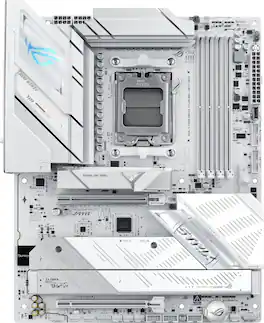
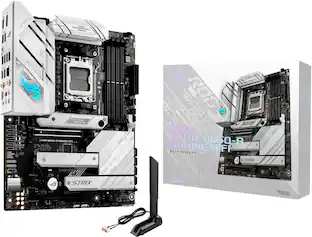
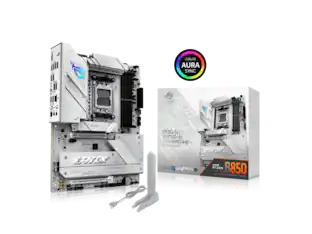
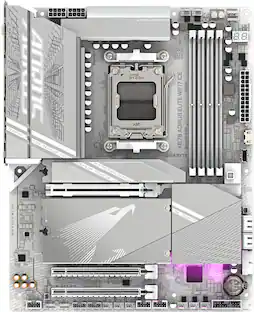
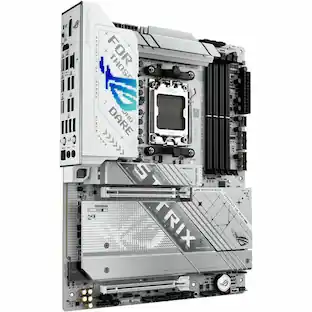
ASUS - ROG STRIX B850-A GAMING WIFI7 NEO (Socket AM5) AMD B850 ATX DDR5 Wi-Fi 7 Motherboard - White

Model: ROG STRIX B850-A GAMING W7 NEO
SKU: 6677871
Sold byBest Buy

Customers are saying

Customers are enthusiastic about the impressive connectivity options and the striking white aesthetic of this motherboard. Users also frequently highlight the straightforward installation process and the generous storage capacity provided by the four M.2 slots. Furthermore, the board is praised for its efficient heat dissipation, reliable Wi-Fi 7 performance, and quick boot speeds.

Generated by AI based on customer reviews.

Features

  • Ready for Advanced AI PCs

    Designed for the future of AI computing, with the power and connectivity needed for demanding AI applications

  • AMD AM5 Socket

    Ready for AMD Ryzen 9000, 8000 and 7000 series desktop processors

  • Intelligent Control

    ASUS AI Advisor, AI Cache Boost, AI Networking II, AI Cooling II and AEMP to simplify setup and improve performance

  • Robust Power Solution

    14+2+2 power solution rated for 80A per stage with an 8+8-pin ProCool power connector, high-quality alloy chokes and durable capacitors to support multi-core processors

  • Optimized Thermal Design

    Massive heatsinks bridged to the VRMs with high-conductivity thermal pads and an integrated I/O cover

  • Latest M.2 Support

    One PCIe 5.0 M.2 slot and three PCIe 4.0 M.2 slots

  • Abundant Connectivity

    USB 20Gbps Type-C front-panel connector, two 5Gbps headers, three USB 2.0 headers, PCIe 5.0 x16 SafeSlot, HDMI port

  • High-Performance Networking

    On-board Wi-Fi 7 (802.11be) with Realtek 5Gb Ethernet

  • DIY Friendly Design

    PCIe Slot Q-Release, M.2 Q-Latch, M.2 Q-Release, M.2 Q-Slide, Q-Antenna, Q-Dashboard, Q-DIMM, Q-LED, BIOS FlashBack button, Clear CMOS button and pre-mounted I/O shield

  • Immersive Audio

    ROG SupremeFX 7.1 Surround Sound High Definition Audio CODEC ALC4080  with Savitech SV3H712 amplifier

  • Unmatched Personalization

    ASUS-exclusive Aura Sync RGB lighting, including three addressable Gen 2 headers

  • Renowned Software

    ROG CPU-Z, Dolby Atmos, Armoury Crate, ASUS DriverHub, ASUS MB Manager,  TurboV Core, ASUS GlideX, HWiNFO, intuitive UEFI BIOS dashboard

Specifications

  • Chipset
    AMD B850
    Form Factor
    ATX
    Processor Socket
    Socket AM5 (LGA 1718)
    Number of PCI-E Slots
    2
    Wireless Networking Standard
    Wi-Fi 7
    Number Of Memory Slots
    4
Sponsored

Reviews

Rating 4.9 out of 5 stars with 34 reviews

5 star rating. 30 reviews4 star rating. 4 reviews
97% would recommend to a friend
Customers are sayingCustomers are enthusiastic about the impressive connectivity options and the striking white aesthetic of this motherboard. Users also frequently highlight the straightforward installation process and the generous storage capacity provided by the four M.2 slots. Furthermore, the board is praised for its efficient heat dissipation, reliable Wi-Fi 7 performance, and quick boot speeds.
This summary was generated by AI based on customer reviews.
  • Connectivity (13)
  • Ease of Installation (12)
  • Aesthetics (11)
  • Heat Dissipation (4)
  • Storage Capacity (3)

Customer Images

The vast majority of our reviews come from verified purchases. Reviews from customers may include My Best Buy members, employees, and Tech Insider Network members (as tagged). Select reviewers may receive discounted products, promotional considerations or entries into drawings for honest, helpful reviews.

  • Rated 5 out of 5 stars

    All the right specs to set my kid up for success..

    Based on specs alone, this motherboard is going to be the foundation of a Christmas PC build for my son, who is a sophomore studying AeroAstro engineering. He’s been using an Asus ROG laptop that I purchased through Best Buy, but as he gets deeper into engineering and more demanding research, I wanted his next computer to be something we could build around his needs and upgrade over time. That being said, it was only right I jumped at the opportunity to review the ROG Strix B850-A Gaming WiFi7 Neo. A motherboard isn’t doing the heavy lifting of a CPU or GPU, but it determines what you can build around them. With AM5 processor support, DDR5 memory, (4) M.2 storage slots, PCIe 5.0, Wi-Fi 7 and 5Gb Ethernet, there’s considerable room here to build something powerful now and expand on it later. As far as connectivity specs go, this Motherboard is super impressive. There are 12 USB ports on the rear alone, a USB-C, plus HDMI port, optical audio, BIOS FlashBack and Clear CMOS. At first, I questioned the single HDMI port before remembering that our eventual dedicated GPU will handle his displays anyway. The board itself feels substantial, and the heatsinks and overall construction look and feel premium. My son and I haven’t completed the build yet, so I can’t comment on real-world performance or stability. But as the foundational piece for a PC intended to grow alongside his engineering studies, Asus gives us a ton to work with. They’re also a brand that has some of the best product warranties, and they haven’t let me down yet.

    Posted by Drew B

  • Rated 5 out of 5 stars

    Enjoyable Build - Looks Great and Very Stable

    I have been building computers for the last 16 years, and this MOBO is going in as an update to my 5th AMD build. This is my 3rd Ryzen based system, which previously had an X870 board. Unfortunately that board had some bugs, so I jumped at the chance to try out this B850 board. This board is mainly white, but a black colorway option is also available. I paired the Strix B850 Neo with a 9600X in a build I had done for one of my kids. MOBO Spec’s: Socket – AM5 support 7000, 8000, and 9000 CPU’s Memory – 4 DIMMs Dual Channel DDR5 with EXPO support – Max 256GB up to DDR5 with max speeds dependent on processor generation PCIe – (1) PCIe x16 slot @ 5.0 x16 for GPU, (1) PCIe x16 slots @ 4.0 x4 Storage - (1) M.2 @ PCIe 5.0 x4, (3) M.2 @PCIe 4.0 - slot M2.2 and M2.4 run at x4, and slot M2.3 runs at x4 or X2 if the PCIe X16 4.0 slot is also populated, (2) SATA III connectors USB Headers – (1) USB 3.2 Gen 2x2 Type-C, (2) USB 3.2 Gen 1 Type A, (3) USB 2.0 Type A Fan/LED Headers – (1) CPU Fan, (1) CPU_Opt Fan, (4) System fans, (3) aRGB Gen 2 I/O Panel – (2) USB 2.0, (5) USB 3.0 Type A, (1) USB 3.0 Type C, (2) USB 3.2 Gen 2 10 Gbps Type A, (2) USB 3.2 Gen 2 10 Gbps Type C, (1) HDMI 2.1, 3.5mm audio, Optical S/PDIF, 5Gb LAN, Clear CMOS and Bios Flashback buttons Connectivity – 5Gb LAN, WiFi 7 2.4/5/6 GHz, and Bluetooth 5.4 BIOS – Single 64MB BIOS chip - BIOS 1627 currently installed – 1683 or 1804Beta available to flash System Components Used: CPU – AMD R5 9600X AM5 6C/12T @ 3.9GHz (boost to 5.4GHz) GPU – ASUS ROG STRIX 6900XT LC TOP 16GB GDDR6 w/ 200mm Okinos Riser Cable RAM – TEAMGROUP T-Force Delta RGB 32GB (2x16GB) DDR5 6000 CL30 Storage – 1TB Crucial T700 PCIe Gen5x4 NVME; 1TB Samsung 990 EVO Plus Gen 4x4 NVME PSU – SeaSonic Focus GX ATX3 850W modular Case – Corsair 3500X aRGB with 3 Corsair RS120 aRGB fans Cooler – Razer Hanbo Chroma 240mm AIO The Strix B850-A Gaming WIFI7 NEO is an ATX form factor motherboard that sits as an entry-level to ASUS’s motherboard offerings. The X870 lineup commands a decent premium over the B850, but AMD’s B series chipsets have always offered a great value. I see this motherboard offering as being no different. Design wise the board looks great. The white accents and brushed aluminum heatsinks really look clean. All of the headers, ports, and connectors are out of white plastic. So if you are looking to match an all-white case like I was then this board looks great. There is a subtle amount of RGB on the board and only located on the rear I/O cover and the southbridge heatsink cover. Its not overly bright, and I found the LED’s to be somewhat overpowered by the glow of the ARGB case fans. The board has a solid array of modern features with the only major missing feature (that I noticed) was USB 4 support. The board supports PCIe 5.0 M.2, has a 5G LAN port, WIFI7, and 3 additional PCIe 4.0 M.2 slots. The board also supports the latest Gen 2 ARGB fan headers. It also includes many user friendly features (named Q-xxxx) like toolless M.2 slots (Q-Latch), an easy release PCIe Slot (Q-Release), and more. The only time I had to get out a tool, other than the initial install in the case, was to access the second M.2 slot under the aluminum heatsink plate. I could have used slots 3 or 4 though, and would not have needed tools as that heatsink has a toolless release latch. For the build things went smoothly. I installed my RAM and storage first, which was a breeze. The chunky M.2 heatsink for my main drive utilizes the Q-Release toolless latch, which sped things up. The heatsink has a thermal pad/patch covered with blue plastic that you need to remove prior to reinstalling the heatsink onto the drive. My other M.2. drive went in the second slot which is below the PCIe 5.0x16 slot that your graphics card will use. It has its own heatsink as well, which is held in by 2 retained screws. The install of that drive is otherwise toolless thank to the Q-latch system. If you plan to install more than 1 M.2 drive, then it would be wise to install it here because a big graphics card will limit your access to the heatsink. Like the other heatsink there is a thermal pad with blue plastic you need to remove prior to reinstall. Installing 2 RAM sticks meant I populated slots A2 and B2 per the manual. Install of those components took only a few minutes. I went on to install all of my jumpers and wires along the bottom and right side of the board. The header location for the USB’s, fans, and front panel are in the same location as every other board I have used. I connected all of those and the 24 pin power cable and my 8+4 CPU power cable. The board has support for 8+8 CPU power cables, but that’s really only needed if you intend to do a decent amount of overclocking. With that done I installed my GPU riser cable before moving to the CPU. I removed the AM5 cooler retention frame brackets and preinstalled mounting hardware for my AIO cooler. I did not have to do any to the backplate, so no access to the rear of the motherboard was needed. Since AM5 uses an LGA socket there are no fragile pins to bend, so dropping the CPU in takes just a second. I then applied my thermalpaste and mounted my AIO pump head to complete the CPU install. Its definitely worthwhile to make sure you have everything populated and ready to go before installing things like an AIO cooler or GPU as those will definitely limit access to the board. One thing I did notice is that the fittings on my pump head stick out in the airspace of the first RAM slot. I am not populating this slot, but if you plan to install 4 sticks of RAM, make sure you have clearance with your cooling solution. This is an issue I have seen with several AIO coolers and the AM5 socket/board layout. Everything booted up first try, which always feels good. Since this was a motherboard swap, I wasn’t starting from scratch like on a brand new PC build. I already had existing drives with Windows 11, and the drivers for my CPU and GPU were already installed. However, I still had to go through the BIOS on the first boot to confirm my boot sequece and whatever else I might need to adjust. Going into the BIOS the Boot Manager recognized the boot partition on my main drive. I didn’t want to adjust any settings on this first trip into the BIOS. A nice feature that benefits all installs is the board already has pre-installed WIFI drivers. You can get connected to the internet right away without needing to tether to a hardline connection. This is a welcome feature, and I am surprised it’s not the standard for all motherboards at this point. I installed the ASUS DriverHub utility once I got logged in, and I let it start updating things. I also installed Armory Crate and Aura sync for the additional controls they possess. I checked my RAM speed with CPU-Z, and I was running at DDR5 4800, but I have DDR5 6000 RAM. I new I needed to enable EXPO in the BIOS, so I rebooted and entered the BIOS to enable it. It was a simple change - the setting is on the first screen of the BIOS, and you can’t miss it. I have ran this system for several weeks now with zero stability issues. We have not experienced any faults or failures will gaming, or while running benchmarks. This seems to be a pretty stable board so far, and we are very happy about that. In my experience I am more pleased with this B850 board than I was with my entry-level X870 board. ASUS did a really nice job here. The design looks great, and it was very DIY friendly. I know the X series of boards tends to age a bit better, but the it’s a pretty significant cost job to get things like additional PCIe 5.0 lanes or USB 4. Those boards tend to overclock a little easier as well. In reality those things don’t factor in as much for mine or my kid’s usage.

    Posted by DaveW

  • Rated 5 out of 5 stars

    Perfect

    IMO this is a great mb at this point in time because of the relevant specs it has. Obviously wifi 7, 5g ethernet and ddr5 will keep anyone up modern standards for some years to come. Love the look, it's very clean yet edgy. I had no issues with any part of installing components. 10/10

    Posted by LexiBu

  • Rated 5 out of 5 stars

    Beautiful and packed with features!

    Amazing Asus motherboard. With this new Neo series Asus has made lots of improvements. From the aesthetic point of view, now the motherboard is completely white and silver. Even the DIMM and Pcie slots (the previous iteration had them black). So if you are looking to build an all white rig this motherboard won't disappoint. It still looks beautiful on a regular black build (like mine) though. Included in the box was 2 sata cables, a Wi-Fi antenna (with great quick connect plugs, no more having to screw in the antenna), some rubber pieces for single sided Nvme drives (I did not need them, there were some pre installed already), some nice stickers and a key chain. Building up my rig was super easy and the motherboard already has a io plate pre installed. One great new feature is this motherboard has a larger size bios (64mb) compared to the common 32mb. This will allow the motherboard to further support more bios upgrades for future Ryzen CPUS. It also allows it to have a pre included Wi-Fi driver, so if your windows build install does not have the drivers, they are already included on the motherboard itself and they will install for you. It has tons of USB ports on the back, including 2 type C ones. One great surprise is on the motherboard itself they not include 3 (not the common 2) USB ports for internal connections. Asus was smart enough to think on these modern times, those connectors can be used quickly as many AIO coolers, internal screens etc connect that way and you can run out of connectors, so 3 was a welcome new addition. It also has tons of fans and ARGB connectors (bare in mind, it only has the newer 3 pin ones, so if you have old devices that use the older 4 pin analog RGB ones they won't work here, but who uses those?). Installing my Nvme drives was also a breeze, the top main Pcie gen 5 one has their Qlatch mechanism and the bottom too has a quick mechanism (I'm referring to the heatsinks), only the middle one has two screws. The NVME drives themselves are also screwless. Then I nervously installed my Ryzen 9800x3d CPU making sure I didn't damage any of the tiny pins (be careful!) and then installed my RAM modules (this is also great, only one side of the DIMM slots have those pesky latches, great!). The bios was modern enough that it detected my CPU and RAM right away. Of course I looked for the latest bios and flashed it right away (you should too). My RAM is a Team group extreem 48GB (2x24GB) kit DDR5 8000mts and the bios detected the EXPO profile and everything is running as it should. The bios layout is amazing and easy to work with. It also supports full HD! With t he larger size bios they can support this now and wow, I can't believe we can now see our BIOS setup on HD. You can select and EZ mode or if you are a tinkerer like me, also an advanced mode. It has a mode on the fan setting were it can detect the lowest and highest speed your chassis, CPU fans can do and you can tune your fan curves accordingly. Now, their software, I was greatly surprised at how good on a "diet" they have put their Armory crate software. They have definitely taken in the feedback, because years ago Armory crate was a bloated mess and to the verge of being considered malware. Not now, I had heard them talking about this before on hardware review sites and it is true. The have worked good on it making it as light as possible and you can choose what you want to install. If you just want to control your fan and RGB, just make it do that. If you want all their bells and whistles (Aura animated wallpapers that sync with your RGB etc., install that too, its in your hands). However, if you still don't want anything to do with Armory crate, again, listening to us the consumer, they have made a lighter program called Asus Mainboard manager and you can control the basics (fans, overclocking etc.) without resorting to Amory crate. Everything is running fast, stable and cool for me. Greatly surprised on how much has Asus worked on giving us lots of features and not skimping on them for the price (forgot to mention, its a B850 chipset, however they did make the graphics PCIe slot a full gen 5 16x one and also the first Nvme slot, and they do not share bandwidth!, this is optional on B850 boards). The only slot that may 'share" something is the lowest Nvme slot on the left. If you only use it and nothing is plugged on the lower PCIe slot, the Nvme drive works at full Pcie gen 4 x3, if there is something on the slot, then they both work at x2, but you can change that in the bios. Definitely great motherboard for the price, amount of features and great improvements Asus has made, and listened to us, the customer!

    Posted by JamexRZ

  • Rated 5 out of 5 stars

    Complete Hot White Out

    The ASUS ROG STRIX B850-A GAMING WIFI7 NEO is one of those components that immediately makes a custom PC build look more premium. From the moment I installed it in my white case, it was clear this motherboard was made to be seen. The clean white design, ROG styling, silver accents, and large heatsinks complement a white build extremely well and give the whole system a polished, high-end look even before everything is powered on. The aesthetics alone make this motherboard stand out, but it is also loaded with features that make it feel built for a serious gaming setup. The chipset design is awesome, and there are plenty of heatsinks spread across the board to give it a strong, performance focused appearance while helping manage heat from the major components. Once paired with white fans, a white AIO cooler, and clean cable management, it really becomes the centerpiece of the build rather than just the part hidden behind everything else. I may have to even find a way to paint my gpu to complete the white out look. One small feature that I genuinely appreciate is the main M.2 boot-drive heatsink. ASUS included a very convenient pull-tab mechanism that makes securing and releasing the heatsink over the SSD easy. There is included foam protection underneath as well, so installing the M.2 drive feels more secure and less stressful than having to deal with tiny screws and awkwardly fitting heatsink covers. It is a thoughtful design choice that makes the installation process much smoother, especially for someone building or upgrading a PC at home. The board also has plenty of RGB and fan headers, which gives you a lot of flexibility when connecting case fans, RGB accessories, and an AIO liquid cooler. That is important for a build like this because it lets you keep the lighting and cooling setup organized without immediately needing extra hubs or splitters. There is plenty of room to grow the build visually and functionally, whether you want a clean all-white setup, more RGB effects, additional cooling, or a more advanced AIO configuration. Connectivity is another strength. This motherboard has plenty of ports for a modern gaming PC, allowing room for storage, graphics hardware, peripherals, networking, fans, lighting, and other upgrades. The Wi Fi 7 support is a nice future-focused addition as well, and the overall feature set makes this board feel like something that will stay relevant for a long time rather than needing to be replaced after only one upgrade cycle. In fact, this motherboard is so future-proof that it is already making me want to change and upgrade other parts of my PC just to take fuller advantage of what it offers. Right now, I am using an AMD Ryzen 5 CPU, and while my setup works fine for the moment, this motherboard clearly has more potential than I am currently using. My first major upgrade will hopefully be moving up to a Ryzen 7, or another processor more worthy of turning this into the ultimate gaming PC. The AM5 platform, DDR5 support, strong cooling design, modern connectivity, and expansion options all make that upgrade path very appealing. One thing I was especially happy about during the build was that the B850 accepted my current AMD Ryzen 5 processor without needing a major BIOS update first. That made the installation and first boot much less stressful, since the system powered on, recognized the CPU, and ran smoothly right away. Performance with the Ryzen 5 has been stable and satisfying for my current setup, but I can definitely tell this motherboard is capable of much more than I am asking from it right now. The board is not the limitation, the processor is. Until I upgrade to a stronger Ryzen 7 or another higher-end AM5 CPU, I know I am leaving a lot of this motherboard’s gaming and performance potential unused. Still, it is reassuring that the system runs so smoothly today while giving me a strong and easy path toward a much more powerful build later. Overall, the ASUS ROG STRIX B850-A looks incredible in a white PC case, offers smart installation touches like the pull-tab M.2 heatsink, provides plenty of RGB and fan connectivity, and gives you the foundation to build into something much more powerful over time. My current Ryzen 5 setup is working well, but this motherboard has me excited for the upgrades ahead because I know I am only scratching the surface of what it can do.

    Posted by Section8ght

Compare similar products

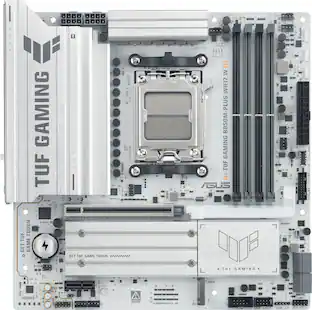
ASUS - ROG STRIX B850-A GAMING WIFI7 NEO (Socket AM5) AMD B850 ATX DDR5 Wi-Fi 7 Motherboard - White
4.9(34)

ASUS ROG STRIX B850-A GAMING WIFI7 NEO AM5 ATX motherboard with 14+2+2 power stages, DDR5 slots, PCIe 5.0 Ready, 4x M.2 slots, Wi-Fi 7, 3x USB 2.0 headers, USB-C 20Gbps, upgraded gaming audio solution, advanced AI tuning with AI Cache Boost and DIY-friendly Q-design with robust thermals.
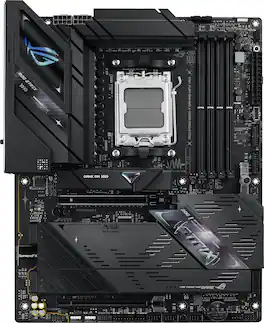
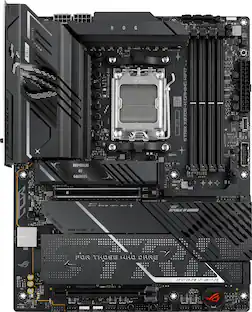
ASUS - ROG STRIX B850-F GAMING WIFI7 NEO (Socket AM5) AMD B850 ATX DDR5 Wi-Fi 7 Motherboard - Black
5.0(3)

ASUS ROG STRIX B850-F GAMING WIFI7 NEO AMD ATX motherboard with 16+2+2 power stages, DDR5 slots, PCIe 5.0 Ready, four M.2 slots, Wi-Fi 7, three USB 2.0 headers, upgraded gaming audio solution, Dynamic OC Switcher, advanced AI tuning with AI Cache Boost and DIY-friendly Q-design with robust thermals.

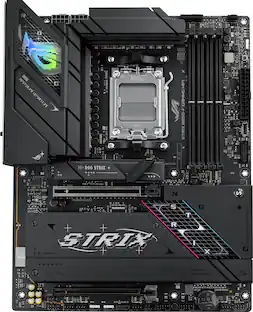
ASUS - TUF GAMING X870-PRO WIFI7 W NEO (Socket AM5) AMD X870 ATX DDR5 Wi-Fi 7 Motherboard - White
5.0(27)

ASUS TUF GAMING X870-PRO WIFI7 W NEO AMD ATX motherboard delivers 16+2+1 power stages, DDR5 with NitroPath DRAM Technology and AEMP, PCIe 5.0 support for next-gen GPUs, four M.2 slots, advanced AI tuning technologies, Wi-Fi 7, 5Gb Ethernet, and a 64MB BIOS for stability and performance.

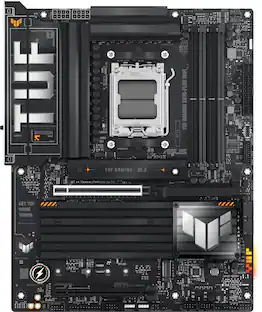
ASUS - ROG STRIX B650-A GAMING WIFI (Socket AM5) AMD B650 ATX DDR5 Wi-Fi 6E Motherboard - White
4.8(81)

ASUS ROG STRIX B650-A GAMING WIFI 6E white and silver scheme motherboard is designed with boosted power delivery and optimized cooling to cope with the demands of powerful Ryzen 7000 series processors. Along with Wi-Fi 6E and PCI Express 5.0 for superfast transfer speeds and storage, ROG STRIX B650-A GAMING WIFI 6E is ready to take the helm of your clean and neat white gaming gear.

Pros for ASUS - ROG STRIX B850-A GAMING WIFI7 NEO (Socket AM5) AMD B850 ATX DDR5 Wi-Fi 7 Motherboard - White
Aesthetics, Heat Dissipation, Connectivity, Ease of Installation, Storage CapacityThere were no pros for this product—Heat Dissipation, Aesthetics, Build Quality, Stability, BIOS InterfaceOverall Performance, Ease of use, BIOS, Compatibility, Wi-Fi 6E

Specs

Be the first to ask a question.

We’ll try to get your question answered within 24 hours by a Best Buy customer or brand representative.

No content

Customers often buy these together

Sponsored