Deals for every list.It’s officially saving season.Shop now

Skip to contentGo to Product Search
Main Content

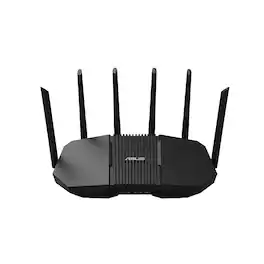
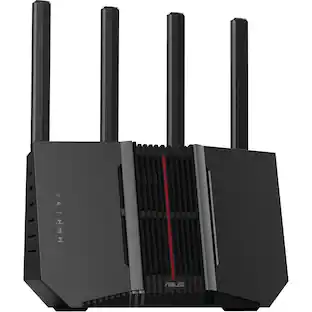
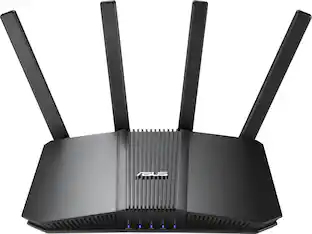
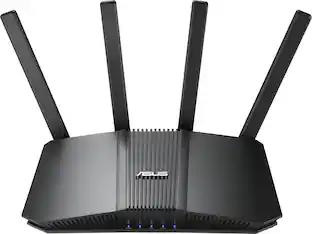
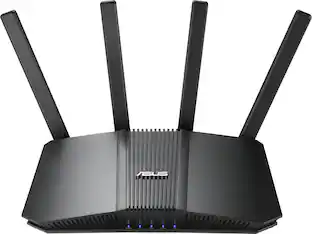
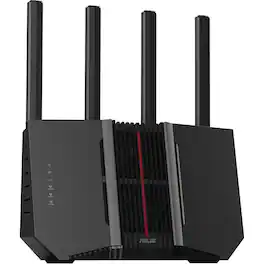
ASUS - RT-BE90U BE9400 Tri-Band Wi-Fi 7 Router - Black

Model: RT-BE90U
SKU: 6683790
Sold byBest Buy

About this product

ASUS RT-BE90U BE9400 Tri-band Wi-Fi Router, Wi-Fi 7, 802.11be, up to 2500 sq ft & 100 devices, Commercial-Grade Network Security, AiMesh Extendable Router, 320MHz, Quad 2.5G ports, Smart Home Master.

Highlights

Features

  • Ultra-Fast Wi-Fi 7 Performance

    Wi-Fi 7 (802.11be) tri-band technology delivers speeds up to 9400 Mbps, with 320 MHz channels, 4096-QAM, and Multi-Link Operation (MLO) for next-generation streaming, gaming, AI networking, and cloud applications

  • AI-Powered Smart AiMesh

    Wi-Fi 7-enhanced Smart AiMesh provides wider coverage, seamless roaming, and secure whole-home networking with easy expansion using compatible ASUS routers

  • Simple Setup, Powerful Management

    Get connected in minutes with the ASUS Router app, offering intuitive setup and comprehensive network controls from your smartphone

  • Engineered for Wall-to-Wall Coverage

    Six external antennas and six high-power front-end modules help eliminate Wi-Fi dead zones, delivering strong, reliable connectivity throughout your home

  • Quad 2.5G Multi-Gig Connectivity

    Four 2.5G Ethernet ports with flexible WAN/LAN configuration provide up to 10G of wired capacity, prioritized traffic handling, and high-performance networking for demanding devices

  • Always-On Backup Connectivity

    Stay connected with support for 4G LTE and 5G mobile tethering, providing internet access when your primary connection is unavailable

  • Smart Home Network Control

    Create up to three dedicated SSIDs for IoT devices, parental controls, VPN connections, and customized network management with Smart Home Master

  • Commercial-Grade Security & VPN

    Protect every connected device with AiProtection, one-tap Security Scan, Safe Browsing, automatic security updates, instant notifications, and advanced VPN support including WireGuard

Specifications

  • Wi-Fi Mesh System
    No
    Number Of LAN Ports
    3
    Wi-Fi Speed
    9.4 gigabits per second
Sponsored

Reviews

Rating 4.7 out of 5 stars with 28 reviews

96% would recommend to a friend

Customer Images

The vast majority of our reviews come from verified purchases. Reviews from customers may include My Best Buy members, employees, and Tech Insider Network members (as tagged). Select reviewers may receive discounted products, promotional considerations or entries into drawings for honest, helpful reviews.


  • Rated 5 out of 5 stars

    mid to high tier Wi-Fi 7 router w/many features

    ASUS - BE9400 Tri-Band Wi-Fi 7 Router is focused on great performance and a plethora of features you would want in a capable middle to high tier router. This model only has one WAN and three LAN & ports all 2.5Gbps. My service provider tops out a 1Gbps up/down so I couldn’t realize the true potential of the premium connectivity, however internal copies between devices on my network were able to use this additional capacity. This router is Wi-Fi 7 compatible AND Tri-band. There are lesser “Wi-Fi 7” routers out there that are only dual band. ASUS - BE9400 Tri-Band Wi-Fi 7 Router implements MLO (Multi-Link Operation) simultaneously to communicate with devices over all three Wi-Fi bands 2.4/5 & 6 ghz for those compatible devices, a trifecta of communications. In addition, a USB-A 3.0 port is on the back of the unit so you can setup a basic Network Attached Storage (NAS) for file sharing and streaming via the on-router USB 3.0 USB-A port. The unit also has six external antennas which can be swiveled. I prefer external antennas over the ASUS ROG BE18000 gaming router (more later on that router) which has internal antennas. Setup is fairly simple using the ASUS Router app, you can also access the admin console via the web interface. I am experienced in setting up home networks and the mobile app did just about everything I needed including setup of an IOT and guest networks (IOT for devices such as connected refrigerators and thermostats). I also like that a lot of the functionality in the mobile app did not require cloud management of the router, which is really appealing as I do not want adversaries to have data about devices living on my internal home network. Testing yielded good results in most portions of my home, only a few of my devices can use Wi-Fi 7 and specifically the 6ghz band (the “Tri” in “Tri-band). This router had no hiccups over the course of the week I used it and noticed no real difference between the more expensive ASUS ROG BE18000 router that I have been using for over a year. After a week I decided to utilize the AIMesh capabilities of this router, creating an Wi-Fi mesh system with my compatible ASUS ROG BE18000 router. Since that router was introduced last year (2025) and it still has more processing power and more ethernet ports I decided to just reset the new ASUS - BE9400 router back to factory settings as a first step in trying create a mesh network. Using the ASUS mobile app I was able to create a mesh network with ease, just adding the BE9400 router as node. The setup establishes a 6ghz backhaul (for traffic between each router using a dedicated channel). The concept of one network SSID meshed throughout the house great providing great signal coverage. It was certainly improved from my first gen, circa 2017 Linksys Velop mesh system. The mesh system even solved my problem with one of my Ring cameras being chronically offline, as the new ASUS - BE9400 router is now covering that portion of my home. Placing the BE9400 as a node in my secondary work area solved “my need for speed problem”, where I was lucky to get 100 megabits from my primary single ASUS router solution. Now I get almost gigabit via an ethernet port. Overall, there is not much to NOT LIKE about this router, it performs very well, the admin interface and mobile app are well done and there are many more features which I intend on enabling (such as per device network throttling). This router gets props for the simplicity of mating two ASUS routers to create a seamless mesh network and providing numerous ways to configure that mesh network. I was even able to assign devices specifically to each node in the mesh network as well as create a exclusive SSID on the BE9400 so I could connect that problematic Ring device and assign Wi-Fi band @ 5 ghz >>> Pros >> Wi-Fi 7 compatible, includes 2.4, 5 AND 6ghz bands >> all WAN and LAN ports are of the 2.5gbps variety >> good mobile app >> easy mesh network configuration leveraging ASUS AIMesh technology >> configuration options, VPN, IOT and guest network >> MLO – Multi-Link- Operation for additional throughput on capable devices. <<< CONS << needs at least two more ethernet ports.

    Posted by Bappy

  • Rated 5 out of 5 stars

    Great Security, Performance, Speeds

    SETUP / INSTALLATION The setup was pretty simple. I had the router connected and running in under 25 minutes, and the ASUS Router app made the process even easier. It pretty much walks you through everything step by step without making the process overly complicated. My devices connected easily once configured, and I did not experience any issues that required troubleshooting. For a router with this many features, I appreciated how straightforward the setup was. BUILD / FEEL The router feels very solid and well built. The case is sturdy, the materials do not feel cheap, and there is no noticeable flex when handling it. The six antennas are probably the most delicate parts of the design because of their small hinges and screw-on connections, but that is pretty standard with routers that use external antennas. WI-FI SPEED / PERFORMANCE This is where the router really impressed me. I pay for gigabit internet service, and I have been getting speeds upwards of 800 Mbps on nearly all my devices. Even while streaming movies on my television, the other devices continue receiving excellent speeds without noticeable slowdowns. My PC has a newer motherboard with Wi-Fi 7, and I have reached speeds over 900 Mbps, pretty much getting the maximum performance I can expect from my internet service. I was not getting those speeds with my previous router, so the difference is noticeable. The router supports tri-band Wi-Fi 7, which gives compatible devices access to newer wireless technology. For me, the important part is actually getting the speeds I am paying for instead of being limited by my router. COVERAGE / SIGNAL STRENGTH Coverage has been excellent throughout my home. There really isn't an area where I have experienced slow speeds, lag, or dropped connections. I can walk around the house while streaming, and my devices maintain a stable connection. I also have security cameras in my garage, approximately 20 to 25 feet away, and they connect without any issues. The cameras stream their 4K video without interruptions, which is important because I rely on them for security. The six external antennas seem to do a nice job providing coverage throughout the house. GAMING / STREAMING I have my Xbox Series X and PS5 connected directly to the router through Ethernet cables. The connection has been fast and stable, even when multiple devices are streaming movies or using the internet simultaneously. I did not experience significant gaming connection problems with my previous router, and I certainly have not experienced any with this one. SECURITY / SMART HOME One feature I genuinely appreciate is ASUS AiProtection. I have over 25 devices connected to my network, including security cameras, doorbells, vacuums, coffee machines, Google speakers, Nest thermostats, laptops, cell phones, gaming systems, and televisions. You really do not realize how many internet-connected devices you own until you make an inventory. Each one represents another potential security weak point, and that makes built-in network protection increasingly important. AiProtection provides an additional layer of security and peace of mind without requiring a separate subscription. It is not going to eliminate every security risk, but having protection built directly into the router is definitely a nice feature. I have not noticed any loss of speed or connection stability while using it. OVERALL Overall, the ASUS RT-BE90U is an awesome router that provides fast, stable Wi-Fi along with useful security features. Great router that does not break the bank and delivers great performance.

    Posted by veritech13

  • Rated 5 out of 5 stars

    Good Addition To ASUS's Line Of Routers

    ASUS has another router in their lineup, the RT-BE90U WiFi 7 router. This is a good addition to ASUS’s series of routers. Connectivity The RT-BE90U has 6 antennas. They provide good coverage. It supports WiFi 7 and has 4 2.5Gb port one of which is the WAN port. The backplane support up to 10Gb throughput. It also has a USB-A 3.2 gun 1 port which allows me to tether my phone to the router for internet backup in case my primary internet connection is down. In The Box In the box I got the router, power adapter, and a LAN cable. AI Mesh The router supports Ai Mesh. This is ASUS’s mesh routing feature. ASUS says the setup is hassle free and it is true. I setup this so the BE90U was a node to my existing network which is running a GS-BE18000. In the mobile app, I went into the Ai Mesh option. It detected the BE90U was a potential Ai Mesh node. I selected it, and the app indicated that it was setting up the BE90U as an Ai Mesh node and it would take up to 5 minutes. In about 5 minutes, it was done and the router rebooted. When I booted back up, the app showed it as a node in the network. It also showed me that it was using two 6GHz channels for backhaul. I’m in an environment that is heavily saturated in the 2.4GHz band and a little less in the 5GHz band. Because of the 6GHz band use for backhaul, I get a really good wireless connection to the BE18000. I’m liking its performance as a mesh node. Other Features The has numerous features. One is the option to turn on multiple SSIDs for separating traffic and the wireless bands the traffic uses. I have the IoC network on and set to only use 2.4GHz. I set it to that for a few reasons. The majority of my IoC devices only use 2.4GHz. Given that band is saturated where I live and I don’t need super fast connectivity related to those devices, it works well with that SSID using 2.4GHz and not add more devices in the environment using 5GHz and 6GHz. I like that I can set the VLANs to use what frequencies that I want them to be able to use. The BE90U supports up to 3 different SSIDs, but with it as a node in the Ai Mesh setup, I manage this through the BE18000. Some additional features are AiProtection, Security Scan, and Safe Browsing, and IPv6. It also comes with a 3 year warranty. Final Thoughts This is a good router. By itself, it has great features and works well. It works just as well when it is a node in an Ai Mesh setup. The setup was hassle free. The mobile app is easy to navigate. I think this is a good addition to ASUS’s router line and, so far, I’m happy with the RT-BE90U. If you are looking for a new router, than add this to your list for consideration.

    Posted by James

  • Rated 4 out of 5 stars

    Strong Speeds but range falls off quickly

    Setup: Onboarding the RT-BE90U was straightforward using the included QR code and the Asus mobile app. The setup wizard guided me through the initial configuration in minutes and proactively prompted me to create an isolated IoT network alongside the primary SSID, which is a great touch for keeping smart home gear segregated. Right after initial setup, the app prompted me to link the router login to a third-party account such as Google, Apple, Microsoft, or Facebook. I linked my Gmail account, saving me from remembering another set of router credentials while also enabling optional Google Assistant voice controls. Hands-On Experience and Daily Use: As a standalone unit, the router pushed impressive bandwidth close to the source, but coverage dropped noticeably across physical distance. On my 750 Mbps down and 39 Mbps up plan, I hit 100 percent of my provisioned speed in the primary room and adjacent areas. Further away on the same floor, speeds dropped to roughly 400 Mbps down and 30 Mbps up. Moving upstairs, bandwidth dropped to around 220 Mbps down and 20 Mbps up, with the furthest back bedrooms bottoming out near 130 Mbps down. While 130 Mbps easily handles casual streaming and gaming, latency climbed noticeably further out on the main floor and even more upstairs. I also noticed occasional speed fluctuations, suggesting the router can hesitate when balancing multiple wireless frequencies across active clients. Adding an AiMesh node would be necessary to keep latency stable across a two-story home. Device stability was generally solid across most hardware, but I ran into a persistent quirk with my iPhone. The phone frequently dropped connection to the router and attempted to roam onto other saved networks, even with the router running the latest firmware. Every other laptop, streaming box, and wireless client in the house maintained a stable link without dropping, so this may have been an isolated client-side handshake issue, but it was frustrating during regular phone use. The software offers some great management tools alongside a few notable flaws. The QoS section is well designed, giving you the flexibility to prioritize tasks like work from home, learn from home, gaming, or media streaming globally at the router level, or drill down into individual devices to assign specific bandwidth priority. In the Insights tab, the built-in Trend Micro engine provides transparent protection against malicious sites and two-way IPS intrusions without subscription fees. The mobile app functions strictly while connected to your local network, preventing remote management when away from home. While that limits on-the-go checks, it provides an extra layer of privacy and network security. The Family Protection feature, however, was a major disappointment. On paper, it looks comprehensive with options to set age ranges, scheduled internet hours, and category-level content blocking. In actual testing, the content filtering failed to categorize traffic properly. Devices were still able to stream video and visit sites that were explicitly marked as blocked. The only parental control function that worked consistently was the blanket toggle to shut off all internet access to a profile. Because the automated content filtering let restricted material through, I cannot trust the built-in family protections for child safety. Pros • Flexible router and per-device QoS • Convenient single sign-on account linking • Free built-in Trend Micro security • Full internet speeds up close • Helpful dedicated IoT network prompt Cons • Unreliable content category filtering rules • Speeds drop significantly with distance • Higher latency on upper floors • Occasional iPhone wireless connection drops • App restricted to local network Final thought: The Asus RT-BE90U BE9400 delivers strong close-range throughput, granular QoS management, and subscription-free security, but inconsistent family content filters, client drop quirks, and range fall-off make it tough to recommend for large multi-story homes without an AiMesh node.

    Posted by KKCNIck

  • Rated 5 out of 5 stars

    great coverage, and speed

    Router was packed very nicely, and includes the router, adapter, and LAN cable. . Boasting very respectable specs, including Wi-Fi 7, tri-band technology that delivers speeds up tp 9.4Gbs / second, up to 100 devices, and extensive security, firewall and data encryption. Internal memory of 256Mb flash and 1Gb DDR4. These are just a few of the numerous specs – much more extensive information can be found on line. The back connections consist of three 2.5G LAN ports, one 2.5G WLAN port, one USB WAN port, and power port. The six fold out antennas can cover up to 2500 sq. ft. Fold out the 6 antennas and plug in. Download the Asus router app and begin set up. At this point, I did run into some trouble with integration of the modem, router, and ISP settings. This made it necessary to reach out to the individual devices technical support. After up and running, I found that the router preformed well. I was impressed with the range which provided great coverage throughout entire home. And, with multiple devices running – TV's, computers, phones, tablets – I did not experience any slow downs or interruptions. The router has been a big improvement over my previous set up, as far as speed, coverage, security, and ability to manage multiple devices.

    Posted by ebk02

Compare similar products

ASUS - RT-BE90U BE9400 Tri-Band Wi-Fi 7 Router - Black
4.7(28)

ASUS RT-BE90U BE9400 Tri-band Wi-Fi Router, Wi-Fi 7, 802.11be, up to 2500 sq ft & 100 devices, Commercial-Grade Network Security, AiMesh Extendable Router, 320MHz, Quad 2.5G ports, Smart Home Master.

ASUS - RT-BE92U BE9700 Tri-Band Wi-Fi 7 Router - Black

Elevate your smart home with blazing-fast tri-band Wi-Fi 7 speeds of up to 9700 Mbps, boosted range with ASUS RF and AI-boosted Smart AiMesh technology and up to 20G of wired capacity. The ASUS RT-BE92U unleashes superior 6 GHz Wi-Fi and future-proof 10G networking.

TP-Link - Archer BE9700 Tri-Band Wi-Fi 7 Router - Black

Step into a new era of home Wi-Fi with the TP-Link BE9700 Tri-band Wi-Fi 7 Router. Powered by revolutionary Wi-Fi 7 technology, this tri-band router revolutionizes your home connectivity. It offers expansive wireless coverage and impressive Wi-Fi speeds of up to 9.7 Gbps using Multi-Link Operation across six simultaneous streams spanning the 6GHz, 5GHz, and 2.4GHz bands. Wi-Fi 7 delivers even smoother connections with less interference, lower latency, and enhanced reliability. Plus, enjoy increased capacity to accommodate more devices simultaneously, making it the perfect router for 4K/8K streaming, lag-free online gaming, and seamless smart home connectivity. Designed for ultra high speed, multi-gigabit internet, the Archer BE9700 boasts a 10 Gbps WAN/LAN port, 2.5 Gbps WAN/LAN port, 3× 2.5 Gbps LAN ports, and a USB 3.0 port, catering to all your high-performance device needs. Experience the future of Wi-Fi today with the TP-Link Archer BE9700. †‡§
ASUS - Refurbished Excellent - RT-BE92U: BE9700 Tri-Band WiFi 7 Router with 10G Port & AiMesh - Black

The ASUS RT-BE92U is a high-performance WiFi 7 router designed to deliver ultra-fast speeds, low latency, and reliable connectivity for modern smart homes and demanding networks. With next-generation wireless technology and advanced security features, it ensures seamless streaming, gaming, and multi-device performance.

Pros for ASUS - RT-BE90U BE9400 Tri-Band Wi-Fi 7 Router - Black
There were no pros for this product—There were no pros for this product—Overall Performance, Speed, Connectivity, Signal Strength, RangeThere were no pros for this product—

Specs

Be the first to ask a question.

We’ll try to get your question answered within 24 hours by a Best Buy customer or brand representative.

No content

Customers often buy these together

Sponsored