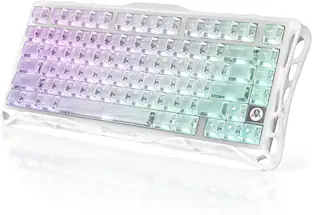
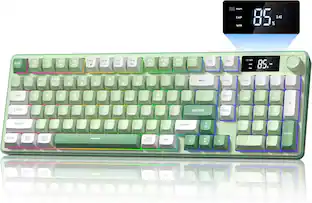
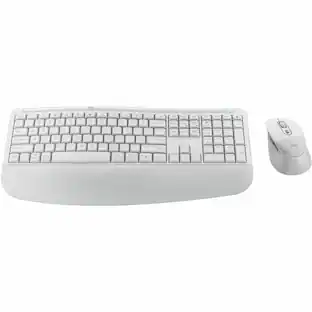
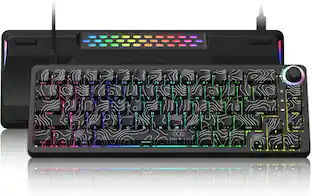
AZIO - IZO Wireless Mechanical Blue Clicky Switch Keyboard - Baroque Rose
About this product
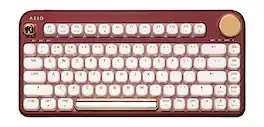
The IZO Collection is a vibrant collection of computer accessories aimed to boost your mood through color. By blending fashion-forward hues with ergonomic round forms, we created refined accessories that draw envious eyes and jealous fingers. By combining unique aesthetics and innovative technology, the IZO keyboard set will not only improve your productivity but also make a style statement for your workspace.
Color
Baroque RoseFeatures
Glistening Pearl Finish
Blended with an alluring metallic and matte paint for a fresh perspective on pearl finishes.
The Gold Standard
The trifecta of colors is complete with a touch of elegant gold on the knob and keycaps. Solid-colored replacements keycaps are included in the box to achieve a different look.
Embracing Round Form
Every corner, line, and edge follows a unified curved form, and numerous design elements were fused for ergonomic comfort and refined beauty. Our unique edge-less design is built to be visually soothing and soft to the touch.
Dual Function Control Knob
The intuitive gold control knob is both gorgeous and functional - helping you efficiently access important media and backlight functions with ease.
Never-Fading Keycaps
Our custom PBT double-shot keycaps create a light and dark color contrast between the keycap and font - displaying two-color effects with the backlight on and off. By adding laser-etched font, the keys will never fade away with time and usage.
21 Backlight Modes
With 21 backlight modes to choose from, you can pick from a variety of different light settings for the perfect visual experience.
Mechanical Switches
Popular for typing and programming, Gateron Blue mechanical switches are clicky with responsive haptic feedback.
Dual Bluetooth and USB Interface
Connect via Bluetooth or USB. When USB mode is selected, simply connect the included USB-C cable to the computer and type away.
Mac and PC Compatible
Built to fully support both Mac and PC interfaces. The IZO comes with hybrid Operating System keycaps which display both OS icons.
Specifications
- Form Factor75%, ErgonomicKeyboard TechnologyMechanicalKey Switch BehaviorClickyConnection TypeWireless
Reviews
Rating 4.6 out of 5 stars with 11 reviews
Customer Images
The vast majority of our reviews come from verified purchases. Reviews from customers may include My Best Buy members, employees, and Tech Insider Network members (as tagged). Select reviewers may receive discounted products, promotional considerations or entries into drawings for honest, helpful reviews.
Compare similar products
The IZO Collection is a vibrant collection of computer accessories aimed to boost your mood through color. By blending fashion-forward hues with ergonomic round forms, we created refined accessories that draw envious eyes and jealous fingers. By combining unique aesthetics and innovative technology, the IZO keyboard set will not only improve your productivity but also make a style statement for your workspace.
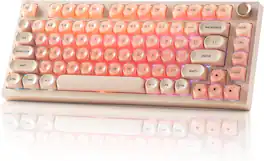
Hot Swappable, Pre-lubed Switches, Gasket Mount with MOA Profile Jelly Keycaps Gaming Keyboard
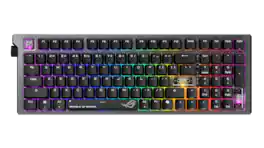
The ROG Strix Morph 96 Wireless gaming keyboard is designed for customization, featuring easy disassembly from top plate to PCB, hot-swappable mechanical switches, South-facing PCB, and GearLink web-based configuration. Enjoy peak gaming performance on tri-mode connection with ROG SpeedNova technology and SpeedTap mode. MacOS supported.
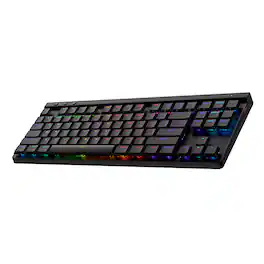
Ultra-thin 0.9 in design meets high-performance engineering with Logitech G515 LIGHTSPEED TKL wireless gaming keyboard. Suit your way of play with tri-mode connectivity and KEYCONTROL. Low-profile GL mechanical switches, double-shot PBT keycaps, and sound dampening layered construction offer durability and accuracy for a superior experience visually and in play.
| Pros for AZIO - IZO Wireless Mechanical Blue Clicky Switch Keyboard - Baroque Rose | |||
|---|---|---|---|
| There were no pros for this product— | There were no pros for this product— | Connectivity, Noise Level, Build Quality, Customization, RGB Lighting | Connectivity, Noise Level, Keyboard Quality, Battery Life, Feel |
| Cons for AZIO - IZO Wireless Mechanical Blue Clicky Switch Keyboard - Baroque Rose | |||
| There were no cons for this product— | There were no cons for this product— | Backlighting | There were no cons for this product— |
Specs
Customers often buy these together
![esc 1 ! 2 @ 3 # 4 $ 5 % 6 ^ 7 & 8 * 9 ( 0 ) - = | F1 F2 F3 F4 F5 F6 F7 F8 F9 F10 F11 F12 tab Q W E R T Y U I O P [ ] { } | caps A S D F G H J K L : : enter shift Z X C V B N M , < > ? shift ctrl alt fn ctrl](https://pisces.bbystatic.com/image2/BestBuy_US/images/products/bc5bce35-ca08-45da-bcc3-8d6fb215154b.jpg;maxHeight=232;maxWidth=233?format=webp)
Razer - Huntsman Mini 60% Wired Optical Clicky Switch Gaming Keyboard with Chroma RGB Backlighting - Black
$69.00The price was $119.99





![Sure, here is the corrected and grouped text from the image:
**Top Row:**
- ESC
- F1
- F2
- F3
- F4
- F5
- F6
- F7
- F8
- F9
- F10
- F11
- F12
- PRTSC
- DEL
**Number Row:**
- 1
- 2
- 3
- 4
- 5
- 6
- 7
- 8
- 9
- 0
- -
- =
- \
**Letter Row:**
- TAB
- Q
- W
- E
- R
- T
- Y
- U
- I
- O
- P
- [
- ]
- \
**Letter Row:**
- CAPS
- A
- S
- D
- F
- G
- H
- J
- K
- L
- ;
- '
**Letter Row:**
- SHIFT
- Z
- X
- C
- V
- B
- N
- M
- ,
- .
- /
**Function Row:**
-](https://pisces.bbystatic.com/image2/BestBuy_US/images/products/9be10b95-8e90-4a5d-b85f-cbc6a7d8e8df.png;maxHeight=232;maxWidth=233?format=webp)

![esc F1 F2 F3 F4 F5 F6 F7 F8 F9 F10 F11 F12 1 2 3 4 5 6 7 8 9 0 - = backspace tab Q W E R T Y U I O P [ ] \ caps lock A S D F G H J K L ; ' shift Z X C V B N M , . / shift ctrl alt logi](https://pisces.bbystatic.com/image2/BestBuy_US/images/products/6411/6411501_sd.jpg;maxHeight=232;maxWidth=233?format=webp)


![Esc F1 F2 F3 F4 F5 F6 F7 F8 F9 F10 F11 F12 Print Screen Scroll Lock Pause Break 1 2 3 4 5 6 7 8 9 0 - + = Backspace Insert Home H Page Up A Num Look 1 I Tab Q W E R T Y U I o P { [ } ] I I Delete End IN Page Down 7 Home 8 9 Pg Up Caps A Lock A S D F G H J K L ; : DE g Enter 4 5 6 Shift Z X C V N M < > ? I Shift 1 End 2 3 Pp Dn Enter Ctrl Alt Alt Ctrl 0 Ins Del](https://pisces.bbystatic.com/image2/BestBuy_US/images/products/a588d446-5678-40ae-86b8-1f15e0026e66.jpg;maxHeight=232;maxWidth=233?format=webp)
![Sure, here is the corrected and grouped text:
```
ESC F1 F2 F3 F4 F5 F6 F7 F8 F9 F10 F11 F12 1 2 3 logitech - - 1 2 # $ 4 % 5 6 & 7 8 9 0 - - back insert home page up num lock clear / . tab Q W E R T Y U I O P { [ } ] / delete end page down 7 home 8 A 9 P9 up + caps lock A S D F G H J K L : ; a enter 4 5 6 shift Z X C V B N M < > ? shift 1 end 2 3 pg dn enter ctrl fn start alt opt alt crnd x alt cmd x fn ctrl alt opt 0 ins del 1 logitech
```](https://pisces.bbystatic.com/image2/BestBuy_US/images/products/5761/5761911_sd.jpg;maxHeight=232;maxWidth=233?format=webp)
![Sure, here is the corrected and grouped text from the image:
---
**Top Row:**
- Esc
- F1 F2 F3 F4 F5 F6 F7 F8 F9 F10 F11 F12
**Second Row:**
- 1 ! 2 @ 3 # 4 $ 5 % 6 ^ 7 & 8 * 9 ( 0 ) - _ + =
**Third Row:**
- Tab Q W E R T Y U I O P [ { ] } \
**Fourth Row:**
- Caps Lock A S D F G H J K L ; ' Enter
**Fifth Row:**
- Shift Z X C V B N M , . / Shift
**Function Keys:**
- F1 F2 F3 F4 F5 F6 F7 F8 F9 F10 F11 F12
**Right Side:**
- Insert Home Page Up Delete End Page Down
**Bottom Row:**
- Ctrl Alt Spacebar Alt Ctrl
**Additional Keys:**
- Logi
- Scroll Lock
- Pause Break
---
This should match the layout of the keyboard in the image.](https://pisces.bbystatic.com/image2/BestBuy_US/images/products/0ce0f170-380c-41e4-8d6a-fa0aadbd534c.jpg;maxHeight=232;maxWidth=233?format=webp)

Customers ultimately bought
Explore tech essentials Sponsored
 $149.99The price was $199.99
 $199.99The price was $299.99



Discover related products
 $249.00The price was $275.00
 $12.99The price was $13.99













Keep exploring
 $129.95The price was $159.95
 $59.99The price was $69.99