Blackmagic Design - ATEM SDI Extreme ISO Live Stream Switcher
Related Item

Specifications
- Maximum Supported Resolution1080pOperating System CompatibilityWindows, Mac
- Key Specs
- Maximum Supported Resolution: 1080p
- Operating System Compatibility: Windows, Mac
- General
- Brand: Blackmagic Design
- Model Number: BMD-SWATEMMXEPCEXTISO
- Product Name: ATEM SDI Extreme ISO Live Stream Switcher
- Warranty
- Warranty - Parts: 1 Year Manufacturer Warranty
- Other
- UPC: 9338716007978
ATEM SDI Extreme ISO is a live production switcher designed for broadcasters who need extreme portability! This model includes all the features of ATEM SDI Pro ISO model but has 8 SDI inputs and 4 SDI outputs. It can record 9 separate H.264 video streams in real time, allowing capture of all 8 clean feed inputs as well as the program video. A DaVinci Resolve project file is also saved. One of the benefits of ATEM SDI is the professional production values that are possible using the range of built in video effects! The cut button ensures an instant cut when switching between sources. The auto button is a professional term that's used on large broadcast switchers to enable video effect transitions. There are duration buttons for video effects allowing 0.5, 1, 1.5 and 2 second settings. You can also select the type of effect you want including mix, which does a smooth transition between sources, and dip which fades via a color during the transition. Or use fun DVE effects that move the image off screen when transitioning between sources. With two independent 3.5mm stereo audio inputs, you can connect desktop and lapel microphones. You can even connect a music player to generate introduction music after the live stream commences but before the program starts. With 2 extra stereo audio inputs, you can ensure a host and guest both have lapel microphones when doing interviews. All audio inputs to ATEM SDI include buttons on the panel for adjusting audio level and enabling inputs into the audio mixer. Plus all models feature a Fairlight audio mixer with all SDI inputs and both microphone inputs connected to the audio mixer allowing live mixing from all your audio sources.
- FEATURE RICH: Supports up to 9 layers; 4 x Upstream Keyers; 2 x Downstream Keyers; Up to 16 Screen Multiview; 4G and 5G Phone Support; Records 9 separate H.264 video streams in real time!
- APPLICATIONS: Built-in hardware streaming engine for live streaming to popular social media platforms and works with streaming software. Perfect for education & training, business presentations, livestream eSport events and more!
- INPUTS: 3G-SDI, 10-bit HD switchable, 2 channel embedded audio (Re-Sync, Frame Rate and Format Converters on all inputs); 2 x 3.5mm TRS Stereo Analog Audio; 1 x RJ45 Gigabit Ethernet for live streaming, software control and direct or network panel connection.
- OUTPUTS: 4 x 3G-SDI; 1 x 3.5mm TRS Stereo Analog Audio; 2 x USB Type-C 3.1 Gen 1 for external drive recording, webcam out, software control and panel connection.
- INCLUDES: ATEM SDI Extreme ISO Live Stream Switcher, Power Supply with International Adapters
Whats Included
- ATEM SDI Extreme ISO Live Stream Switcher, Power Supply with International Adapters
Compare similar products
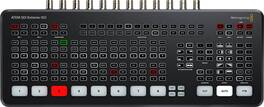
ATEM SDI Extreme ISO is a live production switcher designed for broadcasters who need extreme portability! This model includes all the features of ATEM SDI Pro ISO model but has 8 SDI inputs and 4 SDI outputs. It can record 9 separate H.264 video streams in real time, allowing capture of all 8 clean feed inputs as well as the program video. A DaVinci Resolve project file is also saved. One of the benefits of ATEM SDI is the professional production values that are possible using the range of built in video effects! The cut button ensures an instant cut when switching between sources. The auto button is a professional term that's used on large broadcast switchers to enable video effect transitions. There are duration buttons for video effects allowing 0.5, 1, 1.5 and 2 second settings. You can also select the type of effect you want including mix, which does a smooth transition between sources, and dip which fades via a color during the transition. Or use fun DVE effects that move the image off screen when transitioning between sources. With two independent 3.5mm stereo audio inputs, you can connect desktop and lapel microphones. You can even connect a music player to generate introduction music after the live stream commences but before the program starts. With 2 extra stereo audio inputs, you can ensure a host and guest both have lapel microphones when doing interviews. All audio inputs to ATEM SDI include buttons on the panel for adjusting audio level and enabling inputs into the audio mixer. Plus all models feature a Fairlight audio mixer with all SDI inputs and both microphone inputs connected to the audio mixer allowing live mixing from all your audio sources.
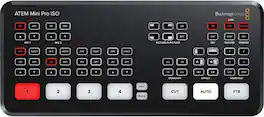
Blackmagic Design ATEM Mini Pro ISO is fast to set up and easy to use. It includes 4 standards converted HDMI inputs, USB webcam out, HDMI out, Fairlight audio mixer with EQ and dynamics, DVE for picture in picture, transition effects, green screen chroma key, 20 stills media pool for titles and free ATEM Software Control. ATEM Mini Pro ISO also adds direct recording of up to 5 separate H.264 video streams in real time and direct streaming via Ethernet to YouTube Live and more. There's also a multiview with 4 cameras, media, preview and program plus status of recording, streaming and audio.

Blackmagic Videohub 10x10 12G is an advanced zero latency video router that supports any combination of SD, HD and Ultra HD on the router at the same time. It has 10 12G-SDI inputs and 10 12G-SDI outputs plus reference connections in a one rack unit size. The front panel LCD lets you see video before routing and clearly displays routing labels and video standards. Routing can be performed by direct button selection and using the large spin knob control that has an electronic clutch. It also features SDI re-clocking, external Ethernet control and supports all SDI video standards up to 2160p60.Blackmagic Videohub 12G eliminates cable mess because you can plug all your SDI equipment into the router, then do connections electronically! You don't need complex system diagrams for your studio because you can connect any video input to any video output, or even a single video input to multiple video outputs. This means monitors can view any source in the studio! You get total flexibility to handle constant change or even emergencies. It lets you use multiple HyperDeck recorders for redundant mastering. Or you can route video to multiple streaming processors for all broadcast platforms. Blackmagic Videohub 12G is also great for adding extra inputs to an ATEM switcher!
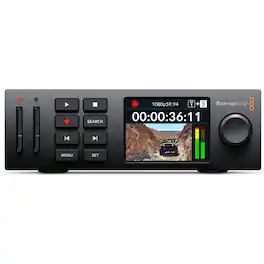
The most compact model of HyperDeck Studio is based on the Teranex Mini form factor. This modular design means that you can use a Teranex Mini Rack Shelf to rack mount 3 HyperDeck Studio HD Minis in a single rack unit, or you can combine them with other products such as switchers, converters or streaming processors. It might be small, but you still get powerful features, such as 3G-SDI in and out, HDMI output, dual SD card media slots, built in sync and timecode generators, front panel controls and both AC and DC power inputs. You can even connect the USB to a computer as HyperDeck Studio HD Mini works like a webcam so you can use any video software! HyperDeck Studio includes a traditional broadcast style control panel that's very fast to use. Simply press the record button and you instantly start recording the video input to a file! You can also change the record file format from the menu. There are transport control buttons for playback, rewind, fast forward, previous clip, next clip and more.
Specs
Reviews
This product doesn't have any reviews yet.
Elevate your entertainment Sponsored
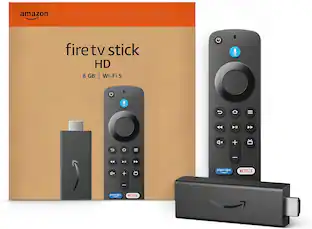 Memorial Day Deal$21.99The price was $34.99