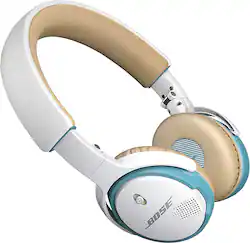
Bose - SoundLink® Wireless On-Ear Headphones - White
- Key Specs
- Noise Cancelling (Active): true
- Connection Type: Wireless
- Wireless Connectivity: Bluetooth (The manner in which a device sends data to another device over a short distance without the use of wires or cables.)
- True Wireless: false (These headphones not only lack wires between the device and headphones, they also lack wires between the headphones themselves. (true wireless is really only possible with in-ear headphones))
- Water Resistant: false (Resists some degree of water penetration.)
- Built-In Microphone: true
- Carrying Case: true
- Headphone Fit: On-Ear
- Adjustable Headband: true
- General
- Brand: Bose
- Model Number: SOUNDLINK ON-EAR HEADPHONES WH
- Product Name: SoundLink® Wireless On-Ear Headphones
- Color: White
- Audio
- Noise Cancelling (Active): true
- Sound Isolating: false
- Connectivity
- Connection Type: Wireless
- Wireless Connectivity: Bluetooth (The manner in which a device sends data to another device over a short distance without the use of wires or cables.)
- True Wireless: false (These headphones not only lack wires between the device and headphones, they also lack wires between the headphones themselves. (true wireless is really only possible with in-ear headphones))
- Features
- Water Resistant: false (Resists some degree of water penetration.)
- Built-In Microphone: true
- Carrying Case: true
- Design
- Headphone Fit: On-Ear
- Style: Pro
- Adjustable Headband: true
- Foldable Design: true
- Power
- On/Off Switch: No
- Material
- Ear Cushion Material: Leatherette
- Dimensions
- Product Height: 7.13 inches (The out of box height of the item. Height is measured as the vertical distance from the bottom of the item to the top as it would be primarily used or placed.)
- Product Width: 5.5 inches (The out of box width of the item. Width is measured as the horizontal distance from one side of the item to the other as it would be primarily used or placed.)
- Product Weight: 0.338 pounds (The out of box weight of the item.)
- Other
- UPC: 017817652513
Enjoy crisp, powerful sound from the best sounding wireless headphones in its class. These Bose® SoundLink® on-ear headphones feature an advanced microphone system for clear calls in windy or noisy environments and up to 15 hours of playtime, thanks to its rechargeable lithium-ion battery. Its state-of-the-art interface and voice prompts make it easy to use.

- Rechargeable lithium-ion battery: Delivers up to 15 hours of use on a full charge.headphone in its class.
- Proprietary Bose® technologies: Deliver crisp, powerful sound from the best sounding wireless headphone in its class.
- Advanced 2-microphone system: For clear calls in windy or noisy environments.
- Multifunction buttons: Located on the earcup, the state-of-the-art interface allows you to easily control your music and calls, access Siri or voice dial from a compatible cell phone.
- Voice prompts: Guide you through Bluetooth pairing and connection steps, and tell you battery life, connection status and who's calling.
- Bluetooth 3.0 connectivity: Enables simple pairing with compatible cell phones, tablets and more from up to 30' away.
- On-ear design: Along with a lightweight, contoured headband and synthetic leather earcups ensures comfortable use during long listening sessions.
- Included USB cable: Allows simple recharging and software updates.
Whats Included
- Audio cable
- Bose® SoundLink® Wireless On-Ear Headphones
- Carrying case
- Owner's manual
- Rechargeable lithium-ion battery
- USB cable
Q: Can these wireless phones be listen to in a plug in A/ V receiver jack
A: Thanks for your question, Des. The SoundLink On-Ear Bluetooth headphones are certainly compatible for wireless playback from connected Bluetooth audio devices, but also include a standard audio cable. The cable uses a standard 1/8" (3.5mm) audio connection so if your receiver uses a larger 1/4" output, a 1/8" to 1/4" adapter may be necessary. Thank you for your interest!
Q: On ear or around ear headphones?
A: I have the on ear type. I think the around ear headphones might cut out a bit of the ambient noise (they're not noise canceling), but may be a little uncomfortable while working up a sweat working out. I did notice that the battery life for the on ear type is 15 hours while the around ear battery life is only 7 hours.
Q: Will an iPod sync wireless?
A: The answer is going to be dependent on the iPod itself. If the iPod is a newer model with Bluetooth technology, you can certainly enjoy wireless music with these headphones. You can check this by going into Settings and seeing if there is an option to turn Bluetooth on. Otherwise, you can use a wired connection for getting Bose sound through your iPod.
A: Hi Metak, The SoundLink On-Ear headphones include a USB cable for charging. You can charge the headphones with any USB charger you already have such as a cell phone charger, or you can use a USB port on a computer. So long as your USB charger is rated at 120v-240v there is no concern. Thanks!
Q: can you use these for watching tv?
A: Hi Skip, The SoundLink On-Ear headphones use the A2DP Bluetooth profile for wireless stereo audio streaming from devices such as smartphones, tablets and computers. You could connect the headphones to a headphone output or analog audio output however via audio cable. Thank you.
Q: Are the headphones fully compatable (mic/remote) with Android devices such as the Galaxy S5?
A: yes but the volume control turns up and down the volume of just the headphones and not media volume of the device. So you have to make sure the device volume is all the way up so you have full range of volume of the headphones
Q: Over the ear vs on the ear options
A: Yes. I link to my iPhone and iPad at the same time. Once paired with both, all you have to do is put the headset on and turn them on. It will tell you how much battery is left and then tell you which two devices you are connected to. If those are the only two devices you pair the headset with, it will automatically connect it to both as long as you are in the range of both.
A: Great Question! The audio cable provided as a back-up for the SoundLink On-ear headphones is for music listening only. The microphone and call functions of the headset are implemented over Bluetooth via the Hands-Free Profile (HFP). This means that the headset needs to be powered up and connected to your phone via Bluetooth to be used on calls. Thank you.
People also viewed
 $199.99The price was $249.99
 $299.00The price was $429.00
 $194.99The price was $249.99
 $149.99The price was $239.99

Today's top picks
 $479.99The price was $729.99
 $69.99The price was $129.99
- $199.99The price was $249.99
 $49.99The price was $62.99