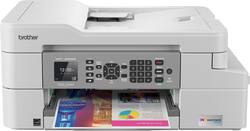
Brother - INKvestment Tank MFC-J805DW Wireless All-In-One Inkjet Printer - White
- Key Specs
- Networking: Wireless
- ENERGY STAR Certified: true (Devices carrying the ENERGY STAR service mark, such as computer products and peripherals, kitchen appliances, and other products, generally use 20% to 30% less energy than required by federal standards.)
- Printer Type: Copier, Fax, Printer, Scanner
- ISO Color Print Speed: 6 pages per minute (The number of color pages able to be printed per minute in the device's default single-side mode, as tested by the International Standards Organization (ISO).)
- ISO Mono Print Speed: 12 pages per minute (The number of black ink (grayscale) pages able to be printed per minute in the device's default single-side mode, as tested by the International Standards Organization (ISO).)
- Touch Screen: false (Touch-screen devices make navigating more intuitive. Using a touch-screen display, you can do things such as tap to select, hold and drag to move items, swipe to scroll, and pinch to zoom.)
- General
- Brand: Brother
- Model Number: MFC-J805DW
- Product Name: INKvestment Tank MFC-J805DW Wireless All-In-One Inkjet Printer
- Color: White
- Display Screen: true
- Display Screen Size: 1.8 inches
- Dimensions
- Product Height: 7.7 inches (The out of box height of the item. Height is measured as the vertical distance from the bottom of the item to the top as it would be primarily used or placed.)
- Product Width: 17.1 inches (The out of box width of the item. Width is measured as the horizontal distance from one side of the item to the other as it would be primarily used or placed.)
- Product Weight: 19.8 pounds (The out of box weight of the item.)
- Features
- Automatic Document Feeder: true
- Photo Printing: true
- Monochromatic/Color: Color
- Automatic Two-Sided Printing: true
- Tray Capacity: 150
- Duty Cycle: Up to 5,000 (The maximum number of pages per month that the device can produce without failing, as specified by the manufacturer.)
- Scanner Info
- Scanner Type: Flatbed
- Scanner Resolution: Up to 1200 x 1200 (Refers to the number of pixels/dots, both horizontally and vertically, of the image produced by the scanner. Generally, the higher the resolution, the sharper and cleaner the produced image.)
- Fax Info
- Integrated Fax: true
- Ink
- Compatible Cartridges: LC3035BK Ultra High-yield Black Ink Cartridge, LC3035C Ultra High-yield Cyan Ink Cartridge, LC3035M Ultra High-yield Magenta Ink Cartridge, LC3035Y Ultra High-yield Yellow Ink Cartridge, LC3033BK Super High-yield Black Ink Cartridge, LC3033C Super High-yield Cyan Ink Cartridge, LC3033M Super High-yield Magenta Ink Cartridge, LC3033Y Super High-yield Yellow Ink Cartridge
- Paper Info
- Automatic Document Feeder Capacity: 20 sheets
- Maximum Document Length: 14 inches
- Maximum Document Width: 8.5 inches
- Performance
- Printer Resolution (Black): Up to 6000 x 1200 (Refers to the number of pixels/dots, both horizontally and vertically, of the image produced by the printer in black ink. Generally, the higher the resolution, the sharper and cleaner the produced image.)
- Other
- UPC: 012502655435
The MFC-J805DW printer features reengineered INKvestment Tank cartridges along with an internal ink storage tank. Business-capable features include mobile device printing⁴, scan to cloud services capabilities⁴, flexible paper handling options, automatic two-sided printing, and easy on-screen navigation using the 1.8" color display. With the ink included in-box, the Brother INKvestment Tank all-inclusive solution delivers truly uninterrupted printing, exceptional features, super convenience, large page yields, and low-cost printing.
- Breathe easy with up to 1 year of ink in-box: Experience truly uninterrupted printing and super convenience with up to 1 year of ink, based on printing approximately 150 pages per month, using only the cartridges provided in-box.¹
- Revolutionary INKvestment Tank ink system: Brother reengineered its ink cartridges to hold more ink and created an internal ink storage tank that delivers more pages of uninterrupted printing without sacrificing the compact, desktop size.
- Large page yields and low-cost printing: Help extend the savings when it's time to replace your ink supply with super or ultra high-yield replacement INKvestment Tank cartridges.
- Eliminate ink replacement guesswork: You can print with confidence using the Brother Page Gauge to help take the guesswork out of when to replace ink. The Brother Page Gauge is a visual, numerical way to know the amount of ink you've used and the amount of ink you have remaining.³
- Simple to connect your way: Versatile connection options with built-in wireless or connect locally to a single computer via USB interface.
- Mobile printing and scanning capabilities: Print and scan wirelessly from your desktop, laptop, smartphone, and tablet using AirPrint®, Brother iPrint&Scan, and Wi-Fi Direct®.⁴
- Versatile paper handling: Use a 20-sheet automatic document feeder, bypass tray, or 150-sheet capacity paper tray that adjusts for letter- or legal-size paper. Automatic duplex (2-sided) printing helps save paper.
- Color 1.8" display: Navigate to powerful features and scan to popular cloud services, including Google Drive, Dropbox, Box, OneDrive and more, directly from your printer.⁵
- Built-in duplex printing: Print on both sides of the page without turning it over manually to minimize your printing costs and help the environment.
- Compatible with Brother super-high-yield and ultra-high-yield cartridges: Including LC3033 (black, cyan, magenta, yellow) and LC3035 (black, cyan, magenta, yellow) models.
- Be sure you have the right cartridge: Enter your printer's model number into Ink and Toner Finder to find compatible cartridges.
- Brother At Your Side support: 2-year limited warranty and free online, call, or live chat support for the life of your printer.
Whats Included
- Brother INKvestment Tank MFC-J805DW Wireless All-In-One Inkjet Printer
- LC3033BK/C/M/Y starter ink cartridges
- Owner's manual
- Telephone line cord
Product Manuals
A: Your Brother MFC-J805DW will perform maintenance purges of the print head at regular intervals. The cleaning is to ensure consistent print quality and prevent damage to the print head. These purges remove any air or debris that may have gotten into the print head manifold. Your machine will use the minimum amount of ink necessary to perform this operation.
Q: Does this printer continue printing when color ink runs out?
A: The Brother MFC-J805DW can operate in a black and white mode when one or more color ink cartridges are empty.
Q: If the printer is off will it automatically power on when a print job is sent to it ?
A: Yes! I love this feature. The printer can be powered off for days and when you send it a document from wherever like your phone it will start printing.
Q: Will this printer work with iCloud?
A: No, this printer will not work with iCloud
Q: Does it fax
A: Yes, this printer can FAX.
Q: Is there a way to install the drivers if you cannot use a cd on your computer?
A: Yes, you can install the Brother MFCJ805DW by downloading the drivers from our website support.brother.com
Q: Will this printer print pictures edge to edge?
A: The MFCJ805DW offers a borderless feature option.
A: So far I have not tried any Post Card Printing at all. But I believe the Instruction manual says that this is possible. It has been a very good Machine on making Copies and printing things from my Firefox Browser from the Internet. The quality is great. You can go online I believe to the Brother Support Site and download the Instruction manual and it should relate to you about the Post Card Printing. Hope this Helps Dan T.
People also viewed
 $249.00The price was $323.00
 $199.99The price was $248.00
 $119.89The price was $179.89
 $99.89The price was $179.89
 $79.89The price was $109.89
 $449.00The price was $450.45
 $119.89The price was $159.89





Today's top picks
 $499.99The price was $749.99
 $199.99The price was $249.99
 $789.99The price was $1,049.99