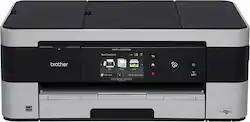
Brother - MFC-J4620DW Business Smart Wireless Inkjet All-in-One Printer - White/Black
- Key Specs
- Networking: Wired, Wireless
- ENERGY STAR Certified: true (Devices carrying the ENERGY STAR service mark, such as computer products and peripherals, kitchen appliances, and other products, generally use 20% to 30% less energy than required by federal standards.)
- Printer Type: All In One
- ISO Color Print Speed: 35 pages per minute (The number of color pages able to be printed per minute in the device's default single-side mode, as tested by the International Standards Organization (ISO).)
- ISO Mono Print Speed: 27 pages per minute (The number of black ink (grayscale) pages able to be printed per minute in the device's default single-side mode, as tested by the International Standards Organization (ISO).)
- Touch Screen: true (Touch-screen devices make navigating more intuitive. Using a touch-screen display, you can do things such as tap to select, hold and drag to move items, swipe to scroll, and pinch to zoom.)
- General
- Brand: Brother
- Model Number: MFC-J4620DW
- Product Name: MFC-J4620DW Business Smart Wireless Inkjet All-in-One Printer
- Color: White/Black
- Display Screen: true
- Display Screen Size: 3.7 inches
- Dimensions
- Product Height: 7.4 inches (The out of box height of the item. Height is measured as the vertical distance from the bottom of the item to the top as it would be primarily used or placed.)
- Product Width: 18.9 inches (The out of box width of the item. Width is measured as the horizontal distance from one side of the item to the other as it would be primarily used or placed.)
- Product Depth: 18.9 inches (The out of box depth of the item. Depth is measured as the distance from the front of the item to the back as it would be primarily used or placed.)
- Product Weight: 20.6 pounds (The out of box weight of the item.)
- Features
- Automatic Document Feeder: true
- Photo Printing: false
- Automatic Reduction/Enlargement: true
- Automatic Two-Sided Printing: false
- Tray Capacity: 150
- Duty Cycle: Up to 13,000 (The maximum number of pages per month that the device can produce without failing, as specified by the manufacturer.)
- Certifications Listings & Approvals
- EPEAT Qualified: false (The Electronic Product Environmental Assessment Tool (EPEAT) was designed to provide an environmental assessment tool for purchasers. In order to qualify for EPEAT, a product must meet all 23 required criteria.)
- Scanner Info
- Scanner Type: Flatbed
- Duplex Scan Function: true
- Scanner Resolution: Up to 2400 x 1200 (Refers to the number of pixels/dots, both horizontally and vertically, of the image produced by the scanner. Generally, the higher the resolution, the sharper and cleaner the produced image.)
- Fax Info
- Integrated Fax: true
- Ink
- Compatible Cartridges: LC203BK, LC203C, LC203M, LC203Y
- Ink Subscription Service Available: false (The printer monitors ink usage and alerts the subscription provider when levels are low. A purchased subscription provides refills of ink based on usage.)
- Memory
- Memory Card Slot: true
- Paper Info
- Automatic Document Feeder Capacity: 20 sheets
- Maximum Document Length: 17 inches
- Maximum Document Width: 11 inches
- Supported Paper Sizes: Letter, legal
- Paper Handling: 1-Sheet, 150-Sheet Tray loader, 20-Sheet, 50-Sheet
- Performance
- Printer Resolution (Black): Up to 6000 x 1200 (Refers to the number of pixels/dots, both horizontally and vertically, of the image produced by the printer in black ink. Generally, the higher the resolution, the sharper and cleaner the produced image.)
- Printer Resolution (Color): Up to 6000 x 1200 (Refers to the number of pixels/dots, both horizontally and vertically, of the image produced by the printer in colored ink. Generally, the higher the resolution, the sharper and cleaner the produced image.)
- Approximate Page Yield (Black): 1200
- Approximate Page Yield (Color): 550
- Copier Info
- Copier Resolution (Black): Up to 600 x 600 (Refers to the number of pixels/dots, both horizontally and vertically, of the image produced by the copier in black ink. Generally, the higher the resolution, the sharper and cleaner the produced image.)
- Copier Resolution (Color): Up to 600 x 600 (Refers to the number of pixels/dots, both horizontally and vertically, of the image produced by the copier in colored ink. Generally, the higher the resolution, the sharper and cleaner the produced image.)
- Connectivity
- Minimum System Requirements: Windows, Mac OS
- Other
- UPC: 012502637691
Complete a variety of office tasks with this Brother MFC-J4620DW all-in-one printer that lets you print, copy, scan and fax documents and images for versatility. Built-in Wi-Fi allows direct printing and scanning from select devices and Cloud services.
- Prints up to 35 ISO ppm* in black and up to 27 ISO ppm* in color in fast mode: Plus up to 22 ISO ppm* in black and up to 20 ISO ppm* in color in ISO standard mode to generate documents and photos quickly.
- 4-in-1 functionality: Prints, copies, scans and faxes for multipurpose use.
- Built-in wireless LAN (802.11b/g/n): Allows easy wireless network connectivity.
- NFC (near-field communication) technology: Lets you pair select NFC-capable devices simply by touching them to the printer for remote printing and scanning.
- Ethernet LAN: Offers a simple wired connection to your home or office network.
- Up to 6000 x 1200 dpi resolution in black and color: To help ensure optimal image clarity and detail.
- Card slots: Accept Secure Digital, Secure Digital High Capacity, SDXC, MultiMediaCard Plus and select other formats for easy storage (cards not included).
- Supports letter and ledger media sizes: So you can easily add paper up to 8.5" x 11" to the paper tray and up to 11" x 17" to the bypass tray.
- Wireless device connectivity: Lets you print directly from select devices via AirPrint, Google Cloud Print, Brother iPrint&Scan and Wi-Fi Direct and scan and print from Cloud services, including Google Drive, Dropbox, Evernote and more.
- Copies up to 12 cpm* in black, up to 9 cpm* in color: To produce copies rapidly.
- Copy resolution up to 1200 x 1200 dpi: Delivers crisp, clear copies.
- Color flatbed single-pass ADF scanner: Features 2400 x 2400 dpi optical flatbed resolution, 1200 x 2400 dpi ADF resolution and 19,200 x 19,200 dpi interpolated resolution for faithful document reproduction.
- High-speed fax: With 14.4 Kbps speed, 200 speed dials and up to 200-page fax memory to meet your office needs. Color faxing to and from color fax machines.
- 20-page automatic document feeder: Along with a 150-sheet input tray and single-sheet bypass tray lets you easily complete large tasks.
- High-speed USB 2.0 interface: Makes it easy to connect your compatible PC or Mac.
Whats Included
- MFC-J4620DW Business Smart All-in-One Printer
- Black, cyan, magenta and yellow ink cartridges
- Phone line cord
- Installation CD-ROM, documentation CD-ROM
- Owner's manual
A: Yes - I have recently printed for an additional month after the "low ink" indicator came up (this is a personal printer, tho, not a business one)! Now I have changed out just the yellow, and am STILL printing!! And yes, if all the colors go out, you can still print in black.
Q: Printer can print in color-- but not photos?
A: It will print photos. In my experience the inks just are not as vivid as the original image.
Q: Is this printer compatible with windows 10.1?
A: Yes, I transitioned from 8.1 to 10 with no issues.
Q: does this j4620 print in duplex(both sides) automatically??
A: It doesn't print automatically, you have to check the box on the print screen to that says "Two-sided" under options in the print screen.
Q: can you scan 11 x 17 docs? or is the scanning bed smaller than the printer?
A: No, the scanner is a standard 8.5 x 11
Q: Does this printer have media (camera) slot for downloading pictures?
A: yes it has multiple card reader ports.
Q: Can I fax using VOIP phone connection?
A: Yes. I am using that same service. You may have to set the transmission rate at the slower setting for that to work depending on the service you use. The manual will explain how tondo that. It is one click, and easy to do
A: Yes, you can print labels on this printer.
People also viewed
 $119.89The price was $179.89
 $99.89The price was $179.89
 $79.89The price was $109.89
 $449.00The price was $450.45
 $119.89The price was $159.89
 $299.89The price was $429.89





Today's top picks
 $479.99The price was $729.99
 $1,199.99The price was $1,399.99
 $199.99The price was $249.99
 $69.99The price was $129.99
 $799.99The price was $1,199.99
 $789.99The price was $1,049.99