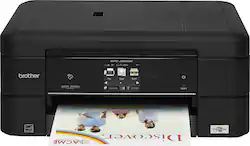
Brother - MFC-J885DW Wireless All-In-One Printer - Black
- Key Specs
- Networking: Wireless
- ENERGY STAR Certified: true (Devices carrying the ENERGY STAR service mark, such as computer products and peripherals, kitchen appliances, and other products, generally use 20% to 30% less energy than required by federal standards.)
- Printer Type: All In One
- ISO Color Print Speed: 10 pages per minute (The number of color pages able to be printed per minute in the device's default single-side mode, as tested by the International Standards Organization (ISO).)
- ISO Mono Print Speed: 12 pages per minute (The number of black ink (grayscale) pages able to be printed per minute in the device's default single-side mode, as tested by the International Standards Organization (ISO).)
- Touch Screen: true (Touch-screen devices make navigating more intuitive. Using a touch-screen display, you can do things such as tap to select, hold and drag to move items, swipe to scroll, and pinch to zoom.)
- General
- Brand: Brother
- Model Number: MFC-J885DW
- Product Name: MFC-J885DW Wireless All-In-One Printer
- Color: Black
- Display Screen: true
- Display Screen Size: 2.7 inches
- Dimensions
- Product Height: 6.8 inches (The out of box height of the item. Height is measured as the vertical distance from the bottom of the item to the top as it would be primarily used or placed.)
- Product Width: 15.7 inches (The out of box width of the item. Width is measured as the horizontal distance from one side of the item to the other as it would be primarily used or placed.)
- Product Depth: 15.7 inches (The out of box depth of the item. Depth is measured as the distance from the front of the item to the back as it would be primarily used or placed.)
- Product Weight: 16.8 pounds (The out of box weight of the item.)
- Features
- Automatic Document Feeder: true
- Photo Printing: false
- Automatic Reduction/Enlargement: true
- Automatic Two-Sided Printing: false
- Tray Capacity: 150
- Duty Cycle: Up to 2,500 (The maximum number of pages per month that the device can produce without failing, as specified by the manufacturer.)
- Certifications Listings & Approvals
- EPEAT Qualified: false (The Electronic Product Environmental Assessment Tool (EPEAT) was designed to provide an environmental assessment tool for purchasers. In order to qualify for EPEAT, a product must meet all 23 required criteria.)
- Scanner Info
- Scanner Type: Flatbed
- Duplex Scan Function: true
- Scanner Resolution: Up to 2400 x 1200 (Refers to the number of pixels/dots, both horizontally and vertically, of the image produced by the scanner. Generally, the higher the resolution, the sharper and cleaner the produced image.)
- Fax Info
- Integrated Fax: true
- Ink
- Compatible Cartridges: LC201BK, LC201C, LC201Y, LC201M, LC203BK, LC203C, LC203Y, LC203M
- Ink Subscription Service Available: false (The printer monitors ink usage and alerts the subscription provider when levels are low. A purchased subscription provides refills of ink based on usage.)
- Memory
- Memory Card Slot: true
- Paper Info
- Automatic Document Feeder Capacity: 50 sheets
- Maximum Document Length: 14 inches
- Maximum Document Width: 8.5 inches
- Supported Paper Sizes: Up to 8.5" x 14"
- Paper Handling: A4, A5, A6, letter, legal, executive, 4" x 6" photo, 5" x 8" index card, 5" x 7" photo, C5 envelope, Com-10, DL envelope, Monarch, 3.5" x 5" photo
- Performance
- Printer Resolution (Black): Up to 6000 x 1200 (Refers to the number of pixels/dots, both horizontally and vertically, of the image produced by the printer in black ink. Generally, the higher the resolution, the sharper and cleaner the produced image.)
- Printer Resolution (Color): Up to 6000 x 1200 (Refers to the number of pixels/dots, both horizontally and vertically, of the image produced by the printer in colored ink. Generally, the higher the resolution, the sharper and cleaner the produced image.)
- Approximate Page Yield (Black): 550
- Approximate Page Yield (Color): 260
- Copier Info
- Copier Resolution (Black): Up to 6000 x 1200 (Refers to the number of pixels/dots, both horizontally and vertically, of the image produced by the copier in black ink. Generally, the higher the resolution, the sharper and cleaner the produced image.)
- Copier Resolution (Color): Up to 6000 x 1200 (Refers to the number of pixels/dots, both horizontally and vertically, of the image produced by the copier in colored ink. Generally, the higher the resolution, the sharper and cleaner the produced image.)
- Connectivity
- Minimum System Requirements: Windows: 2003 R2, 2003, 2008 R2, 2008, 2012 R2, 2012 Server, XP Professional, XP Home, Vista, 7, 8 or 8.1; Mac: OS X 10.8.5, 10.9.x or 10.10.x
- Other
- UPC: 012502640691
Get more done with this Brother MFC-J885DW all-in-one printer, which enables you to copy, scan and wirelessly print, so you can complete a variety of tasks. NFC (near-field communication) technology lets you print and scan via select mobile devices.
- Prints up to 12 ISO ppm* in black, up to 10 ISO ppm* in color: So you can quickly generate documents.
- Be sure you have the right cartridge: Enter your printer's model number into our Ink and Toner Finder to find compatible cartridges. Get started ›
- Print, copy and scan functionality: Helps you accomplish tasks at home or in the office.
- Built-in wireless LAN (802.11b/g/n) with Wi-Fi Direct: Ensures fast data transfer from a wireless connection. Network-ready with built-in Ethernet interface for simple connection to your home or office network.
- Up to 6000 x 1200 dpi resolution: Delivers crisp, detailed prints.
- Supports media up to 8.5" x 14": For versatile printing options.
- NFC (near-field communication) interface: Features touch-to-connect functionality, so you can print and scan right from enabled mobile devices.
- Web Connect: Lets you scan to and print from Cloud services, including Google Drive, Dropbox, Facebook, Box, OneDrive and more. Print directly from your compatible mobile device via AirPrint, Google Cloud Print, Brother iPrint&Scan and more.
- Copies up to 6 cpm* in color: To help you quickly produce copies.
- Color flatbed scanner: Enables you to duplicate images with accurate hues.
- 2.7" TouchScreen display: Helps simplify operation and lets you easily navigate on-screen menus.
- USB 2.0 interface: For easy connectivity.
Whats Included
- Installation and documentation CD-ROM
- LC201 black ink cartridge
- LC201 cyan, magenta and yellow ink catridges
- MFC-J885DW Wireless All-In-One Printer
- Owner's manual
- Phone line cord
Q: Can you print in black ink only. Also if one of the ink cartridges is empty, can you still print?
A: Yes. Go to your printer details in your computer and change setting to black only. The printer will respond to that command. Yes, but the color will be off if printing in color.
Q: Can you use non Brother ink?
A: I have been using off-brand ink and toner for years with NO problems, on Brother and HP printers (both inkjet and laser). The image quality tends to be not QUITE as good, but I am not sending my prints/copies to Buckingham Palace. I have used several different brands of ink and toner over the years, but in the last several years I have been using exclusively EZink, ordered via Amazon. It is a VERY reliable and inexpensive brand, and the quality of the prints and copies is very close to using OEM ink and toner, but for a fraction of the cost.
Q: Can you print from/scan to a thumb drive. Is there a memory card slot?
A: There is a memory card slot
Q: What are the dimensions of this printer?
A: The dimensions of this printer are 15.7" x 13.4" x 6.8".
Q: is this compatible with windows 10?
A: I'm using it with Windows 10 and it works great.
Q: Can you use a cell phone to use the fax?
A: This is for a landline service.
A: Yes, this model does print photos.
Q: Can it print text messages from a mobil phone?
A: Yes. You just need to download the Brother plugin or app (if you want more features) from your play store.