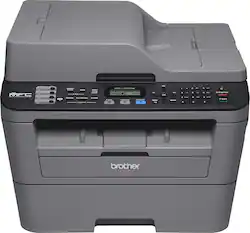
Brother - MFC-L2700DW Wireless Black-and-White All-in-One Laser Printer - Gray
- Key Specs
- Networking: Wired, Wireless
- ENERGY STAR Certified: true (Devices carrying the ENERGY STAR service mark, such as computer products and peripherals, kitchen appliances, and other products, generally use 20% to 30% less energy than required by federal standards.)
- Printer Type: All In One
- Duty Cycle: Up to 10,000 (The maximum number of pages per month that the device can produce without failing, as specified by the manufacturer.)
- Monochromatic/Color: Monochromatic
- General
- Brand: Brother
- Model Number: MFC-L2700DW
- Product Name: MFC-L2700DW Wireless Black-and-White All-in-One Laser Printer
- Color: Gray
- Display Screen: true
- Display Screen Size: 2.7 inches
- Dimensions
- Product Height: 12.5 inches (The out of box height of the item. Height is measured as the vertical distance from the bottom of the item to the top as it would be primarily used or placed.)
- Product Width: 16.1 inches (The out of box width of the item. Width is measured as the horizontal distance from one side of the item to the other as it would be primarily used or placed.)
- Product Weight: 24.9 pounds (The out of box weight of the item.)
- Features
- Photo Printing: false
- Automatic Reduction/Enlargement: true
- Certifications Listings & Approvals
- EPEAT Qualified: false (The Electronic Product Environmental Assessment Tool (EPEAT) was designed to provide an environmental assessment tool for purchasers. In order to qualify for EPEAT, a product must meet all 23 required criteria.)
- Paper Info
- Automatic Document Feeder Capacity: 35 sheets
- Maximum Document Length: 14 inches
- Maximum Document Width: 8.5 inches
- Paper Handling: Up to 250 sheets
- Supported Paper Sizes: Up to 8.5" x 14" (legal); manual feed slot: 3" to 8.5" in width and 5" to 14" in length
- Tray Capacity: 250
- Ink
- Compatible Cartridges: TN630, TN660
- Ink Subscription Service Available: false (The printer monitors ink usage and alerts the subscription provider when levels are low. A purchased subscription provides refills of ink based on usage.)
- Copier Info
- Copier Resolution (Black): Up to 600 x 600 (Refers to the number of pixels/dots, both horizontally and vertically, of the image produced by the copier in black ink. Generally, the higher the resolution, the sharper and cleaner the produced image.)
- Copier Resolution (Color): Up to 600 x 600 (Refers to the number of pixels/dots, both horizontally and vertically, of the image produced by the copier in colored ink. Generally, the higher the resolution, the sharper and cleaner the produced image.)
- Maximum Number Of Copies: 99
- Fax Info
- Integrated Fax: true
- Performance
- Printer Resolution (Black): Up to 2400 x 600 (Refers to the number of pixels/dots, both horizontally and vertically, of the image produced by the printer in black ink. Generally, the higher the resolution, the sharper and cleaner the produced image.)
- Scanner Info
- Scanner Resolution: Up to 2400 x 600 (Refers to the number of pixels/dots, both horizontally and vertically, of the image produced by the scanner. Generally, the higher the resolution, the sharper and cleaner the produced image.)
- Scanner Type: Flatbed
- Connectivity
- Minimum System Requirements: PC: Windows XP (Home, Professional and Professional x64 editions), Vista, 7, 8 or 8.1, Windows Server 2003 (32- or 64-bit), 2008, 2008 R2, 2012 or 2012 R2, Mac: OS X 10.7.5, 10.8.x or 10.9.x; Linux
- Other
- UPC: 012502638872
This Brother MFC-L2700DW all-in-one laser printer features printing, copying, scanning and faxing functions for diverse utility. The built-in wireless networking and Ethernet input make it easy to connect to your existing home or office network.
- Prints up to 27 ISO ppm* in black: To generate documents quickly.
- 4-in-1 functionality: Prints, copies, scans and faxes for convenience.
- Built-in wireless LAN (802.11b/g/n): Ensures fast data transfer from a wireless connection.
- Network-ready with built-in Ethernet interface: For simple connection to your home or office network.
- AirPrint technology: Along with Google Cloud Print, Brother iPrint&Scan, Cortado Workplace and Wi-Fi Direct for easy wireless printing from select mobile devices.
- Up to 2400 x 600 dpi resolution: For crisp images.
- Prints on legal-size paper up to 8.5" x 14": Ideal for various documents.
- Copies up to 27 cpm* in black: To generate copies quickly.
- Color flatbed scanner: With an optical scan resolution up to 600 x 2400 dpi (up to 19,200 x 19,200 dpi interpolated) to reproduce exact colors and large documents.
- High-speed fax: With 33.6 Kbps modem, 200 speed dials and up to 400-page fax memory to meet your office needs. Color faxing to color fax machines.
- 250-sheet-capacity lower paper tray: To print more documents without reloading. The 35-page auto document feeder with a single-sheet manual-feed slot enables quick paper reloading.
- USB 2.0 connectivity: For easy connection to your computer.
Whats Included
- AC power cord, phone line cord
- Installation CD-ROM, drum (DR-630)
- MFC-L2700DW Wireless All-in-One Laser Printer
- Owner's manual
- Starter black toner cartridge
Disclaimers
- Print speeds vary with use. See manufacturer for info on print speeds.
Q: Do you have to use the wireless?
A: This product can be connected via USB 2.0. It does not include a USB cord.
Q: Does this work with Win 10?
A: Yes it does work fine with windows 10!
Q: Is it compatible with a MAC/Apple?
A: I downloaded the driver on the computer.
A: This printer prints in black and white but scans in color.
Q: What is best printer to buy that is wireless, copier & fax
A: Brother has big bank for buck. Software it comes with better than printers in this price class. Price includes OCR software that works well a $100 plus value. Cost per page is low and even lower with generic toner. Lifetime support If you fax, it is nice this has the hook button so you can hear what is going on, this helps to determine if a problem is on the other side, or miss dialed number etc
Q: does it auto feed on the scanner?
A: Yes it auto feeds on scan. You can also scan on flat bed and combine into single file.
A: Yes
A: Yes. This works well well with mobile and tablet devices (Apple or Android). You will need to install the latest Brother iPrint&Scan application on your supported device and connect your printer on your network. Once setup correctly, you can print from that mobile device. A word of caution -- if you do not mind having this iPrint&Scan application connected to personal accounts (like your Google email, or Google Drive, Evernote, etc.) then you can access these applications and the documents you keep safely within the "cloud" and print directly from your phone or device.
People also viewed
 $309.99The price was $349.99
 $399.99The price was $659.00
 $339.99The price was $379.99

Today's top picks
 $499.99The price was $749.99
 $199.99The price was $249.99
 $789.99The price was $1,049.99