Labor Day SaleEnds September 7. Limited quantities. No rainchecks.Shop now

Skip to contentGo to Product Search
Main Content

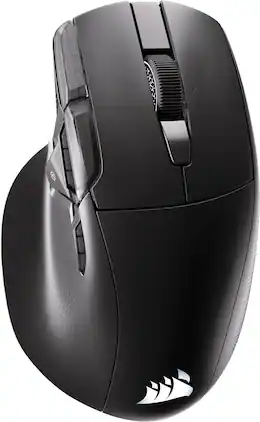
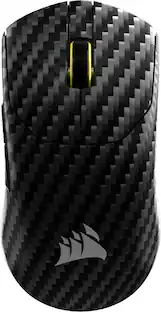
CORSAIR - NIGHTSWORD v2 WIRELESS SD Stream Deck Gaming Mouse - Wireless - Black

Model: CH-931E010-WW
SKU: 6678916
Sold byBest Buy

About this product

One button summons infinite control. The NIGHTSWORD v2 WIRELESS SD is the first gaming mouse with a dedicated Stream Deck Launch Button, bringing your Virtual Stream Deck instantly to your screen. Summon a personalized on-screen shortcut panel built around whatever you play, create or get done, and extend that same control across 8 programmable buttons. Up to 8,000Hz hyper-polling, a 33K DPI CORSAIR MARKSMAN S sensor and optical switches rated for 100 million clicks keep every input sharp and precise. Up to 170 hours of battery life and three ways to connect keep you in the game, your way.

Features
  • Stream Deck Launch Button

    Press the dedicated Stream Deck Button once and every action you need appears instantly. One button summons infinite control.

  • Elgato Virtual Stream Deck

    Do more in fewer clicks. Create your own on-screen panel of actions for every game and app you use, from managing inventory to launching your favorite playlist.

  • Expand without limits

    Take your setup further. All 8 buttons are fully expandable through the Elgato Marketplace, giving you plugins for your favorite apps, games and creative tools.

  • 8,000Hz hyper-polling

    At 8,000Hz in both wired and wireless modes, SLIPSTREAM WIRELESS delivers the speed and stability to keep you at your best when it matters most.

  • 33K DPI CORSAIR MARKSMAN S Sensor

    Your every move, perfectly captured. The CORSAIR MARKSMAN S sensor delivers true 33,000 DPI tracking, 750 IPS speed and 50G acceleration for precision that never lets you down.

  • Comfortable ergonomic shape

    Ergonomic curves and a contoured thumb rest deliver a secure, natural right handed grip through every session.

  • Responsive optical switches

    Optical switches rated for up to 100 million clicks deliver reliable, responsive input every single time.

  • Versatile tri-mode connectivity

    Choose 2.4GHz SLIPSTREAM WIRELESS for low-latency performance, Bluetooth for flexible multi-device use, or USB-C for direct wired connection.

  • Included wireless adapter

    Position the included wireless adapter near your mouse to shorten transmission distance and keep your connection robust during every session.

  • Customizable via CORSAIR Web Hub

    Map buttons, set macros and tune your setup directly via CORSAIR Web Hub with no additional software installation required.

See all features
Specifications
  • Lighting Type
    RGB
    Maximum Sensitivity
    33000 dots per inch
    Number of Buttons (Total)
    11
    Connection Type
    Wireless
Sponsored

Reviews

Rating 4.5 out of 5 stars with 17 reviews

82% would recommend to a friend

Customer Images

The vast majority of our reviews come from verified purchases. Reviews from customers may include My Best Buy members, employees, and Tech Insider Network members (as tagged). Select reviewers may receive discounted products, promotional considerations or entries into drawings for honest, helpful reviews.

  • Rated 4 out of 5 stars

    Interesting Stream Deck Integration in a Mouse

    The Nightsword v2 features integrated Elgato Stream Deck integration, but is this actually a mouse feature or just a software feature that's locked to this specific SD branded mouse? Other than the side button, I don't really see how its not just a software integration with a Virtual Stream Deck overlay and assignable Elgato keys that bind to your mouse. That said, the Stream Deck integration is actually really quite useful, not so much for gaming but for productivity and general usage. The number of integrations that Corsair/Elgato have managed to integrate is extremely impressive to the point you can really control your whole home from your desktop PC. With this mouse, you can additionally command a bunch more shortcuts with the press of a button by binding the Virtual overlay to the side Elgato button (or any other button) and then get access to more shortcuts. For my needs, this is actually super handy for work because I am constantly on calls and there are some keys I use frequently, like talk, mute, share screen. I also frequently use some programs like Snipping Tool to mark up and cut out screenshots for documentation so that is a real time saver for me to just pop that up with a virtual overlay. One thing I would like to see is the ability to pop up the overlay right at your mouse cursor to save you the travel of going back to where you last moved the overlay. I took off a star because the mouse itself is really not that nice. No infinite scroll wheel, heavy, plastic that doesn't feel premium, kind of light and slick vs. some of the rubberized ones I own. The thumb landing is also really sharp and flat and while the buttons feel ok, they're not as nice as the ones on my other recent mice. It does have left/right tilt on the scroll wheel which is not a given with Corsair mice so that is a nice touch. I also like BT in addition to slipstream 2.4ghz RF dongle which is also another Corsair hallmark, although the BT does feel a lot lower poll rate and jerkier compared to RF. The other reason I took a star off is that there is TOO MUCH weirdness to setting up Corsair mice. There's the dongle firmware update utility web page. The mouse web-hub page and then there's iCue which can't co-exist with the web-hub page. And, if you somehow manage to disconnect the dongle like I did in iCue, you need to re-pair the mouse via the dongle firmware update page bc iCue only gives you keyboard press combos. Its all very frustrating and ofc no one includes manuals or even quick start guides anymore physically so you have to go digging online for it. Pretty miserable experience of tons of firmware updates and then when I finally got everything updated, I still had to re-launch Stream Deck multiple times and then launch it as admin (as it stated in the quick start guide that wasn't included, only online), I finally got Stream Deck to show up. Bad integration, bad user experience, cool Stream deck integration, just an OK mouse. But I really do like that Stream Deck integration and the ability to go RF and BT will come in handy swapping between my work laptop and personal desktop.

    Posted by TechBuyer

  • Rated 5 out of 5 stars

    Great Design w/ Tons Of Flexibility For Control

    This is a great gaming mouse. As you’d expect, performance is top-notch with super fast polling and precision. It’s also very versatile with support for a range of connections including bluetooth, wired via USB, wireless via the dongle, or a shortened transmission with the included wireless adapter. The adapter includes a clip for easy clipping to a gaming mat or mousepad. Beyond these, the reprogrammable Stream Deck button is ready to launch a customizable virtual Elgato Stream Deck on your screen at the press of a button. This is a cool feature, further extending control beyond the already generous 8 programmable buttons on this thing. __ Design __ This mouse is clearly designed for right hand use. It’s nicely formed for comfort, though getting used to the thumb rest took some time as I’ve never had a mouse with one before. It’s very lightweight, while not flimsy at all. Most of the extra buttons are positioned nicely within reach of your thumb and index finger without getting in the way. I noticed myself accidentally hitting the stream deck button a few times during use, but with some practice I managed to stop doing that. The mouse is crafted in the expected black plastics with some nice texture details in places. Three areas of RGB lighting (sides of the wheel, logo and a rear surface glow) provide simple but effective, controllable lighting for some extra fun. Nothing that original there, but if you like it, you have it in this mouse. Clearly the main feature of this mouse is the Stream Deck button, bringing this mouse into the usually separate suite of Elgato streaming products. While most of the core features can be handled without software via Corsair’s Web Hub (which simply loads your controls in a browser for adjusting settings) the Steam Deck features are accessed by downloading the Elgato Steam Deck App. This is available for both PC and Mac and it was super easy to get up and running. Mapping the Steam Deck launcher to the button will bring up a small virtual grid of chosen controls, either at your cursor location, or at a location of your choosing on your screen. If you do a lot of streaming, this can bring up things like a sound board, or allow quick access to media controls without lifting your hand from the mouse - pretty cool. __ Performance __ But how’s the mouse perform? - Well, very good. There’s so much competition in the world of gaming mice that it’s hard to go wrong. This thing has more speed and precision than you need at 8,000hz hyper polling and 33k DPI tracking. Beyond that, a long lasting 170 hour battery life means that charging should be very seldom needed. __ Overall __ This is a very nice, ergonomic gaming mouse. It performs very well and allows for very fine levels of sensitivity, all while being comfortable in the hand and offering plenty of both physical and virtual programmable button options. It took me a while to get comfortable with the thumb rest and hand some accidental Stream Deck Button presses, but it’s a solid design and a great option for those looking for a gaming mouse.

    Posted by Scott S

  • Rated 5 out of 5 stars

    A Mac Productivity Game Changer

    The Corsair Nightsword v2 Wireless SD is one of the most unique peripherals I’ve put on my desk in a long time. Pairing standard gaming hardware with Elgato’s ecosystem sounds gimmicky on paper, but after testing it out daily on a MacBook Pro (M3 Pro), it has completely changed my daily workflow. The Virtual Stream Deck Experience The built-in Virtual Stream Deck functionality is easily the standout feature—honestly, it might be the single best productivity add-on I’ve used on macOS. ⚬ Endless Flexibility: The sheer amount of customization is wild. Diving into the Elgato ecosystem gives you access to a massive library of plugins, hotkeys, smart profiles, and custom icon packs. It can feel a bit overwhelming at first glance, but in the best way possible once you tailor it to your setup. ⚬ Mac Workflow: Being able to trigger multi-action shortcuts, app launches, or media controls directly without needing a separate physical deck taking up desk space is a huge win. Software & Setup ⚬ Corsair Web Hub: Managing the mouse settings through Corsair's browser-based Web Hub is a breath of fresh air. It works seamlessly and means one less bulky software suite you have to keep permanently installed on your local drive. ⚬ The Software Hiccups: It isn't completely bug-free on Mac. Occasionally after waking the MacBook up or logging back into a fresh session, the Elgato connection will freeze or fail to register. Fortunately, a quick force quit and restart of the Elgato app fixes it right away, but it’s still an occasional quirk worth keeping in mind. The Hardware & In-Hand Feel ⚬ Ergonomics & Sensor: The body fits naturally for palm and claw grips with solid thumb support, and the wireless tracking is snappy with zero perceptible lag during daily use or fast gaming sessions. ⚬ Tactile Inputs: The dedicated extra buttons are well-placed, giving you instant physical access to your virtual macros without accidental clicks. The Takeaway If you want an ergonomic wireless mouse that pulls double duty for serious productivity shortcuts and gaming, the Nightsword v2 SD hits a sweet spot. Despite the occasional minor software restart on macOS, the level of customization and the convenience of the Virtual Stream Deck make it an easy daily driver recommendation.

    Posted by bamfsig45

  • Rated 5 out of 5 stars

    Reliable Performance and Comfort

    Corsair is one of my best gaming peripherals brand; I have been using their products for many years and have never been disappointed with their quality and performance. The NIGHTSWORD v2 WIRELESS SD is no doubt an excellent device that is packed with features that make it stand out in terms of performance and comfort. Before I dive into the details, but one of the features that liked most is the integrated Elgato Stream Deck functionality. Since I already use a Corsair Galleon 100 SD keyboard with integrated Stream Deck functionality, so having the same features also in mouse I kind of liked the idea as it provides an easy access to my custom shortcuts, applications, and controls. Inside the box, Corsair includes the NIGHTSWORD v2 mouse, a 2.4GHz SLIPSTREAM Wireless USB receiver/dongle, a USB adapter, and a USB-C to USB-A charging/data cable. After completing the unboxing, I plugged in the 2.4GHz USB dongle into my PC and launched the Corsair Web Hub to customize the mouse and check for any available firmware updates. I tend to like using Corsair Web Hub over the iCUE software because the software can sometimes glitch, so having a browser-based option is an awesome alternative. After spending several hours using the Corsair NIGHTSWORD v2, I can genuinely say that it is one of the most comfortable gaming mice I have ever used. Despite its lightweight, it still feels solid and well-built in my hand. Although it is noticeably lightweight but does not feel cheap. The ergonomic design makes it super comfy in hand. The shape fits naturally in my hand, and the dedicated thumb rest provides more comfort to my hand and gives me better control. When it comes to performance, this NIGHTSWORD v2 really shines. And comes packed with modern features for gaming. It features up to 33,000 DPI, 750 IPS tracking, and 50G acceleration. I found it very great not only in gaming but also for productivity. The 8,000Hz hyper-polling is another impressive feature. Having 8K polling available in both connection modes either wired or 2.4GHz wireless, which is incredible that I experience no lag whatever. The RGB lighting looks fantastic and that is also customizable. Personally, the dedicated Elgato Stream Deck Launch Button is the star of the show here. With a single press, I can bring up the Elgato Virtual Stream Deck and access all of my custom shortcuts, applications, controls without a need to have another device. One mouse can do all of that. Overall, I am very happy with it for all what it offers, reliable performance and comfort.

    Posted by Zaid

  • Rated 5 out of 5 stars

    Lightweight, smaller in the hand

    I'm a huge fan of Corsair mice and was looking forward to this one. It definitely seems like a good one if you're in the market, just be aware of what you're getting into. Packaging: First the packaging. It's a very premium experience. The box is double-walled. the mouse itself is in a cloth sleave, it comes with a USB-A to C dongle for the receiver and a good size USB cable. Use: The mouse is extremely lightweight, lighter than most mice in this segment than I've used, it's not something I personally love, but it might be something others enjoy. It is also much smaller in my hand than it looks like it should be. I think the wing where your thumb rests gives the illusion that it's a lot larger than it feels in the hand, but when compared to other mice I have the overall height and width is definitely smaller. There's a streamdeck button on the side but I find its positioning a little awkward, way too easy to accidentally push when casually reaching for the mouse. It has some minor lighting effects on the wheel and the tail, but nothing too intense. The mouse itself can use the dongle or be switched to bluetooth which is a welcome thing if you do go portable with it (and forget your dongle, although there's a slot in the bottom of the mouse for storage). It has 4 more programmable buttons aside from the streamdeck button and the DPI button. Overall: The mouse actually has a lot going for it and I dont hate it, it's just smaller than I'd expect and it really comes down to a personal preference thing. I've chosen not to remove a star for that because if a mouse doesn't fit my hand doesnt mean it wont be absolutely perfect for someone else.

    Posted by Beradon

Compare similar products

CORSAIR - NIGHTSWORD v2 WIRELESS SD Stream Deck Gaming Mouse - Wireless - Black
4.5(17)

One button summons infinite control. The NIGHTSWORD v2 WIRELESS SD is the first gaming mouse with a dedicated Stream Deck Launch Button, bringing your Virtual Stream Deck instantly to your screen. Summon a personalized on-screen shortcut panel built around whatever you play, create or get done, and extend that same control across 8 programmable buttons. Up to 8,000Hz hyper-polling, a 33K DPI CORSAIR MARKSMAN S sensor and optical switches rated for 100 million clicks keep every input sharp and precise. Up to 170 hours of battery life and three ways to connect keep you in the game, your way.
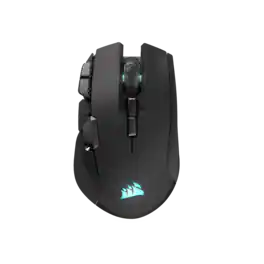
CORSAIR - IRONCLAW WIRELESS SE FPS/MOBA/MMO Optical Gaming Mouse - Wireless - Black
4.7(76)

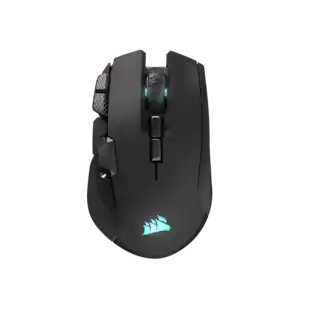
The CORSAIR IRONCLAW WIRELESS SE Gaming Mouse was designed to deliver comfortable control for right-handed players that prefer palm grips. Its uniquely-sculpted shape and textured grips are built to give players secure, comfortable control. The precise 26k DPI sensor provides amazing accuracy for MOBA, FPS, and MMO gameplay. IRONCLAW WIRELESS SE is all about longevity with up to 285 hours over 2.4GHz, 532 hours over BT, and switches rated for up to 100 million clicks. Versatile tri-mode connectivity connects via robust 2.4GHz wireless, convenient Bluetooth®, or USB-C cable. CORSAIR IRONCLAW WIRELESS SE Gaming Mouse – Comfortable Control in the Palm of Your Hand.

CORSAIR - Nightsword RGB Tunable Wired FPS/MOBA/MMO Optical Gaming Mouse with Adjustable Weights - Wired - Black

Upgrade your gameplay with this ergonomic Corsair Nightsword gaming mouse. Included software detects the center of gravity in real-time and automatically adjusts weight for superior grip. The adjustable 18,000 dpi optical sensor offers sensitivity customization, and 10 programmable keys provide versatility. This Corsair Nightsword gaming mouse works with Windows and MacOS systems, and the rugged construction handles over 50 million clicks.

CORSAIR - HARPOON v2 WIRELESS Gaming Mouse - Wireless - Black
4.8(26)

Get a better grip on your gaming with the HARPOON v2 WIRELESS Gaming Mouse. CORSAIR’s iconic asymmetric ergonomic shape and textured side grips deliver comfortable control and reduced thumb fatigue for all your daily gaming. Keep your aim on point with the crisp precision of the 26K DPI CORSAIR MARKSMAN sensor. Customize the 6 programmable buttons to get instant access to important abilities or powerful macros. With 140 hours* of battery life, you’ll enjoy days of wireless freedom before your mouse needs a recharge.

Pros for CORSAIR - NIGHTSWORD v2 WIRELESS SD Stream Deck Gaming Mouse - Wireless - Black
There were no pros for this productErgonomics, Battery Life, Button Layout, Overall Performance, ConnectivityWeight, Overall Performance, Comfort, RGB, SizeErgonomics, Battery Life, Button Layout, Weight, Performance
Cons for CORSAIR - NIGHTSWORD v2 WIRELESS SD Stream Deck Gaming Mouse - Wireless - Black
There were no cons for this productSizeButton Placement, Software, PriceThere were no cons for this product

Specs

Questions & Answers
  • Is this gaming mouse designed for left-handed or right-handed users?

    This gaming mouse is designed with an ergonomic shape specifically for a natural right-handed grip.

    This question and answer was generated by AI based on customer and product data.
  • Does this gaming mouse offer multiple ways to connect to a computer?

    Yes, this gaming mouse features tri-mode connectivity, allowing you to choose between 2.4GHz wireless, Bluetooth, or a wired USB-C connection.

    This question and answer was generated by AI based on customer and product data.
  • What is the maximum sensitivity of the sensor in this gaming mouse?

    The sensor in this gaming mouse has a maximum sensitivity of 33,000 dots per inch.

    This question and answer was generated by AI based on customer and product data.
  • How many programmable buttons are available on this gaming mouse?

    This gaming mouse features 8 programmable buttons that can be expanded through the Elgato Marketplace.

    This question and answer was generated by AI based on customer and product data.
  • Can I customize the buttons and macros without installing extra software?

    Yes, you can map buttons and set macros directly via the web hub without needing to install additional software.

    This question and answer was generated by AI based on customer and product data.
Ask a question
No content

Customers often buy these together

Sponsored

Finance Options

My Best Buy® Credit Card
Buy Now, Pay Later

Special Offers

Included with Purchase