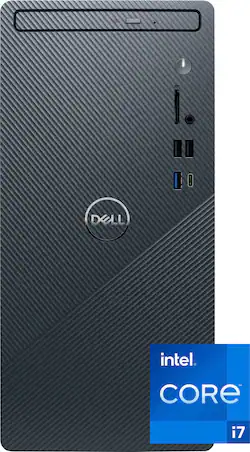
Dell - Inspiron 3020 Desktop - 13th Gen Intel Core i7 - 16GB Memory - Intel UHD Graphics 770 - 512GB SSD - Mist Blue
- Key Specs
- Processor Model: Intel 13th Generation Core i7 (Your computer's processor is like its brain. Working in combination with system memory, the power of the processor determines the complexity of software you can run, how many programs you can have open at the same time, and how fast those programs will run. Most computers feature an AMD, Intel or Snapdragon processor.)
- Storage Type: SSD
- Total Storage Capacity: 512 gigabytes
- System Memory (RAM): 16 gigabytes (Random-access memory (RAM) is a computing device's short-term data storage, which allows active information to be accessed quickly. The size and type of RAM determines how efficiently the device can handle large amounts of information at one time. For example, gaming or video editing requires more RAM for optimal performance.)
- Graphics Type: Integrated (Dedicated graphics uses a separate graphics card for processing video images. Because it does not use memory from the system's RAM, there is no extra burden on the CPU and graphics are processed more efficiently. Integrated graphics shares system RAM to process video images.)
- Graphics: Intel UHD Graphics 770 (Often referred to as a "graphics processing unit" (GPU), this device is responsible for displaying image content and decoding/encoding video content in programs and games.)
- General
- Brand: Dell
- Model Number: i3020-7292BLU-PUS
- Product Name: Inspiron 3020 Desktop - 13th Gen Intel Core i7 - 16GB Memory - Intel UHD Graphics 770 - 512GB SSD
- Color: Mist Blue
- Year of Release: 2022
- Processor
- Processor Brand: Intel
- Processor Model: Intel 13th Generation Core i7 (Your computer's processor is like its brain. Working in combination with system memory, the power of the processor determines the complexity of software you can run, how many programs you can have open at the same time, and how fast those programs will run. Most computers feature an AMD, Intel or Snapdragon processor.)
- Processor Model Number: 13700
- CPU Base Clock Frequency: 2.1 gigahertz (Actual central processing unit (CPU) speed may vary by device configuration and design. The average rate at which the processor is able to execute tasks under normal operating conditions as asserted by the manufacturer.)
- CPU Boost Clock Frequency: 5.1 gigahertz (Actual central processing unit (CPU) speed may vary by device configuration and design. The maximum rate at which the processor is able to execute tasks, typically only used for a short period of time as needed. This rate may temporarily boost the processor's performance, but may result in overheating, shutdown, or damage to equipment if sustained.)
- Number of CPU Cores: 16-core (A core, or "brain" of a CPU, allows it to receive and execute instructions. Each core can work independently or together to perform parallel operations.)
- Number of CPU Threads: 24 (Generally, the more threads, the faster and more responsive the operating system.)
- CPU Cache Memory Level: L3
- L3 Cache: 30 megabytes (Cache memory, also called CPU memory, is random-access memory (RAM) that a computer microprocessor can access more quickly than it can access regular RAM. This memory is typically integrated directly with the CPU chip or placed on a separate chip that has a separate bus interconnect with the CPU.)
- Storage
- Storage Type: SSD
- Total Storage Capacity: 512 gigabytes
- Solid State Drive Capacity: 512 gigabytes (The amount of data that can be stored on the device's solid state drive (SSD). SSD is a flash-based storage with faster speeds than a hard disk drive (HDD).)
- Solid State Drive Interface: PCIe (Connects the solid state drive to the host system. PCI and SATA interfaces are the most common; PCI interfaces are typically faster, but SATA interfaces are compatible with a wider range of systems.)
- Memory
- System Memory (RAM): 16 gigabytes (Random-access memory (RAM) is a computing device's short-term data storage, which allows active information to be accessed quickly. The size and type of RAM determines how efficiently the device can handle large amounts of information at one time. For example, gaming or video editing requires more RAM for optimal performance.)
- Type of Memory (RAM): DDR4 (Each type of RAM delivers a different level of speed, bandwidth, energy efficiency and performance.)
- System Memory RAM Speed: 3200 megahertz (How fast the information-storing hardware operates. The faster the RAM, the faster memory can be transferred to other system components. Ultimately, faster RAM improves operational efficiency.)
- Number Of Memory Slots: 2
- Number of Memory Sticks Included: 1
- Graphics
- Graphics Type: Integrated (Dedicated graphics uses a separate graphics card for processing video images. Because it does not use memory from the system's RAM, there is no extra burden on the CPU and graphics are processed more efficiently. Integrated graphics shares system RAM to process video images.)
- GPU Brand: Intel
- Graphics: Intel UHD Graphics 770 (Often referred to as a "graphics processing unit" (GPU), this device is responsible for displaying image content and decoding/encoding video content in programs and games.)
- Compatibility
- Operating System: Windows 11 Home (The operating system manages all software and hardware, including files, memory and connected devices. Most importantly, it lets you interact with your device and your programs in a visual way; otherwise, you'd be typing computer code to get anything done.)
- Operating System Architecture: 64-bit (An operating system (OS) manages computer hardware, software resources, and programs in conjunction with the system's processor. 64-bit operating systems can handle more data at once than 32-bit systems, resulting in faster speeds, more effiency, and overall improved performance.)
- Connectivity
- Display Connector(s): 1 x DisplayPort 1.4 (The number and type of connectors used to connect to an external display.)
- Number of HDMI Outputs (Total): 1
- Number of DisplayPort Outputs (Total): 1
- Number of Thunderbolt Ports (Total): 0
- Number of VGA Ports: 0 (VGA (Video Graphics Adapter or Video Graphics Array) is a display standard that transmits via analog signals. This type of interface is typically used to connect a computer to a display device such as a monitor, projector, or TV.)
- Number Of DVI Ports: 0
- USB Ports: 4 x USB-A 2.0, 3 x USB-A 3.2, 1 x USB-C 3.2 (The number and type of USB ports the product has.)
- Number of USB Ports (Total): 8
- Number Of PS/2 Ports: 0
- Microphone Input: true (The device features an input for connecting an external microphone.)
- Wireless Connectivity: Wi-Fi, Bluetooth (The manner in which a device sends data to another device over a short distance without the use of wires or cables.)
- Wireless Standard: AX (The wireless networking protocol used by the device. Each iteration of the protocol is based on the 802.11 standard developed by the Institute of Electrical and Electronics Engineers (IEEE) Standards Association. Denoted by letters following 802.11 (802.11a, 802.11ac, etc.), each version, published in alphabetical order, encompasses all previous versions.)
- Wireless Networking Standard: Wi-Fi 6 (The wireless networking standard used by the device. Each iteration of the standard developed by the Wi-Fi Alliance corresponds to an existing IEEE 802.11 protocol; for example, standard 802.11ac (or AC) is termed Wi-Fi 5. Refers specifically to the standard the device is designed to use, but ultimately determines product interoperability and backward compatibility including previous versions.)
- Ethernet Card: 10/100/1000 (Also known as an Ethernet adapter, this card plugs into a computer's motherboard and enables it to access an Ethernet network. Ethernet data transmission speeds are measured in Mbps (megabits per second) and Gbps (gigabits per second). For example, a 10/100 Ethernet port transmits 10 and 100 Mbps, while a 10/100/1000 Ethernet port transmits 10 and 100 Mbps and has a maximum speed of 1000 Mbps (1 Gbps).)
- Number Of Ethernet Ports: 1
- Cooling
- CPU Cooling System: Air
- Power
- Power Supply Maximum Wattage: 180 watts
- Expansion
- Number Of PCI-E x1 Slots: 1
- Number Of PCI-E x2 Slots: 0
- Number Of PCI-E x4 Slots: 0
- Number Of PCI-E x8 Slots: 0
- Number Of PCI-E x16 Slots: 1
- Features
- Keyboard Type: Mechanical
- Customizable Keyboard Lighting: No
- Media Card Reader: true (A hardware device that allows for access to data on a memory card and enables the transfer of its files to a computer. These devices may have one or multiple slots for various types of memory cards, and may be integrated into the computer or available as an external device.)
- Customizable Case Lighting: false
- Audio Technology: Onboard, Cirrus Logic Codec
- Size: Standard
- Dimensions
- Product Height: 12.77 inches (The out of box height of the item. Height is measured as the vertical distance from the bottom of the item to the top as it would be primarily used or placed.)
- Product Width: 6.06 inches (The out of box width of the item. Width is measured as the horizontal distance from one side of the item to the other as it would be primarily used or placed.)
- Product Depth: 11.54 inches (The out of box depth of the item. Depth is measured as the distance from the front of the item to the back as it would be primarily used or placed.)
- Product Weight: 11.57 pounds (The out of box weight of the item.)
- Certifications Listings & Approvals
- ENERGY STAR Certified: true (Devices carrying the ENERGY STAR service mark, such as computer products and peripherals, kitchen appliances, and other products, generally use 20% to 30% less energy than required by federal standards.)
- EPEAT Qualified: true (The Electronic Product Environmental Assessment Tool (EPEAT) was designed to provide an environmental assessment tool for purchasers. In order to qualify for EPEAT, a product must meet all 23 required criteria.)
- EPEAT Level: Silver (The Electronic Product Environmental Assessment Tool (EPEAT) was designed to provide an environmental assessment tool for purchasers. In order to qualify for EPEAT, a product must meet all 23 required criteria. Products are rated Bronze, Silver or Gold based on how many of 28 optional criteria they meet (below 50%, 50%, 75%).)
- Included
- Included Software: Microsoft Office 30 Day Trial; McAfee LiveSafe 30 Day Trial
- Optical Drive Type: DVD+RW (An optical disk drive (ODD) uses a laser light to read data from or write data to an optical disc. These discs include CDs, DVDs, and Blu-ray Discs. This allows you to play music or watch movies using prerecorded discs.)
- Keyboard Included: true
- Mouse Included: true
- Wireless Keyboard: false
- Wireless Mouse: false
- Warranty
- Warranty - Parts: 1 Year Hardware Service with Onsite/In-Home Service After Remote Diagnosis
- Warranty - Labor: 1 Year Hardware Service with Onsite/In-Home Service After Remote Diagnosis
- Other
- UPC: 884116427292
Meet the new Dell Inspiron 3020 Mini Tower. Experience seamless and smooth multitasking with optional graphics card for better performance and with the latest processors up to Intel 13thGen Processors. The new Inspiron Desktop comes in a compact chassis allowing it to fit anywhere in your home.
- Windows 11 Home: Windows 11 has all the power and security of Windows 10 with a redesigned and refreshed look. It also comes with new tools, sounds, and apps. Every detail has been considered. All of it comes together to bring you a refreshing experience on your PC.
- 13th Gen Intel Core i7 13700 Processor: Designed for gamers and creators, the new generation of Intel processors includes higher core counts, higher frequencies and support for more performance than ever.
- 16GB system memory for intense multitasking and gaming: Reams of high-bandwidth DDR4 RAM to smoothly run your graphics-heavy PC games and video-editing applications, as well as numerous programs and browser tabs all at once.
- 512GB solid state drive (SSD): While offering less storage space than a hard drive, a flash-based SSD has no moving parts, resulting in faster start-up times and data access, no noise, and reduced heat production and power draw on the battery.
- Intel UHD Graphics 770 with shared graphics memory: On-processor graphics with shared video memory provide everyday image quality for Internet use, basic photo editing and casual gaming.
- Wireless and Wired Network Connectivity: Built-in high-speed wireless LAN connects to your network on the most common Wi-Fi standards. 1x10/100/1000 Gigabit Ethernet LAN port plugs into wired networks.
- 1 x 5 in 1 Card Reader (SD, SDHC, SDXC, MMC, MMC+): Supports SD and MMC memory card formats.
Whats Included
- Dell Inspiron 3020 Desktop
- US Power Cord
- Dell Multimedia Keyboard
- Dell Wired Mouse
- Manual
Product Manuals
A: The Dell Inspiron 3020 comes with a GPU (graphics processing unit) that is good enough to run Windows 11 and some games I downloaded through Steam. I added another GPU on a card. I picked the ASUS Phoenix GEFORCE GTX 1650 with 4GB of RAM. It improved the graphics a lot. My screen resolution in Windows is higher and my games look nicer. The card was easy to install. The PC upgraded my BIOS automatically, downloaded drivers for the GPU, and worked perfectly. It was plug-and-play. When you buy a separate GPU like this, the problem is space in the cabinet. My GPU is small compared to others, with only one fan. Even so, you can see the fan is right up against the power supply. The case for this PC doesn't have very big vents, so I am worried it will get hot inside. This GPU is supposed to run pretty cool, so maybe it will work okay. I read that this GPU work work with most games on low to medium resolution, which is good enough for me. If you want a more powerful GPU, then you probably want a gaming PC with a bigger cabinet and better air flow.
Q: Is Optical Drive Type Reads and writes formats, including DVD+R/RW, DVD-R/RW and CD-R/RW?
A: This desktop includes a DVD+RW drive that reads from and writes to CDs and DVDs.
Q: Can I add the 1 tb hdd from my old dell easily. Does this come with a drive cage like my older dell?
A: No, the Dell Inspiron 3020 will not support your old hard disk easily -- but it is probably possible if you are willing to work at it. The PC comes with an M.2 storage device and a read/write DVD drive. In case you're not familiar with it, the M.2 device is a chip which is attached to the motherboard. In addition to those devices, there are power and data cables for two more devices, so it looks like you could attached your hard drive if you wanted. However, there is no hard drive cage. There is space for the drive in the cabinet, but you would have to figure out how to mount it. It looks like you would need a proprietary bracket of some kind, but so far I haven't figured out how to buy one. If you are buying a new computer anyway, you can get a 1TB SSD device for relatively little money. You could copy your files from the hard drive (HDD) to the SSD. Then at the worst you could attach the SSD to the inside of the Inspiron cabinet with double-sided tape. See the attached pictures for more details.
A: You will not be sorry with the Dell Inspiron 3020 Desktop, 16G of memory. The transition from the old computer to the new one was seamless. We had only 4G of memory before and this 16G model is great. I also would recommend having the Geek Squad install it. They did ours and were fast, professional and very helpful. They explained what they were doing and completed the setup in record time.
A: This desktop comes with one HDMI 1.4b port and one DisplayPort 1.4. The maximum resolution supported over HDMI is 1920x1200 and Display Port can support up to 1 UHD or 3 FHD monitors if displays are equipped with Daisy chain functionality.
Q: what operation system is this, windows 11?
A: Yes. My Inspiron 3020 came with Windows 11 Home Edition.
A: We understand your concern. Please contact the USA Dell technical support team for assistance in resolving this issue. they are available 24/7 on X(@Dellcares) and Facebook.
A: our system is set up with both a wired printer and a wireless one, both work fine. As for the old monitor no clue but frankly with the improvements in color, definition, and overall all size why would you want to use a dinosaur
People also viewed
 $959.99The price was $1,019.99
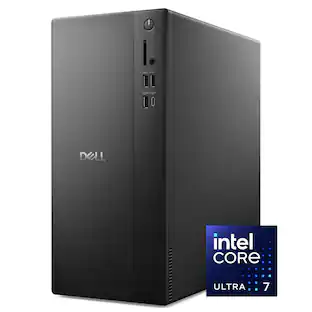 $1,279.00The price was $1,319.99
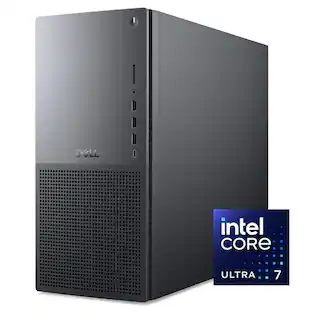 $1,699.99The price was $1,759.99
 $1,479.00The price was $2,119.00
 $359.99The price was $399.99
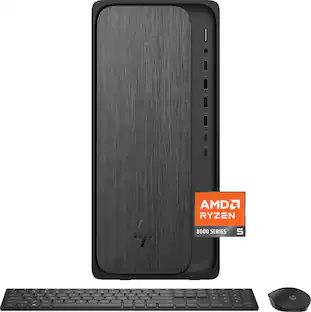 $659.99The price was $849.99
 $929.99The price was $1,219.99
- $2,049.99The price was $2,209.99
Today's top picks
 $549.99The price was $749.99
- $359.99The price was $399.99
- $1,279.00The price was $1,319.99
- $659.99The price was $849.99
- $959.99The price was $1,019.99
- $929.99The price was $1,219.99
 $819.99The price was $1,009.99
 $859.99The price was $989.99