Techtober SaleEnds Sunday. Limited quantities. No rainchecks.Shop now

Skip to contentGo to Product Search
Main Content
In Windows Laptops

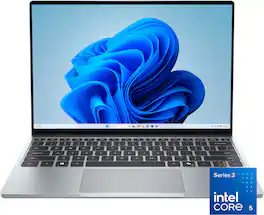
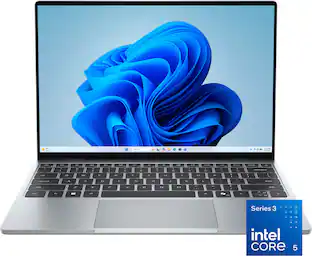
Dell - XPS 13.4" 3K Touchscreen Laptop - Intel Core 5 Series 3 320 2026 - 8GB Memory - 512GB Storage - Sky

Model: LDX13260-5953SKY-PUS
SKU: 6683771
Sold byBest Buy

Customers are saying

Customers find value in the device's high-quality touchscreen display and its excellent portability, which makes it a convenient choice for students. While users appreciate the reliable battery life, some have noted concerns regarding the limited number of connectivity ports. Additionally, a few customers mentioned that the memory capacity may be insufficient for certain needs.

Generated by AI based on customer reviews.
See it in-store: Roseville has a demo model on display.

Highlights

Features

  • Stunning Display

    2.5K touch display with InfinityEdge offers vivid color, immersive viewing and efficient power usage.

  • Smart Performance

    Series 3 Intel Core processors with built-in AI deliver smooth, fast performance for multitasking and daily apps.

  • Featherlight XPS

    Razor-thin, featherlight XPS laptop is easy to carry anywhere, with long battery life that keeps you productive all day*

  • XPS Craftsmanship

    XPS iconic design uses CNC aluminum to create an ultra-thin yet durable laptop with exceptional fit, finish and strength.

  • Immersive Audio

    Quad speakers produce 360-degree sound, projecting audio upward and downward for a richer experience.

Specifications

  • Screen Size
    13.4 inches
    Screen Resolution
    2560 x 1600
    Touch Screen
    Yes
    Refresh Rate
    120Hz
    Brightness
    500 nits
Sponsored

Reviews

Rating 4.8 out of 5 stars with 57 reviews

93% would recommend to a friend
Customers are sayingCustomers find value in the device's high-quality touchscreen display and its excellent portability, which makes it a convenient choice for students. While users appreciate the reliable battery life, some have noted concerns regarding the limited number of connectivity ports. Additionally, a few customers mentioned that the memory capacity may be insufficient for certain needs.
This summary was generated by AI based on customer reviews.
  • Display Quality (18)
  • Portability (15)
  • Battery Life (6)
  • Connectivity (6)
  • Memory Capacity (5)

Customer Images

The vast majority of our reviews come from verified purchases. Reviews from customers may include My Best Buy members, employees, and Tech Insider Network members (as tagged). Select reviewers may receive discounted products, promotional considerations or entries into drawings for honest, helpful reviews.

  • Rated 5 out of 5 stars

    Very capable machine

    Despite the low ram being at 8gb, if you need a laptop for simple basic computer functions (office work, web browsing, video streaming, video game streaming) it works great! The build quality is great, the screen at 120hz, the speakers, 512gb hard drive, all around a great experience. If you have the money and can upgrade to 16gb might as well, but for $599 its a no brainer.

    Posted by ANDREWM

  • Rated 5 out of 5 stars

    Good deal on a premium notebook

    I've been traveling with a really nice 15" Notebook with a OLED display, I love it except for its weight and getting bashed by seats on airplanes.  I wanted something smaller.  I'm a software developer doing most of my work on windows.  I've had several Dell XPS machines before, but one of my requirements is that I need at least 2Tb and a fast SSD.  A year ago that would have cost me about $150, today it's more like $380 (if I'd only stocked up a year ago).  The Dell XPS 13 spec sheet seemed say I could only get a 1Tb drive (from them) and had to order it with the machine as memory and SSD were soldered to the motherboard.  Well not being one to believe everything they read I decided to try this entry level XPS 13, with 8Gb memory and a 512Gb SSD. I'll use an external SSD if I absolutely needed to (SSD prices are bound to come down eventually). What really caught my attention was the 3K matt screen (2560x1600 resolution).  I saw the screen instore, picked up the machine and it's 2.2 pound weight it said "take me home".  I asked a salesperson if the SSD was user replaceable, and was told none of the current XPSs can be user upgraded.  When I was setting up the XPS 13 at home I first noticed how well the island keyboard responded and the relatively large, responsive trackpad.  The entire unit is clad in a nice sturdy silver aluminum case. And such a nice display running at 120Hz. After about 2 hours of fiddling with system settings and installing updates, I almost had everything done.  But there are two more little tricks to improve the performance given the machine only has 8Gb of memory.  First, change the windows swap file to have a fixed 16GB size (twice the size of physical memory; From: Windows Tools, launch Control Panel, select System, Under Device Information select: Advanced System Settings, then under: Performance click Settings, then Select Advanced, under Virtual Memory select change, now select Custom Size, set Initial Size and Maximum size to: 16384 and select Set, you will need to reboot for this to take effect (well hidden and hard to get to from Win 11)).  Second, if enabled (it was on mine) disable the SSD's drive encryption: from Start Menu select Settings, click Privacy & Security and now select Device Encryption, change the toggle to off.  This may take a while to complete (this reduces work that needs to be done by the hardware).  My boot time was now down to 10s.   I disconnected the notebook from the power (this machine only has 2 USB-C ports (to the top right and left of the base)), both with Power Delivery, it supports Displayport 2.1 over USB (so you can easily connect an external display) but both are USB 3.2 (not Gen2 ports).  I then turned it over to expose 4 screws (small star),  I removed all 4, and gently pried open the case exposing the notebook's innards. And voila there was a 2230 SSD covered with a plastic sleeve. I removed the screw and sleeve to expose the 512Mb KIOXIA.  This is actually an excellent 2230 SSD in the larger sizes.  But most important it is user replaceable (disabling encryption is required if you are going to clone it).  The memory is in fact soldered to the motherboard.  The battery is also user replaceable (A EU requirement for many hardware products in 2027).  So in the near future I'll replace the 512Gb drive with a 2TB, and more than double the SSD performance (I've attached KIOXIA (Formerly: Toshiba Memory) spec sheet) to get the machine I really need/want. Having used it a bit more I appreciate the touch screen more on a 13" screen than with a 15" or larger, the screen is just a bit closer to your fingers making it a bit easier to access.  The screen colors on the XPS 13 are very good, but not OLED quality, that being said, the 2.5K display makes the screen very easy to read.  The audio quality is pretty good for a small notebook, essentially no bass but fairly good midrange and highs with decent stereo separation from above and below (there is no headphone jack, and no micro SDcard slot (boo).  The keyboard has 2 levels of backlighting, but after every reboot the last level must be reset.  There is no function key to disable the trackpad (something I've grown accustomed to).  I did a battery rundown test while playing video (very low sound) and I got to 5% after 14 hours (excellent).  I found MS Copilot to be very responsive after it had been run once.  This is a big improvement from my 15" notebook.  The WiFi performance is excellent. I tested with WiFi 5 and WiFi 6, and if close enough to my WiFi 6 access point, the performance was exceptional.  WiFi 5 was faster than WiFi 6 when further from the AP.  With 8 tabs open I expected to see the CPU struggle, but it seemed fine. When loading very large graphics files I found some studders, but not bad.  Even short videos seemed to edit fine. Loading 30 minute videos for editing took a long time (combination CPU and slower SSD), but it did load.  I did not try any serious gaming, I did a test to see if Minecraft would load (for my nephew) and it did run.  Little more investigation. This is not a gaming notebook.  For internet browsing and office automation work it's just fine.  It is actually fine for Visual Studio code and python development too. Soon I'll take it on a plane and see how much better it is to travel with a smaller, lighter notebook.  This little notebook really has a premium feel with a reasonable price tag, it's quite a nice surprise. If you can afford the 16Gb memory upgrade (especially if discounted) it's even a better deal.

    Posted by 3Tcubed

  • Rated 5 out of 5 stars

    Stand-Out Hardware, Great Option for Everyday Use.

    This is really great machine with some very good hardware for the price. At current entry-level pricing you get a high res touch screen with with great color accuracy and a high (120hz) refresh rate, thin bezels, a thin and light aluminum design, a new-generation ‘Wildcat Lake’ Intel processor, an ideal keyboard design, 10-17 hours of battery life and Windows Hello (face login) incorporated into a respectable integrated video chat camera. It’s a stand-out offering in a sea of other laptops that often compromise on most of these details which instantly makes this one of the best everyday laptop options at the time of writing. (Oh, and it’s actually LIGHT BLUE, don’t be fooled, it’s not silver like nearly every photo suggests - see below) __ Design __ This machine has some great hardware. The latest Wildcat Lake architecture in the Intel processor is ready to provide great battery life in a thin and light chassis that follows a familiar, proven design. It feels premium, which is great at an entry-level price point. But Dell didn’t stop there, providing the other improvements that most people immediately appreciate and benefit from, starting with the screen. A bright and crisp IPS panel running at 120hz makes scrolling appear much more smooth than on many other machines. Then there’s the fact that it has a 3k (2560 x 1600) resolution that looks amazing at this size. Screens are probably the most important aspect of any machine beyond having enough power to do what you want and you’d be surprised how often manufacturers skimp on them, but not here. It’s beautiful with great color accuracy and thin bezels. Having a simple ‘XPS’ branding on the rear of the screen is a nice change over a Dell logo, making it feel even more premium. (That Dell logo now present on the bottom… this is a direct swap in placements from the prior model) While you won’t find anything more than 2 USB-C ports on this machine, they are capable of video-out and utilizing an inexpensive dongle (not included) can compensate for the lack of a headphone jack if you ever actually need one. Dell thoughtfully placed one port per side, which provides convenient flexibility to charge into the closest port to available outlets when traveling, etc. This laptop rounds things out with a familiar, customer-preferred keyboard design. I rather liked the unique latticeless design and seamless trackpad of their prior 'futuristic' direction - it was so slick… but I understand the need to give people what they kept saying they wanted, and enjoy in practice. The keyboard is backlit with several levels of brightness, easily controlled from the keyboard. It's keys feels slightly more firm than others, but it’s still quite nice. One small thing of note: the arrow keys follow a compact layout for up/down and some may not prefer that… Meanwhile, the trackpad is similarly good, with physical clicks rather than haptic ones. Lastly, the color. Don’t be fooled by how modern smartphones seem unwilling to capture its true color, this machine is a light, cool-blue. Despite the official images and customer images appearing quite silver… this machine is a chameleon that shifts from an obvious light blue (hence the official ‘Sky’ color), to a medium graphite color (similar to a Space Grey,)… and at other times, silver. It all depends on the lighting, with the blue coming out more in low, ambient light settings. I’ve included a photo next to my silver aluminum keyboard to prove just how different it can look. In any case, it looks very nice and professional - just know what you’re getting. __Performance__ In terms of performance, this is a great everyday machine, but it has a few limitations. It can handle a normal day of web-browsing, word processing, and number crunching, but doesn’t handle creative software like Adobe Photoshop very well, at least in the 8gb configuration. Even with more ram, I doubt its graphics capabilities are up to it really. Same goes for gaming. Dell (or maybe Microsoft) extended a 3 month trial of GamePass on this machine, but there’s no way you could really utilize it beyond very simple games. Still, casual gamers may find it completely acceptable as many games that were originally designed for phones will likely run fine here (things like Candy Crush, or your typical RTS or tower defense style games). I imagine it may also do just fine with video game streaming, but I was not able to test that. Heat dissipation seems good but not perfect, with a slightly hot spot in the middle of the bottom, luckily this is the location that most people won’t have in contact with their legs as this is small and sits on my lap via it’s edges, for instance. Still, it runs very quiet and it’s an all-around great machine. __ Overall __ If you’re looking for a great entry level Windows machine, Dell has been very generous in providing the best of what people actually want to pay for within a very versatile machine that perfect for travel or everyday portability. A great screen w/ touch, and quality construction make this appear and perform as a more expensive machine, without blowing the budget. It’s very easy for me to recommend!

    Posted by Scott S

  • Rated 5 out of 5 stars

    XPS That Feels Far More Expensive Than It Is: WOW!

    I absolutely love this XPS 13. It is hard to believe that a newly released XPS laptop can be found at this price, because nearly every part of this laptop feels premium. The XPS line has always aimed for a high-end look and feel: the CNC aluminum feels solid, the design is extremely thin and light, and it has the kind of fit and finish that makes it feel like a much more expensive computer. The display is the star The screen is the first thing that stands out. A 3K touchscreen display with a 120Hz refresh rate on a compact 13.4-inch laptop is an incredible combination at this price point. I dare you to find another current one at this price. The resolution makes text look exceptionally sharp, while photos, streaming video, and everyday web browsing look rich and detailed. The high refresh rate also makes normal tasks—scrolling pages, moving windows, and using the touchscreen—feel noticeably smoother than on a standard 60Hz laptop. Dell’s display design keeps the bezels looking very small, which helps the screen feel more immersive without making the laptop physically large. It is the sort of display that makes work, reading, and media consumption easy and pleasurable. Premium speed and portability Performance has been excellent for the kind of work this computer is intended for. The Core 5 Series 3 processor feels quick and responsive with daily apps, web browsing, streaming, Office work, and general multitasking. The 512GB of storage is also a practical amount for a portable laptop, leaving room for applications, files, and photos without immediately needing external storage. I do wish that it had Xe cores for some real Arc graphic power, however. This is not meant to be a dedicated gaming machine or a replacement for a high-powered workstation used for demanding professional rendering or large video-production projects. But for school, work, travel, home use, and normal productivity, it feels fast, capable, and polished. Dell also positions this processor generation as including built-in AI capabilities for modern Windows features and everyday tasks. I did push Adobe Premiere on the unit, and it was able to edit two stacked 4K lines but if I put any effects on the timeline I think it would have not been a good experience. The thin, lightweight design is a real advantage. It is easy to pick up, carry around the house, or drop into a bag, but it does not feel fragile. Dell pairs the compact build with quad speakers that project sound upward and downward, giving the laptop fuller sound than many ultra-thin machines manage. This is so small that I don't mind carrying it everywhere. And it's case is so strong that I won't worry about it so much. One configuration consideration The only spec I would ask prospective buyers to consider is the 8GB of memory. It has been fine for ordinary everyday use, but people who routinely keep dozens of browser tabs open, run virtual machines, edit high-resolution video, or use higher end creative and engineering software may want a configuration with more RAM. For everyone else, the performance, storage capacity, portability, and remarkable screen are a very compelling package. It's $200 more for the 16GB version. Will you miss it? That's up to you to decide. For what *I* am using it for, 8GB is enough, but I have a Switch 2 for my games and a Z Book for my production video work. Bottom line This is one of those laptops that makes you want to keep using it. The body feels premium, the display is outstanding, the touchscreen and smooth 120Hz experience are a treat, and the laptop has the speed needed for normal modern work. If you want a compact Windows laptop that looks and feels high-end without moving into an extreme price range, this XPS 13 is an easy RECOMMEND! It has all the refinement I hoped for from the XPS name—and then some. I just can't believe the value in this laptop. I'm a big fan. Wow, what a great great laptop. They did good.

    Posted by wizozzie

  • Rated 5 out of 5 stars

    Tiny and lighweight, perfect for school

    I recently got the Dell XPS 13.4" 3K touchscreen laptop in the Sky color and so far l've been really happy with it. The unboxing experience felt premium right away. The laptop was packaged nicely and everything was organized well inside the box. As soon as I took it out, the first thing I noticed was how light and sleek it felt. It looks modern without being flashy and the Sky color gives it a clean and elegant look. Setting it up was surprisingly easy. After turning it on, Windows walked me through the setup process step by step. Connecting to my home WiFi was quick and there were no issues at all. Within a short time I was signed in, updated, and ready to start using it. Even for someone who is not super technical, the setup process is pretty straightforward. The laptop itself looks fantastic. It is thin, lightweight, and easy to carry around the house. The build quality feels solid and not cheap. The keyboard is comfortable to type on and the large touchpad works smoothly. The 3K touchscreen is probably my favorite feature. The screen is bright, sharp, and very clear. Videos, websites, and photos all look great on it. The touchscreen is responsive and reacts quickly when tapping or scrolling. Performance has been good for what I need. Opening programs, browsing the internet, watching videos, and doing everyday tasks feels smooth. I haven't noticed any annoying lag or freezing. Everything responds quickly enough that I don't have to sit there waiting for things to load. The speakers also sound better than I expected from a laptop this size. The sound is clear and loud enough for videos, online classes, and casual music listening. One of the main reasons I got this laptop is because I plan to give it to my kid. Lately she has been borrowing my laptop whenever she needs to do homework or research. Having her own device will make things much easier for both of us. I wanted something that was reliable, easy to use, and light enough for him to carry around. This seems like a good fit. The touchscreen is also nice because it feels more natural for kids who are already used to phones and tablets. Overall, I'm very satisfied with this purchase. It looks great, feels premium, is easy to set up, and performs well for everyday use. It may not be the most powerful laptop out there, but for web browsing, school work, video streaming, and general day to day use, it does everything I need. My kid is excited to have her own laptop and I think this will serve her well for school and homework for years to come. The only thing I wish is that it came with a few more ports and perhaps a carrying pouch, but that's a small complaint compared to everything else it does well.

    Posted by Lenlen

Compare similar products

Dell - XPS 13.4" 3K Touchscreen Laptop - Intel Core 5 Series 3 320 2026 - 8GB Memory - 512GB Storage - Sky
4.8(57)

The XPS 13 embodies the essence of the XPS brand – combining groundbreaking design, innovation and effortless portability. It’s more than just a laptop, it’s a reflection of XPS’s commitment to pushing boundaries and delivering technology that works seamlessly in your hands, wherever life takes you.
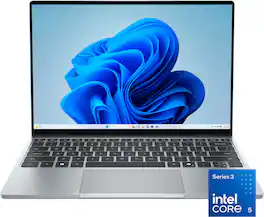
Dell - XPS 13.4" 3K Touchscreen Laptop - Intel Core 5 Series 3 320 2026 - 16GB Memory - 512GB Storage - Sky
4.1(15)

The XPS 13 embodies the essence of the XPS brand – combining groundbreaking design, innovation and effortless portability. It’s more than just a laptop, it’s a reflection of XPS’s commitment to pushing boundaries and delivering technology that works seamlessly in your hands, wherever life takes you.

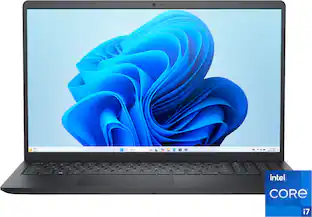
Dell - 15.6" 2K Touchscreen Laptop - Intel 13th Generation Core i5 1334U 2023 - 8GB Memory - 512 GB Storage - Carbon Black

Effortlessly chic. Always efficient. A 15-inch laptop with a built-in HD camera, enlarged ergonomic keyboard and Intel processors.
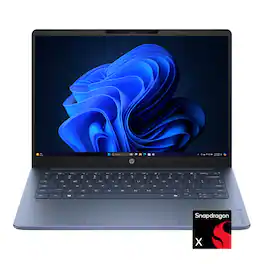
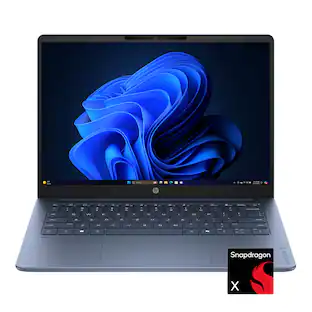
HP - OmniBook 3 - 14" 2K OLED Laptop - Snapdragon X (8-Core CPU) - 8GB Memory - 256GB SSD - 41+ Hrs Battery Life¹ - Starlit Blue

Built for your multi-tab life. Smooth AI-powered performance, long battery life, immersive visuals, and essential ports help you stay productive, connected, and entertained anywhere on campus.

Pros for Dell - XPS 13.4" 3K Touchscreen Laptop - Intel Core 5 Series 3 320 2026 - 8GB Memory - 512GB Storage - Sky
Display Quality, Portability, Battery LifePortability, Battery Life, Display QualityOverall Performance, Portability, Touchscreen ResponsivenessOverall Performance, Battery Life, Portability, Processor Speed, OLED Quality
Cons for Dell - XPS 13.4" 3K Touchscreen Laptop - Intel Core 5 Series 3 320 2026 - 8GB Memory - 512GB Storage - Sky
Connectivity, Memory CapacityConnectivityBattery LifeThere were no cons for this product—

Specs

Questions & Answers

  • Is the keyboard backlit on this laptop?

    Yes, this laptop is equipped with a backlit keyboard.

    This question and answer was generated by AI based on customer and product data.
  • How many USB ports does this laptop have?

    This laptop has a total of two USB ports.

    This question and answer was generated by AI based on customer and product data.
  • Does this laptop include a built-in microphone?

    Yes, this laptop includes a dual microphone array.

    This question and answer was generated by AI based on customer and product data.
  • Can the system memory be expanded?

    Yes, the system memory on this laptop can be expanded up to 16 gigabytes.

    This question and answer was generated by AI based on customer and product data.
  • Does this laptop have a touchscreen?

    Yes, this laptop features a touchscreen display.

    This question and answer was generated by AI based on customer and product data.
Ask a question
No content

Customers often buy these together

Sponsored