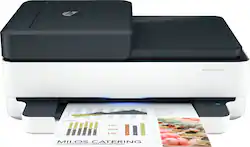
Envy Pro 6475 Wireless All In One Inkjet Printer with 2 years of HP Instant Ink - White
- Key Specs
- Networking: Wireless
- ENERGY STAR Certified: true (Devices carrying the ENERGY STAR service mark, such as computer products and peripherals, kitchen appliances, and other products, generally use 20% to 30% less energy than required by federal standards.)
- Printer Type: All In One
- ISO Color Print Speed: 7 pages per minute (The number of color pages able to be printed per minute in the device's default single-side mode, as tested by the International Standards Organization (ISO).)
- ISO Mono Print Speed: 10 pages per minute (The number of black ink (grayscale) pages able to be printed per minute in the device's default single-side mode, as tested by the International Standards Organization (ISO).)
- Output Tray Capacity: 25
- General
- Brand: HP
- Model Number: ENVY Pro 6475
- Product Name: Envy Pro 6475 Wireless All In One Inkjet Printer with 2 years of HP Instant Ink
- Color: White
- Display Screen: false
- Dimensions
- Product Height: 6.8 inches (The out of box height of the item. Height is measured as the vertical distance from the bottom of the item to the top as it would be primarily used or placed.)
- Product Width: 17.02 inches (The out of box width of the item. Width is measured as the horizontal distance from one side of the item to the other as it would be primarily used or placed.)
- Product Depth: 14.21 inches (The out of box depth of the item. Depth is measured as the distance from the front of the item to the back as it would be primarily used or placed.)
- Product Weight: 13.58 pounds (The out of box weight of the item.)
- Features
- Automatic Document Feeder: true
- Photo Printing: true
- Wide Format Printing: false (Machines with this function support printing on media with widths between 18 and 100 inches, such as posters, banners, canvases, and more.)
- Wide Format Scanning: false
- Monochromatic/Color: Color
- Automatic Two-Sided Printing: true
- Tray Capacity: 100
- Duty Cycle: Up to 1,000 (The maximum number of pages per month that the device can produce without failing, as specified by the manufacturer.)
- Scanner Info
- Scanner Type: Flatbed
- Duplex Scan Function: false
- Scanner Resolution: Up to 1200 x 1200 (Refers to the number of pixels/dots, both horizontally and vertically, of the image produced by the scanner. Generally, the higher the resolution, the sharper and cleaner the produced image.)
- Fax Info
- Integrated Fax: false
- Ink
- Compatible Cartridges: HP 67 Black Original Ink Cartridge, HP 67XL Black High Yield Original Ink Cartridge, HP 67XXL Black Extra High-Yield Original Ink Cartridge, HP 67 Tri-Color Original Ink Cartridge, HP 67XL Tri-Color High-Yield Original Ink Cartridge, HP 67XXL Tri-Color Extra High-Yield Original Ink Cartridge
- Ink Subscription Service Available: true (The printer monitors ink usage and alerts the subscription provider when levels are low. A purchased subscription provides refills of ink based on usage.)
- Memory
- Memory Card Slot: false
- Paper Info
- Automatic Document Feeder Capacity: 35 sheets
- Maximum Document Length: 14 inches
- Maximum Document Width: 8.5 inches
- Supported Paper Sizes: Letter, 4 x 6 in, 5 x 7 in, 8 x 10 in, No. 10 envelopes
- Paper Feeder: Tray loader, Bottom loader
- Paper Handling: Up to 100 sheets input tray; 25-sheet output tray
- Media Weight (Minimum): 16 grams per square meter
- Media Weight (Maximum): 53 grams per square meter
- Compatible Media Types: Plain Paper; HP Photo Papers; HP Matte Brochure or Professional Paper; HP Matte Presentation Paper; HP Glossy Brochure or Professional Paper; Other Photo Inkjet Papers; Other Matte Inkjet Papers; Other Glossy Inkjet Papers; Plain Paper, Light/Recycled
- Performance
- Printer Resolution (Black): Up to 1200 x 1200 (Refers to the number of pixels/dots, both horizontally and vertically, of the image produced by the printer in black ink. Generally, the higher the resolution, the sharper and cleaner the produced image.)
- Printer Resolution (Color): Up to 4800 x 1200 (Refers to the number of pixels/dots, both horizontally and vertically, of the image produced by the printer in colored ink. Generally, the higher the resolution, the sharper and cleaner the produced image.)
- Copier Info
- Copier Resolution (Black): Up to 300 x 300 (Refers to the number of pixels/dots, both horizontally and vertically, of the image produced by the copier in black ink. Generally, the higher the resolution, the sharper and cleaner the produced image.)
- Copier Resolution (Color): Up to 300 x 300 (Refers to the number of pixels/dots, both horizontally and vertically, of the image produced by the copier in colored ink. Generally, the higher the resolution, the sharper and cleaner the produced image.)
- Connectivity
- Minimum System Requirements: Windows 10, 7; MacOS Sierra v10.12 (previously OS X), macOS High Sierra v10.13, macOS Mojave v10.14, macOS Catalina v10.15
- Other
- UPC: 194721022370
Handle it all from home. Print, scan, copy, 24 months send mobile fax with HP Smart App, and get a 35-page auto document feeder. Set up and connect on any device, and get self-healing Wi-Fi
- Connectivity & Ports: 1 Hi-Speed USB 2.0; 1 Wi-Fi 802.11ac, Bluetooth, HP Smart App, Apple Airprint, Mopria Certified
- HP Instant Ink Compatible: Includes two years of ink delivered to your door*
- Loaded with everything. Except complications: Work fast and hands-free—the 35-page auto-feeder helps you complete scan and copy jobs quickly.
- HP Smart App: Easily print, scan, and copy everyday documents from your smartphone, using HP Smart app.
- All in One Printer: Easily handle tasks and get a lot from one device – print, scan, and copy.
- Print then and there. From anywhere: Get started fast with simple setup that guides you through each step, using HP Smart app.
- Get everyone connected. Just like that.: Self-healing Wi-Fi™ automatically detects and resolves connectivity issues to help reduce interruptions.
- 2 Years of Instant Ink in the box: Upon purchase, your printer comes with a $120 USD, (Canada $144 CAD) credit that will be added to your account. This will cover 24 months of service on a monthly U.S. $4.99 for 100 pages or Canadian $5.99 for 100 pages Instant Ink plan.
- Dynamic Security: This printer uses dynamic security, which may be updated periodically by firmware updates. The printer is intended to be used solely with cartridges using only original HP electronic circuitry.
Whats Included
- HP 67 Setup Black Instant Ink Ready Cartridge; HP 67 Setup Tri-Color Instant Ink Ready Cartridge;
- Regulatory flyer
- Setup guide
- Reference guide
- Power cord (1.5 m)
Product Manuals
A: I have Instant Ink and wanted to note that how the Instant Ink pages are tracked gives a bit more flexibility on what you can print without worrying on increasing cost. A page is a page, regardless of how much ink you put on the page. This could include brochures, PowerPoints or pictures. I have found this valuable as I no longer need to worry about how or ration how much ink I am putting on a page. I just need to be conscious of how many pages I print and I find I am now printing with a bit more color. Colorful pages could cost me 5-10 times as much as traditional cartridges but are about 5 cents each with the 100 page plan. This product starts with a $120 Instant Ink credit and initally defaults to a $5/mn on the 100 page plan. I generally print around this. If you go under your plan, you can carry over unused pages for a couple months. If you go over my plan, Instant Ink debits against the remaining credit taht starts at $120 of value. You have the choice to switch plans if my printing changes (50pg, 100pg, $300pg per mn) but I haven't needed to change mine. I hope this information helps.
Q: Will this printer handle 8.5x11, 90 lb. cardstock?
A: This printer can handle the following media weights: Letter: 16 to 24 lb; HP envelopes: 20 to 24 lb; HP cards: up to 53 lb; HP 4 x 6 inch photo paper: up to 80 lb. We recommend looking at the HP Officejet Pro 9015 or 9025 printers which can handle up to 110 pound paper.
Q: Where do you load the paper?
A: The paper tray is located in the bottom of the printer.
A: Yes, this printer has HP ePrint.
Q: Do I need to purchase an USB cable in order to use this printer?
A: Hello. Thanks for your question. If you are planning on connecting this HP Envy Pro 6475 to your wireless network, then you don't need the USB cable. If don't have a wireless network or you don't want to connect the printer to your wireless network, then you would need the USB A to B cable to connect the printer to your computer.
Q: how is the 2 year hp instant ink used or sorted
A: When you enroll in an HP Instant Ink plan, you print a defined number of pages per month. The plans are based on the number of pages that you print, not on how many ink cartridges you use. After the trial, you can cancel or keep going and save about 50% over regular cartridges. Your monthly fee pays for ink, shipping, and recycling. If you do not print all of your plan pages in a month, you can roll over up to the number of pages per month in your plan. If you need additional pages, they are automatically provided in blocks for only $1. A printed page counts the same whether it's black and white, a color document or a photo.
Q: If one of the color inks runs out, will the printer still print?
A: Yes, although it will print in black and white.
Q: Can this scan to an email address or only to a computer? What options are there for scanning?
A: Yes, the Envy Pro 6475 can scan to email.
People also viewed
 $99.89The price was $179.89
 $119.89The price was $159.89
 $119.89The price was $179.89
 $79.89The price was $109.89
 $449.00The price was $450.45
 $299.89The price was $429.89





Today's top picks
 $199.99The price was $249.99
 $799.99The price was $1,199.99
 $789.99The price was $1,049.99











