- Key Specs
- Product Weight: 5.7 pounds (The out of box weight of the item.)
- Resolution: Full HD (1080p) (Refers to the number of pixels, both horizontally and vertically, used to capture video/images. The higher the resolution the finer the detail that can be seen.)
- Contrast Ratio: Up to 15,000:1 (Measured difference between a displayed image's brightest whites and darkest blacks. The larger the first number, the more detail and color that can be displayed.)
- General
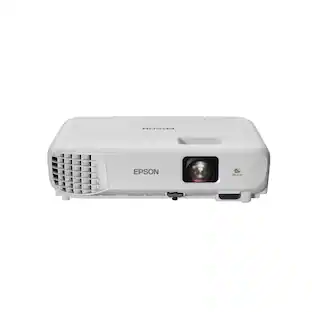
- Brand: Epson
- Model Number: HC 1040 Projector - V11H772020
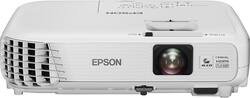
- Product Name: Home Cinema 1040 1080p 3LCD Projector
- Color: White
- Dimensions
- Product Height: 3.3 inches (The out of box height of the item. Height is measured as the vertical distance from the bottom of the item to the top as it would be primarily used or placed.)
- Product Width: 11.7 inches (The out of box width of the item. Width is measured as the horizontal distance from one side of the item to the other as it would be primarily used or placed.)
- Product Depth: 9.6 inches (The out of box depth of the item. Depth is measured as the distance from the front of the item to the back as it would be primarily used or placed.)
- Product Weight: 5.7 pounds (The out of box weight of the item.)
- Display
- Resolution: Full HD (1080p) (Refers to the number of pixels, both horizontally and vertically, used to capture video/images. The higher the resolution the finer the detail that can be seen.)
- Resolution (Native): 1920 x 1200 (Native resolution of a screen refers to its single, fixed resolution. Sometimes screens must scale an image up or down in order to fit the native resolution. This can cause a loss of resolution or detail.)
- 3-Chip Technology: true (Projectors with this technology are able to display images with optimal brightness, color, and detail. Because of their high-performance design, these projectors are primarily used in large venues and digital cinemas.)
- Contrast Ratio: Up to 15,000:1 (Measured difference between a displayed image's brightest whites and darkest blacks. The larger the first number, the more detail and color that can be displayed.)
- Aspect Ratio: 16:10 (The measurement of the width of a screen compared to the height of a screen, expressed as a ratio.)
- Throw Ratio Range: 1.38 (zoom: wide) - 1.68 (zoom: telephoto) (This measurement indicates what size of projected image can be produced from a certain distance. The smaller the ratio, the closer the projector can be to the screen while still producing a large image.)
- Digital Keystone Correction: true ("Keystone effect" refers to the distortion of an image when it is projected on an angled surface or when the projector is positioned too high or too low from the center of the display. Projectors with a digital keystone correction feature are able to scale the image as needed before it is projected, resulting in the correct image orientation no matter where it is displayed.)
- 3D Technology: false
- Viewing
- Minimum Projector Distance: 2.85 feet (Minimum distance that the projector can be placed from the screen to produce a display with acceptable visual performance.)
- Maximum Projector Distance: 36.02 feet (Maximum distance that the projector can be placed from the screen to produce a display with acceptable visual performance.)
- Minimum Viewable Screen Size: 30 inches
- Maximum Viewable Screen Size: 300 inches
- Features
- Remote Control Included: true
- Exposure Control
- Digital Zoom Capability: true (Projectors with this feature allow for digital adjustment to the projected image size without changing the location of the projector.)
- Connectivity
- Number of HDMI Inputs (Total): 2
- Number of USB Port(s): 2
- Audio
- Speaker(s) Included: true
- Certifications Listings & Approvals
- ENERGY STAR Certified: false (Devices carrying the ENERGY STAR service mark, such as computer products and peripherals, kitchen appliances, and other products, generally use 20% to 30% less energy than required by federal standards.)
- Other
- UPC: 010343923652
Enjoy an immersive, distortion-free picture when you use this Epson Home Cinema 1040 3LCD projector, which features ±30° digital keystone correction and crisp 1080p HD resolution. Stream media using an MHL-enabled device, such as a Chromecast or Roku Streaming Stick.
- Not sure what size projector or screen you need? Learn more.

- Designed for simple portability: Weighs 5.7 lbs. so you can bring the projector to a friend's house with ease.
- 3LCD, 3-chip technology*: Delivers 3x brighter colors and reliable performance for brilliant images with true-to-life color.
- 3000 lumens white and color brightness: Along with a contrast ratio of up to 15,000:1 ensures a highly visible display.
- 1920 x 1200 full high-definition resolution: Offers rich, clear images on a screen that adjusts from 30" to 300" to suit your needs.
- Horizontal and vertical image correction: Projects rectangular images from any angle; just move the easy-slide control bar to make the necessary horizontal image adjustments; vertical adjustments are automatic.
- 2W mono speaker included: To provide quality audio that complements the clear picture.
Whats Included
- Home Cinema 1040 1080p 3LCD Projector
- Remote with AA batteries
- Power cord
- CD-ROM
- Owner's manual
A: You can hang it upside down and there are settings to adjust the pic so you can invert the screen or rotate it accordingly on how you have it setup so the picture can appear the way it needs to be for proper viewing.
Q: Can you use this in replacement of a normal TV for daily use? How is it in lighted rooms?
A: This projector does not have a TV tuner. You would need to feed it a signal from a receiver (basically this is a monitor). The normal setup for TV use, is to have a receiver feed this and speakers. You can hook it to a ROKU, a computer or something similar though to stream Netflix and such without a tuner. Do not use the internal speakers, they are pretty much minimal junk.
A: Yes it can. I am currently running it at 20' at 120" with no image quality loss.
Q: Will I be able to hook up my surround sound receiver to this projector?
A: Yes! We ran an hdmi from our receiver out to the projector. It will put out the video through the projector and sound through whatever sound system you have hooked up to the receiver.
Q: How far must projector be from a 120" screen?
A: I have mine about 13" feet away and it's sitting on a shelf at about 5 foot tall and it gives me a 127" screen.
Q: How do you change screen size? It claims 30" - 300"
A: Distance between projection surface and projector is key. There's also a zoom and focus knob on the lens.
A: 110-220V
A: Simply put if you have a see through surface like a thin canvas or an actual rear view projector screen, just set it up behind the screen turn on the project and change the settings to rear view and there you go..
People also viewed
 $949.99The price was $999.99
 $1,039.99The price was $1,399.99

Today's top picks
 $199.99The price was $249.99
 $789.99The price was $1,049.99
 $799.99The price was $1,199.99