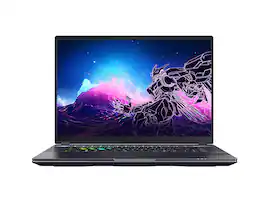
The new GIGABYTE AORUS 16X sets a new standard for gaming excellence. Powered by Intel Core processor and AI-accelerated NVIDIA® GeForce RTX laptop GPU, it guarantees unparalleled performance. The integrated AI Nexus enhances power management, gaming, and generative-AI experiences for both gamers and creators. Empowered by WINDFORCE Infinity cooling technology, this laptop achieves a remarkable slim profile while asserting dominance in the gaming world with unparalleled performance.
About Open Box
This is an Open Box product, which means it's been opened and returned by another customer. Each open box item is unique, and we offer different discounts based on the . To see a product's condition before purchasing, visit us in store.
Big SavingsScore a major deal on a product that's a perfect fit for you and your budget.
Customers are sayingCustomers express satisfaction with the AORUS 16X's impressive build quality, vibrant display, and strong performance in gaming and other demanding tasks. The keyboard and trackpad also receive praise for their comfort and responsiveness. While some users note the fan noise can be noticeable under heavy load, the positive feedback on battery life and the customizable RGB lighting outweighs this concern for many. Overall, the laptop is considered a high-performing machine with a premium feel.
This summary was generated by AI based on customer reviews.
Graphics Performance (24)
Build Quality (23)
Cooling System (8)
RGB Lighting (8)
Battery Life (7)
Fan Noise (7)
Port Selection (6)
Customer Images
The vast majority of our reviews come from verified purchases. Reviews from customers may include My Best Buy members, employees, and Tech Insider Network members (as tagged). Select reviewers may receive discounted products, promotional considerations or entries into drawings for honest, helpful reviews.
Rated 5 out of 5 stars
More than a Gaming Laptop, Keeping it Cool...
The Gigabyte Aorus 16X ASG 2024 Laptop can be used for Gaming, Content Creation, and AI rendering. It comes equipped with the Intel I7 14650HX and the Nvidia RTX 4070 GPU along with 32GB of RAM, and a 1 TB SSD. I was impressed with just how many features Gigabyte managed to pack into this lightweight unit.
**Unique Features**
1. The Aorus has Advanced Optimus that saves you from having to restart the computer or go into bios, every time you switch from Optimus to dedicated or integrated graphics.
2. Gigabyte, through its control center, has integrated AI to switch between graphic cards, or even change power modes depending on what application you open. Stable diffusion is also available in the control center to render graphics.
**Design/Build Quality**
There's a matte surface (great for avoiding fingerprints) with a hard plastic bottom and surface, and aluminum lid. I was a little disappointed that it only opens up to about 120 or 130 degrees, so you can't lay it flat, but the hinges are nice and strong. There's a light projector with a purple AORUS that illuminates from the back (kind of cool,) and there's an iridescent logo on top of the lid. I didn't notice any flex on the screen. The trackpad is large with small satisfying clicks. There are two vents on the surface, two vents out the back, and vents on the left and right. You will notice 7 translucent keys on the keyboard, the Dolby Vision Atmos logo, subtle Auros graphics, and a power button top center. There is also non-slip rubber on the bottom to prevent sliding. Design and build quality is solid, but with the translucent key caps, iridescent logo, and RGB highlights, it will be hard to hide that it's a gaming laptop.
**Display**
The display is a 16.0" 16:10 WQXGA QHD (2560x1600) IPS with a 165 Hz Refresh rate. It comes with adaptive sync, 100% sRGB coverage. It's pantone validated (must have for content creators using the Adobe Suite) and TUV Rheinland Certified (which means it is low-blue light emitting and takes better care of your eyes.) It comes with Dolby Vision, Gsync, 2 Display Ports via USB-C and 1 HDMI 1.1 out. This means 3 external monitors. (I hooked up 2.) It's specced at 400 nits of brightness but this one goes well over 500 nits. You can also take this one outside with some sun and still see what you're doing. There are slim bezels on the sides with a Webcam up top and thicker bezel at the bottom. The display boasts a 3ms response time which is great for gaming. TestUFO testing for ghosting shows a good image. There's a very good 178 degree viewing angle and an anti-glare finish. This display is very good quality and great for gaming/content creation/rendering.
**CPU**
Equipped with a 14th Generation Intel I7 14650HX it will reach speeds up to 5.2 GHz. There are 16 cores, 8 P-cores and 8 E-cores. I feel like this is the sweet spot. You get plenty of power and Gigabyte manages to keep this one very cool. On Cinebench R23 I scored 1840 on the Single-Core test and a Multi-Core test of 21206. Very good scores here and capable of handling any gaming/software with ease.
**GPU**
Equipped with an Nvidia RTX 4070 and 8GB of VRAM, it maxes at 140 watts. The RTX 40 series is great for increasing frames with Frame generation and DLSS technologies. I scored 12600 on TimeSpy with standard settings. In gaming mode I hit 12900, and in Turbo mode (fans are maxed) I hit 13100. Note: During the Timespy test I did average 88 degrees on the CPU and 71 on the GPU. The clock frequency was right at 5.2 GHz on the CPU. The 4070 is more than enough to play any AAA title at High to Ultra settings.
**HDD**
There's a 1 TB NVME SSD, plenty of space, and fortunately there are two M.2 SSD slots so you can expand later if necessary. These are the latest generation PCIe Gen4x4 NVMe M.2 SSD up to 4TB. I hit about 5000 MB/s Read/Write speeds on CrystalDiskMark 8.04 on the 1 TB SSD that was included.
**Memory**
There are 2 DDR5 slots with DDR5-5600MHz memory sticks in them. These are very good speeds for memory. Gigabyte didn't cut any corners here. You can put up to 64GB in this system, but 32GB is more than enough for just about anything you throw at it. Memory never exceeded 16GB used on the performance monitor during gaming or while using content creation software.
**Keyboard**
There's almost no keyboard flex so it's a solid build. The Aorus comes with 3 zone RGB backlighting, and has up to 1.7mm key travel (supports n-key which is great for hitting multiple keys at once.) There are semi transparent W-A-S-D-Q-E-R keys that are soft and quiet. On the downside there is no per-key RGB which would allow for more customization. It does support macros if you want to save your common key combinations.
**Ports**
2 Type-A supports USB 3.2 Gen 2
1 Type-C supports USB 3.2 Gen2 DisplayPort 1.4
1 Type-C Thunderbolt 4 (Supports USB4, Display Port 1.4) (Delivers power of 100 watts)
1 MicroSD (UHS-II) transfer rates here are exceptional
1 Audio/headphone jack
1 RJ-45 Gigabit Ethernet
1 HDMI 2.1 (I'm using this slot for one of my monitors to save the USB-C for something else)
There's a nice selection of ports. I do wish they were a little higher up (away from the hands) or in the back of the laptop out of the way.
**Webcam**
The webcam is an IR (face recognition) 1080p at 30 FPS. There's a built in array microphone, 2.1 MP camera, and it supports Windows Hello Face authentication. This is all you will need for any zoom/teams meetings. With good light it looks great, in low-light it's good enough.
**Tech**
Equipped with Wi-fi 7 you get the 6GHz band too. It comes with Bluetooth version 5.4, Dolby Vision and Dolby Atmos (which is like 5.1.2 surround sound.) This is essential for gaming so that you can hear thing around you. It's also great for movies.
**Sound**
There are two 2W Speakers that are bottom firing. Speakers get louder than most laptops I've had, but with little bass as usual.
**Battery**
There's a big battery in the Aorus at 99WH. There's a fast charge of 50% capacity in 30 minutes. With normal to light use (such as web browsing and other functions outside of gaming and video rendering, you can get 8 or 9 hours out of a single charge. There's a small 240 watt AC adapter (nice for traveling.) I'm happy with the size of the battery, the run time, and the intelligent power switching provided by AI Power gear.
**Fans/Cooling**
The fans are silent most of the time. Some gaming laptops struggle with cooling and have to blasts the fans to compensate for inadequate cooling or space. Gigabyte really nailed the cooling in this laptop. When the fans are working hard, the highest sound I measured was about 51 decibels, not too bad. You will see CPU temps idling in low to high 40s and GPU temps in mid to high 30s depending on what power profile you choose. There are 5 heat pipes with a really well engineered system. There's a large intake on the keyboard surface and four outtakes (2 on front, left and right), no vapor chamber, no liquid metal, but surprisingly cool.
**Software**
Gigabyte Control Center monitors temps and utilization but it also does much more.
RGB Lighting - You can also select 8 different LED effects or even customize them. This will change how your keyboard looks and the pattern.
AI - This is also your control center for AI. If you choose AI Boost and click on the settings, you can literally change power delivery by choosing different profiles. The default power range is 90 to 120 watts, Creator is 110-135 watts, Turbo is 125-150, Gaming is 110-135, and Meeting and Energy saving are both 65-100 watts. AI Power Gear switches between integrated and discrete GPU and dynamically adjusts power management. AI Boost will detect what application you're using, and it can adjust the CPU, GPU, or fan curve for higher performance. Gigabyte control center also offers AI Stable Diffusion for rendering.
Other Options - You can turn the keyboard to white backlighting or off (which might be nice in a professional setting.) You can also choose different fan control profiles which will determine when the fans kick in and how loud. I adjusted my battery to stop charging at 80% here, and you will find many more options available to customize your system.
**Games tested** (All at highest settings with DLSS when available) Temperatures were very impressive!
Senua's Saga Hell Blade 2: FPS Ave: 52, GPU Temp:75, CPU Temp: 75
Shadow of the Tomb Raider: FPS Ave: 154, GPU Temp: 70, CPU Temp: 70
Alan Wake FPS Ave: 75, GPU Temp: 70, CPU Temp: 70
Cyberpunk 2077: FPS Ave: 75 GPU Temp: 74, CPU Temp: 70
Forza Horizon 5: Extreme Settings, FPS Ave: 82, GPU Temp: 71, CPU Temp: 70
**Conclusion**
This is an exceptional laptop that does so many things well. Gigabyte covered every possible option for gamers and content creators with the added luxury of AI. Gigabyte gets everything out of the CPU and GPU here with no throttling that I could detect. When you analyze every element of this laptop, it's an exceptional machine with hardly any weaknesses. I'm a fan. Highly Recommended.
**Pros**
* Cooling is top-tier
* Display has a ton of features, >500 Nits
* Design is slick and sturdy
* AI features/Gigabyte software
* 1080P IR Webcam
* CPU, GPU, Memory speeds are well above average
* No bloatware
**Needs Improvement**
* Lacks per-key RGB
* Ports on sides (none in back)
* Chassis only has metal on the lid
* Some options are hard to find (not intuitive) in Gigabyte Control Center software
* Micro-SD (Not full size)
Posted by NanoEthan
Rated 5 out of 5 stars
A Powerhouse Gaming Laptop
As a huge gamer who has to travel a lot for work I found myself wanting a good Gaming laptop for on the road. So, I was excited to get my hands on the Aorus GIGABYTE 16X. This 16 inch gaming laptop boasts an impressive lineup of specifications, including a 165Hz display, an Intel i7-14650HX CPU, 32GB of DDR5 RAM, an NVIDIA GeForce RTX 4070, and a 1TB NVMe SSD. After putting it through some performance tests and daily usage, here’s my thoughts focusing on its build, gaming capabilities, screen resolution, battery life, and the Aorus built-in software.
Build:
The Aorus 16X is truly a sleek laptop with a striking design,with a sturdy build quality and doesn't come off as too “gammery” when using it in public. The RGB lighting on the keyboard and the Aorus projection logo on the back adds a little touch of gaming flair without being overly flashy but it can be turned off if you prefer. The top of the laptop is made of aluminum which gives it a nice premium look and feel where the rest of the laptop is made of a sturdy plastic. The trackpad on the AORUS 16X is the perfect size for gaming laptop, offering ample space for multi-finger gestures and smooth navigation. The trackpad surface is made from glass, providing a smooth and responsive experience. Then when gaming, the touchpad has great palm rest touch detection, so you don't accidently register it when playing games.
Gaming Capabilities and Performance:
The Aorus GIGABYTE 16X is a beast when it comes to gaming. The combination of the Intel i7-14650HX CPU that has 30M Cache, up to 5.2 GHz,16 cores: 8 P-core and 8 E-core and the NVIDIA GeForce RTX 4070 with 8GB of VRAM, where it can boost Clock up to 2175MHz and has a maximum graphics power draw of 140 Watts, allowing it to deliver outstanding performance. I tested it with several demanding games like "Cyberpunk 2077," "Ghost of Tsushima,",”Resident Evil 4” and "Call of Duty: Warzone," and it handled them all flawlessly. The games ran smoothly at Medium to High settings when using Nvidia’s DLSS where the frame rates would consistently be above 100 FPS. The 32GB of DDR5 RAM at 5600 MHz ensures that multitasking and running memory-intensive applications are a breeze.To truly get the best out you're Aorus 16X when gaming, I highly suggest using the Nvidia GeForce Experience app. This is a helpful app for those who are new to PC gaming.The app will scan all your games and give you the best option to optimize each game to its recommendation for the best settings that your hardware can run.
Screen Resolution and Display:
The 16-inch display with a 165Hz refresh rate is one of the standout features. The screen is an IPS WQXGA 2560x1600 resolution with a 16:10 aspect ratio, which provides sharp and vivid visuals that enhance the gaming and viewing experience. The high refresh rate allows for buttery-smooth gameplay, which is very noticeable in fast-paced action games and competitive first person shooters. The colors are vivid, and the contrast is excellent, making both dark and bright scenes look stunning.You will notice a little backlight bleeding with dark backgrounds but that is expected from ISP displays, but it's not too noticeable. The display also performs well in outdoor settings with minimal glare, thanks to the anti-glare coating. The screen comes with a built-in FHD 1080p webcam for video chats and it also allows for Windows Hello for unlocking your laptop with your face, which is nice since this laptop does not come with a touch sensor unlock button.
Battery Life and Charging:
Battery life is always a concern with gaming laptops, but with the Aorus 16X it performs decently in this regard. On a full charge, I managed to get around 4-5 hours of moderate use, which included browsing the internet, streaming videos, and some light gaming. During intense gaming sessions, the battery life would give me about 2 hours of playtime, which is expected given just how powerful the hardware is. For extended gaming sessions, I recommend keeping the laptop plugged in to maintain peak performance. This also affects the actual performance when gaming. So in order to get the best performance you are going to want to keep your laptop plugged in, that being said you can still game when it's not charged but you will see a pretty steep decline in gaming performance, so keep that in mind.
Ports and Connectivity:
The Aorus GIGABYTE 16X comes with a generous selection of ports, which includes:
2 x USB 3.2 Gen 2 Type-A
1 x USB Thunderbolt 4 (Type-C)
1 x USB3.2 Gen2 (Type C, support DisplayPort 1.4)
1 x HDMI 2.1
1 x RJ45 Ethernet port
1 x 3.5mm audio combo jack
1 x MicroSD Card Reader
This variety of ports ensures that you can connect all your peripherals, external displays, and accessories without any hassle or need of a port dongle. The inclusion of Thunderbolt 4 and HDMI 2.1 is especially useful for high-speed data transfer and connecting to my high-resolution external monitor that supports HDMI 2.1 or my VR headsets. Internally it comes with the new Wi-Fi 7 wireless chip for faster speeds and lower latency. Currently, I have a Wi-Fi 6e router, but was still able to get my full bandwidth of 900 Mbps for both uploads and downloads, so I can only assume if you have a Wi-Fi 7 router with Gigabit internet that this laptop will have some of the fastest speeds over Wi-Fi. Along with the Wi-Fi 7 chip it also has the latest Bluetooth V5.4 chip that allows for better connections and lower latency for your Bluetooth enabled devices such as Headphones, keyboards, and mice.
The built in speakers are just ok for laptop speakers in that it has two downward firing speakers under the laptop, but let's be honest most people will be using a gaming headset or headphones over bluetooth when using this laptop and the built in ones get the job done. The Laptop comes with 1TB of storage and has an additional M.2 slot so, you can add an additional NVMe SSD for more storage. The same goes for RAM, in that it is also upgradable with two slots to get you up 64GB of RAM.
Built-In Software:
The Aorus Control Center, which comes pre-installed, is a comprehensive software app that enhances the overall user experience. The AI Nexus utilizes AI to optimize the system performance based on the current task. For example, it can dynamically adjust power settings and fan speeds to balance performance and thermal management depending on if you're gaming, rendering videos or just surfing the web. The AI-driven features are particularly handy during gaming, as it makes sure that the system runs at its best without having to manually tinker in the settings. The software also offers customization options for the RGB lighting, keyboard macros, and system monitoring, giving users full control over their setup. It comes packaged with Windows 11 Home Edition, but I recommend upgrading to the Pro edition, so you are not limited in some of the admin and customizations that the Home edition does not have.
Pros:
Great Gaming Performance: Handles the latest games at medium to high settings with respectable frame rates.
High-Quality Display: 165Hz refresh rate with excellent color and sharpness.
Robust Build and Design: Sleek, durable, and portable.
Ample Ports: Wide selection of ports including Thunderbolt 4 and HDMI 2.1.
AI Optimization: Aorus software intelligently manages performance and thermal settings.
Cons:
Battery Life: Limited battery life during intensive gaming sessions.
Performance not Plugged in: Performance will take a dip when not plugged into an outlet.
Fan Noise: Can get quite loud under heavy load.
Weight: 5.0lbs is on the heavier side for laptops
Overall, the Aorus GIGABYTE 16X is a powerhouse gaming laptop that excels in delivering top performance and an immersive gaming experience on a laptop. Its high-refresh-rate display, powerful internals, and its plentiful ports make it a standout choice for serious gamers on the go. While it comes with a premium price tag and some minor drawbacks like battery life and fan noise, the overall performance and features justify the investment. You can't go wrong with picking this laptop.
Posted by Ian L
Rated 5 out of 5 stars
Impressive Machine from Gigabyte!
I was quite surprised by this gaming laptop. Most are clunky, using simple shells with more of an ‘off-the-shelf-components’ vibe to them. Enter this 2024 Aorus 16X laptop and Gigabyte blew away a lot of those assumptions. The internals are still great for gaming, but the overall package (design) is much more streamlined and compact for a 16” laptop, which is great!
_Performance__
But before talking about design a bit more, let me mention performance. The 4070 in this machine is great. Sure a 4080 might eke out more fidelity in demanding games, but for me it’s more than suitable. Frame rates are consistently over 60fps in the current games I played on it, and for the price I can’t complain. The 165hz screen doesn’t disappoint either. With nice, high pixel density that makes using this machine for productivity also quite good. Colors are punchy, despite a more matte finish on the screen, and blacks are quite good for an IPS panel (not OLED level, of course, but still looks nice in games with a lot of black.)
_Design__
Now back to design. While the chassis is largely plastic, it feels solid and compact. A unique raised bottom panel provides airflow channels while keeping the profile much more streamlined and wedge-like. In short, it’s not endlessly huge and chunky. It feels much more portable than most gaming laptops on the market that have similar specs. It also utilizes Windows Hello facial recognition login, which is another rare commodity on gaming laptops, - but boy do I love having it here. It’s just nice to get logged in and running without the annoyance of passwords or codes. It also contains two m.2 slots, with only one in use at purchase, so expanding your machine’s storage to up to 2TB is an option. Memory is also upgradable in 2x SO-DIMM (DDR5) slots, but Gigabyte suggests that its max is 32gb, which is what this ships with anyway. RGB color features seem fairly tasteful, with the back lights shining up from the bottom of the screen a bit when open. WASD lights are interesting, but also a bit distracting at times, since it makes spotting the letter markings a bit harder. These can be turned off in software though.
One last feature that I appreciated was the low-profile charging brick. All gaming laptops forego an internal transformer, so you’ll find the need to lug around a big black brick to charge it. Luckily, Gigabyte’s is the best I’ve seen, it’s thinner and a bit wider, but easier to travel with.
Overall, I really appreciate the design here. I don’t prefer having sporty graphics on my laptop, but the ones here are fairly minimal in person. The top of the shell is simple and professional. It’s plenty powerful for my gaming needs and with its nice, pixel dense screen, it’s great for productivity too!
Good Stuff
- Streamlined design, looks more professional
- Compact with thin bezels
- Solid, yet minimal hinges that contribute to smaller footprint despite 16” screen
- 4070 graphics are plenty for enjoying modern games, even if not always at the highest settings
- Great, high resolution screen is good for productivity too.
- Screen black-levels are not OLED level, but good - great colors vibrance too
- Accessible memory and SSD slots for upgrading
- RGB Lights seem tasteful, even if I don’t care for some of the slogans and graphics on the shell
- Love having all ports on the sides, not the rear
- Windows Hello face login is convenient
Less than Good Stuff
- Fan noise can be on the louder side at times
- Power plug cannot be inserted all the way
- Battery lasts only around 90 minutes, but I always plug in my gaming laptops anyway.
- Would have appreciated a simple, protective sleeve for the price
- WASD in clear keys make it a little hard to see key labels
Posted by Scott S
Rated 5 out of 5 stars
A Great Laptop that will Perform
The Gigabyte Aorus X16 is a nice update from previous Gigabyte laptops.
The Aorus X16 has what I consider amazing build quality. I have had a couple of gaming laptops before that were much more expensive ad did not feel as quality or as solid, had massive back light bleed, or all the above. It has no chassis flex, no creaking, and most everything feels like metal, even the non metal bits. It a nice looking matte black aluminum lid with a nice gloss Aorus logo in the center of of the lid and another along the right outside edge of the keyboard. It has an RGB strip in the bottom of the monitor that reflects off the cooler and the can match or be different that the RGB keyboard. This year they decided to add a curvy back end between the exhaust ports and move the I/O ports to the side of the laptop and put in a panel that says AORUS and is back-lit by RGB to flash the AORUS logo on your desk. It is also less of a finger print magnet than my Aorus 15, probably because the lid is aluminum on this model and the keyboard tray is a textured matte plastic.
The laptop is easy to maintain and mostly easy to work on as the internal components are smartly laid out and the expansion slots are easy to find. My biggest knock is they used Torx T6 screws to put the bottom shell on instead of more common #1 or #2 Phillips screws. Unless you have a purpose built electronics kit the likelihood of you having a Torx driver lying around isn't that great. Oddly enough the internals ARE held together with #0 and #1 Phillips.
It weighs in a roughly 5.1lbs, and combined with the big CPU GPU cooler it is not the most portable laptop, but its nowhere near as bad as a lot out there. It comes with a chonky 240w power brick that is able to power the i7-14650HX and RTX4070 very well, and when not plugged in allows the NVIDIA Optimus Mux switch to run the integrated graphics and give you a reasonable 6-7hr web-surfing time and 3-4 streaming time. Gaming on a gaming laptop while on battery is generally a terrible idea and it proved true on this one as well. FPS suffers heavily running on integrated graphics and unless you drop settings to as low as they’ll go and the battery dies pretty quick after about an hour and a half or so in my testing. It has a 99Wh battery which is as big as airlines allow so you can fly and frag if you so desire.
The laptop comes with a 16” 165hz display. At 2560x1600 the laptop has a 16:10 resolution that has more vertical height than a 2560x1440 display. It looks much better when doing productivity work, and if the game supports it, you get another 160 pixels in height to see whats going on in your game. However some games don’t and you'll get black bars at the top and bottom of your screen but its nothing really distracting. Also a great to have, this monitor has NVIDIA Gsync to help eliminate screen tearing in video games caused by fast movement. It works extremely well and helps keep you immersed in the game.
The laptop comes with an RTX4070 with 8GB GDDR6 VRAM. This GPU is a great choice to power your gaming sessions. This GPU is plenty to run the majority of games at very high graphics settings and will do great in with heavy ray tracing. The 40 series includes Frame Generation, which reads the frame being displayed and the next frame and creates and inserts a frame between the two. This, along with NVIDIA's DLSS, has the effect of increasing FPS and the smoothness of the game, making it more enjoyable to watch. You don’t have to run these in many games, especially FPS games that rely more on quick reflexes than super detailed environments. Frame Generation can increase input lag, which will make it seem like what you do with the controls takes longer to show up, which can get you killed. Therefore, I recommend to test it in the game you're playing. It is best used in single player games, which are usually more graphically intense anyway and where Ray Tracing is at its best as well. DLSS on the other hand, is great to use in FPS games to help increase FPS while not increasing input lag. It will reduce the detail of the game to some extent, but its nothing you’re going to notice while running around in Call of Duty.
Gigabyte wisely included 2 SO-DIMM slots to allow for upgrading your RAM. They included 2 16GB sticks of DDR5 running at 5600Mhz which isn't the fastest, but is a good spot and will have an impact on your games. 32GB is a nice amount to have as well. With more and more games using more RAM, 16GB is quickly becoming the bare minimum to have in a system. 32GB will be great for most anything you throw at it. If it isn’t you can stick up to 64GB in here which will be plenty.
Gigabyte also includes a 1TB Gen 4 m.2 SSD. There isn't a game on the market that can saturate a Gen 4’s bandwidth so there won’t be long load times or stuttering while loading game content. 1TB is plenty for the majority of gamers right now. Unless you have to have All the Things, or only play AAA titles, you shouldn’t have to delete and download games often. They also include another 2280 m.2 slot for plenty of storage expansion so you shouldn’t run out of storage anytime soon.
When it comes to a clean Windows install, Gigabyte deserves some credit here. Other than standard Microsoft programs, the only things installed were Gigabyte Control Center and Network Dragon, and NVIDIA Control Center. Network Dragon can be uninstalled, as you don’t need anything monitoring your internet while you play a game, as you really shouldn’t be doing any major background tasks while gaming in the first place.
Control Center is decent. You go there to adjust the computers mode from gaming to battery saver to anything in between, adjust fan curves and RGB settings, etc. Its light and the settings are not buried in dozens of sub menus like one of my other laptops. The one of two thing that annoys me is that even though I can turn the track pad off to keep from bumping it while using a mouse, I cant disable the Windows key without installing a third party program or editing the Windows registry. I use the left Alt key to ping items in-game, and I kept hitting the Windows key instead and pulling me out of the game! Super simple thing they could fix in a future Control Center update.
My only real knock against this laptop is Gigabyte decided to move the I/O ports to the side of the laptop to make room for a gimmicky RGB projector that lights up the AORUS logo on your desk. It’s tiny, blurry, and dim. Its not eye catching, more forgetful. And if you are a South Paw or just like not having your mouse cable, charging cable and HDMI cables in the way of your mouse and desk space, it just a dumb design. Previous AORUS laptops had the ports on the back, leaving the sides of your desk clutter free and usable. Not anymore.
In conclusion, for the money you get a very well rounded gaming laptop that can handle all your games and some light creativity software with some room for upgrades and with a great Sync display that just so happens to be a little taller and a bit better to do work on, it can do more than most will ask of it. If the side I/O ports don’t bother you then it’ll be a great laptop.
Posted by Bakut3n
Rated 5 out of 5 stars
High-end gaming hardware in a notebook size laptop
Every year it never ceases to amaze me how much technology manufacturers somehow squeeze into a smaller product and still be able to perform at impressive levels. That sense of amazement still reigns true with GIGABYTE’s latest model, the 2024 AORUS 16” gaming laptop which comes packed with some of the latest high-end gaming hardware which they somehow shoved into a smaller, lighter rig compared to the gaming laptop I used for the past year.
One of the things I like about the GIGABYTE brand is it’s not as flashy and loaded with bloatware compared to other manufacturers. The main consumer benefit for this lack of flashy-ness and added, unnecessary software also cuts down on cost allowing you to get more bang for your buck. You can see this cost cutting right away starting with the simple, uncolored cardboard box the high-end laptop ships in. Once out of the box, you may also notice the AORUS looks and feels like any run-of-the-mill, non-gaming, laptop; it looks more like a work notebook in my opinion with its smooth matte black shell until you turn it on and the RGB lighting kicks in to subtly whisper otherwise. However, don’t let that fool you once you delve into the specs of this silent, yet powerful, beast.
As I previously mentioned, the RGB lighting that kicks on when you fire it up is when you can finally tell it’s not your grandma’s laptop. All the keys light up highlighted by the gamers’ favorite “QWERASD” keys that are clear and fully light up for quick visual reference. RGB lighting also shines across the rear along with the “AORUS” logo that projects on any surface you set it on which is pretty cool. There are fan exhaust ports on the rear and both sides to help pump the heat out when in performance gaming mode. While on the topic of the fans, even when they are at full speed, they are pretty quiet considering the heat the laptop’s internal hardware can produce. There are only ports on both sides, none on the rear, which consist of the power port, an ethernet input, HDMI out, USB-A and USB-C on the left side and another USB-A, USB-C, micro-SD slot and audio output on the right side. Unfortunately, there is no display port but you can always plug in an external dock if you need one or if you want to add additional monitors. The 16” IPS WQXGA 2560x1600 165Hz screen with Dolby Vision Atmos is stunning and the colors and contrast displayed during gaming look amazing.
Looking under the hood, you’re able to see the intricate technical design allowing room for the hardware crammed into this beast. The fans, exhaust vents and 99.20Wh Li-Ion battery take up most of the space you can see on the bottom which isn’t a bad thing as they prevent overheating and giving you more unplugged time. Somehow, the designers still allowed room to add another SSD on top of the 1TB Gen4 M.2 SSD included, which is a must for me, and comes with fast 32GB (16x2) of DDR5 5600 RAM which can also upgrade if you wish to. The latest 14th generation Intel Core i7-14650HX processor can run up to 5.2 GHz which can give any multitasker piece of mind for ultra-productivity.
Needless to say, I was excited to finally put this thing through a few rigorous tests to see how all this tech came together and compared to the competition. Unfortunately, at the time of this review, the benchmark software I use for the testing had no other exact matches to compare to but at least I was able to see where it landed with rigs closest to this one. One of the things I was most excited to try out was the compatibility with the latest Wi-Fi 7 router I have been using at my home for almost a year and haven’t had any tech that used Wi-Fi 7 as it is relatively new. That being said, I’ll just say my internet connection and speeds were fast but nothing I could really notice as Wi-Fi 6 is fast as well; the internet speed tests I ran were virtually the same so it was a bit of a letdown but nothing against the laptop. After downloading and installing the plethora of Windows 11 updates and driver updates, I was finally ready to give the benchmark tests a whirl. Long story, short, I was impressed the results came back higher than most other gaming laptops, 69% better than most with similar hardware, considering the size and weight of this one. That is clearly due to the latest Intel Core i7 processor that can run at a whopping 5.2 GHz and the latest NVIDIA GeForce RTX 4070 8GB GDDR6 graphics card built for laptops. The sound is pretty decent for a laptop and has Dolby Atmos Audio Technology with a built-in microphone but I usually just like to plug in headphones for the best sound while gaming. There’s enough storage to get most gamers started and, as I previously mentioned, there’s still room to upgrade or expand in the future.
I have gamed on this laptop for hours and didn’t experience many slow downs, glitches or other issues while gaming. It’s definitely doesn’t perform as well as a full sized PC however it is a great gaming laptop for on the go and the battery lasts surprisingly long. Overall, I’m pretty impressed with this laptops performance considering the size and weight and believe it is priced just right with high-end gaming hardware.
The new GIGABYTE AORUS 16X sets a new standard for gaming excellence. Powered by Intel Core processor and AI-accelerated NVIDIA® GeForce RTX laptop GPU, it guarantees unparalleled performance. The integrated AI Nexus enhances power management, gaming, and generative-AI experiences for both gamers and creators. Empowered by WINDFORCE Infinity cooling technology, this laptop achieves a remarkable slim profile while asserting dominance in the gaming world with unparalleled performance.
The GIGABYTE AERO X16 Copilot+ PC redefines mobile computing, seamlessly blending cutting-edge performance with a sleek and thin design. Weighing just 1.9 kgs, its precision crafted chassis houses the powerful AMD Ryzen 7 AI 350 processor, delivering best-in-class CPU and NPU performance for demanding productivity tasks. The NVIDIA GeForce RTX 5070 Laptop GPU unleashes next-generation graphics capabilities for both gaming and creative pursuits. Equipped with GIGABYTE GiMATE—an intelligent AI agent that personalizes performance to your workflow— adapting system operations to your unique needs. With a creator-class display, portable build, and versatile performance, the AERO X16 is the ultimate laptop for gamers and creators alike.
Unlock a next-level gaming experience with the ROG Strix G16. Featuring a 2.5K 240Hz Nebula Display with Pantone-validated color accuracy, it delivers stunning visuals. Powered by an Intel Core Ultra 9 275HX processor and NVIDIA GeForce RTX 5060 laptop GPU, enjoy seamless gaming and creative performance. With 16GB DDR5 RAM, a 1TB PCIe 4.0 SSD, and advanced ROG Intelligent Cooling, stay at the top of your game. The esports-ready keyboard, Dolby Atmos audio, and customizable RGB Aura Light Bar elevate every moment. Plus, enjoy easy upgrades and 3 months of PC Game Pass for the ultimate gaming experience.
Essential power. No distractions. Optimized performance in a sleek design, featuring a WQXGA240Hz 500 nits display, stylish anodized aluminum lid and bottom cover and Intel Core Ultra processors. Alienware 16X Aurora delivers an immersive gaming-first experience in a sleek design. Get the performance you need, anywhere – powered by Intel Core Ultra HX processors (Series 2) and NVIDIA GeForce RTX 50 Series Laptop GPUs.
Pros for GIGABYTE - AORUS 16X 16" 165Hz Gaming Laptop IPS - Intel i7-14650HX with 32GB RAM - NVIDIA GeForce RTX 4070 - 1TB SSD - Black










 $279.00The price was $359.00
 $1,199.99The price was $1,699.99
 $599.99The price was $749.99