Rating 3.7 out of 5 stars with 42 reviews
3.7- Ease of use (11)
- Automation (9)
- Design (7)
- Infrared (3)
- Zigbee (3)
- Device Compatibility (15)
- Price (5)
Customer Images
The vast majority of our reviews come from verified purchases. Reviews from customers may include My Best Buy members, employees, and Tech Insider Network members (as tagged). Select reviewers may receive discounted products, promotional considerations or entries into drawings for honest, helpful reviews.
- Rated 3 out of 5 stars
Zigbee compatibility
This product is advertised as having zigbee capability so I bought it to connect to my Schlage Connect smart deadbolt lock - it finds the lock alright but still not responsive nor operational. The problem might be that the Schlage Home does not support their Schlage Connect. In essence the Homey Pro might not be compatible with all manufacturers’s Zigbee products and hence steep for the 399.99 price - am returning mine
Posted by Urbangrid
- Rated 5 out of 5 stars
A needed addition to my smart home
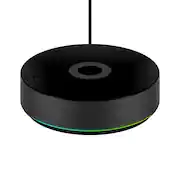
The Homey Pro is a versatile smart home hub that offers multi-protocol compatibility and ease of use. Right out of the box, it comes with the charger, the cable with USB C on both sides and the Hub. The Hub looks sleek and it is around five inches in diameter and about one and a half inches tall. The piano black looks elegant and it does not suffer from leaving fingerprints on it. Once it is on it offers a ring of light, either with solid colors or different colors, it can be personalized. The only input is for the USB C input and there is an option to make connect it via wired with the Ethernet Adapter. The Homey Pro seemed hard to understand but it is much easier than I thought we started with one smart device at home and now there are a lot of devices that I often forget which application controls what so having the Hub was a must. It simplifies integrations and management. I can control from the application anywhere and also on my computer for easier to build automations. Speaking of automations, I can open the garage and at the same time it will turn on the lights in the garage and on my way to my house. Once I walk inside the door, it can turn on the lights inside, perhaps music and more. With over 50k devices and 1k brands I know I can connect future devices, so far all my devices have been connected with no problems. I like that it supports 5 and 2.4 Wi-Fi, Bluetooth 5.0, Zigbee 3.0, Infrared, Z-Wave Plus 700 series, and Matter protocols. I do not have all of them at home but it is good to know they are available just in case. Overall the setup was much easier than I thought, the automation is awesome, there is no subscription and everything is stored locally.
Posted by AngelM
- Rated 3 out of 5 stars
I wanted to love the Homey
I consider myself an early adopter for a lot of home automation things. I also consider myself technologically advanced as it relates to electronics. My home has a multitude of smart home “appliances” – ones from Philips, TP Link, Switchbot, Ecobee, and more. I’ve wired up my network with Home Assistant; it works well enough for my needs but moving to a professionally (read: not community) supported equivalent feels like it could be an improvement for the effort I need to put in to maintaining my home setup. My network is segmented – one for my computers and one for my IoT devices; I do this for security, and I think it will become relevant later. Bottom line up front, Homey has the right intent in mind of supremely easy setup and functionality, but I do not feel that this device is ready for primetime yet. Where I think Homey will work best is for entirely offline home IoT networks, but I don’t see how it could accomplish that given most smart home devices require an initial cloud connection for them to download firmware updates and be configured for the first time. The thing that drew me to the Homey was that all my disparate devices could be integrated with a single device. All my smart home devices connect to the cloud – mainly for the initial firmware download above, but also because I like them being accessible remotely. The ones that do not (specifically ones on the Z-Wave network) are still connected to Home Assistant for manipulation. On the tin, Homey checks all of these boxes with ease. Out of the box, you get the device, a charger and a USB cable for it. The instruction manual is sparse, but the setup is basically “plug it in, download the app.” My first attempt with it resulted in a device that would attempt to connect to WiFi, then give up. A factory reset by using the pinhole at the base didn’t resolve the problem, so I needed to perform a several hour-long factory reinstall by using their web application and connecting the device to my laptop. After the factory reset, I changed from my IoT segmented network to my home computer network. This got me to the point where I was able to begin to configure the device, but it was not the end of my problems. Most all of my smart devices were added without issue. Homey is based around “apps” that will allow you to connect devices that do not link via infrared, Z-Wave, Zigbee, or Matter. I added integrations for every device type I mentioned earlier and it was _mostly_ fine. For my hue and ecobee devices, it was literally as simple as logging in. My two Z-Wave devices were marked as generic “Z-Wave Device[s]” with no means of interacting with them – this was for an older Schlage smart lock and a Qolsys alarm panel. I was able to add the alarm panel via a Home Assistant integration, but the fact I had to use a competing standard to make things work defeats the value of this appliance significantly. Even after setup, I had issues with two of the five apps I was utilizing. The Switchbot app was misconfigured, preventing me from being able to log into it, and the TP Link app kept reporting that it was rate limited. Just like before, I was able to work around and “ignore” these problems, but it adds to the frustration of the experience. (Editing note, the TP Link issues seem to have shaken out over writing this review) After the initial teething, how well did it work? Pretty well. Homey leans more towards automation than observability. Each Homey app publisher selects what data can be represented for their various device; overall I found Home Assistant to have more data available for devices out of the box. For instance, my TP Link integration in Home Assistant tells me the line-level current, voltage, current consumption and overall consumption today. The Homey will provide a hard number and a graph of the usage at a specific moment in time, but there’s no additional data present. Homey’s strongest offering is automation via flows. If you have basic needs, Homey has a simple “When X and Y, then Z” flow. If you are a more advanced user, there is a drag and drop “blueprint” style flow with conditionals. The first flow I wrote using the advanced flow was “if a window or door is open for more than two minutes, turn off the HVAC.” I have written this flow in other applications, so I understand the general “what” and “how” of what I need to do making this a great test for exercising the capability. The advanced builder is relatively feature complete, but there is a steep learning curve, and it sometimes requires you to think creatively about your solution depending on how the Homey app is written. For instance, I can start a flow with “when a contact alarm is on” using the community supported app for Home Assistant, but if I want to conditionally check it again to make sure the contact is still on, I need to check for the negative case for if the contact alarm is off as the same check doesn’t exist for an “and” step. The builder also allows you to set variables using existing device states but reusing them as inputs to states seems to be impossible as of this moment (for instance, I want to set my HVAC back to the mode it was at last). I can see the world of possibilities opened with this script implementation. I’ve been meaning to get a water sensor and tie it to some lights or notifications for “hey you’ve got a leak,” but getting that integration set up using my existing tools is not nearly as trivial as this Homey will make it. For the people who want to go even further, Homey has an app called HomeyScript that lets you code automation using JavaScript. Much like the advanced builder, it is relatively complete with its own set of challenges. Nothing insurmountable, just sometimes it feels closer to an interview coding challenge than meaningful work. HomeyScripts also cannot be used as standalone flows – they must be integrated into a simple or advanced flow. I would love it if they could be run standalone. I wanted to love the Homey. Being able to replace Home Assistant with a singly integrated device has huge promise and one that requires next to no effort on my part makes it so much the better. Having a scriptable interface built in to the controller itself alone made me want the Homey. But after several hours of installation and having difficulties getting integrations to work with minimal configuration, I’m having difficulty figuring out where this device belongs in the user spectrum. For novices, the troubleshooting I was working through likely would have ended up with a return first. For more experienced people, while it does keep the promise of a singly integrated point of service, it still feels like there are other alternatives.
Posted by Shawn
- Rated 5 out of 5 stars
Seamless Smart Home Integration
As a tech enthusiast who has a lot of smart devices in my house, I had become tired of having to use multiple apps just to control and sync everything. In comes the Homey Pro Smart Home Hub which has truly stood out to me, and has made my easier and more streamlined with controlling my smart home. Here are my thoughts on the Homey Pro Smart Home Hub. The sleek, modern design of the hub is subtle and seamlessly blends in with any home decor. It has an RGB light ring that lights up, if you're into that, but it can be turned off in the settings . Setting up the Homey Pro was a breeze. Simply plug in the USB-C into the back of the Hub and plug it into the wall and you're good to go. After plugging it in and connecting it to your home network, just downloaded the Homey app, which is available on both iOS and Android. The Homey app is very intuitive and user-friendly. From the moment I opened the Homey app, you are guided through the setup process with clear, step-by-step instructions. Within minutes, I had my hub up and running. The app's interface is clean and organized, making it very easy to navigate even for those who might not be tech-savvy. Once in the app you will then need to download “Apps” from every type of smart home device you want to connect to the Homey Hub. I was able to download a brand sponsored app or a community made app for every smart device I have in my home. That being said you might need to do some more work in setting up your device if it's a community made app. For instance with my Govee lights, I needed to reach out to Govee for their API code, through the actual Govee App. Govee emailed me the API code in less than 24 hours. Once I had the code, I just entered it into the Govee app in the Homey app and all my lights were now able to be discovered by Homey. Once, I had all my devices in the Homey app, I then assigned them to all the rooms in my house, so I now could control all my smart devices from just one app. That being said, make sure you have your username and passwords because you will need to login to some of your accounts in order to pair them to the Homey hub. A beta feature that Homey offers is non-supported devices in the Apple Home assistant, This is a cool feature because my Govee lights are not supported in Apple Home, but with the Homey hub I was able to assign my lights there, making it convenient to control my lights from the control center on my phone or with Siri. The Homey app really excels in its automation capabilities. Creating "Flows," which are custom automation routines that are very intuitive and easy to set up. In the Homey app or on through the Homey web page, where users have a visual flowchart-like interface that makes it easy to link triggers and actions across different devices. For instance, I created a morning routine that gradually turns on my bedroom lights, and then as I leave my house it knows that I have left and turns off all the lights and then starts my iRobot vacuum to clean my home. Overall, the Homey Pro Smart Home Hub is a fantastic investment for anyone looking to centralize and streamline their smart home devices. Its extensive catalog of devices, user-friendly app, and intuitive automation capabilities make it a standout choice. If you're serious about smart home automation, I highly recommend investing in a Homey Pro Hub. Pros: Extensive Compatibility: Works with a wide range of smart devices, including Govee, Philips Hue, LG, Tapo, Ring, Google, Amazon and iRobot. User-Friendly App: The Homey app is intuitive and easy to navigate, even for beginners. Powerful Automation: Creating custom automation routines is simple and highly customizable. Seamless Integration: Quick and painless syncing of devices. Real-Time Control: Provides real-time notifications and control over all connected devices. Cons: Price: The Homey Pro is on the pricier side compared to some other hubs. Learning Curve for Advanced Features: While basic setup is easy, mastering advanced automation might take some time. Apps: Some devices might not have an app and the community apps might not offer support for newer devices that were just released.
Posted by Ian L
- Rated 3 out of 5 stars
My Homey
Everything is smart nowadays. TVs are smart, lights are smart, refrigerators are smart, fans are smart. Having one place to combine all of your smart devices makes things so much easier. While the Homey Pro attempts to provide that solution, it falls just short of doing so. The design of the homey pro is smooth. Black puck like disc with LED lighting around the base…it’s nice without being too big or taking up too much space. The intro setup is easy. Download the app, locate the device, connect the device to your phone and the WiFi, and bam, you’re ready to setup your smart home…kind of. Devices are added via searching the brand and how far ultimately your experience goes with this product is based upon how many devices it supports. Results for me were about 50/50. And therein lies my major problem. Even when the Homey devices supports certain brands, it may not fully support all of their products. Which then means you may still have to use other apps for the other products, but if the other app supports more of the products, why not just continue to use the other app? This is no doubt a problem you’ll run into with most smart home setups, but I found the inconsistency within brands a little extra with the Homey Pro. Which is sad because the overall idea and concept of the device/app is done well. The app allows for community based device additions, however. I was a little nervous to try some of those out. It allowed for me to add my PlayStation, or even my PlayStation network login to gain access to my trophies/friends trophies etc, however, understanding my billing info is tied to that account. I was a little nervous testing that out as a community addition. The Homey Pro is a cool device/app for controlling your smart home, but its mileage varies depending on how many of you smart devices it supports. As of today, I could only give it a 3/5, however, if more of the community additions to the app become official, I can easily see that score increasing. If you see a device/brand you’d like included isn’t, the device has a “request a brand button,” that will not only allow you to request a brand, but also see the status of previous requests with updates like “negotiating with manufacturer” “in testing” “not planned,” etc. This type of commitment to improvement/transparency gives me faith in Homey’s long term commitment to the product.
Posted by Bruce