Honeycomb Aeronautical - Bravo Throttle Quadrant for Flight Simulation - Black - Open Box - fair
Honeycomb Aeronautical - Bravo Throttle Quadrant for Flight Simulation - Black - Open Box - fair
- Works like new.
- May have larger dents or scratches.
- May be missing parts, accessories, or packaging.
More Buying Options

About This Item
About Open Box
Reviews
Customers are saying
Customers are enthusiastic about the Bravo Throttle Quadrant for Flight Simulation. The build quality of the product is receiving positive feedback. Customers are generally happy with the feel and sturdiness of the quadrant.
Customer Images
The vast majority of our reviews come from verified purchases. Reviews from customers may include My Best Buy members, employees, and Tech Insider Network members (as tagged). Select reviewers may receive discounted products, promotional considerations or entries into drawings for honest, helpful reviews.


Compare similar products

Bring realistic flight control to your flight simulation with the Bravo Throttle Quadrant from Honeycomb Aeronautical. Six commercial or general aviation levers give you realistic control. In addition to flaps, spoilers, and thrust reversers, this throttle also utilizes an annunciator panel and TOGA button for multiple configurations. Seven two-way programmable switches and 14 warning lights allow for craft-specific performance. Along with autopilot and backlit buttons, the Bravo Throttle Quadrant also features adjustable lever tension and a trim wheel. This flight control is compatible with MAC and Windows PCs and with X-Plane 11, Prepar3D, and Microsoft Flight Simulator.
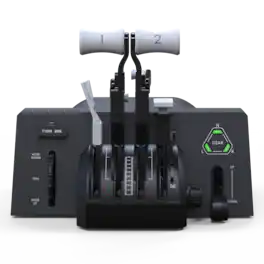
Same high quality, less complexity. The Bravo Throttle Quadrant Lite brings the flexibility of the original Bravo to a more streamlined, accessible form. With essential flight controls and a compact design, it’s the perfect entry point for building your home cockpit on PC.

Dominate the competition using these Honeycomb Alpha flight controls. The solid-steel shaft provides stable control, while 180-degree yoke rotation and self-centering mechanism eliminate dead zones, providing a true-to-life flight experience. Dual linear ball bearings deliver fluid handling. These Honeycomb Alpha flight controls feature a dual-mounting system for secure attachment on your tabletop.

Developed by world-class aeronautical engineers and pilots, the Turtle Beach VelocityOne Flight Universal Control System offers the most immersive, authentic flying experience on the market. A true-to-life 180 yoke handle with built-in rudder controls provide precise, long-lasting control of any aircraft. The modular throttle quadrant with integrated trim wheel and included custom lever handles offers at-home aviators enhanced customization for both light and heavy aircrafts. The Flight Management Display and an authentic status indicator panel offers real-time alerts and critical flight details. Setup is easy with a simple USB connection for Xbox Series X|S & Xbox One or Windows 10 PCs.
| Pros for Honeycomb Aeronautical - Bravo Throttle Quadrant for Flight Simulation - Black | |||
|---|---|---|---|
| Build Quality, Configuration | There were no pros for this product— | Build Quality, Feel, Setup Ease, Performance | Ease of use, Quality, Buttons, Customization, Realism |
| Cons for Honeycomb Aeronautical - Bravo Throttle Quadrant for Flight Simulation - Black | |||
| There were no cons for this product— | There were no cons for this product— | There were no cons for this product— | Yoke, Throttle, Setup |