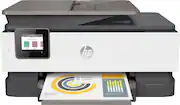
Rating 4.4 out of 5 stars with 6626 reviews
4.4- Print Quality (2139)
- Ease of use (1886)
- Size (189)
- Price (167)
- Reliability (156)
- Paper Tray (171)
Customer Images
The vast majority of our reviews come from verified purchases. Reviews from customers may include My Best Buy members, employees, and Tech Insider Network members (as tagged). Select reviewers may receive discounted products, promotional considerations or entries into drawings for honest, helpful reviews.
- Rated 5 out of 5 stars
HP OfficeJet Pro 8025
The OfficeJet Pro 8025 is an outstanding all-in-one printer that caters to the needs of productive professionals. As someone who values efficiency and reliability, I have been thoroughly impressed by the device's performance, feature set, and overall functionality. One of the standout features of the OfficeJet Pro 8025 is its impressive print quality. With its PrecisionCore technology and vibrant color reproduction, it consistently delivers sharp and professional-looking documents. Whether it's text, graphics, or photos, the printer ensures that every printout showcases exceptional detail and clarity. Another aspect that sets the OfficeJet Pro 8025 apart is its impressive print speed. With a swift printing rate of up to 20 pages per minute for black and white documents and 10 pages per minute for color, it efficiently handles high-volume print jobs without sacrificing quality. Additionally, the automatic two-sided printing feature saves both time and paper, making it an eco-friendly choice. Setting up and using the OfficeJet Pro 8025 is a breeze, thanks to its intuitive touchscreen display and user-friendly interface. Navigating through the various functions and settings is straightforward, allowing users to quickly access the desired features. The printer also offers seamless wireless connectivity, enabling effortless printing from various devices such as smartphones, tablets, and laptops. One of the major advantages of the OfficeJet Pro 8025 is its robust paper handling capabilities. With a 225-sheet input tray and a 60-sheet output tray, it accommodates a considerable amount of paper, minimizing the need for frequent refills. The automatic document feeder (ADF) simplifies scanning and copying tasks, effortlessly handling multi-page documents with ease. The OfficeJet Pro 8025 is equipped with smart features that further enhance productivity. With built-in Wi-Fi Direct and support for mobile printing services like HP ePrint and Apple AirPrint, you can conveniently print from anywhere within your network or on the go. The printer also supports HP Smart App, allowing you to easily manage and monitor printing tasks from your smartphone or tablet. An aspect that could be improved upon is the printer's noise level. While it's generally quiet during regular printing, it can become slightly noisy during high-speed printing. However, this minor drawback doesn't overshadow the printer's exceptional performance and functionality. Additionally, the OfficeJet Pro 8025 offers cost-saving benefits. Its compatibility with HP's Instant Ink subscription service ensures that you never run out of ink at crucial moments, while also providing potential savings on ink costs. The printer's energy efficiency, coupled with its automatic shut-off feature, contributes to reducing power consumption, making it an environmentally friendly choice. In conclusion, the OfficeJet Pro 8025 is a reliable and efficient all-in-one printer that excels in meeting the demands of productive professionals. With its impressive print quality, fast printing speed, user-friendly interface, and robust paper handling capabilities, it offers a seamless printing experience. Despite a minor issue with noise levels, the OfficeJet Pro 8025 proves to be a valuable addition to any home office or small business setting, ensuring consistent and professional printouts for all your document needs.
This review is from HP - OfficeJet Pro 8025e Wireless All-In-One Inkjet Printer with 6 months of Instant Ink Included with HP+ - White
Posted by SoggyC3r3al
- Rated 5 out of 5 stars
HP printer!
"The HP Pro Jet 8025 is a fantastic all-in-one printer for home or small office use. It's easy to set up, prints quickly, and produces high-quality results. With its wireless connectivity and mobile printing options, it's super convenient too. If you want a reliable printer that gets the job done without fuss, the HP Pro Jet 8025 is a great choice!"
This review is from HP - OfficeJet Pro 8025e Wireless All-In-One Inkjet Printer with 6 months of Instant Ink Included with HP+ - White
Posted by LingF
- Rated 4 out of 5 stars
Difficult setup but excellent & versatile printer
Overall good experience with this printer. Build quality is much better than the Canon it replaced and it's well designed...it's got a practical, no-nonsense look and feel, and is surprisingly compact. Setup was a bit of a chore due to confusing software (HP Smart), but once you finally get through all of the various steps it works like a charm and getting ink shipped automatically is a nice feature. I've made use of the sheet fed scanner, flatbed scanning, regular document printing on plain paper, as well as borderless printing on 4x6 photo paper. Everything looked excellent with only some barely detectable banding on the photo paper in areas with solid color (it was non-HP paper). Photos printed on plain paper also looked decent, and text was clear and sharp. No issues with connectivity to a PC, Mac, or iPhone. Remote printing also worked well...was able to print several work documents while sitting at the beach and they were ready when I arrived home several days later. Very useful feature! I would recommend this printer to anyone with a small home office who needs a reliable printer with excellent print quality for modest monthly print needs.
This review is from HP - OfficeJet Pro 8025e Wireless All-In-One Inkjet Printer with 6 months of Instant Ink Included with HP+ - White
Posted by GregoryC
- Rated 5 out of 5 stars
Easy setup, great quality, smaller size
Excellent product... I have been trusting HP for my printing needs for many years. I love my new printer... it is smaller than the last one, was easy to set up, and has the same great print quality of my other HP printers.
This review is from HP - OfficeJet Pro 8025e Wireless All-In-One Inkjet Printer with 6 months of Instant Ink Included with HP+ - White
Posted by TerryO
- Rated 5 out of 5 stars
GREAT Printer
I have always used HP Printers. When my last one died after 13 years, there was no doubt that I would continue with HP. The 8025e was my choice. Once it arrived, the setup was quick & easy. Print quality is excellent. I could not be happier. In addition…I find the reviews that setup was awful amazing. It is a breeze! I just followed the prompts. Loading the HP Smart App on my iPhone 13 Pro Max took less than a minute & it works fine. Also, it connected to my home computer in seconds & prints out flawlessly. Lastly, I printed out a couple of photos on photo paper & they came out great. Fantastic printer, especially for the low price
This review is from HP - OfficeJet Pro 8025e Wireless All-In-One Inkjet Printer with 6 months of Instant Ink Included with HP+ - White
Posted by KingZoe