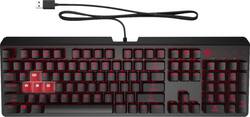
HP OMEN - Encoder Full-size Wired Gaming Mechanical Keyboard - Black
- Key Specs
- Lighting Type: Single color
- Form Factor: Full-size (The size, arrangement, and physical configuration of the product.)
- Keyboard Technology: Mechanical (Type of technology that detects a key press.)
- Key Switch Behavior: Linear (Refers to the mechanisms under the keycaps on a keyboard that enable you to type faster and more precisely. Linear switches move straight up and down without any sound or bump. Tactile switches provide a noticeable bump in the key press, and no sound. Clicky switches provide a bump in the key press and "clicky" sound.)
- Connection Type: Wired
- General
- Brand: HP OMEN
- Model Number: 6YW76AA
- Product Name: Encoder Full-size Wired Gaming Mechanical Keyboard
- Color: Black
- Features
- Lighting Type: Single color
- Customizable Lighting: true
- Numeric Keypad: true
- Touchpad: false
- Keyboard Type: Gaming
- Palm Rest: false
- Spill Resistant: false (Designed to resist some degree of accidental liquid spill. The level of spill-resistance is indicated by the product manufacturer, but the degree of protection may not be guaranteed after normal wear of the product.)
- Keyboard Features: CHERRY MX Mechanical Switches
- Foldable: false
- Functions
- Form Factor: Full-size (The size, arrangement, and physical configuration of the product.)
- Number Of Keys: 114
- Keyboard Technology: Mechanical (Type of technology that detects a key press.)
- Dedicated Macro Keys: true (Perform shortcuts of key sequences to carry out commands with a single key. Key sequences may include key strokes, mouse actions, and/or menu actions.)
- Adjustable Tilt Function: true
- Key Switch Type: Cherry MX Red
- Key Switch Behavior: Linear (Refers to the mechanisms under the keycaps on a keyboard that enable you to type faster and more precisely. Linear switches move straight up and down without any sound or bump. Tactile switches provide a noticeable bump in the key press, and no sound. Clicky switches provide a bump in the key press and "clicky" sound.)
- Rollover: Full-key (Refers to the number of keys that can be correctly registered when pressed simultaneously. Rollover may be referred to as n-key rollover (KRO) or anti-ghosting.)
- Multimedia Keys: true
- Internet Keys: false
- Connectivity
- Connection Type: Wired
- Wired Connectivity: USB Type A
- Cable Length: 5.905 feet
- Detachable Cable: false
- Compatibility
- Operating System Compatibility: Windows
- Plug and Play Operation: true
- System Requirements: Available USB port (The software that a product must have for it to be able to integrate with another product.)
- Dimensions
- Product Height: 1.5 inches (The out of box height of the item. Height is measured as the vertical distance from the bottom of the item to the top as it would be primarily used or placed.)
- Product Width: 17.52 inches (The out of box width of the item. Width is measured as the horizontal distance from one side of the item to the other as it would be primarily used or placed.)
- Product Weight: 1.98 ounces (The out of box weight of the item.)
- Mouse
- Mouse Included: false
- Other
- UPC: 193905096213
Command a flawless symphony of keystrokes, with a mechanical keyboard crafted for high-caliber competition. Anti-ghosting with N-key rollover and ultra-responsive, CHERRY MX Red mechanical switches deliver the agility you need to maneuver ahead of the competition.
- CHERRY MX Mechanical Switches: CHERRY MX Red with its incredibly fast reactivity and smooth operation, its linear feel, combined with minimal spring force, is ideal for people who play fastaction games.
- USB Wired Keyboard: Forget cable management—braided sheathing enhances the USB cord’s durability and minimizes kinking.
- Every move matters: No matter how many keys are activated at once, every key press is detected.
- Illuminate your accuracy: Prevent miss-keying and watch every key glow a deep red with its own dedicated LED.
- Compete in comfort: 2-way adjustable legs meet your desired wrist angle to help prevent cramps and discomfort.
- OMEN Command Center Integration: Easily control lighting effects, brightness, single key on/off, media keys, macros with on-the-fly settings and OMEN Command Center.
Whats Included
- OMEN by HP Encoder Keyboard
- Product notice
- Quick Start Guide
- OMEN sticker
- Warranty card
Product Manuals
A: "If you are using a computer running the Windows 10 operating system and the software does not download automatically, select Start and then select Microsoft Store. Search for OMEN Command Center, and then download the app.For more information about configuring the keyboard, go to http://www.hp.com /support and follow the instructions to find your product. Then select User Guides" If you need further assistance, visit https://support.hp.com
Q: Is the keyboard hot-swappable and if so is it 3 or 5 pin? Thank you.
A: No hot swapping switches here, as they are soldered to the board.
Q: Hi im thinking of changing the switches on my keyboard is the keyboard hotswap?
A: No, HP soldered the switches to the board. So, that means no swapping for different switches. Thanks
Q: What color switches are these
A: Cherry red MX
A: undefined
A: The placement of the "=" and "+" symbols on the HP Encoder keyboard may differ from the standard keyboard layout, but for my the = is on top while + on below... Technically = comes first for me. So i can't relate to your non-issue.
A: Common BIOS keys: Del or Delete key F2 key F1 key F10 key Esc key F12 key
A: The keys just stay red. There is no cycling colors. Also it only the letters and numbers have rgb. The undersides of the keys arent illuminated
People also viewed
 $89.99The price was $149.99
 $179.99The price was $219.99
 $99.99The price was $119.99
 $36.99The price was $54.99


Today's top picks
 $199.99The price was $249.99
 $789.99The price was $1,049.99
 $799.99The price was $1,199.99