HP - Shipping Label Printer, 4x6 Commercial Grade Direct Thermal - 203 DPI
Color
203 DPIMore Buying Options
Related Item

About This Item
- General
- Brand: HP
- Model Number: HPKE100
- Product Name: Shipping Label Printer, 4x6 Commercial Grade Direct Thermal
- Color: 203 DPI
- Warranty
- Warranty - Parts: 1 Year; Limited
- Warranty - Labor: 1 Year; Limited
- Other
- Product Width: 7.9 inches (The out of box width of the item. Width is measured as the horizontal distance from one side of the item to the other as it would be primarily used or placed.)
- Product Height: 4.6 inches (The out of box height of the item. Height is measured as the vertical distance from the bottom of the item to the top as it would be primarily used or placed.)
- Product Weight: 41.6 ounces (The out of box weight of the item.)
- Product Length: 4.7 inches (The out of box length of the item. Length is measured as the longest dimension of the item.)
- Compatible Label Size(s): Up to 4"
- Handheld or Desktop: Desktop
- Labeling Tape Included: false
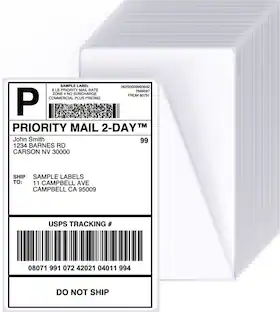
- Additional Label Types Printed: Shipping labels, barcodes, product labels
- Automatic Cutting Feature: false
- Save Text Feature: false
- UPC: 843812171915
Complete your workspace by adding the HP Label Printer for Shipping Packages. This innovative thermal printer is the perfect addition to group with your office supplies. Connect this 203 dpi thermal shipping label printer to your Mac or PC and print out easy-to-read labels without needing to load your compact printer with ink, thanks to direct thermal technology. Create barcodes, gift tags, shipping labels, address stickers, and more at home in no time with a printing speed of 6 ips. Whether it is for yourself or a small business, you can create a variety of labels for shipping packages with ease. Purchase reliable HP printer shipping labels or use other major brand thermal labels with a compatible printer and you’re ready to begin. Take full advantage of a desktop label printer that works as hard as you do from HP.
- 203 Dpi Resolution: You can print out clear, detailed labels without worrying about ink or toners
- Personal or Business Use: Increase productivity in your home, office, or small business with this label maker
- Types of Labels: Create various sized labels up to 4” in width with the printer’s adjustable media holder guides
- Prints Fast and Easy: Load labels through the back of the printer and get shipping labels, barcodes, and more
- Direct Thermal: The printing technology allows you to produce labels without needing any ink cartridges
Whats Included
- Label printer
- Quick start guide
- Power cord
- AC adapter
- USB cable
Product Manuals
Q: Does this HP printer require ink cartridges for printing labels?
A: No, this printer uses direct thermal technology, eliminating the need for ink cartridges.
Q: Can I use this printer for both personal and business purposes?
A: Yes, this label maker is suitable for increasing productivity at home, in the office, or for a small business.
Q: What is the maximum width of labels this printer can handle?
A: This HP label printer can create labels up to 4 inches wide.
Q: How do you load labels into this printer?
A: Labels are loaded through the back of the printer.
Q: How fast can this label printer print?
A: This HP printer has a printing speed of 6 inches per second (ips).
A: Hello and thank you for asking. The HP KE100 Thermal Label Printer only connects via USB. It does not have wireless capability. Your MacBook Pro should have USB-C/Thunderbolt ports. If so, you will need a USB-C to USB-B printer cable (available at Best Buy) to connect it.
Q: Does this printer work with Chromebook?
A: Thank you for your question. The HPKE100 printer is a compact thermal label printer that connects via USB and is compatible with Windows and macOS. Unfortunately, it is not compatible with the Chrome OS.
Q: What software would I use for printing barcodes
A: undefined
Reviews
Customer Images
The vast majority of our reviews come from verified purchases. Reviews from customers may include My Best Buy members, employees, and Tech Insider Network members (as tagged). Select reviewers may receive discounted products, promotional considerations or entries into drawings for honest, helpful reviews.
Compare similar products
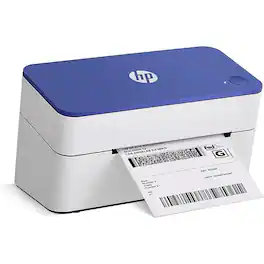
Complete your workspace by adding the HP Label Printer for Shipping Packages. This innovative thermal printer is the perfect addition to group with your office supplies. Connect this 203 dpi thermal shipping label printer to your Mac or PC and print out easy-to-read labels without needing to load your compact printer with ink, thanks to direct thermal technology. Create barcodes, gift tags, shipping labels, address stickers, and more at home in no time with a printing speed of 6 ips. Whether it is for yourself or a small business, you can create a variety of labels for shipping packages with ease. Purchase reliable HP printer shipping labels or use other major brand thermal labels with a compatible printer and you’re ready to begin. Take full advantage of a desktop label printer that works as hard as you do from HP.

Complete your workspace by adding the HP Label Printer for Shipping Packages. This innovative thermal printer is the perfect addition to group with your office supplies. Connect this 203 dpi thermal shipping label printer to your Mac or PC and print out easy-to-read labels without needing to load your compact printer with ink, thanks to direct thermal technology. Create barcodes, gift tags, shipping labels, address stickers, and more at home in no time with a printing speed of 7 ips. Whether it is for yourself or a small business, you can create a variety of labels for shipping packages with ease. Purchase reliable HP printer shipping labels or use other major brand thermal labels with a compatible printer and you’re ready to begin. Take full advantage of a desktop label printer that works as hard as you do from HP.

Wireless 4x6 Shipping Label Printer for Small Business, Compatible with Android, iPhone, Windows, Mac, Chromebook, Print Width 1.57"-4.25"
Specs
Discover lifestyle innovations Sponsored
 $94.99The price was $99.99