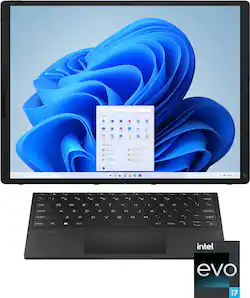
HP has released a brand new FOLDABLE laptop, the Spectre 3-in-1 with Intel EVO platform and Intel i7 processor. You can use as a 13" or 17" monitor configuration. The very sturdy box includes the main foldable unit/PC, mini magnetic keyboard/touchpad, USB-C hub, HP Stylus, extra stylus tips, USBC-to-keyboard proprietary wired/magnetic cable connector, power brick & cord set, and quick user guide/paperwork. The computer comes with a manufacturer's 1-year warranty.
DISCLAIMER 1: This review will mainly focus on the PC's functionality and features more-so than Win11 itself since Win11 is mostly the same on any computer.
DISCLAIMER 2: HP claims 5 different modes, but I will primarily be addressing the functionality of "laptop" mode (13") and "desktop" mode (17").
1. Tablet (fully open, no keyboard)
2. Laptop (keyboard fully connected to bottom half of tablet creating a 13" laptop screen)
3. Desktop (keyboard fully detached, screen on its side, creating a 17" screen propped on a support leg on the back of the screen)
4. Extended Screen (keyboard detached, screen in "laptop" position creating a bent full vertical screen with 1/2 flat and 1/2 the normal 13" screen at an angle.
5. Expanded Screen (keyboard slid down 1/2-way down the bottom half of the screen, mouse pad hanging off the end at a slight angle, creating a "bonus" flat area in front of the keyboard but below the main 13" screen area)
PROS:
-----------
* As far as the "coolness" factor, this product hits the mark. It will give you some good looks your way.
* PC performance is top notch with the Intel i7 processor provided. It's incredibly fast, video is super smooth, and after playing a few games online, they keep up as well.
* The BT keyboard charges when it's connected in 13" mode magnetically. If the keyboard is moved down 1/2-way down the screen so the optional bonus area of the screen is visible OR if the keyboard is completely removed to go to 17" mode, the keyboard will have to be connected via cable provided (USB-C cable connects magnetically to the keyboard and the lower-left tablet USB-C port -- See picture). When charging, the light will illuminate orange.
* The stylus charges magnetically to the front/bottom of the folded tablet. When charging, the light will illuminate orange.
* The 2.5K LED picture is great. If you have used any foldable phone devices, this one is no different with the picture. You don't really see the fold in the screen unless you look at it from an angle.
* The webcam has a physical ON/OFF switch. When OFF, there are some white/black slanted lines that show where the camera is located to indicate it's blocked.
* When not in use, the keyboard should be placed in the center of the screens (13" mode) and closed. It fits perfectly in the middle (see picture).
* Though compact, the keyboard does have a solid feel to it. The mouse pad works well too.
* The PC can be used as a giant tablet with stylus. If you are having to draw or create graphics using the stylus, this might be a great option. There is a ton of real estate to work with.
* The 1TB SSD and 16GB of LPDDR5 will be ample for most people. The Wi-Fi 6E available will allow for Gig speeds which is a big plus if networking and moving a ton of data. The processor is top notch, being an Intel 12th gen Core i7 EVO.
* The quad speaker B&O systems actually is very good for laptop standards. Ideally, you'll want to use headphones or a BT speaker system, but if you only have your laptop available, it's not bad.
CONS:
-----------
* Even though it feels mostly solid-built, I still feel like I'm going to break it due to the thinness of it combined with the size/weight. It's hard to explain. It's solid, but due to the build structure, I feel like I have to be extra careful with it when the full screen is used, either as a tablet or with the stand. When in 13" (folded) mode, it feels much more solid. I think there should be more "stop" support on the sides of the hinge when fully opened as a "tablet" so it doesn't cause stress on the screen when at 180-degrees. This would limit damage to the screen when someone opens with more force that normal that might try and make the screen go further than 180-degrees.
* A 13" screen isn't much to work with. I guess it might come in handy on an airplane or compact usage areas. The 17" full tablet on its stand is the preferred way to use since there is more real estate provided. I would almost prefer a 15.6" monitor doubled into a ~20" monitor unfolded since 15.6" is the "normal" medium-size laptop already.
* The $5k price point, to me is pretty steep considering you're still getting 1 laptop/tablet. I believe a lot of the price is built-in to a "wow" factor of the foldable screen. To me, the wow-ness doesn't calculate to that steep of a price - not even close. The best gaming PCs don't even reach close to this price unless on the "extreme" built-out kind.
* This laptop only comes with 2 USB-C ports: When folded, one of the bottom-right of the 13" screen, and one on the upper-left 13" screen. Ports are NOT on the LEFT side of the folded screen since that is the bottom of the tablet when fully opened in 17" mode. It is designated by the 4 rubber feet to hold it in place (see picture). The problem is IF your keyboard battery is low AND you want to use in 17" mode, if you plug in the USB-C hub, and also have to use the keyboard charging cable, then the ONLY place to charge the laptop would then be on the TOP-CENTER where the spare USB-C port is then located. This means pressure is then put on the whole PC/stand due to the upright nylon power cable. If the cable was angled off the top at a 90-degree angle, that would be a semi-better solution. An even better solution would be to have another USB-C port on the LEFT side of the 17" tablet setup near the other USB-C port. Then power can be provided at the same time the hub and keyboard cable are being used. I was able to purchase a 90-degree Female-to-Male USB-C adapter to help with the cable management issue when power is plugged onto the top of the tablet when in 17" mode. This is a pretty big flaw, in my opinion, and HP should have accounted for that. Another super-easy fix for this would have been to simply add another USB-C port on the hub HP provided. Then power AND the keyboard adapter cable could both be used there on the lower-left bottom USB-C port.
* The rear stand (in 17" mode) can be slightly difficult to pull out depending on how big your fingers are. Smaller fingers will have an easier time pulling out the rear stand. It is also not centered since it can't be on the actual hinge point. It clicks into place, but does appear it can be pushed in slightly to make the screen not be so far tilted back. Keep in mind that the more that leg is pushed inward (causing the screen to stand up straighter), the more unstable it will become. It's also possible to simply lean the 17" screen up against something behind it that's as tall as it is. This would allow more of a near-90-degree viewing surface. There has to be a better and more sturdy way to allow the full tablet to be more upright instead of leaning back so far when the rear leg is snapped-in. A better mechanism/prop would be something similar to another manufacturer that has a full-length flat pullout bracket that reaches from both sides of the screen. Having this one semi-wobbly leg that's not even centered, can make for an awkward viewing experience both in stability and viewable angle (which includes a glared screen).
* I personally don't see a real use for "expanded screen" mode or "extended screen" mode (see disclaimer above for definitions). It just seems weird to me to have part of the screen bent OR some of it not even in use. I have tried to find ways to utilize this feature but haven't found a real functional way that benefits me to this point.
OTHER OBSERVATIONS:
-----------
* The accessories are great, but you'll need to keep them in your computer bag or a drawer somewhere.
* The power button is located on the top of the screen, on the right end while the volume buttons are on the same upper-right corner, but on the side of the screen.
* When in 17" mode, the webcam is on the LEFT side of the screen. It appears to compensate for the tilting of the screen. It uses vertical camera mode in this case (like a cell phone). When the camera is in 13" mode, it creates a horizontal video feed.
* The keyboard is NOT backlit. The camera is 5MP and has a built-in mic.
* HP claims up to 13.5 hours of battery; however, that will depend on your personal usage of the PC.
CONCLUSION:
================
Overall, I really like the concept that HP created. I do wish there were at least 1-2 more USB-C ports on the side panel and possible have the extra USB-A/HDMI ports built-in to the side of the screen as well so a hub isn't even needed. Having the short keyboard charging cable seems necessary at times if the full screen 17" mode is used. With the price of this unit, I would almost expect for a small carrying case (whether hard or soft) be provided so that the power and accessories can be contained in one small-profile storage area. That would really make this product a bit more complete. I would also say to fix the semi-flimsy stand issue and offer up a better way to prop up closer to 90-degrees if that's even possible. Though I really like the concept of this PC, I'm not so sure the price is completely justified. I feel like I need to either pay less OR get more as a user (like the mentioned case). The whole thing is a bit gimmicky but it will "wow" your friends at the same time. I'm in the middle on rating this product, but I still like it more than I don't like it. There are still some tweaks that need to be made to take it to the next level. Hopefully HP can do that. I would recommend, but only if some of the fixes I mentioned were implemented.