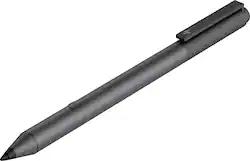
HP - Tilt Stylus Pen
- Key Specs
- Model Compatibility: HP Spectre x360
- Screen Compatibility: Built for Windows Ink (Active)
- Operating System Compatibility: Windows
- General
- Brand: HP
- Model Number: 2MY21AA#ABL
- Product Name: Tilt Stylus Pen
- Compatibility
- Brand Compatibility: HP
- Model Compatibility: HP Spectre x360
- Screen Compatibility: Built for Windows Ink (Active)
- Operating System Compatibility: Windows
- Features
- Comfort Grip: false
- Replaceable Stylus Tip: false
- Integrated Writing Pen: false
- Pocket Clip: true
- Dimensions
- Product Weight: 0.5 ounces (The out of box weight of the item.)
- Other
- UPC: 192018488649
Write and draw in a natural way with this HP Tilt pen. It works with Windows 10 programs on touch-screen devices to let you create freely.
- Compatible with HP Spectre x360: For wide-ranging use.
- Compatible with Windows Ink: Naturally drive content, ideas, and drawings forward with digital pen-based computing and Windows Ink.
- N-trig technology: The improved technology allows you to write, draw, and navigate with precision.
- Precision tip: The precision tip and pressure sensitivity give you complete control.
- Bluetooth button: Set your customizable Bluetooth button as a tail end eraser, and launch functions with a quick click.
- Easy storing: Clip it to a book, bag, or pocket and carry anywhere.
- Rechargeable battery: Offers up to 10 hours of battery life.
Whats Included
- HP Tilt Stylus Pen
- Quick start guide
- Product notice and Warranty card
Product Manuals
Q: Are the tips of this pen replaceable? How many levels of pressure can the pen recognize? Thank you.
A: The specs specifically say "No" as to whether the tip is replaceable and I have had AWFUL luck dealing with Best Buy and HP online. HP seemed surprised that I'd want to be able to buy the actual stylus that was supposed to come with my new Spectre and said "If you'd have ordered with us, it's included"...LOTS of help that is. I asked how to buy it on its own and they gave me ones that were not this model. I said "I want the EXACT one it was supposed to come with" and they said even they didn't have it. I'm raging. You put out a product, you put out everything it needs at once and do not allow stores to sell versions missing key pieces or at least sell them separately. It's taken months for them to post this one and it's still not the one included with the late-2017 model.
Q: Is this pen compatible with an HP ENVY x360 laptop model 15m-ee0013dx? If not, which pen is?
A: Yes, this HP Tilt Stylus pen is compatible with the HP Envy x360 15m-ee0013dx laptop.
A: Yes, the HP Tilt Stylus pen will work just find with that laptop.
Q: will this work with the hp model15-dy0013dx ?
A: Because the computer has Windows Ink installed, this stylus should work with no problems.
Q: After use, how do you turn the pen Off? Thanks.
A: According to the setup guide, there is no Off button. http://h10032.www1.hp.com/ctg/Manual/c06242118
A: This pen is designed to be used with HP computers, so unfortunately we can't guarantee compatibility with other brands.
A: You can find a compatibility chart here: https://support.hp.com/hk-en/document/c05166879 The chart says it is compatible.
People also viewed
 $57.99The price was $82.99








Today's top picks
 $499.99The price was $749.99
 $199.99The price was $249.99
 $789.99The price was $1,049.99










