Icy Dock - M.2 PCIe NVMe SSD Mobile Rack for External 3.5" Drive Bay
Reviews coming soon
About this product
The M.2 PCIe NVMe SSD Mobile Rack for External 3.5" Drive Bay is a ruggedized, tool-less enclosure designed for easy installation and maintenance of M.2 NVMe SSDs. It supports all standard M.2 drive lengths and offers high-speed data transfer up to 32Gb/s via MiniSAS HD (SFF-8643) interface. The enclosure features a high-efficiency aluminum heat sink and ample ventilation to ensure optimal SSD temperatures, along with a 2-segment key lock system for enhanced security.
Tool-less M.2 Drive Installation
Allows easy installation and removal of M.2 NVMe SSDs without tools, enhancing maintenance and upgrades.
Full M.2 Drive Length Support
Accommodates M.2 SSDs of all lengths: 2230, 2242, 2260, 2280, and 22110.
High-Speed Data Transfer
Supports PCIe x4 transfer speeds up to 32Gb/s via MiniSAS HD (SFF-8643) interface.
Efficient Cooling Design
Features a high-efficiency aluminum heat sink and ample ventilation to maintain optimal SSD temperatures.
Enhanced Security Features
Equipped with a 2-segment key lock system to prevent unauthorized physical access.
- Drive Form FactorM.2
Reviews
This product doesn't have any reviews yet.
Compare similar products
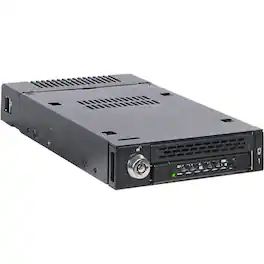
The M.2 PCIe NVMe SSD Mobile Rack for External 3.5" Drive Bay is a ruggedized, tool-less enclosure designed for easy installation and maintenance of M.2 NVMe SSDs. It supports all standard M.2 drive lengths and offers high-speed data transfer up to 32Gb/s via MiniSAS HD (SFF-8643) interface. The enclosure features a high-efficiency aluminum heat sink and ample ventilation to ensure optimal SSD temperatures, along with a 2-segment key lock system for enhanced security.

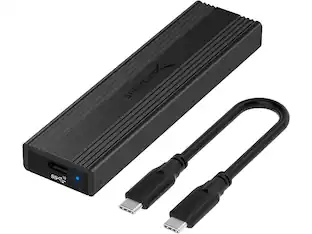
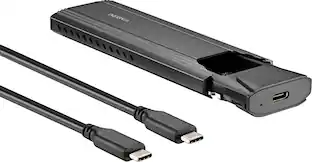
There’s nothing worse than low computer storage when you’re in the middle of working on a big project. Add portable data storage to your laptop or computer with the Insignia NS-PCNVMEHDE M.2 NVMe to USB-C SSD Enclosure. It turns your M.2 NVMe into a USB-C connection with transfer speeds up to 10 Gbps, giving you a high-speed access to your data. The enclosure includes a USB-C cable and a USB-to-USB-C adapter for wide-ranging use. It also has a plug-and-play design, making it easy to use with most computers and laptops. Featuring UASP support, it further reduces processor requirements while improving your data speeds. Improve your computer storage with a high-quality solution that will let you get things done.
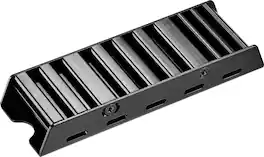
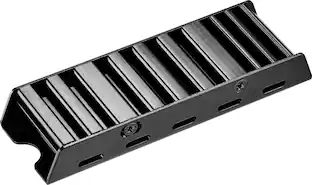
Work and play hard with a heatsink that won’t let your devices overheat. With the Insignia NS-PM2HS Heatsink Enclosure for M.2 NVMe SSDs and PS5, improve the performance of your PlayStation 5 or desktop computer. Its M.2 B&M key or M key supports both 2280 and 22110, giving it wide compatibility with eligible devices. It has a double-sided construction and is made of vented aluminum and silicone thermal pads, preventing overheating and throttling by improving heat dissipation while in use. Black in color, it matches your other electronics for a clean, camouflaged look. Work and play for as long as you need with a heatsink that will take care of the rest.

Whether you’re looking for additional storage space or want to access files on older drives, the Insignia NS-PACS2B25 1.97' USB-C to SATA Adapter is your simple plug-and-play solution. Connect your 2.5" SATA drive with a USB-C connection to view and transfer files on your computer. The plug and play design makes setup simple, and its UASP support reduces your machine’s processor requirements. Tackle any old storage projects today with the help of this Insignia adapter.
| Pros for Icy Dock - M.2 PCIe NVMe SSD Mobile Rack for External 3.5" Drive Bay | |||
|---|---|---|---|
| There were no pros for this product— | Ease of use, Overall Performance, Price, Speed, USB-C | Ease of use, Cooling, Performance, Fit, Installation | Overall Performance, Ease of use, Price, Connectivity, Compatibility |
| Cons for Icy Dock - M.2 PCIe NVMe SSD Mobile Rack for External 3.5" Drive Bay | |||
| There were no cons for this product— | Heat, Compatibility, Locking Mechanism | Instructions | There were no cons for this product— |
Specs
Be the first to ask a question.
We’ll try to get your question answered within 24 hours by a Best Buy customer or brand representative.
Customers often buy these together
More to consider
 $168.49The price was $172.49
 $299.99The price was $352.74

Explore tech essentials Sponsored
 $379.99The price was $579.99
 $339.99The price was $423.99
 $239.99The price was $289.99