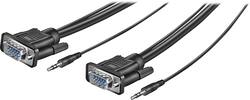
Insignia™ - 12' VGA Cable - Black
- Key Specs
- Cable Length: 1 feet
- Connector Type (End 1): VGA
- Gender (End 1): Male
- Connector Type (End 2): VGA
- Gender (End 2): Male
- In-Wall Rated: false
- General
- Brand: Insignia™
- Model Number: NS-PV12531
- Product Name: 12' VGA Cable
- Color: Black
- Quantity: 1
- Connectivity
- Cable Type: VGA
- Cable Length: 1 feet
- Product Type: Cable
- Connector Type (End 1): VGA
- Gender (End 1): Male
- Connector Type (End 2): VGA
- Gender (End 2): Male
- Environmental
- In-Wall Rated: false
- Warranty
- Warranty - Parts: 1 year
- Warranty - Labor: 1 year
- Other
- UPC: 600603168000
Easily connect your PC to a VGA monitor or TV with this 12' Insignia™ NS-PV12531 cable that supports most VGA video resolutions and 3.5mm stereo audio for optimal performance.
- Connects your PC to a VGA monitor or TV: So you can enjoy content stored on your computer through an external display.
- Supports most VGA video resolutions and 3.5mm stereo audio: To ensure sharp visuals and crisp, clear sound.
- 12' length: Allows flexible placement.
Whats Included
- Insignia 12' VGA Cable
Product Manuals
Q: the picture shows an audio cable also. is it included?
A: The audio cable is incorporated into the VGA cable. Nice touch.
A: Yes, both ends are male! I used it to connect my new monitor to my laptop port and it did the trick.
Q: how do i connect my tv to my computer
A: Make sure t.v and computer turned off. connect both end of plugs to each component. Turn on both screens. Check youtube on how to set tv screen and computer screen together. Easy peezy.... Once you do it the first time, it will always set when disconnected and reconnected
A: This works to connect on monitor to one laptop. If you have a second monitor you will need a second cord or HDMI cord for the second monitor depending on what display ports your computer has
A: If your monitor has sound, plug into the sound input port on the monitor and the output port on the CPU. Otherwise, they audio cables are obsolete. I have this cable and I don't use them. I just taped them to the VGA cable to keep them out of the way.
Q: How do I connect the speakers through a J5 docking station?
A: Supports most VGA video resolutions and 3.5mm stereo audio to ensure sharp visuals and crisp, clear sound.
A: The cable is 12 feet long. Go for it!
A: Feet.
People also viewed








Today's top picks
 $479.99The price was $729.99
 $69.99The price was $129.99
 $199.99The price was $249.99
 $49.99The price was $62.99