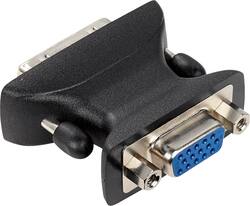
Insignia™ - DVI-A-to-VGA Adapter - Black
- Key Specs
- Connector Type (End 1): DVI-A
- Gender (End 1): Male
- Connector Type (End 2): VGA
- Gender (End 2): Male
- General
- Brand: Insignia™
- Model Number: NS-PV90501
- Product Name: DVI-A-to-VGA Adapter
- Color: Black
- Compatibility: Universal
- Connectivity
- Cable Type: DVI, VGA
- Product Type: Adapter
- Connector Type (End 1): DVI-A
- Gender (End 1): Male
- Connector Type (End 2): VGA
- Gender (End 2): Male
- Warranty
- Warranty - Parts: 1 year
- Warranty - Labor: 1 year
- Other
- UPC: 600603166808
Easily convert DVI-I video card signals to VGA analog using this Insignia™ NS-PV90501 adapter that features a high-speed data cable and copper contacts to help promote optimal performance.
- Converts DVI-I video card signals to VGA analog: To accommodate your needs.
- High-speed data cable: Promotes optimal performance.
- Copper contacts: Enhance conductivity.
- Thumbscrews and barrel nuts: Help ensure a secure fit.
Whats Included
- Insignia™ DVI-A-to-VGA Adapter
Product Manuals
Q: what gender is the dvi side?
A: DVI-I is Male, VGA is Female.
Q: do you have a cable that will connect a samsung syncmaster 914v monitor to a dell pdcg3220t
A: If I am thinking of the same model that should only just need a vga cable *the one with the blue ends with screws attached* I just set up about 100 of them for a school and there were vga ports on them and connected them to other displays too.
A: Yes it will work both directions
A: Not likely, not sure that you would have a gain from this either. The adapter is Male DVI-I and Female VGA. A DVI cable consists of two male ends (pins stick out) so you would need a gender changer for the DVI. For your setup to go into a VGA KVM you would need a VGA male to male cable (standard cable) or a male to male gender changer. Skip the hassle, put the DVI to VGA at your VGA card DVI-I port, take the VGA from that to your KVM. Cheaper and quicker this way.
Q: Will this let my monitor and pc connect?, so I’ll be able to play games on my monitor?
A: If you have a dvi cable with your monitor and a VGA input to your pc then yes.
Q: I need a monitor as a second screen to connect to Dell laptop. What do I need to connect them?
A: You need either a Dvi-DVi or a Dvi-Vga adapter.
Q: I have an HP AtE32 90W docking Station, I need a DVi cord or adapter to connect two monitors
A: make sure you know the specific configuration of your DVI port or ports - DVI-A is only one configuration - wrong for my computer!
Q: Is this an adapter to extend a VGA cord?
A: No, it makes a VGA plugable into a DVI-A jack.
Today's top picks
 $199.99The price was $249.99
 $2,449.99The price was $3,199.99
 $449.99The price was $829.99
 $999.98The price was $1,639.98
 $789.99The price was $1,049.99









