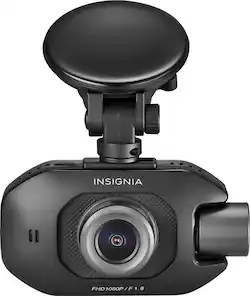
Insignia™ - Front and Rear-Facing Camera Dash Cam - Black
- Key Specs
- Field of View: 148 degrees
- Automatic Incident Detection: true
- G-Sensor: true
- Recording Resolution: 1080p (Refers to the number of pixels, both horizontally and vertically, used to capture video. The higher the resolution the finer the video detail that can be seen.)
- Compatibility: Universal
- Wi-Fi Built-in: false (Able to connect directly to a wireless network without the use of an adapter.)
- Camera Mounting Location: Dash
- Vehicle Camera Type: Dashboard
- General
- Brand: Insignia™
- Model Number: NS-DCDCHH2
- Product Name: Front and Rear-Facing Camera Dash Cam
- Color: Black
- Vehicle Camera Type: Dashboard
- Recording & Playback
- Field of View: 148 degrees
- Automatic Incident Detection: true
- G-Sensor: true
- Recording Resolution: 1080p (Refers to the number of pixels, both horizontally and vertically, used to capture video. The higher the resolution the finer the video detail that can be seen.)
- Frame Rate: 30 frames per second (The frequency at which consecutive images can be captured. The higher the frame rate, the more detail that can be captured.)
- Loop-Cycle Recording: Yes
- Camera Power Source: Vehicle battery
- Expandable Memory Compatibility: microSD, microSDHC, microSDXC
- Recording Feature: true
- Compatibility
- Compatibility: Universal
- Wi-Fi Built-in: false (Able to connect directly to a wireless network without the use of an adapter.)
- Features
- Integrated Microphone: true
- Display
- Screen Included: true
- Screen Resolution: 320 x 240 (Screens come in a range of resolutions (measured in pixels, horizontal x vertical). The higher the resolution, the greater the picture quality.)
- Mounting
- Camera Mounting Location: Dash
- Mount Included: true
- Mount Type: Suction cup
- Input
- Number Of Auxiliary Inputs: 0
- Number of USB Port(s): 1
- Dimensions
- Product Height: 1.23 inches (The out of box height of the item. Height is measured as the vertical distance from the bottom of the item to the top as it would be primarily used or placed.)
- Product Width: 1.97 inches (The out of box width of the item. Width is measured as the horizontal distance from one side of the item to the other as it would be primarily used or placed.)
- Product Depth: 3.42 inches (The out of box depth of the item. Depth is measured as the distance from the front of the item to the back as it would be primarily used or placed.)
- Product Weight: 0.66 pounds (The out of box weight of the item.)
- Warranty
- Warranty - Parts: 1 year
- Warranty - Labor: 1 year
- Other
- UPC: 600603250699
Secure complete footage of vehicular incidents with this Insignia Full HD dual dash camera. The 1080p rear-facing and front cameras capture detailed events at different perspectives, and the G-force sensor supports automatic recording upon impact. This Insignia Full HD dual dash camera has a built-in microphone to record audio details of important moments.
- 1080p Full HD recording: Allows you to capture sharp high-definition footage at 30 fps.
- 148° front and 110° rear cameras: Provides expansive shooting coverage with minimal edge-to-edge distortion.
- 2 Cameras: Front and rear-facing camera for 2-way recording
- Built-in G-sensor: Supports emergency video file backup when an accident happens.
- Loop recording: Overwrites the oldest footage and prevents you from running out of storage.
- Enhanced night vision: Records incidents any time of day.
- Built-in microphone and speaker: Capture and play clear audio and provide versatility in use.
- Supports microSD cards up to 128GB: Expand your camera's storage and recording capabilities with a microSD card (sold separately).
- Suction mount: Ensures simple mounting.
Whats Included
- Insignia Front and Rear-facing Camera Dash Cam
- Owner's manual
- Suction mount
- USB cable
- Vehicle power adapter
Product Manuals
Q: when the car is off for example on parkin lot,this camera is not recording???
A: This camera turns off when the car is turned off. If left plugged into the power source and the user set the GPS and Motion detection settings, the device will record if your car is hit, or if someone walks within view of the camera.
Q: does anybody know what the coffee cup or the other symbols are?
A: Hi. I truly appreciate you taking some time to share your inquiry. The coffee cup symbol is the Driver fatigue alarm. It displays the icon and beeps once to remind you to rest. You can select 1h, 2h, 4h, or Off. If you do not stop for a break, the alarm is repeated every 30 minutes. We have a full schematic with all the icons of the Camera that we can send you. Just please e-mail us at https://www.insigniaproducts.com/contact-us and we will be happy to provide you with the full information. Alexander G. - Insignia Support
A: No, the rear view is just a small window in screen of the dashcam, and if you swap it out it still won't work because it takes an image of everything towards the back beginning at the camera, so your face and the inside of the car plus looking through the rear and side windows is what is seen.
Q: What is the capacity of micro sd card that can be use in GB?
A: Quick Setup Guide in the box says 128GB. Online Quick Setup Guide says 256GB. Online User Guide says 256G. INSIGNIA support, which is correct?
Q: Does the camera record both front and rear simultaneously, or must you choose one or the other?
A: Both simultaneously. you'll get a 'back' file and a 'front' file on the memory card
A: The camera will record as long as there is a power source that is active. This is a wired camera and the device must be plugged into a USB/lighter socket using the adapter that comes with the device. When your car is on, the camera records. If your car is off and the accessories are not provided power when off, the camera will turn off. If you would like protection while parked, i.e. footage of incidents, then you should turn on the feature for GPS activation and Motion. GPS will turn the camera on and record if the camera detects an impact. The Motion setting will turn the camera on and record when motion is detected in the camera view. Always ensure that you have a good battery and alternator, and check your vehicle manual regarding accessory power use. Footage is nice, but don't kill your battery by accident.
Q: Does this dash cam require a subscription? Can it playback video on an android phone?
A: No, It does not require a subscription. It saves the video to a memory card that you will have to buy separate. So if your phone can pull video off a micro memory card you should be able to see it on your phone.
A: Has to be always plugged in to use. No internal battery for standalone recording.
People also viewed
 $59.99The price was $68.99
 $49.99The price was $79.99
 $119.99The price was $149.99
 $129.99The price was $149.99
 $52.99The price was $63.99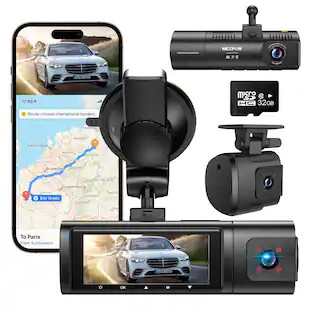
NEXPOW - 4K Dash Cam Front Rear WiFi GPS Dual Camera Night Vision WDR 24H Parking Mode 32GB Included
$99.99The price was $179.99
Today's top picks
 $199.99The price was $249.99
 $479.99The price was $729.99
 $789.99The price was $1,049.99
 $799.99The price was $1,199.99