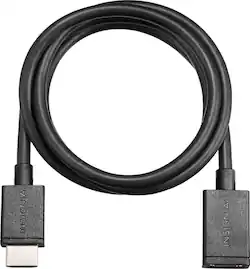
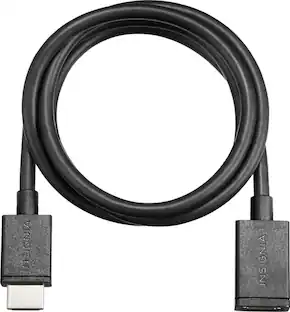
Insignia™ - HDMI Cable Extender - Black
- Key Specs
- Cable Length: 3 feet
- Connector Type (End 1): HDMI Type A
- Gender (End 1): Male
- Connector Type (End 2): HDMI Type A
- Gender (End 2): Female
- In-Wall Rated: false
- Connector Finish: Tin
- General
- Brand: Insignia™
- Model Number: NS-HZ316
- Product Name: HDMI Cable Extender
- Color: Black
- Quantity: 1
- Connectivity
- Cable Type: HDMI
- Cable Length: 3 feet
- Product Type: Cable
- Connector Type (End 1): HDMI Type A
- Gender (End 1): Male
- Connector Type (End 2): HDMI Type A
- Gender (End 2): Female
- Environmental
- In-Wall Rated: false
- Indoor Or Outdoor Use: Indoor (Indicates the appropriate environment product was designed to be used in.)
- Material
- Precision-Made Connectors: true
- Connector Finish: Tin
- Warranty
- Warranty - Parts: 1 year limited
- Warranty - Labor: 1 year limited
- Other
- UPC: 600603198465
Only @ Best Buy
Clear up cluttered HDMI ports with this Insignia™ NS-HZ316 HDMI cable extender, which features a male-to-female HDMI connection to extend the reach of cables and accessories by 3'.
- HDMI cable extender: Creates additional space for your crowded HDMI inputs or allows easier access to an HDMI port.
- Male-to-female connection with tin finish: Provides a reliable link to HDMI peripherals.
- 3' length: Allows versatile placement of HDMI cables and accessories.
Whats Included
- HDMI Cable Extender
Product Manuals
A: Hi Rosemary. I understand that you left us this question because this device plays an important role for you. My suggestion is using the HDMI extender cable so your Roku Stick is near the power outlet and you use a wall adapter to juice your Roku Stick, not the USB port of the TV as this could lead to the overheating. We are always here to help you and thanks for your interest in this product. Charles V. - Insignia Support https://www.insigniaproducts.com/contact-us
Q: Will this cable work with an Amazon Fire Stick?
A: As long as it's a hdmi that you plug into your tv. The Roku stick my girlfriend has is too big to be plugged in to the tv because of her dresser and the angle of the hdmi port on her tv, the port faces downward so the stick would be pressed against her dresser which would bend the hdmi connector. This cable helps by plugging the cable in to the tv and then plugging the Roku stick into the cable.
Q: Can I use this cable to connect my cell phone to watch on TV?
A: No . . . This is a simple HDMI "extension cord"
Q: Will this extender work with chromcast?
A: Yes it should. It works great with the Roku that I purchased with it.
Q: Can this fit in a ZTE PHONE
A: NO ! This is a cable extender only .
Q: Will do this work with MacBook Air? To connect from Macbook Air to TV?
A: This is a HDMI cable extender. It has a plug on one end and a socket on the other end. To connect a computer to a TV you will still need a regular HDMI cable that has a plug on each end.
Q: Does that cable extension work 8k for the ps5?
A: Try the cable model RF-HG08N19
A: Cable is 6ft long. Take a tape measure and measure the area desired to accommodate your cable needs. If it longer than 6ft..I recomend buying the longer optioned cable. I believe they are available in 8ft..10ft and 12ft.
People also viewed
Today's top picks
 $449.99The price was $829.99
 $2,449.99The price was $3,199.99
 $999.98The price was $1,639.98
 $199.99The price was $249.99
 $1,099.99The price was $1,499.99
 $549.99The price was $749.99








