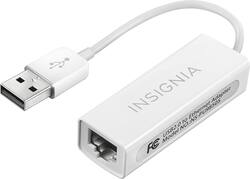
Insignia™ - USB 2.0-to-Ethernet Adapter - White
- Key Specs
- Networking Cable Type: Cat 5 (Type of cable standard utilized.)
- Connector Type (End 1): USB
- Gender (End 1): Male
- Connector Type (End 2): RJ45
- Gender (End 2): Female
- General
- Brand: Insignia™
- Model Number: NS-PU98505
- Product Name: USB 2.0-to-Ethernet Adapter
- Color: White
- Compatibility: Universal
- Connectivity
- Cable Type: Networking, USB
- Product Type: Adapter
- Networking Cable Type: Cat 5 (Type of cable standard utilized.)
- Connector Type (End 1): USB
- Gender (End 1): Male
- Connector Type (End 2): RJ45
- Gender (End 2): Female
- Other
- UPC: 600603166747
Easily connect peripherals to your home or office network with this Insignia™ NS-PU98505 USB 2.0-to-Ethernet Adapter that offers a reliable link between a USB 2.0 port and your 10 Mbps Ethernet network. A driver CD enables simple installation (not compatible with macOS 11 Big Sur).
- Adapter: Provides connectivity to wired networks via a USB 2.0 port.
- 10 Mbps Ethernet: Ensures fast data transfer.
- Driver CD: Enables easy installation.
Whats Included
- Driver CD
- Insignia™ USB 2.0-to-Ethernet Adapter
Q: how can download the driver for win7 64 bits?
A: Apparently this company doesn't realize computers don't have CD drives anymore. Maybe join 2018 and put the drivers online. Piece of dung product . don't waste your time or money.
Q: Will this work on the Nintendo Switch?
A: No, this won't work on Nintendo Switch.
A: The CD contains the drivers for the adapter, but on Windows 10, all the necessary drivers are built-in already. All you need to do is plug into a USB 2.0 or 3.0 port and connect the Ethernet cable, then Windows will automatically switch to a wired internet connection. You don’t need the CD for anything on Windows 10.
Q: Is this compatible with Windows 10?
A: yes
Q: Does this work for MacBook Airs?
A: I can't say for sure about the MacBook Air, but it works with an early 2016 MacBook Pro. I had to download a driver.
Q: Does this work with Chromebook?
A: Yes, if your model has a USB 2.0 port.
A: I have no idea. Fortunately I had a separate CD driver that I could plug into a USB port on my laptop. It was frustrating that Best Buy would sell a product that was also out of date as there was no mention of Windows 10 as an acceptable platform.
Q: WHAT IT THE DIFFERENCE BETWEEN THE ONE THAT IS " USB 2.0 & THE USB 3.0" ?
A: The difference is speed. The 3.0 will work in either a USB 2.0 or 3.0 slot however the performance and speed will be much better when 3.0 product is installed in a 3.0 slot
People also viewed









Today's top picks
 $479.99The price was $729.99
 $69.99The price was $129.99
 $199.99The price was $249.99
 $49.99The price was $62.99