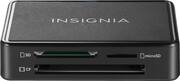
Insignia™ - USB 3.0 Memory Card Reader - Black
- General
- Product Name: USB 3.0 Memory Card Reader
- Brand: Insignia™
- Model Number: NS-DCR30D3K
- Color: Black
- Color Category: Black
- Warranty
- Manufacturer's Warranty - Parts: 1 year
- Manufacturer's Warranty - Labor: 1 year
- Other
- Product Width: 0.94 inches (The out of box width of the item. Width is measured as the horizontal distance from one side of the item to the other as it would be primarily used or placed.)
- Product Height: 0.47 inches (The out of box height of the item. Height is measured as the vertical distance from the bottom of the item to the top as it would be primarily used or placed.)
- Product Length: 2.48 inches (The out of box length of the item. Length is measured as the longest dimension of the item.)
- USB Cable Included: true
- LED Indicator(s): false
- Computer Connectivity: Windows, Mac, Linux
- Plug and Play Operation: true
- Host Interface(s): USB 3.0
- Media Support: microSD, microSDXC, microSDHC, Secure Digital, Secure Digital High Capacity (SDHC), Secure Digital Extended Capacity (SDXC), miniSD
- Number Of Memory Cards Supported: 2
- Number Of Slots: 2
- 2-Way Transfer: false
- Card-To-Card Transfers: false
- UPC: 600603210907
You’ve taken hundreds of photos on your trip but are running out of space on your memory card. With a memory card adapter, you can easily transfer files from a camera, tablet, or phone’s SD card or micro SD card to a computer. All you need is a USB port: Plug and play technology lets you connect and move files to your computer without additional software. Transfer files to free up card space, then view or edit them on your computer. A compact, thumb-drive design makes this card reader convenient for travel. Make sure that you have space for the next great photo with the Insignia USB 3.0 Memory Card Reader.
- USB 3.0 design: Plugs into any USB 3.0 port (or below) to quickly transfers files between memory cards and a computer with a standard USB port.
- Supports a variety of memory cards: The first slot supports your Micro SD, T-FLASH, Micro SDXC and Micro SDHC cards, and the second slot fits your SD, SDHC, SDXC and Mini-SD cards.
- Plug & play technology: Connect to your Windows, MacOS, or Linux system with no additional software needed. The memory card reader is compatible with: Windows® 10, Windows® 8.1, Windows® 8, Windows® 7, Windows Vista®, Mac OS 9.0 or higher, or Linux Kernal 2.4.1 or above.
- Compact design: With a convenient, thumb-drive style design, this card reader easily travels with you in a pocket or bag.
- Safe and secure: A tether ensures that the lid isn’t lost, while an attached loop lets you attach the card reader to a belt loop or keychain.
Whats Included
- Insignia USB 3.0 Memory Card Reader
- Quick Setup Guide
A: This is more of an adapter. You put your memory card into it. Then insert the whole thing into an USB on your computer.
A: Yes, just insert the adapter in the USB port on the Chromebook and the device shows up in Files.
A: Yes, just plug it into a USB port. It will only take one card at a time, you can’t put an SD and a MicroSD in the reader at the same time.
Q: Is this backward compatible with USB 2?
A: Yes, USB 3.0 specifications require backward compatibility with USB 2.
A: I don't know why it wouldn't. I transferred high definition audio files from my pc computer to my Ultra PLUS 128GB microSDXC UHS-I Memory Card. I haven't tried video,but can't see any reason why it wouldn't read any of the three cards it says it reads,if there is no damage to the cards.It transfers pretty quick, also.
Q: Does this reader work with CFast cards?
A: NO - CFAST CARDS DON'T WORK WITH THIS. CF seems to be used to abbreviate Compact Flash OR CFast. But these are different cards and CFast cards do not fit into this device. I bought one on the previous advice from whoever answered "Yes it works with CFast cards." Now I'm wasting two hours heading back into the city to Best Buy to return it. IN FACT: NO IT DOESN'T. CFast cards do not even fit into the machine. The answer that says "Yes" should be removed.
Q: Can you transfer data from one sd to another sd?
A: You could do that by plugging in the first card and copying the files TO your computer, and then plugging in the second card and copying the files FROM the computer
Q: Does this support a 128GB SD Card?
A: I have been using 128gb micro sd cards with no difficulty.


