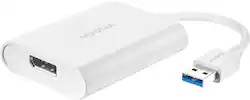
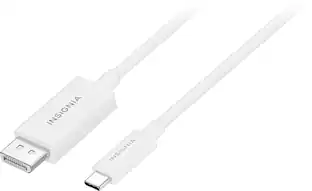
Insignia™ - USB 3.0 to DisplayPort Adapter - White
- Key Specs
- Connector Type (End 1): USB-A
- Gender (End 1): Male
- Connector Type (End 2): DisplayPort
- Gender (End 2): Female
- General
- Brand: Insignia™
- Model Number: NS-PCA3D
- Product Name: USB 3.0 to DisplayPort Adapter
- Color: White
- Quantity: 1
- Compatibility: USB and DisplayPort-Compatible Devices
- Connectivity
- Cable Type: USB
- Product Type: Adapter
- Connector Type (End 1): USB-A
- Gender (End 1): Male
- Connector Type (End 2): DisplayPort
- Gender (End 2): Female
- Warranty
- Warranty - Parts: 1 year limited
- Warranty - Labor: 1 year limited
- Other
- UPC: 600603264214
This Insignia USB to DisplayPort Adapter can mirror the display from one computer to any DisplayPort-enabled monitor. Or extend your existing display to a second monitor, making it easier to organize programs and windows for day-to-day use at work or while browsing. Use with USB 3.0 for dazzling high-quality 3840 × 2160 resolution or with USB 2.0 for standard use. Compatible with Windows 10 and macOS 10.12 or newer, its hassle-free setup lets you easily install the driver online, letting you work hard and play harder. (Not compatible with an M1 chipset MacBook).
- USB 3.0 to DisplayPort Adapter: Mirror or extend your computer’s display by connecting from your computer’s USB port to a DisplayPort-enabled monitor.
- For Windows and macOS: Works with Windows 10 or macOS 10.12 or newer systems (not compatible with an M1 chipset MacBook). All you need is an available USB port.
- High-quality resolution: Provides high-quality, 3840 × 2160 resolution at 30 Hz when using USB 3.0.
- Audio included: Sends your stereo audio signal through the DisplayPort connection.
- Backwards compatible: Backwards compatible with USB 2.0 (max resolution 2048 × 1152 at 60 Hz) to work with older computers.
- No-hassle setup: Easy to install online driver lets you get started quickly.
- Brought to you by Best Buy: Insignia brings you affordable, dependable products with all the features you need.
Whats Included
- Insignia USB 3.0 to DisplayPort Adapter
- Quick Setup Guide
Q: What is the resolution of this Insignia adapter when using USB 3.0?
A: This adapter provides high-quality, 3840 x 2160 resolution at 30Hz when using USB 3.0.
Q: Can I use this adapter with my gaming console?
A: No, this product does not work with gaming consoles.
Q: Does this adapter include audio?
A: Yes, the audio signal is sent through the DisplayPort connection.
Q: How do you set up this Insignia adapter?
A: It's a hassle-free setup where you easily install the driver online.
Q: What is the maximum resolution when using USB 2.0?
A: The maximum resolution when using USB 2.0 is 2048 x 1152 at 60Hz.
Q: What operating systems is this adapter compatible with?
A: This adapter is compatible with Windows 10 or macOS 10.12 or newer systems. It is not compatible with an M1 chipset MacBook.
A: There are two issues will cause the computer cannot recognize the NS-PCA3D. 1. The driver has not installed successfully. 2. The connection of the hardware is not properly complete. Verify driver installation. Please make sure the driver has been installed successfully. 1. Click the Apple icon, then click “About This Mac”→”System Report”→”Software”→”Extensions”, look for the “MCT Display” & “MCT Trigger6USB” (Refer to the picture "verification_Step1") 2. Please make sure the “Security & Privacy” has allow the app to record the contents of your screen. (Refer to the picture "verification_Step2") Verify NS-PCA3D (USB 3.0 Display Adapter) added to the system. 1. Restart the computer after finishing the driver installation, then connect the DisplayPort monitor to NS-PCA3D, turn on the DisplayPort monitor. Plug the NS-PCA3D to the USB 3.0 port of your computer (MacBook Pro). 2. Make sure the NS-PCA3D has been recognized . Click the Apple icon, then click “About This Mac”→”System Report”→”Hardware”→”USB”, look for “Insignia USB 3.0 Display Adapter Station”. (Refer to the picture "verification_adapter")
People also viewed


Today's top picks
 $29.99The price was $59.99