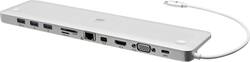
IOGEAR - Ultra-Slim USB-C Docking Station with Power Delivery Pass-Through - Silver
- General
- Brand: IOGEAR
- Model Number: GUD3C02
- Product Name: Ultra-Slim USB-C Docking Station with Power Delivery Pass-Through
- Color: Silver
- Ports
- Headphone Jack: false (The device features an interface that allows for the connection of headphones.)
- Compatibility
- Brand Compatibility: Universal
- Model Compatibility: Universal
- Features
- Indicator Light(s): false
- Dimensions
- Product Height: 0.6 inches (The out of box height of the item. Height is measured as the vertical distance from the bottom of the item to the top as it would be primarily used or placed.)
- Product Length: 11 inches (The out of box length of the item. Length is measured as the longest dimension of the item.)
- Product Width: 3 inches (The out of box width of the item. Width is measured as the horizontal distance from one side of the item to the other as it would be primarily used or placed.)
- Product Weight: 11.2 ounces (The out of box weight of the item.)
- Other
- UPC: 881317515001
Build an extensive peripheral hub for your MacBook or USB-C laptop with this 10-port IOGEAR USB-C docking station. It has Mini DisplayPort, HDMI and VGA ports for multiple high-definition display monitors, and its power delivery pass-through conveniently charges your connected laptop. This ultra-slim IOGEAR USB-C docking station has an Ethernet port for LAN connectivity.
- Compatible with most laptops with USB Type-C port: To incorporate your devices into a full-size workstation.
- Mini DisplayPort and HDMI port*: Support up to 3840 x 2160 resolution.
- VGA port*: Supports up to 1920 x 1200 resolution.
- Three USB 3.0 ports: To connect your compatible devices.
- Built-in memory card readers: Compatible with SD/MMC/Micro SD formats.
- Gigabit Ethernet port: Provides high-speed Internet access.
- Slim and compact design: Perfectly suits your laptop.
- Power Delivery Pass-Through: Power Delivery Pass Through requires a USB-C charger from your laptop. A total of up to "60W" can be charged to the laptop after deduction of 15W is used by the dock.
Whats Included
- IOGEAR USB-C Docking Station
- Owner's manual
Product Manuals
A: It does not have any support for multiple display neither through the mini-display port nor through the HDMI on the newest MacBook pro and other Macs lineup. All these slots are just decorative holes. Under their employee's Eduardo: "If you are using a adapter to get a connection you may a problem and on a MAC you can only get 1 display not two." Simply do not buy this product.
Q: Can I use this with a 13" Dell laptop. Connecting to an LG 34" monitor?
A: Yes I could use it with my Dell XPS 13, and a 28" 4k monitor. It worked. HOWEVER, my Dell needed 45w to keep charging, and although this dock states it gives up to 60w, apparently the other items will suck some of that so my Dell gave a message saying the dock device was not outputting enough to charge the laptop when connectng the dock into the Dell main charging c port. The solution is to plug the Dell directly to the wall with its own original charging cord into the main power USBc port on the laptop, PLUS then plug the short dock cord into the Dell's OTHER charging USBc port (which is right next to the dell main charging cable c port). If you don't mind two plugs going into your Dell this will work. However i wanted to try for the single cord setup so I returned this dock to get one with 100w power output to see if I could truly have only one plug going into my laptop... from the dock. Have to wait to see if that will work as I don't have both items yet. Bestbuy has two other USBc docks (that are not made by Dell) that will output 100w or 80w. --> Be aware that you are not going to use the Dell laptop's original 2-piece charging cord to supply power to the dock and monitor etc (the dell cord is only meant to supply 45w, to directly charge the laptop only when no docks are involved), you may need to BUY a USBc wall adaptor cord as well (I bought an 90w, to plug and power from the dock's USBc power port to the wall. Then the short dock cord plugs into the laptop, and hopefully it will charge and power everything. Hope some of this helps!
Q: If you don't have a USB-C port on your laptop, can you use a USB A (USB3) port?
A: No unfortunately one must have a USB-C adaptor (in this case you'd want a USB-C to [what I'm assuming is] a standard USB connector - when you get the adaptor tip, (they are available everywhere), all you have to do is snap the tip onto the connecting wire of this USB hub, and you'll be up and running. This dock in particular has REALLY come in handy for me since I swapped out the macbook pro retina screen (that DID have USB and an SD card reader), to the newer 2016 touchbar model. But the new model, doesn't come with ANY adaptors and all four plugs are a USB-C, added with a headphone jack, of which I'm predicting that will too go by the wayside one day. Since photography is may main area of focus, I was forced to go out and purchase every possible adaptor to make sure that I'd get full use out of my macbook pro. While I love the machine, I was really upset that they took their 'work horse machine' and turned it into a dongle dependent laptop. As MOST people that have a macnew book pro. Many like me need it for editing programs,(photos, music, writing, and movie making). Unfortunately for mac/apple, they didn't think that it was a big deal to remove every creative use port. By taking away every single plug and port, we are now forced as consumers to buy more junk (and carry it with us if we bring our computer anywhere for a display or tutorial, just to keep our machines up and running with our gear. The new macbook pro doesn't even come with an SD card reader - something that I as a photographer, needed and depended on deeply. While I love the machine, it seems that they have turned it into a very expensive macbook air. But like I said, the converter tips ARE available - just watch the reviews and make certain that you buy good quality adaptors - I looked ALL over Best Buy and could not find the right adaptor. HOPEFULLY they wont mind me posting a picture of this one: USB 3.0 (Type-A) Male to USB3.1 (Type-C)Female Gold Plated Connector Converter Adapter (Grey 2-Pack)
A: If you are using a docking station try the 2nd hdmi port on the station. When your computer is on right click anywhere on your desk top and select display settings. Scroll down to the bottom and there is a "multiple displays" section. There should also be a "detect" button to identify all monitors attached to your computer. Once you get your monitor going you can select a setting to have the external monitor on while your laptop is closed. Good Luck.
A: Did you check settings on Mac for secondary screen? Sorry if basic question. Had similar issue when I 1st connected to my existing screen. It does not always come up right away or partially. I tried disonnecting hdmi cable then reattaching and it seemed to work.
A: If the charger does not power the usb port when it is directly plugged into the usb c port power supply connection then you should be getting power to the devices you plug into the ports. The port is not going to know to only power the laptop and not your devices. I cannot comprehend how your laptop would receive power and your usb ports would not. Its just a port to transfer power to anything plugged into it as well as be read by the laptop or computer you plug into it. So you should be able to use this as a charging station on its own. I use another port that is a belkin with a usb c port that i used to charge devices and not connected to my laptop.
Q: would this docking station work with my HP Envy Intel Core I7 laptop?
A: If you have a micro USB port then yes it will work.
People also viewed
 $119.99The price was $129.99
 $173.95The price was $199.99