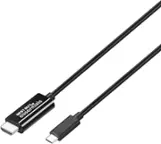
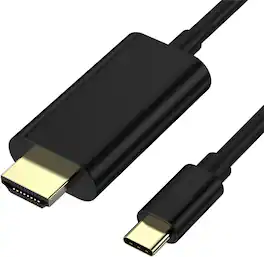
j5create - USB-C to 4K HDMI Cable - Gray
More Buying Options
Related Item

About This Item
- Key Specs
- Cable Length: 6 feet
- Connector Type (End 1): USB-C
- Gender (End 1): Male
- Connector Type (End 2): HDMI Type A
- Gender (End 2): Male
- Maximum Data Transfer Rate: 18000 megabits per second (The fastest data can be moved between devices.)
- General
- Brand: j5create
- Model Number: JCC153G
- Product Name: USB-C to 4K HDMI Cable
- Color: Gray
- Quantity: 1
- Connectivity
- Cable Type: USB, Digital audio
- Cable Length: 6 feet
- Product Type: Cable
- Connector Type (End 1): USB-C
- Gender (End 1): Male
- Connector Type (End 2): HDMI Type A
- Gender (End 2): Male
- Maximum Data Transfer Rate: 18000 megabits per second (The fastest data can be moved between devices.)
- Warranty
- Warranty - Parts: 2 year limited
- Warranty - Labor: 2 year limited
- Other
- UPC: 847626002397
Put your display on the big screen with the USB-C to 4K HDMI Cable. This cable gives you the ability to connect your USB-C equipped desktop or laptop to an external monitor, HDTV, projector, or other display device with an HDMI input. This plug-and-play cable is capable of transmitting video signals up to 4K @ 60 Hz.
- Universal Compatibility: Compatible with a variety of laptops, tablets, and phones that support DisplayPort Alternate Mode over USB-C.
- Supports 4K Video Resolutions: Connect your device to 4K TV or monitor and enjoy high-quality video and sound.
- HDMI Certification: Compliant with HDMI 2.1 specifications.
- Plug n Play: No need for software installation.
Whats Included
- 1 - JCC153G USB-C to 4K HDMI Cable
- 1 - Quick Installation Guide
Product Manuals
Q: What is the maximum resolution supported by this HDMI cable?
A: This cable supports up to 4K UltraHD resolution, helping you get the best possible picture from your 4K source.
Q: What is the length of this cable?
A: This cable is 6 feet long, allowing you to place your devices where you need them.
Q: Is this cable compatible with devices other than laptops?
A: Yes, this cable is compatible with a variety of laptops, tablets, and phones that support DisplayPort Alternate Mode over USB-C.
Q: What is the maximum data transfer rate of this cable?
A: This cable has a maximum data transfer rate of 18000 megabits per second.
Q: Does this cable require any software installation?
A: No, this USB-C to 4K HDMI cable is plug and play, so you don't need to install any software.
Q: How to use it and hook it up to your TV and phone
A: You connect the HDMI end to your TV's HDMI connection and the other end into your phone.
A: No, you can transfer only from USB Type C port to HDMI port.
A: This device supports 4K resolution at 60Hz
Reviews
Customers are saying
Customers admire the USB-C to 4K HDMI Cable for its quality, compatibility, and ease of use. Many appreciate the HDMI connectivity and suitable cable length for connecting devices like laptops to TVs. Some customers noted the lack of a charging circuit and concerns about battery depletion. A few others mentioned resolution issues.
- Quality (464)
- Compatibility (289)
- Ease of use (238)
- Connectivity (13)
- Battery Life (7)
- Charging (7)
Customer Images
The vast majority of our reviews come from verified purchases. Reviews from customers may include My Best Buy members, employees, and Tech Insider Network members (as tagged). Select reviewers may receive discounted products, promotional considerations or entries into drawings for honest, helpful reviews.
Compare similar products

Put your display on the big screen with the USB-C to 4K HDMI Cable. This cable gives you the ability to connect your USB-C equipped desktop or laptop to an external monitor, HDTV, projector, or other display device with an HDMI input. This plug-and-play cable is capable of transmitting video signals up to 4K @ 60 Hz.

Our USB-C to HDMI 2.1 8K Cable allows you to conveniently connect your gaming laptop, MacBook , Chromebook, or tablet to an 8K UHD / 4K 144Hz external monitor, 8K UHDTV, projector and other display device using an HDMI input. This cable offers the latest USB-C to 8K or 4K 144Hz HDMI connection, letting you connect an HDMI display to a gaming laptop, tablet, or phone that supports DisplayPort Alternate Mode, for a plug and play connection.

Acer USB C to HDMI Cable for Home Office 6.6FT (4K@60Hz), High-Speed Type C to HDMI 2.0 Braided Cord, Thunderbolt 4/3 Compatible with MacBook, iPhone 16/15 Pro/Max, iMac, iPad Pro, Galaxy S24, Surface
Connect your USB C device directly to an HDMI display with this USB C to HDMI Cable designed for reliable performance at home in the office or in professional settings Supporting up to 4K Ultra HD resolution the cable delivers sharp detailed video and smooth audio for monitors TVs and projectors Compatible with Thunderbolt 3 and Thunderbolt 4 this cable works with USB C devices that support video output allowing you to mirror or extend your screen with ease The plug and play design requires no adapters drivers or software ensuring fast and simple setup With a 6 foot length it provides flexible placement for desks home offices conference rooms and entertainment setups
| Pros for j5create - USB-C to 4K HDMI Cable - Gray | |||
|---|---|---|---|
| Compatibility, Ease of use, HDMI, Quality, Cable Length | Compatibility, HDMI, Ease of use, Overall Performance, Refresh Rate | Build Quality | There were no pros for this product— |
| Cons for j5create - USB-C to 4K HDMI Cable - Gray | |||
| Connectivity, Battery Life, Charging, Lag, Resolution | Price | There were no cons for this product— | There were no cons for this product— |