Skip to contentGo to Product Search
Main Content

j5create - USB4 Dual 4K Multi-Port Hub - Space Gray/Black

Model: JCD401
SKU: 12597903
Sold & shipped by

About this product

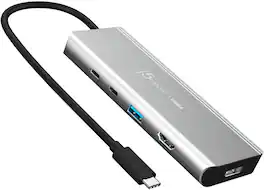
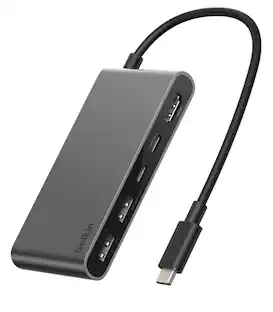
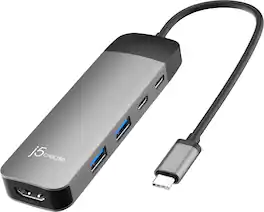
The high-performance USB4 multi-port hub incorporates the latest USB4 controller from Intel, offering compatibility with Thunderbolt and older USB specifications. With up to 20Gbps of throughput, dynamic data, and display bandwidth allocation for efficient display data flow, you can easily create a dual-monitor setup. Enjoy up to 4K resolution using DisplayPort, HDMI, or USB-C and access data faster without affecting system performance. Additionally, it has two USB SuperSpeed+ 10Gbps ports (1 USB-C and 1 Type-A) for charging or connecting peripherals. It is also equipped with a USB-C Power Delivery port to charge your laptop and power your connected devices with up to 85W pass-through power.
Features
  • Featuring Intel USB4 Controller

    Enhances Dynamic Bandwidth Sharing For Better Video And Optimized Data Transmission.

  • Dual 4K Monitor Setup

    Includes a 4K capable DisplayPort, HDMI, and USB-C display output for a dual monitor setup.

  • Built-in A Multi-Function USB-C Port

    Multi-function USB-C port supports up to 4K display and 10Gbps data transfer. Let you connect hubs, docks, display, flash-drive, and other USB-C devices you need.

  • PD Pass-Through Charging

    Charges your laptops and provides power to connected peripherals with up to 85W of PD pass-through charging.

  • Efficient USB Ports

    Connect your latest and legacy devices with two USB SuperSpeed+ 10Gbps ports (1 USB-C and 1 Type-A) for charging or connecting peripherals.

  • Thunderbolt and USB4 Compatible

    A high-performing USB4 multi-port hub and the first USB-C hub to incorporate the latest USB4 controller from Intel, compatible with Thunderbolt 3 and 4, and USB4.

  • Driver free

    Plug-and-play, no driver installation required.

Specifications
  • Connector Type (End 1)
    USB-C
    Gender (End 1)
    Male
    Connector Type (End 2)
    USB-A
Sponsored

Reviews

Customer Images

The vast majority of our reviews come from verified purchases. Reviews from customers may include My Best Buy members, employees, and Tech Insider Network members (as tagged). Select reviewers may receive discounted products, promotional considerations or entries into drawings for honest, helpful reviews.

  • Rated 4 out of 5 stars

    Dual monitor solution solved.

    I have 2 external monitors and only 2 usb-c ports on my laptop. One of the ports is for power. So this adapter worked perfectly for my needs.

    This review is from j5create - USB4 Dual 4K Multi-Port Hub - Space Gray/Black

    Posted by MMansfieldRes

  • Rated 5 out of 5 stars

    THE USB-C hub for the ROG Ally

    THE USB-C hub for the ROG Ally. Would definitely recommend.

    This review is from j5create - USB4 Dual 4K Multi-Port Hub - Space Gray/Black

    Posted by WeGbored

  • Rated 5 out of 5 stars

    Must Have Compact Laptop Accessory

    Since the deployment of the USB-C port on computers, quality hubs have become a must have accessory. In my opinion, one of the best features of the USB-C standard is that it offers a one cable solution to set up multiple displays. The 100W of power delivery is enough to power a laptop, power the hub, and provide power to the ports. Remember that it is pass-through power, which means that the hub must be connected to a power adapter in order to pass the power to your laptop. I would recommend using the most powerful adapter you have up to 100W. This is because the hub needs 15W to operate, so the maximum power it will actually deliver is 85W. Thai will not be a problem for most laptops, but if your compact laptop only came with a smaller adapter you might have problems if it needs a specific wattage to properly operate, which some compact laptops do. What really sets this hub apart from other hubs is the inclusion of a USB4 controller. This is what allows the use of dual 4K display outputs. It accomplished this by upping the bandwidth. Even if you don’t have a video card that is 4K capable I think that the higher bandwidth will be beneficial to anyone. Another thing that I really like about this hub is that it is completely plug and play and does not require the user to manually download a driver. All that is necessary is to connect it and windows automatically detects the hub and configures the driver. Having to manually download a driver can be a problem if you are trying to use it with a work device that you don't have administrator privileges on to install a new device. Thankfully that will never be an issue with this hub. This j5create does everything you would expect from it, and does it well. It looks good, has a nice number of ports, and is small enough to easily transport. It is perfect for someone who travels a lot or someone that doesn’t need more than 2 displays. If you need a 3 monitor set up or need to connect a large number of devices, then you might want to get a larger hub that has 3 display outputs and more ports. This hub will now be my primary hub to take when I travel.

    This review is from j5create - USB4 Dual 4K Multi-Port Hub - Space Gray/Black

    Posted by Kotor

  • Rated 4 out of 5 stars

    Handsome 2x4K hub good for work & Steam Deck play

    It’s hard to get fired up about something as innocuous as a hub…it either works or it doesn’t. So does this one work—definitely…precisely as advertised! Whether it’s the hub for you or not depends entirely on how you feel about the price, design, and most importantly, the kind of number of ports. In terms of design, this j5create hub isn’t exactly what you’d call svelte. Sure, it’s portable and should tuck neatly into any bag or case, but it’s slightly on the larger side compared to some competitors’ offerings. I have it pictured next to my ASUS ZenBook Flip S13 and as you can see it takes up a somewhat sizeable chunk of real estate next to the 2-in-1. The captive 8” USB-C pigtail is fairly thick and feels high quality, but it’s surprisingly quite flexible. Yet, at *only* 8 inches long, nearly all of the pigtail cable requires a pretty substantial bend if you want easy access to the ports or to fold it out of the way of your mousing hand or anything else you normally keep close to your machine. A slightly longer cable, or better still, a modular cable that disconnected from the hub and allowed you to choose your cable length for optimal placement, would have been greatly appreciated. It also would have been nice if at least one of the ends had the option of a 90-degree connector for strain relief; the connection point at the hub end especially only has a small collar to help reduce the effects of long-term cable strain and bends. The enclosure feels solid but is still a bit on the lighter side which means it will move around fairly easy when plugging/unplugging cables or dongles; there are no bumpers or feet so I do not know what prolonged use and movement on a table or desktop might slowly do to the pristine finish. The aluminum construction, side ventilation slots, and shallow side heat fins help with heat dissipation when the hub is pushing a dense video signal or two—and the hub does get warm to the touch during such heavy use. The top of the enclosure features lightly etched “j5create” and “USB4” logos; text indicating the function of each port is printed next to each port opening on the bottom of the enclosure…it’s a very professional and uncluttered look and would be perfectly at home next to a high-powered Mac or professional workstation. Finally, getting down to ports and performance, it’s honestly just a bit of a mixed bag. First, you probably need to note the physical layout of the hub. The DP output is at the end of the hub while the USB-C power delivery input, USB-C 10Gbps data/DP output, USB-A, and HDMI ports are on the side. Depending on where your power brick is located and where you need to snake one of those often beefier and inflexible DP cables, you might end up having your USB or HDMI ports in an inconvenient place, especially if you plug/unplug dongles, thumb drives, or video cables fairly often. All video ports, including the DP-out via the USB-C port, are capable of outputting up to 4K resolution at 60Hz; however, if you connect dual displays, the hub only supports a maximum of 4K at 30Hz to TWO monitors which was slightly disappointing given the way this hub is marketed. The USB-C “Power In” port is exactly that, a PD3.0 port that is just for power delivery; sadly, you cannot hook a drive/dongle or data cable to this port and expect it to do anything. The hub can handle a maximum of 100W through the PD port with 85W of pass-through; this means a beefy enough connected power adapter will feed juice for both attached peripherals and charge up your computer. Both the USB-A and USB-C data throughput is rated up to 10Gbps which was REALLY nice for high-speed file transfers, especially to my NVMe-based USB-C drives. Unless I’m reading it wrong, the manual implies that if you’re not using high-power USB devices, you don’t need to plug an adapter into the power delivery port to use the hub; but using the Thunderbolt 4 port on my ASUS ZenBook, the Thunderbolt 3 port on my HP Omen laptop, and the USB-C port on my Steam Deck, I could not get a simple USB 2.0 headphone dongle to connect using the hub…but as soon as I plugged in a power adapter to the hub’s PD port, the dongle synced right up with my headphones…YMMV. Fortunately, video connection was driverless and quick…I pulled up my Windows 11 desktop on our 4K TV via HDMI and USB-C using a USB-C to HDMI converter cable almost immediately once I adjusted Window’s settings to detect/extend to an external display. I noticed no dropouts, stutters, or other digital artifacts during 4K desktop and video streaming all evening long. My main PC display is a 3440x1600 ultra-wide; my ZenBook found it using the hub’s DP connection immediately. I was also pleasantly surprised to discover that the video output from my Steam Deck was smooth, colorful, and absolutely rock solid during gaming. Using the j5create hub, I was able to get the deck to display on our 4K TV and connect to my Xbox Elite 2 controller via wireless dongle (quicker and more stable than Bluetooth)…if you need a single hub that you can take from work to play, this one is it! I wish the hub had at least one more USB-C or USB-A port (or both) for peripherals, and the omission of a high-speed Ethernet jack seems a bit glaring given that many such hubs are often used with ultra-thin laptops/notebooks that rarely feature Ethernet ports anymore, but the high-speed USB4 capabilities and the stable, artifact-free video performance of the j5create hub make it a little easier to overlook these shortcomings. While not quite as well-appointed with a rainbow of ports as some other high-powered and high-priced USB-C hubs and docking stations, this is still a well-built, flexible, and capable hub for simplifying and unifying your multi-monitor workspace.

    This review is from j5create - USB4 Dual 4K Multi-Port Hub - Space Gray/Black

    Posted by WyldeBlue

  • Rated 5 out of 5 stars

    Must have Device

    I have been searching for a Multi-Port for a long time and Im so glad I came across this one. I currently use a Samsung Chromebook which only has USB-C ports. This is such inconvenient because most of my electronics have a type A port. I have several SD and Micro SD cards with files I've been wanting to download to my computer. This Multi-Port Hub has made it so easy to transport all the files and images. It doesn't require a special program to be installed in order to work. You just plug it in and within seconds you have all that you need, Convenient for people who are not computer savvy like me :) but I try. Great to have different devices plugged in. It's small and light weight so it can be carried anywhere. I was able to utilize most of the ports. This device worked well with my chromebook, windows and my sons gaming laptop. Its power comes from the main source which in my case is my laptop so make sure you have enough power. It's definitely a must have device since now a days most of the electronics have different ports. I really love it and will surely get a lot of use around my home.

    This review is from j5create - USB4 Dual 4K Multi-Port Hub - Space Gray/Black

    Posted by Ivette0930

Compare similar products

j5create - USB4 Dual 4K Multi-Port Hub - Space Gray/Black

The high-performance USB4 multi-port hub incorporates the latest USB4 controller from Intel, offering compatibility with Thunderbolt and older USB specifications. With up to 20Gbps of throughput, dynamic data, and display bandwidth allocation for efficient display data flow, you can easily create a dual-monitor setup. Enjoy up to 4K resolution using DisplayPort, HDMI, or USB-C and access data faster without affecting system performance. Additionally, it has two USB SuperSpeed+ 10Gbps ports (1 USB-C and 1 Type-A) for charging or connecting peripherals. It is also equipped with a USB-C Power Delivery port to charge your laptop and power your connected devices with up to 85W pass-through power.

j5create - USB to HDMI Multi-Monitor Adapter - White
4.5(50)

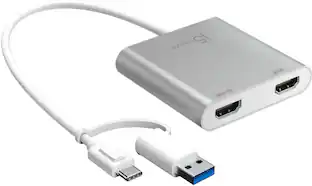
The JUA254 USB to HDMI Multi-Monitor Adapter works as an external video card, instantly allowing users to attach additional displays via HDMI connection without the hassle of a lengthy setup or having to install additional hardware. The USB 3.0 Display Adapter can support up to four displays running on the same computer, turning your workstation into a fully-functioning, multi-display powerhouse. This USB adapter works as an external video card, instantly allowing additional displays without the hassle of opening the computer casing and installing an external graphics card. You can have a second monitor with an extended display, a mirrored display, a rotational display (rotation mode not available for Mac), or make it your primary monitor. Now enjoy true 1080p HD resolution through any Windows or Mac computer with a USB 3.0 port. These adapters are also backwards compatible with USB 2.0 resolutions and playback, which are ideal for office applications. The simple plug-and-play function allows you to connect your computer to a second monitor or projector within seconds to create a new visual environment on Windows 10.

j5create - USB 3.0 7-Port HUB - Black

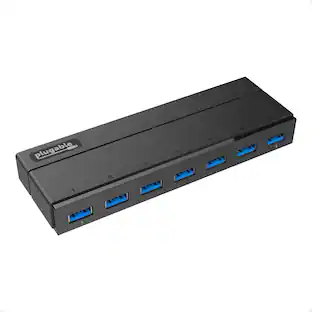
The USB 3.0 7-Port HUB allows up to seven USB 3.0 devices to be connected simultaneously at a transmission speed of 5 Gbps, while still providing connectivity and support for the older USB 2.0 (480 Mbps) and 1.1 (12 Mbps) devices. It works with high-bandwidth SuperSpeed USB 3.0 devices, such as an external disk drive, high-resolution webcam, multi-channel audio and more. In addition, it supports fast charging for smartphones, tablets and iPad.

Anker - 364 USB C Hub (10-in-1, Dual 4K HDMI) - Black

Anker 364 USB C Hub (10-in-1, Dual 4K HDMI) with Max 100W Power Delivery, Dual 4K HDMI Ports, 4 USB-C & A Data Ports, Ethernet and SD Card Slot for Dell Laptop, ThinkPad, and More

Pros for j5create - USB4 Dual 4K Multi-Port Hub - Space Gray/Black
There were no pros for this productOverall Performance, FunctionalityOverall Performance, USB Ports, Ease of use, Size, ConnectivityThere were no pros for this product
Cons for j5create - USB4 Dual 4K Multi-Port Hub - Space Gray/Black
There were no cons for this productThere were no cons for this productPrice, ChargingThere were no cons for this product

Specs

Questions & Answers
  • Is this hub compatible with Thunderbolt?

    Yes, this hub is compatible with Thunderbolt 3 and 4.

    This question and answer was generated by AI based on customer and product data.
  • How many displays does this hub support?

    This hub supports up to two 4K displays with flexible monitor connections.

    This question and answer was generated by AI based on customer and product data.
  • Why is the Intel USB4 controller a good feature?

    The Intel USB4 controller ensures quality and reliability.

    This question and answer was generated by AI based on customer and product data.
  • What kind of data transfer speed does this hub offer?

    This hub offers up to 20Gbps of throughput.

    This question and answer was generated by AI based on customer and product data.
  • Does this hub require a driver installation?

    No, this hub is plug and play, so it does not require any driver installation.

    This question and answer was generated by AI based on customer and product data.
Ask a question
No content
Sponsored

Finance Options

My Best Buy® Credit Card
Buy Now, Pay Later