Logitech - G515 LIGHTSPEED TKL Wireless Mechanical Linear (Red) Switch Gaming Keyboard with LIGHTSYNC RGB - White
Customers are saying
Customers highly value the typing comfort provided by this keyboard, as users frequently note how great it feels to use. Additionally, the device is appreciated for its quiet operation, ensuring that it does not produce excessive noise during use.
Color
WhiteMechanical Gaming Keyboard
G515 LIGHTSPEED TKL mechanical gaming keyboard offers slim profile and tenkeyless design with tri-mode connectivity via LIGHTSPEED wireless, Bluetooth, or wired data mode
GL Red Linear Switches With Smooth Keystroke
Low-profile GL mechanical switches of this compact gaming keyboard are factory-lubed for smoother feel, fast actuation, and precise typing experience – available in tactile and linear
36 Hours Of Play
Keep playing wirelessly with up to 36 hours of continuous battery life*
Next-Level Customization
KEYCONTROL technology allows next-level customization of every key to make your PC gaming keyboard a personal control center
PBT Keycaps
Double-shot PBT keycaps offer durability for the most intense moments of play and look as good as they perform with anti-oil design and premium feel
Control At Your Fingertips
Three hotkeys allow for quick access to LIGHTSPEED wireless, Bluetooth connectivity, and Game Mode
Lightsync Rgb
Access ~16.8 M colors to customize your RGB gaming keyboard for play, create themes, and sync other Logitech G gear in G HUB
Play At Lightspeed
Unlock ultra-fast and robust 1 ms report rate with LIGHTSPEED wireless and 2:1 pairing with compatible wireless gaming mouse on a single USB
- Lighting TypeRGBForm FactorTenkeyless (TKL)Keyboard TechnologyMechanicalKey Switch BehaviorLinearConnection TypeWireless
Reviews
Rating 4.2 out of 5 stars with 5 reviews
The vast majority of our reviews come from verified purchases. Reviews from customers may include My Best Buy members, employees, and Tech Insider Network members (as tagged). Select reviewers may receive discounted products, promotional considerations or entries into drawings for honest, helpful reviews.





Compare similar products

Ultra-thin 0.9 in design meets high-performance engineering with Logitech G515 LIGHTSPEED TKL wireless gaming keyboard. Suit your way of play with tri-mode connectivity and KEYCONTROL. Low-profile GL mechanical switches, double-shot PBT keycaps, and sound dampening layered construction offer durability and accuracy for a superior experience visually and in play.
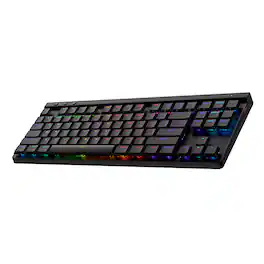
Ultra-thin 0.9 in design meets high-performance engineering with Logitech G515 LIGHTSPEED TKL wireless gaming keyboard. Suit your way of play with tri-mode connectivity and KEYCONTROL. Low-profile GL mechanical switches, double-shot PBT keycaps, and sound dampening layered construction offer durability and accuracy for a superior experience visually and in play.

G915 X LIGHTSPEED low-profile wireless gaming keyboard offers the latest innovations in gaming technology with meticulously crafted design and curated materials. Tri-mode connectivity provides best-in-class 2.4 GHz LIGHTSPEED wireless, Bluetooth, and wired data mode. Set up to 15 features per key with KEYCONTROL. Low-profile GL switches unleash increased APM for even more speed.
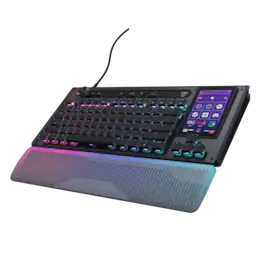
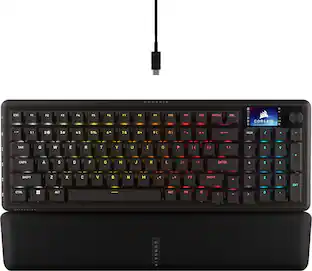
The Turtle Beach Command Series KB7 isn’t just another keyboard. It’s your command center. At the core of the KB7 is an ultra-responsive 4.3” Command Touch Display that lets you switch profiles, trigger macros, monitor system stats, and manage key functions instantly. Adjust audio, launch apps, and control system or stream functions directly from the display, all while staying locked in. Titan low-profile Hall-Effect switches rated for 100 million clicks deliver fast, precise input with adjustable actuation. Built to last, KB5’s premium double‑shot PBT keycaps maintain a clean matte finish for a superior tactile feel. Additional textured WASD keys add enhanced grip and control. A slim aluminum‑reinforced chassis and a detachable wrist rest ensure lasting comfort and durability. True 8K polling, an integrated Action Bar, and per‑key RGB lighting elevate the experience even further. Dual modular rails expand functionality with Command Series accessories like the Command Series KP7 keypad, making the KB7 the centerpiece of the Command Series ecosystem.
| Pros for Logitech - G515 LIGHTSPEED TKL Wireless Mechanical Linear (Red) Switch Gaming Keyboard with LIGHTSYNC RGB - White | |||
|---|---|---|---|
| There were no pros for this product— | Battery Life, Connectivity, Feel, Keyboard Quality, Noise Level | Battery Life, Feel, Connectivity, Build Quality, RGB Backlighting | There were no pros for this product— |
| Cons for Logitech - G515 LIGHTSPEED TKL Wireless Mechanical Linear (Red) Switch Gaming Keyboard with LIGHTSYNC RGB - White | |||
| There were no cons for this product— | There were no cons for this product— | Key Responsiveness, Typing Performance | There were no cons for this product— |
Specs
Customers often buy these together




Explore tech essentials Sponsored
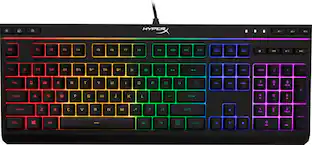 $38.99The price was $54.99
 $149.99The price was $229.99



Discover related products
 $75.31The price was $77.05
 $12.99The price was $13.99
 $239.00The price was $275.00
 $30.99The price was $32.99











Keep exploring
 $228.99The price was $283.49
 $129.95The price was $159.95